React-native-onesignal: Unable to add Notification Service Extension
Description:
On iOS I am able to setup the SDK to work with notifications, however, after adding the Notification Service Extension I run into an error, notably the symbol(s) not found for architecture x86_64 found in the troubleshooting guide and several other issues opened here.
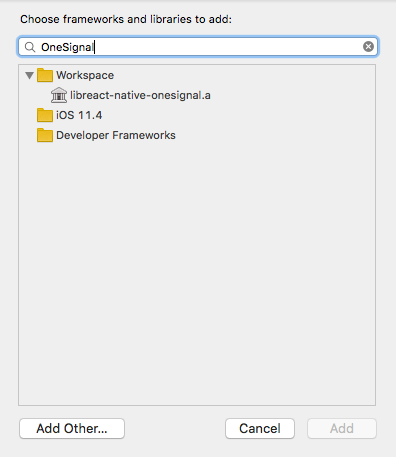
My main issue is this: I can't add the framework libRCTOneSignal.a because it doesn't exist...? I think I am missing something here? 🤷♂️
Environment
npm install --save react-native-onesignalreact-native link react-native-onesignalSteps to Reproduce Issue:
npm installexp detachnpm install --save react-native-onesignalreact-native link react-native-onesignalcd ios/and runpod install- Configure XCodeProject following the official setup guide
- At this point if I build and run on my device, I am able to receive the notifications.
- Following the setup guide to add Notification Service Extension
libRCTOneSignal.acannot be added to the framework since it is not found resulting in thesymbol(s) not found for architecture x86_64build failed error
Anything else:
 yirui94
All 25 comments
@yirui94 Thank you for your detailed issue report.
Push notifications will not work on the iOS simulator (this is a restriction from Apple), so please do run on a real iOS device. Do you get the same error regarding arm64?
That said, it would be terrible if OneSignal prevented you from being able to run on simulator (it normally has no issues targeting x86 architecture) so I'll be happy to work with you to fix this issue.
Does this issue _only_ occur for the Notification Service Extension? If you remove the extension, does your main app build successfully?
 Nightsd01
on 20 Jun 2018
Nightsd01
on 20 Jun 2018
Hi @Nightsd01 , indeed I am running on my device. WIthout the Notification Service Extension I can build my main app & receive notifications successfully. But I think you misunderstood me, my main issue is that the framework libRCTOneSignal.a can't be found & thus I can't configure the Notification Service Extension to actually work.
yirui94
on 21 Jun 2018
Ah, that's a cocoapods issue then. Essentially, with Cocoapods, you have to explicitly define what dependencies are available for certain targets.
Can you post your Podfile?
Nightsd01
on 21 Jun 2018
Of course, here you go
source 'https://github.com/CocoaPods/Specs.git'
platform :ios, '9.0'
EXPO_CPP_HEADER_DIR = 'ExpoKit'
target 'rates' do
pod 'ExpoKit',
:git => "http://github.com/expo/expo.git",
:tag => "ios/2.2.1",
:subspecs => [
"Core",
"CPP"
],
:inhibit_warnings => true
pod 'React',
:path => "../node_modules/react-native",
:inhibit_warnings => true,
:subspecs => [
"Core",
"ART",
"RCTActionSheet",
"RCTAnimation",
"RCTCameraRoll",
"RCTGeolocation",
"RCTImage",
"RCTNetwork",
"RCTText",
"RCTVibration",
"RCTWebSocket",
"DevSupport",
"CxxBridge"
]
pod 'yoga',
:path => "../node_modules/react-native/ReactCommon/yoga",
:inhibit_warnings => true
pod 'DoubleConversion',
:podspec => "../node_modules/react-native/third-party-podspecs/DoubleConversion.podspec",
:inhibit_warnings => true
pod 'Folly',
:podspec => "../node_modules/react-native/third-party-podspecs/Folly.podspec",
:inhibit_warnings => true
pod 'GLog',
:podspec => "../node_modules/react-native/third-party-podspecs/GLog.podspec",
:inhibit_warnings => true
pod 'react-native-onesignal', :path => '../node_modules/react-native-onesignal'
post_install do |installer|
installer.pods_project.main_group.tab_width = '2';
installer.pods_project.main_group.indent_width = '2';
installer.pod_targets.each do |target|
if target.pod_name == 'ExpoKit'
target.native_target.build_configurations.each do |config|
config.build_settings['GCC_PREPROCESSOR_DEFINITIONS'] ||= ['$(inherited)']
config.build_settings['GCC_PREPROCESSOR_DEFINITIONS'] << 'EX_DETACHED=1'
# needed for GoogleMaps 2.x
config.build_settings['FRAMEWORK_SEARCH_PATHS'] ||= []
config.build_settings['FRAMEWORK_SEARCH_PATHS'] << '${PODS_ROOT}/GoogleMaps/Base/Frameworks'
config.build_settings['FRAMEWORK_SEARCH_PATHS'] << '${PODS_ROOT}/GoogleMaps/Maps/Frameworks'
end
end
if ['Amplitude-iOS','Analytics','AppAuth','Branch','CocoaLumberjack','FBSDKCoreKit','FBSDKLoginKit','FBSDKShareKit','GPUImage','JKBigInteger2'].include? target.pod_name
target.native_target.build_configurations.each do |config|
config.build_settings['IPHONEOS_DEPLOYMENT_TARGET'] = '9.0'
end
end
if target.pod_name == "#{EXPO_CPP_HEADER_DIR}"
target.native_target.build_configurations.each do |config|
config.build_settings['CLANG_WARN_COMMA'] = false
config.build_settings['CLANG_WARN_UNGUARDED_AVAILABILITY'] = false
end
end
# Can't specify this in the React podspec because we need
# to use those podspecs for detached projects which don't reference ExponentCPP.
if target.pod_name.start_with?('React')
target.native_target.build_configurations.each do |config|
config.build_settings['IPHONEOS_DEPLOYMENT_TARGET'] = '9.0'
config.build_settings['HEADER_SEARCH_PATHS'] ||= ['$(inherited)']
config.build_settings['HEADER_SEARCH_PATHS'] << "${PODS_ROOT}/Headers/Public/#{EXPO_CPP_HEADER_DIR}"
end
end
# Build React Native with RCT_DEV enabled
next unless target.pod_name == 'React'
target.native_target.build_configurations.each do |config|
config.build_settings['GCC_PREPROCESSOR_DEFINITIONS'] ||= ['$(inherited)']
config.build_settings['GCC_PREPROCESSOR_DEFINITIONS'] << 'RCT_DEV=1'
end
end
end
end
Try changing your podfile to this and run pod install again:
source 'https://github.com/CocoaPods/Specs.git'
platform :ios, '9.0'
EXPO_CPP_HEADER_DIR = 'ExpoKit'
abstract_target 'Both Targets' do
def rn_onesignal
pod 'react-native-onesignal', :path => '../node_modules/react-native-onesignal'
end
target 'OneSignalNotificationServiceExtension' do
rn_onesignal
end
target 'rates' do
pod 'ExpoKit',
:git => "http://github.com/expo/expo.git",
:tag => "ios/2.2.1",
:subspecs => [
"Core",
"CPP"
],
:inhibit_warnings => true
pod 'React',
:path => "../node_modules/react-native",
:inhibit_warnings => true,
:subspecs => [
"Core",
"ART",
"RCTActionSheet",
"RCTAnimation",
"RCTCameraRoll",
"RCTGeolocation",
"RCTImage",
"RCTNetwork",
"RCTText",
"RCTVibration",
"RCTWebSocket",
"DevSupport",
"CxxBridge"
]
pod 'yoga',
:path => "../node_modules/react-native/ReactCommon/yoga",
:inhibit_warnings => true
pod 'DoubleConversion',
:podspec => "../node_modules/react-native/third-party-podspecs/DoubleConversion.podspec",
:inhibit_warnings => true
pod 'Folly',
:podspec => "../node_modules/react-native/third-party-podspecs/Folly.podspec",
:inhibit_warnings => true
pod 'GLog',
:podspec => "../node_modules/react-native/third-party-podspecs/GLog.podspec",
:inhibit_warnings => true
rn_onesignal
post_install do |installer|
installer.pods_project.main_group.tab_width = '2';
installer.pods_project.main_group.indent_width = '2';
installer.pod_targets.each do |target|
if target.pod_name == 'ExpoKit'
target.native_target.build_configurations.each do |config|
config.build_settings['GCC_PREPROCESSOR_DEFINITIONS'] ||= ['$(inherited)']
config.build_settings['GCC_PREPROCESSOR_DEFINITIONS'] << 'EX_DETACHED=1'
# needed for GoogleMaps 2.x
config.build_settings['FRAMEWORK_SEARCH_PATHS'] ||= []
config.build_settings['FRAMEWORK_SEARCH_PATHS'] << '${PODS_ROOT}/GoogleMaps/Base/Frameworks'
config.build_settings['FRAMEWORK_SEARCH_PATHS'] << '${PODS_ROOT}/GoogleMaps/Maps/Frameworks'
end
end
if ['Amplitude-iOS','Analytics','AppAuth','Branch','CocoaLumberjack','FBSDKCoreKit','FBSDKLoginKit','FBSDKShareKit','GPUImage','JKBigInteger2'].include? target.pod_name
target.native_target.build_configurations.each do |config|
config.build_settings['IPHONEOS_DEPLOYMENT_TARGET'] = '9.0'
end
end
if target.pod_name == "#{EXPO_CPP_HEADER_DIR}"
target.native_target.build_configurations.each do |config|
config.build_settings['CLANG_WARN_COMMA'] = false
config.build_settings['CLANG_WARN_UNGUARDED_AVAILABILITY'] = false
end
end
# Can't specify this in the React podspec because we need
# to use those podspecs for detached projects which don't reference ExponentCPP.
if target.pod_name.start_with?('React')
target.native_target.build_configurations.each do |config|
config.build_settings['IPHONEOS_DEPLOYMENT_TARGET'] = '9.0'
config.build_settings['HEADER_SEARCH_PATHS'] ||= ['$(inherited)']
config.build_settings['HEADER_SEARCH_PATHS'] << "${PODS_ROOT}/Headers/Public/#{EXPO_CPP_HEADER_DIR}"
end
end
# Build React Native with RCT_DEV enabled
next unless target.pod_name == 'React'
target.native_target.build_configurations.each do |config|
config.build_settings['GCC_PREPROCESSOR_DEFINITIONS'] ||= ['$(inherited)']
config.build_settings['GCC_PREPROCESSOR_DEFINITIONS'] << 'RCT_DEV=1'
end
end
end
end
end
Hi @Nightsd01 , it still fails with multiple Undefined symbols for architecture arm64:
I am able to successfully pod install again but I received this warning message:
[!] The `OneSignalNotificationServiceExtension [Debug]` target overrides the `HEADER_SEARCH_PATHS` build setting defined in `Pods/Target Support Files/Pods-Both Targets-OneSignalNotificationServiceExtension/Pods-Both Targets-OneSignalNotificationServiceExtension.debug.xcconfig'. This can lead to problems with the CocoaPods installation
- Use the `$(inherited)` flag, or
- Remove the build settings from the target.
[!] The `OneSignalNotificationServiceExtension [Release]` target overrides the `HEADER_SEARCH_PATHS` build setting defined in `Pods/Target Support Files/Pods-Both Targets-OneSignalNotificationServiceExtension/Pods-Both Targets-OneSignalNotificationServiceExtension.release.xcconfig'. This can lead to problems with the CocoaPods installation
- Use the `$(inherited)` flag, or
- Remove the build settings from the target.
likely due to setting the header search paths of the extension. Also, the libRCTOneSignal.a framework still could not be found

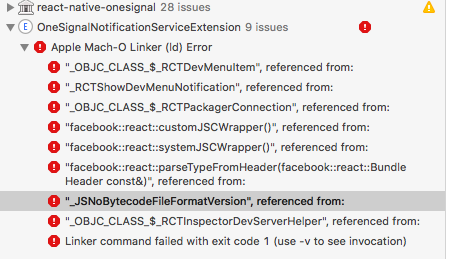
edit1: Added libOneSignal.a from the SDK directly, but still got this error
ld: library not found for -lOneSignal
clang: error: linker command failed with exit code 1 (use -v to see invocation)
You shouldn't have to manually add libOneSignal, it will be bundled with the react-native-onesignal pod.
The errors you are posting seem to be react-native issues. Are you importing any React frameworks in your Notification Extension Service class/es? Try adding $(inherited) as a header search path in your OneSignalNotificationServiceExtension
Since you are installing with cocoapods, you don't need to worry about adding libRCTOneSignal.a or libOneSignal.a, they will both be bundled in the libPods-xxxx.a framework.
Nightsd01
on 26 Jun 2018
Adding $(inherited) as a header search path did not help but it did remove the warning messages from pod install.
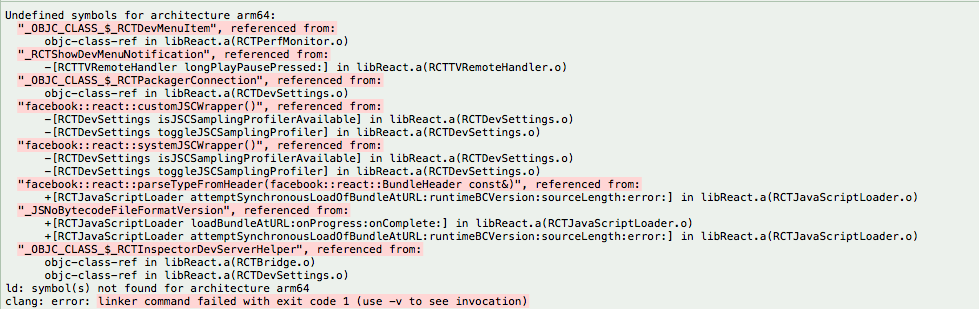
It seems like I stuck with both approaches. My original podfile gives me this error:

while your updated podfile gives me an entirely different set of errors
yirui94
on 27 Jun 2018
@yirui94 Experiencing the exact same issue myself. Will post an update here if I can figure out a fix today.
 atothewest
on 27 Jun 2018
atothewest
on 27 Jun 2018
I seem to have fixed something similar by adding a target completely separate from my main target with all the react stuff included. Probably way too much, but I'm not sure what I can leave out at this point.
# Uncomment the next line to define a global platform for your project
# platform :ios, '9.0'
target 'alarmPrototype' do
# Uncomment the next line if you're using Swift or would like to use dynamic frameworks
# use_frameworks!
pod 'Firebase/Core'
# Your 'node_modules' directory is probably in the root of your project,
# but if not, adjust the `:path` accordingly
pod 'React', :path => '../node_modules/react-native', :subspecs => [
'Core',
'CxxBridge', # Include this for RN >= 0.47
'DevSupport', # Include this to enable In-App Devmenu if RN >= 0.43
'RCTText',
'RCTNetwork',
'RCTWebSocket', # needed for debugging
# Add any other subspecs you want to use in your project
]
# Explicitly include Yoga if you are using RN >= 0.42.0
pod 'yoga', :path => '../node_modules/react-native/ReactCommon/yoga'
# Third party deps podspec link
pod 'DoubleConversion', :podspec => '../node_modules/react-native/third-party-podspecs/DoubleConversion.podspec'
pod 'glog', :podspec => '../node_modules/react-native/third-party-podspecs/GLog.podspec'
pod 'Folly', :podspec => '../node_modules/react-native/third-party-podspecs/Folly.podspec'
# Pods for alarmPrototype
pod 'RNDeviceInfo', :path => '../node_modules/react-native-device-info'
pod 'react-native-battery', :path => '../node_modules/react-native-battery'
pod 'RNI18n', :path => '../node_modules/react-native-i18n'
pod 'react-native-onesignal', :path => '../node_modules/react-native-onesignal'
# Calling
pod 'TwilioVoice', '~> 2.0.0'
pod 'RNTwilioVoice', :path => '../node_modules/react-native-twilio-programmable-voice'
pod 'ReactNativePermissions', :path => '../node_modules/react-native-permissions'
end
target 'OneSignalNotificationServiceExtension' do
# Pods for sevice extension
pod 'React', :path => '../node_modules/react-native', :subspecs => [
'Core',
'CxxBridge', # Include this for RN >= 0.47
'DevSupport', # Include this to enable In-App Devmenu if RN >= 0.43
'RCTText',
'RCTNetwork',
'RCTWebSocket', # needed for debugging
# Add any other subspecs you want to use in your project
]
# Explicitly include Yoga if you are using RN >= 0.42.0
pod 'yoga', :path => '../node_modules/react-native/ReactCommon/yoga'
# Third party deps podspec link
pod 'DoubleConversion', :podspec => '../node_modules/react-native/third-party-podspecs/DoubleConversion.podspec'
pod 'glog', :podspec => '../node_modules/react-native/third-party-podspecs/GLog.podspec'
pod 'Folly', :podspec => '../node_modules/react-native/third-party-podspecs/Folly.podspec'
# pods
pod 'react-native-onesignal', :path => '../node_modules/react-native-onesignal'
end
 jdegger
on 27 Jun 2018
jdegger
on 27 Jun 2018
@jdegger that approach seems to have worked for me also, nice one 👍
I used abstract_target to tidy up my Podfile slightly:
abstract_target 'MyAppAbstractTarget' do
  pod 'React',
    :path => "../node_modules/react-native",
    :inhibit_warnings => true,
    :subspecs => [
      "Core",
      "ART",
      "RCTActionSheet",
      "RCTAnimation",
      "RCTCameraRoll",
      "RCTGeolocation",
      "RCTImage",
      "RCTNetwork",
      "RCTText",
      "RCTVibration",
      "RCTWebSocket",
      "DevSupport",
      "CxxBridge"
    ]
  pod 'yoga',
    :path => "../node_modules/react-native/ReactCommon/yoga",
    :inhibit_warnings => true
  pod 'DoubleConversion',
    :podspec => "../node_modules/react-native/third-party-podspecs/DoubleConversion.podspec",
    :inhibit_warnings => true
  pod 'Folly',
    :podspec => "../node_modules/react-native/third-party-podspecs/Folly.podspec",
    :inhibit_warnings => true
  pod 'glog',
    :podspec => "../node_modules/react-native/third-party-podspecs/glog.podspec",
    :inhibit_warnings => true


  pod 'react-native-onesignal', :path => '../node_modules/react-native-onesignal'

  post_install { |installer| perform_post_install_tasks(installer) }

  target 'MyOneSignalNotificationsApp' do
    pod 'ExpoKit',
      :git => "http://github.com/expo/expo.git",
      :tag => "ios/2.6.5",
      :subspecs => [
        "Core",
        "CPP",
        "GL"
      ],
    :inhibit_warnings => true
  end

  target 'OneSignalNotificationServiceExtension'
end
I defined perform_post_install_tasks as a separate method to tidy up the target block further, it contains the same auto-generated content as posted in @yirui94's earlier post
I then amended the Build Settings of my OneSignalNotificationServiceExtension target, setting both _Search Paths > Header Search Paths_ and _Search Paths > Library Search Paths_ to $(inherited).
In Build Phases, under _Link Binary With Libraries_, I removed all except:

I then ran pod install, which links the pod libraries to both targets.
At this point, I was able to build successfully and send out notifications 🎉
atothewest
on 27 Jun 2018
🎉
jdegger
on 27 Jun 2018
This is more of a problem with our documentation (for using OneSignal after detaching with Expo) than a bug with our SDK, sorry for the inconvenience this has caused you.
We'll update our documentation to better explain how the SDK should be used in Expo projects (which usually use Cocoapods to manage dependencies as opposed to React's more traditional Xcode sub-project model).
I'll mark this issue as resolved once I've updated our docs, also @yirui94 please let me know if the approach described above by @atothewest resolves the problem for you
Nightsd01
on 28 Jun 2018
@Nightsd01 @atothewest @jdegger Hallelujah it works! 🎉
Thanks everyone! I'll write up a simple guide on how to get a Detached Expo App + Onesignal working on Android & iOS once I'm done
yirui94
on 28 Jun 2018
thanks @jdegger that worked for me too.
 hutchy2570
on 29 Jun 2018
hutchy2570
on 29 Jun 2018
Hi,
@Nightsd01 in the meantime could you summarize what the final solution for ejected Expo projects should look like?
I've tried the suggestion of @jdegger , got a lot of warnings
[!] The pod `DoubleConversion` is linked to different targets (["Pods-app-mobile", "Pods-OneSignalNotificationServiceExtension"]), which contain different settings to inhibit warnings. CocoaPods does not currently support different settings and will fall back to your preference set in the root target definition.

[!] The pod `DoubleConversion` is linked to different targets (["Pods-app-mobile", "Pods-OneSignalNotificationServiceExtension"]), which contain different settings to inhibit warnings. CocoaPods does not currently support different settings and will fall back to your preference set in the root target definition.

[!] The pod `Folly` is linked to different targets (["Pods-app-mobile", "Pods-OneSignalNotificationServiceExtension"]), which contain different settings to inhibit warnings. CocoaPods does not currently support different settings and will fall back to your preference set in the root target definition.

[!] The pod `Folly` is linked to different targets (["Pods-app-mobile", "Pods-OneSignalNotificationServiceExtension"]), which contain different settings to inhibit warnings. CocoaPods does not currently support different settings and will fall back to your preference set in the root target definition.

[!] The pod `glog` is linked to different targets (["Pods-app-mobile", "Pods-OneSignalNotificationServiceExtension"]), which contain different settings to inhibit warnings. CocoaPods does not currently support different settings and will fall back to your preference set in the root target definition.

[!] The pod `glog` is linked to different targets (["Pods-app-mobile", "Pods-OneSignalNotificationServiceExtension"]), which contain different settings to inhibit warnings. CocoaPods does not currently support different settings and will fall back to your preference set in the root target definition.

[!] The `OneSignalNotificationServiceExtension [Debug]` target overrides the `HEADER_SEARCH_PATHS` build setting defined in `Pods/Target Support Files/Pods-OneSignalNotificationServiceExtension/Pods-OneSignalNotificationServiceExtension.debug.xcconfig'. This can lead to problems with the CocoaPods installation
    - Use the `$(inherited)` flag, or
    - Remove the build settings from the target.

[!] The `OneSignalNotificationServiceExtension [Release]` target overrides the `HEADER_SEARCH_PATHS` build setting defined in `Pods/Target Support Files/Pods-OneSignalNotificationServiceExtension/Pods-OneSignalNotificationServiceExtension.release.xcconfig'. This can lead to problems with the CocoaPods installation
    - Use the `$(inherited)` flag, or
    - Remove the build settings from the target.
And this libPods-...OneSignal.a appeared here:

But I'm still unable to add libRCTOneSignal.a
Is my setup ok or not?
 slorber
on 3 Jul 2018
slorber
on 3 Jul 2018
@slorber as @Nightsd01 mentioned earlier
Since you are installing with cocoapods, you don't need to worry about adding libRCTOneSignal.a or libOneSignal.a, they will both be bundled in the libPods-xxxx.a framework.
warning for the OneSignalNotificationServiceExtension can be removed by adding the $(inherited) under Header Search Paths. The rest are probably due to your cocoapod version
yirui94
on 4 Jul 2018
thanks it seems to work fine
slorber
on 4 Jul 2018
Can anyone share a working Podfile? I have tried many different variations but I keep getting build failures:
'openURL:' is unavailable: not available on iOS (App Extension)
 peterkuiper
on 12 Jul 2018
peterkuiper
on 12 Jul 2018
I have been successful with the following, using Expo SDK27 + Intercom + OneSignal
source 'https://github.com/CocoaPods/Specs.git'
platform :ios, '9.0'

EXPO_CPP_HEADER_DIR = 'ExpoKit'

target 'x-mobile' do
  pod 'ExpoKit',
    :git => "http://github.com/expo/expo.git",
    :tag => "ios/2.6.8",
    :subspecs => [
      "Core",
      "CPP",
      "GL"
    ]

  pod 'React',
    :path => "../node_modules/react-native",
    :subspecs => [
      "Core",
      "ART",
      "RCTActionSheet",
      "RCTAnimation",
      "RCTCameraRoll",
      "RCTGeolocation",
      "RCTImage",
      "RCTNetwork",
      "RCTText",
      "RCTVibration",
      "RCTWebSocket",
      "DevSupport",
      "CxxBridge"
    ]
  pod 'yoga',
    :path => "../node_modules/react-native/ReactCommon/yoga"
  pod 'DoubleConversion',
    :podspec => "../node_modules/react-native/third-party-podspecs/DoubleConversion.podspec",
    :inhibit_warnings => true
  pod 'Folly',
    :podspec => "../node_modules/react-native/third-party-podspecs/Folly.podspec",
    :inhibit_warnings => true
  pod 'glog',
    :podspec => "../node_modules/react-native/third-party-podspecs/glog.podspec",
    :inhibit_warnings => true


  pod 'react-native-intercom', :path => '../node_modules/react-native-intercom'

  pod 'react-native-onesignal', :path => '../node_modules/react-native-onesignal'

  post_install do |installer|
    installer.pods_project.main_group.tab_width = '2';
    installer.pods_project.main_group.indent_width = '2';

    installer.pod_targets.each do |target|

    if target.pod_name == 'ExpoKit'
      target.native_target.build_configurations.each do |config|
        config.build_settings['GCC_PREPROCESSOR_DEFINITIONS'] ||= ['$(inherited)']
        config.build_settings['GCC_PREPROCESSOR_DEFINITIONS'] << 'EX_DETACHED=1'

        # needed for GoogleMaps 2.x
        config.build_settings['FRAMEWORK_SEARCH_PATHS'] ||= []
        config.build_settings['FRAMEWORK_SEARCH_PATHS'] << '${PODS_ROOT}/GoogleMaps/Base/Frameworks'
        config.build_settings['FRAMEWORK_SEARCH_PATHS'] << '${PODS_ROOT}/GoogleMaps/Maps/Frameworks'
      end
    end


    if ['Amplitude-iOS','Analytics','AppAuth','Branch','CocoaLumberjack','FBSDKCoreKit','FBSDKLoginKit','FBSDKShareKit','GPUImage','JKBigInteger2'].include? target.pod_name
      target.native_target.build_configurations.each do |config|
        config.build_settings['IPHONEOS_DEPLOYMENT_TARGET'] = '9.0'
      end
    end
    # Build React Native with RCT_DEV enabled
    next unless target.pod_name == 'React'
    target.native_target.build_configurations.each do |config|
      config.build_settings['GCC_PREPROCESSOR_DEFINITIONS'] ||= ['$(inherited)']
      config.build_settings['GCC_PREPROCESSOR_DEFINITIONS'] << 'RCT_DEV=1'
    end

    end
  end
end


target 'OneSignalNotificationServiceExtension' do

  # Pods for sevice extension
  pod 'React', :path => '../node_modules/react-native', :subspecs => [
    'Core',
    'CxxBridge', # Include this for RN >= 0.47
    'DevSupport', # Include this to enable In-App Devmenu if RN >= 0.43
    'RCTText',
    'RCTNetwork',
    'RCTWebSocket', # needed for debugging
    # Add any other subspecs you want to use in your project
  ]

  # Explicitly include Yoga if you are using RN >= 0.42.0
  pod 'yoga', :path => '../node_modules/react-native/ReactCommon/yoga'

  # Third party deps podspec link
  pod 'DoubleConversion', :podspec => '../node_modules/react-native/third-party-podspecs/DoubleConversion.podspec'
  pod 'glog', :podspec => '../node_modules/react-native/third-party-podspecs/glog.podspec'
  pod 'Folly', :podspec => '../node_modules/react-native/third-party-podspecs/Folly.podspec'

  # pods
  pod 'react-native-onesignal', :path => '../node_modules/react-native-onesignal'

end
Edit
It seems we can now just use what the doc says:
target 'OneSignalNotificationServiceExtension' do
  pod 'OneSignal', '>= 2.9.3', '< 3.0'
end
https://github.com/geektimecoil/react-native-onesignal/issues/667#issuecomment-447067507
slorber
on 12 Jul 2018
thanks @slorber, I used your Podfile and started all over and now it does build!
peterkuiper
on 12 Jul 2018
Closing issue because it looks resolved by modifying the podfile. If anyone else faces this issue please post and we'll be happy to reopen and help investigate.
Nightsd01
on 31 Jul 2018
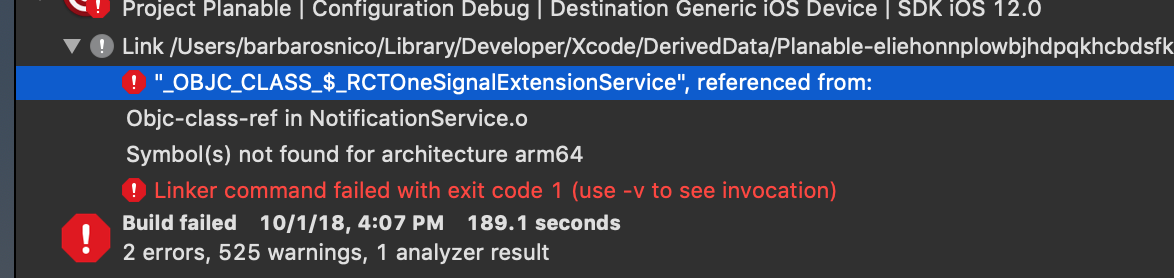
Have the same problem when trying to Archive the project in XCode. ((
Though I could add the libRTCOneSignal.a.
 nicubarbaros
on 1 Oct 2018
nicubarbaros
on 1 Oct 2018
i get issue
Undefined symbols for architecture arm64:
"_OBJC_CLASS_$_UIActivityIndicatorView", referenced from:
objc-class-ref in OneSignal(OneSignalWebView.o)
"_OBJC_CLASS_$_UIBarButtonItem", referenced from:
objc-class-ref in OneSignal(OneSignalWebView.o)
"_SCNetworkReachabilityCreateWithAddress", referenced from:
+[OneSignalReachability reachabilityWithAddress:] in OneSignal(OneSignalReachability.o)
"_UIUserNotificationActionResponseTypedTextKey", referenced from:
+[OneSignalUNUserNotificationCenter callLegacyAppDeletegateSelector:isTextReply:actionIdentifier:userText:fromPresentNotification:withCompletionHandler:] in OneSignal(UNUserNotificationCenter+OneSignal.o)
"_OBJC_CLASS_$_UIColor", referenced from:
objc-class-ref in OneSignal(OneSignalWebView.o)
"_OBJC_CLASS_$_UIViewController", referenced from:
_OBJC_CLASS_$_OneSignalWebView in OneSignal(OneSignalWebView.o)
objc-class-ref in OneSignal(OneSignalWebView.o)
"_OBJC_CLASS_$_UIUserNotificationSettings", referenced from:
objc-class-ref in OneSignal(OneSignalHelper.o)
objc-class-ref in OneSignal(OneSignalNotificationSettingsIOS8.o)
"_OBJC_CLASS_$_UINavigationController", referenced from:
objc-class-ref in OneSignal(OneSignalWebView.o)
"_SCNetworkReachabilityGetFlags", referenced from:
-[OneSignalReachability connectionRequired] in OneSignal(OneSignalReachability.o)
-[OneSignalReachability currentReachabilityStatus] in OneSignal(OneSignalReachability.o)
"_OBJC_CLASS_$_UIMutableUserNotificationAction", referenced from:
objc-class-ref in OneSignal(OneSignalHelper.o)
"_OBJC_METACLASS_$_UIViewController", referenced from:
_OBJC_METACLASS_$_OneSignalWebView in OneSignal(OneSignalWebView.o)
"_OBJC_CLASS_$_UIMutableUserNotificationCategory", referenced from:
objc-class-ref in OneSignal(OneSignalHelper.o)
 ebrahimElgeded
on 22 Oct 2018
ebrahimElgeded
on 22 Oct 2018
I faced the same issue and was not able to build my app anymore. The problem was that I started using Cocoapods in my App and used a similar Podfile as @jdegger here. I just added this at the end of the file:
post_install do |installer|
    installer.pods_project.targets.each do |target|
        if target.name == "React"
            target.remove_from_project
        end
    end
end
The solution was to run react-native unlink react-native-onesignal and then running pod installl again. This worked fine in release mode.
In dev mode I got the same error as @nicubarbaros here. I fixed this with simply adding libReact.a and libRCTWebSocket.a in Build Settings > Link Binary With Libraries.
 far1s
on 14 Dec 2018
far1s
on 14 Dec 2018
Related issues
 janaka120
·
30Comments
janaka120
·
30Comments
 wkoutre
·
30Comments
wkoutre
·
30Comments
 Adesh
·
28Comments
Adesh
·
28Comments
 shardick
·
32Comments
shardick
·
32Comments
 mnmeyers
·
32Comments
mnmeyers
·
32Comments
Most helpful comment
@jdegger that approach seems to have worked for me also, nice one 👍
I used
abstract_targetto tidy up myPodfileslightly:I defined
perform_post_install_tasksas a separate method to tidy up the target block further, it contains the same auto-generated content as posted in @yirui94's earlier postI then amended the Build Settings of my OneSignalNotificationServiceExtension target, setting both _Search Paths > Header Search Paths_ and _Search Paths > Library Search Paths_ to
$(inherited).In Build Phases, under _Link Binary With Libraries_, I removed all except:
I then ran
pod install, which links the pod libraries to both targets.At this point, I was able to build successfully and send out notifications 🎉