React-native-onesignal: (v3.2.1) (iOS) No users on dashboard & Not receiving notifications
Description:
I can't get v3.2.1 working. I set up the app, followed the documentation and checked the app id several times. The weird thing is that I don't even see the Users in the OneSignal dashboard.
I tried to initialize the module in the both ways (JS and AppDelegate).
Finally I tried to downgrade to v3.1.4, I just replaced the version in the package.json, ran yarn and it worked.
Environment
Version v3.2.1
SDK installed using yarn, and linked with react-native link (Not pods)
RN v0.55.3
OS: iOS
Steps to Reproduce Issue:
- Install the OneSignal SDK using yarn into your project
yarn add react-native-onesignal - Run
react-native link react-native-onesignal - Set up OneSignal app
- Initialize the SDK in the iOS AppDelegate or with
OneSignal.init()in the JS code - Attempt to receive a push notification
Anything else:
The app didn't crash nor throw any errors.
I debugged the ids listener and I noticed that it doesn't gets executed every time I open the app, just sometimes (don't know if that's the correct behavior).
I didn't try it on Android.
 nicastelo
All 20 comments
Same here.
 rafaelribeiros
on 14 May 2018
rafaelribeiros
on 14 May 2018
Hi @nicastelo
Can you verify that if you go to the Xcode project settings, libRCTOneSignal.a shows up as a dependency in the Linked Libraries section?
 Nightsd01
on 14 May 2018
Nightsd01
on 14 May 2018
Also, I suspect this is an issue with Xcode subproject dependencies vs. cocoa pod dependencies.
Can you tell me if your project looks like this?

Nightsd01
on 14 May 2018
@Nightsd01 I have the same issue and can verify that my setup is as you described.
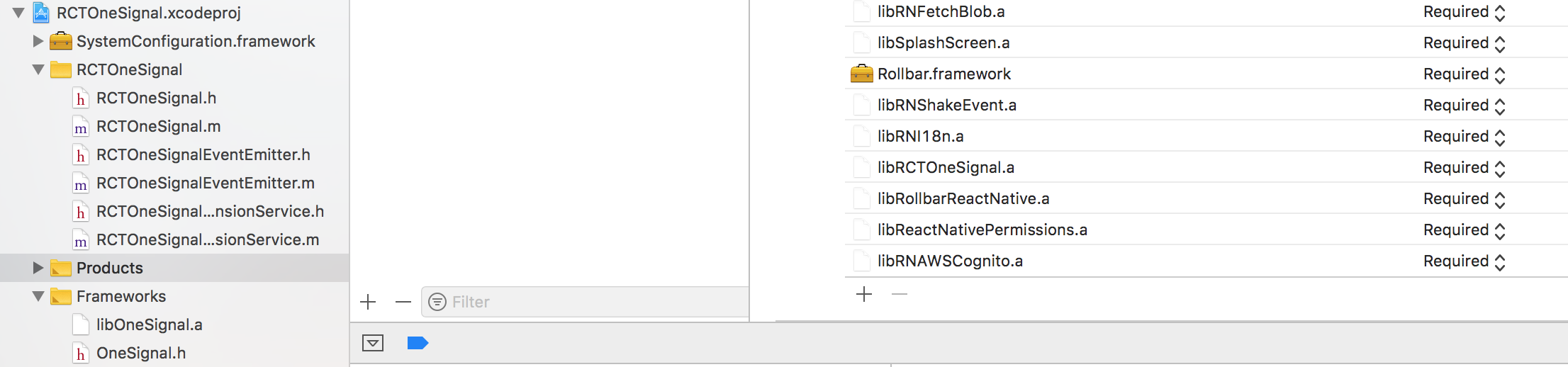
 tpedersen123
on 14 May 2018
tpedersen123
on 14 May 2018
@tpedersen123 Can you call OneSignal.setLogLevel(6, 0) before you call OneSignal.init("your_app_id") and tell me if you see any errors printed to the console?
Also, let's check a few things:
- You're not using Expo right?
- You are running on a real iOS device, correct? Please note that Apple does not support push notifications in the iOS simulator
- You went to Xcode Project Settings > Capabilities, and enabled Push Notifications?
- Where in your react app are you calling
OneSignal.init()from? - Can you see if this issue occurs in the previous version (3.1.4)? If you downgrade to 3.1.4, note that this older version doesn't support JS initialization so you'll have to add code to the native Objective-C AppDelegate as described here
Nightsd01
on 14 May 2018
- You're not using Expo right?
Nope - You are running on a real iOS device, correct? Please note that Apple does not support push notifications in the iOS simulator
Yes - You went to Xcode Project Settings > Capabilities, and enabled Push Notifications?
Yes - Where in your react app are you calling OneSignal.init() from?
In our "root" component in ComponentWillMount - Can you see if this issue occurs in the previous version (3.1.4)? If you downgrade to 3.1.4, note that this older version doesn't support JS initialization so you'll have to add code to the native Objective-C AppDelegate as described here
It worked fine before the updrage to 3.2.*, we have had this app running for months now on 3.1.2 working just fine.
Only a recent addition of AWS modules forced us to upgrade because of the collision with Google Play Services (GMS module)
The code works fine on Android with the exception of "onIds()" event listener not being called.
I tried your example project on Android, that doesn't trigger "onIds()" to be called either as far as I can see.
tpedersen123
on 14 May 2018
Here are the init lines of OneSignal - the kOSSettingsKeyAutoPrompt works to suppress permission prompt, so init() IS called.
We prompt for permissions later on.
OneSignal.setLogLevel(6, 0);
    OneSignal.init('top secret', {
      kOSSettingsKeyAutoPrompt: false,
    });
    OneSignal.inFocusDisplaying(0);
    OneSignal.addEventListener('opened', this.onOpened)
    OneSignal.addEventListener('ids', this.onIds)
tpedersen123
on 14 May 2018
@tpedersen123 When you do eventually prompt for push notifications permission from the user, does the prompt actually show up? Try uninstalling the app and reinstalling it, and make sure the push notification permission prompt actually shows up.
Try a clean install of your app, accept push notification permission, and then can you send me the entire logs from Xcode console?
PS: Sorry you're seeing this issue, thanks for working with me to troubleshoot!
Nightsd01
on 14 May 2018
@Nightsd01 Yes, the prompt shows up every time.
I don't get any OneSignal logs in the console? I did add OneSignal.setLogLevel(6, 0);
tpedersen123
on 14 May 2018
Sorry, was looking in the wrong place. Logs coming up shortly
tpedersen123
on 14 May 2018
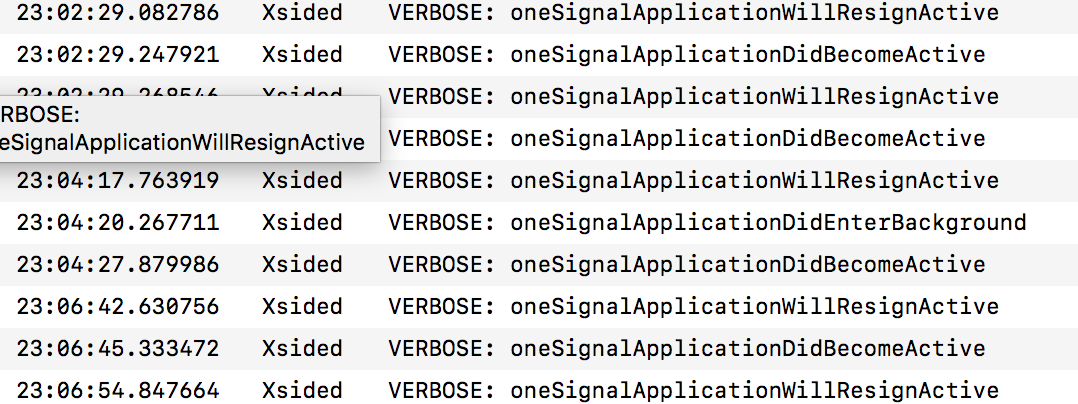
I only get these after a call to
[27 <private> stream, pid: 683, url: https://onesignal.com/api/v1/apps/top-secret-key/ios_params.js, tls] cancelled
tpedersen123
on 14 May 2018
@tpedersen123 There really should be more logs than that - you are calling setLogLevel(6, 0) before calling init() right?
Nightsd01
on 14 May 2018
Yes, but I am having trouble getting the console logs. Will try again tomorrow.
Feel free to email me on tpedersen ( at) gmail.com to avoid messing up this issue discussion :-)
tpedersen123
on 15 May 2018
@Nightsd01
I tried removing kOSSettingsKeyAutoPrompt to trigger permission prompt right away.
That gave me this output
WARNING: Attempted to send an event (OneSignal-idsAvailable) when no listeners were set.
and onIds(device) was called but device was null
tpedersen123
on 15 May 2018
Related #503
 hhunaid
on 15 May 2018
hhunaid
on 15 May 2018
@tpedersen123 Can you please send your logs? Just for the first ~10 seconds after launching your app.
Also, can you tell me where in your project you are calling OneSignal.init() from, where you are adding OneSignal event listeners, etc?
Nightsd01
on 16 May 2018
@nicastelo hi, did you solve this issue?
 neo125874
on 16 May 2018
neo125874
on 16 May 2018
Hi everyone - this issue has been resolved in a new PR (#512). We expect to have this merged and a new update released within the next hour or two. Thanks for your patience!
Nightsd01
on 17 May 2018
@nicastelo @tpedersen123 The new update (3.2.3) has been released and should fix this issue. Please feel free to let me know if you see this issue (or other issues) again and I'll be happy to investigate.
Nightsd01
on 17 May 2018
@Nightsd01 Everything works now - I love you, man :-)
Thx!
tpedersen123
on 17 May 2018
Related issues
 exclusiveTanim
·
4Comments
exclusiveTanim
·
4Comments
 HristoEftimov
·
3Comments
HristoEftimov
·
3Comments
 Kisepro
·
4Comments
Kisepro
·
4Comments
 andrewworld
·
3Comments
andrewworld
·
3Comments
 mtt87
·
3Comments
mtt87
·
3Comments
Most helpful comment
Also, I suspect this is an issue with Xcode subproject dependencies vs. cocoa pod dependencies.
Can you tell me if your project looks like this?