React-native-onesignal: Notification Service Extension Issue
With v3.0.9, having followed the instructions in the readme:
Undefined symbols for architecture x86_64:
  "_RCTRunningInAppExtension", referenced from:
      -[RCTOneSignal checkPermissions:] in libRCTOneSignal.a(RCTOneSignal.o)
      -[RCTOneSignal requestPermissions:] in libRCTOneSignal.a(RCTOneSignal.o)
      -[RCTOneSignal getPermissionSubscriptionState:] in libRCTOneSignal.a(RCTOneSignal.o)
  "_RCTSharedApplication", referenced from:
      -[RCTOneSignal checkPermissions:] in libRCTOneSignal.a(RCTOneSignal.o)
      -[RCTOneSignal requestPermissions:] in libRCTOneSignal.a(RCTOneSignal.o)
  "_OBJC_CLASS_$_RCTConvert", referenced from:
      objc-class-ref in libRCTOneSignal.a(RCTOneSignal.o)
  "_RCTRegisterModule", referenced from:
      +[RCTOneSignal load] in libRCTOneSignal.a(RCTOneSignal.o)
ld: symbol(s) not found for architecture x86_64
 colinramsay
All 17 comments
@colinramsay When do you get this error, you are attempting to compile the primary App target for simulator I assume?
How did you include RCTOneSignal as a dependency in your project?
 Nightsd01
on 31 Jan 2018
Nightsd01
on 31 Jan 2018
This happens for simulator and device. We included as per the reader with the caveat that RN link didn’t work properly so we had to drag the xcproj into Xcode. That might be the source of the problem in that there’s another step we need to manually perform.
On 31 Jan 2018, at 19:54, Brad Hesse notifications@github.com wrote:
When do you get this error, you are attempting to compile the primary App target for simulator I assume?
How did you include RCTOneSignal as a dependency in your project?
—
You are receiving this because you authored the thread.
Reply to this email directly, view it on GitHub, or mute the thread.
colinramsay
on 31 Jan 2018
@colinramsay when you say the RN link didn't work properly, what was the problem?
Are you saying you dragged RCTOneSignal.xcodeproj as a subproject of your Xcode project?
Nightsd01
on 31 Jan 2018
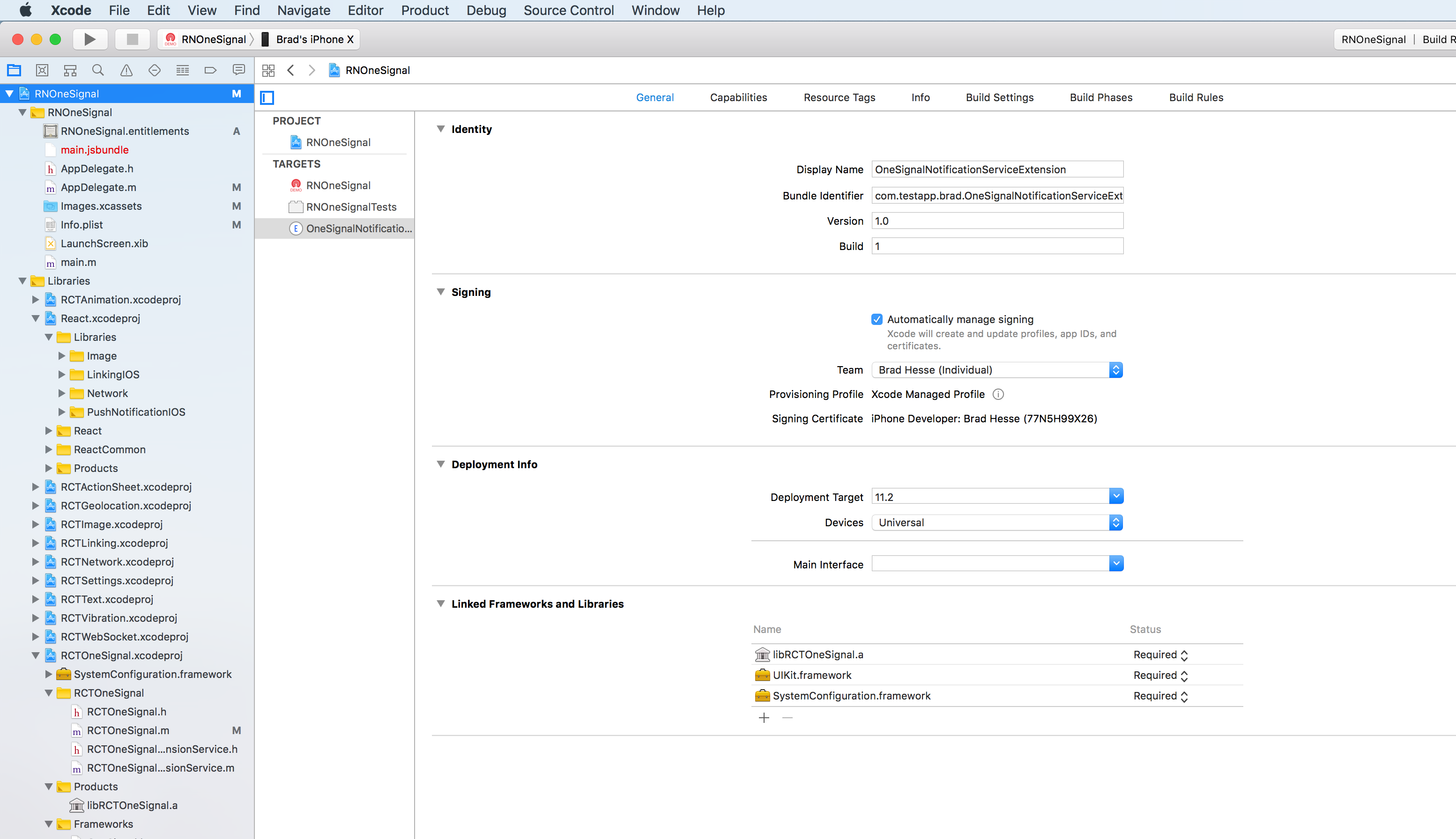
When you look in your Xcode project settings (both for the app and the extension targets), do you see libRCTOneSignal.a as a framework in the Linked Frameworks and Libraries section?
Nightsd01
on 31 Jan 2018
We added that in build phases as per the readme so I think so; I’m not at a computer now to check.
The odd thing is that the errors we see refer to things in RN itself that it seems cannot be found.
On 31 Jan 2018, at 20:05, Brad Hesse notifications@github.com wrote:
When you look in your Xcode project settings (both for the app and the extension targets), do you see libRCTOneSignal.a as a framework in the Linked Frameworks and Libraries section?
—
You are receiving this because you were mentioned.
Reply to this email directly, view it on GitHub, or mute the thread.
colinramsay
on 31 Jan 2018
@colinramsay This specifically started happening after you added the extension service? You were successfully able to run the app for both simulator & real iOS device before adding the extension?
Nightsd01
on 31 Jan 2018
I’ll have to check on that but it does look like the source of the errors is the extension.
On 31 Jan 2018, at 20:25, Brad Hesse notifications@github.com wrote:
@colinramsay This specifically started happening after you added the extension service? You were successfully able to run the app for both simulator & real iOS device before adding the extension?
—
You are receiving this because you were mentioned.
Reply to this email directly, view it on GitHub, or mute the thread.
colinramsay
on 31 Jan 2018
Confirming that we do have libRCTOneSignal.a as a framework in the Linked Frameworks and Libraries section.
If I remove extension service target then the build succeeds.
colinramsay
on 1 Feb 2018
Just to confirm, you have libRCTOneSignal.a in the Linked Frameworks and Libraries in _both_ the Extension _and_ the primary App's target, right?
Nightsd01
on 1 Feb 2018
That's correct.
colinramsay
on 1 Feb 2018
Is your notification extension service in Swift or Objective-C?
Nightsd01
on 1 Feb 2018
Swift, and I've added the bridging header as per the readme.
colinramsay
on 1 Feb 2018
This is probably the issue.
When you select the Extension target, go to Build Settings, and look for the Objective-C Bridging Header setting, what is the value?
Nightsd01
on 1 Feb 2018
I think you're probably right, but we've managed to get this working on our CI build so I think it was also related to something local to my computer. I guess expanding the docs to include exact instructions for the Obj-C Bridging Header might help for future issues. Thanks very much for spending time on this, it is appreciated.
colinramsay
on 2 Feb 2018
@colinramsay @Nightsd01 can you post your Obj-C Bridging Header and a screenshot of the files I need to make.
 vinceprofeta
on 24 Jul 2018
vinceprofeta
on 24 Jul 2018
Hi -- getting this same error. Using Obj-C for the Notification Service Extension. Not using Cocoapods -- used react-native link to setup. It works without the extension. Header search paths are right, and library is linked with both binaries. Any idea how to proceed?
 franzwarning
on 6 Mar 2019
franzwarning
on 6 Mar 2019
i have same issue, problem fixed?
 yongloon
on 2 Jul 2019
yongloon
on 2 Jul 2019
Related issues
 HristoEftimov
·
3Comments
HristoEftimov
·
3Comments
 Kisepro
·
4Comments
Kisepro
·
4Comments
 exclusiveTanim
·
4Comments
exclusiveTanim
·
4Comments
 phantom1299
·
3Comments
phantom1299
·
3Comments
 furkancelik
·
4Comments
furkancelik
·
4Comments
Most helpful comment
I think you're probably right, but we've managed to get this working on our CI build so I think it was also related to something local to my computer. I guess expanding the docs to include exact instructions for the Obj-C Bridging Header might help for future issues. Thanks very much for spending time on this, it is appreciated.