React-native-notifications: Notification Event Callbacks are not Firing on iOS
Thanks for picking up the task of being the only free and maintained PN library for react-native 🙏
react-native: 61.0
react-native-notifications: 3.1.4
I have followed the installation instructions exactly as outlined, and have picked up a few additional snippets from other github issues that have helped me get to a perfectly functioning Android implementation for foreground, background (warm) and background (cold) notifications.
Im having some issues on iOS though, namely none of the native event callbacks are firing:
registerNotificationOpened
registerNotificationReceivedBackground
registerNotificationReceivedForeground
I am receiving push notifications on iOS and when I press the notification banner, none of those callbacks are triggered.
It may be worth noting that getInitialNotification _is_ working on iOS.
I've searched every issue and am at a loss. Any ideas what I may have improperly configured, or is anyone else experiencing this?
I'm using firebase to send the actual remote notifications.
 rynpatk
All 30 comments
My NotificationService code:
export class NotificationsService {
constructor() {
this.messaging = messaging();
}
/**
* FCM-based notification permission function for iOS. Android automatically resolves to true.
* Potentially unused in lieu of RNNotifications permissions.
*/
requestFCMPermission = async (): Promise<string> => {
const granted = this.messaging.requestPermission();
if (granted) {
console.log('User granted messaging permissions!');
} else {
console.log('User declined messaging permissions :(');
}
return granted;
};
/**
* Apps using iOS must first register the app with FCM before being able to receive messages.
* Calling this method allows FCM to send messages to your device, however if you wish to display a
* visible notification further steps are required.
* On Android, no registration is required and this method successfully resolves instantly.
*/
registerAppWithFCM = async (): Promise<void> => {
try {
// updated from messaging().registerForRemoteNotifications to comply with v7 deprecation warning
const register = await this.messaging.registerDeviceForRemoteMessages();
if (!register) {
return;
}
} catch (err) {
console.log(err);
return;
}
};
/**
* Initial setup functions required before attaching RNN event handlers
*/
configureRNNotifications = async (): Promise<void> => {
Notifications.events().registerRemoteNotificationsRegistered((event: Registered) => {
// NOTE: this token does not resemble a fcmToken on iOS! it is returning an APNS
// token which must be converted to an fcm token via an additional POST to another service.
// see: https://github.com/wix/react-native-notifications/issues/408#issuecomment-591734138
// On Android this will be identical to the fcm token returned in the function above.
console.log('(RNN) Token Received', event.deviceToken);
});
Notifications.events().registerRemoteNotificationsRegistrationFailed(
(event: RegistrationError) => {
console.log(event);
}
);
// Request permissions on iOS, refresh token on Android
await Notifications.registerRemoteNotifications();
};
/**
* This method attaches all of the RNN event handlers (the notification UI elements).
* Note: I am adding them as class properties to prevent any possible duplicate instantiations.
*/
attachRNNotificationHandlers(): void {
this.getInitialNotification = Notifications.getInitialNotification()
.then(notification => {
// parse data and do something
console.log(`initial notification opened: ${JSON.stringify(notification)}`);
})
.catch(() => {
// empty
});
/* This triggers when the notification is received, not opened */
this.registerNotificationReceivedForeground = Notifications.events().registerNotificationReceivedForeground(
(notification: Notification, completion) => {
console.log(
`Notification received in foreground: ${notification.title} : ${notification.body}`
);
completion({ alert: true, sound: true, badge: true });
}
);
/* This triggers when the notification is received, not opened */
this.registerNotificationReceivedBackground = Notifications.events().registerNotificationReceivedBackground(
(_notification: Notification, completion) => {
console.log('registerNotificationReceivedBackground');
completion({ alert: true, sound: true, badge: true });
}
);
/* This triggers when the notification is opened, not received */
this.registerNotificationOpened = Notifications.events().registerNotificationOpened(
(notification: Notification, completion: () => void): void => {
const { payload } = notification;
// NOTE: the docs suggest some boilerplate that throws TS errors
console.log(`Notification opened: ${payload}`);
completion();
}
);
}
/**
* This is the main function for registering for push notification services which invloves
* initializing first with react-native-firebase (FCM) and then react-native-notifications (RNN).
*
* Steps:
* 1. permissions (FCM)
* 2. FCM registration (FCM)
* 3. getting token (FCM)
* 4. setting up messaging handlers (RNN)
*
* @param saveFcmToken - the callback function for saving the fcmToken to the server
*/
initialize = async (saveFcmToken): Promise<void> => {
let fcmToken;
// saving the token api call onto the class instance
this.saveFcmToken = saveFcmToken;
// Using the permissions util from FCM. Alternatively react-native-permissions could be used.
const hasPermission = await this.requestFCMPermission();
if (!hasPermission) return;
await this.registerAppWithFCM();
try {
// There are reports of this not working on the first run...
// We are using this token from FCM in lieu of the deviceToken from RNN
fcmToken = await this.messaging.getToken();
console.log(`(FCM) Token Received: ${fcmToken}`);
} catch (e) {
console.log('No Token Received Error:', e);
return;
}
if (fcmToken) {
// ... send to api
}
await this.configureRNNotifications();
this.attachRNNotificationHandlers();
};
}
and my AppDelegate.m contains:
if ([FIRApp defaultApp] == nil) {
[FIRApp configure];
}
[RNNotifications startMonitorNotifications];
return YES;
and
- (void)application:(UIApplication *)application didRegisterForRemoteNotificationsWithDeviceToken:(NSData *)deviceToken {
[RNNotifications didRegisterForRemoteNotificationsWithDeviceToken:deviceToken];
}
- (void)application:(UIApplication *)application didFailToRegisterForRemoteNotificationsWithError:(NSError *)error {
[RNNotifications didFailToRegisterForRemoteNotificationsWithError:error];
}
Did find a way to solve this issue? I was experiencing almost the same thing in iOS. But mine doesn't receive any notification at all. But on the Android side it works as expected.
 jwarrencedro
on 10 Apr 2020
jwarrencedro
on 10 Apr 2020
I am having the same issue
 AlexD10S
on 10 Apr 2020
AlexD10S
on 10 Apr 2020
@jwarrencedro still no solution from me :(
I am able to actually receive notifications on iOS though. Its worth noting that Im using a firebase cloud messaging (fcm) token to send notifications to the device.
You can also utilize the APNS token returned from react-native-notifications to send the notifications by manually converting it into an fcm token as outlined in this comment: https://github.com/wix/react-native-notifications/issues/408#issuecomment-591734138
I have also tried using the curl method of sending a push notification directly via the APNS token (as outlined in this post: https://dev.to/jakubkoci/react-native-push-notifications-313i) to rule out firebase as the culprit of the event handlers not triggering.
I am able to successfully receive push notifications via both methods, however none of the event handler callbacks are ever invoked. I've set a bunch of log statements in the native code itself and nothing seems to trigger there either.
rynpatk
on 10 Apr 2020
Yes, the same for me, I have tried manually with Firebase Cloud Messaging and I am getting the notification (Just when the app is on background, not on foreground). However as you mention none of the handling methods are executed.
The same logic works perfectly with Android
AlexD10S
on 10 Apr 2020
@AlexD10S let me know if you ever figure anything out. This is really frustrating and I don't understand the native iOS side well enough to even conceptually grasp what's missing.
A lot of people report that the iOS notifications _do_ work so I have been thinking about what kind of environment or configuration setting might be causing this difference in observed behavior.
rynpatk
on 13 Apr 2020
Bumping this so that the inactivity bot doesn't get any ideas 😅
I feel like this is a serious issue and is impacting the ability to use this library at all.
Would love to hear even some quick thoughts from the maintainers about just generally what might be causing this.
rynpatk
on 14 Apr 2020
@AlexD10S
I found a way to leverage FCM event handlers for iOS notifications... only thing is they don't work for Android 😅
So basically Im going to be using platform checks to instantiate Android event handlers using RNN, or ios event handlers using FCM. Its hacky, but thats react-native for you.
rynpatk
on 17 Apr 2020
Seeing same exact issue here, wanted to try out this library to use those callbacks but using same code as the docs they don't seem to work
 aprilzero
on 21 Apr 2020
aprilzero
on 21 Apr 2020
Experiencing the same issue as well here. Really want to avoid having to piece together th implementing with FCM since it works really well for Android.
 EIrwin
on 28 Apr 2020
EIrwin
on 28 Apr 2020
Same issue
 saczuac
on 30 Apr 2020
saczuac
on 30 Apr 2020
I know its poor form to reference another lib in the GH issues of another, but I just want to share what ended up working for me because I spent weeks dead in the water because of this problem.
Here is my implementation that uses the FCM event handler (which is semi-undocumented, make sure you're on the latest version release candidate) or the RNN event handler based on the Platform:
/*
     * This triggers when the notification is opened (foreground or background), not received.
     * Note for iOS, we are using the FCM event handler. For Android, we are using the RNN event handler.
     * TODO: If the FCM-based event handler is fixed to support android, remove the ternary here and
     * all RNN-based logic and dependencies.
     */
    this.onNotificationOpened = IS_ANDROID
      ? Notifications.events().registerNotificationOpened(
          // NOTE: the docs suggest some boilerplate that throws TS errors, see: https://github.com/wix/react-native-notifications/pull/499
          (notification: Notification, completion: () => void): void => {
            const { payload } = notification;

            // do your stuff

            completion();
          }
        )
      : this.messaging.onNotificationOpenedApp(remoteMessage => {

          // do your stuff

        });
And for the record I harbor no ill feelings toward any lib. React Native is such a complicated and community-driven ecosystem that anyone whose ever spent any time working on its open-source tooling deserves a medal and a cup of coffee :)
rynpatk
on 30 Apr 2020
I'm experiencing the exact same behavior as you described. I guess I'll go with your "fix" described for now. It might be worth noting that this.messaging.onNotificationOpenedApp(...) worked fine for both iOS and Android in my project, so I'm just going to use that for now entirely in place of Notifications.events().registerNotificationOpened(...)
 bfaulk96
on 19 May 2020
bfaulk96
on 19 May 2020
I'm having the same issue.
 winzazx
on 29 May 2020
winzazx
on 29 May 2020
@rynatk Thanks so much for finding a work around for this, really helped me a lot!
As an addendum for anyone else finding this thread:
messaging().onNotificationOpenedApp(...)
is the workaround for BACKGROUND notifications
messaging().onMessage((remoteMessage) => {
   console.log(remoteMessage);
});
is the workaround for FOREGROUND notifications
 mrarlloyd
on 5 Jun 2020
mrarlloyd
on 5 Jun 2020
This issue has been automatically marked as stale because it has not had recent activity. It will be closed if no further activity occurs.
![stale[bot] picture](https://avatars3.githubusercontent.com/in/1724?v=4&s=40) stale[bot]
on 5 Jul 2020
stale[bot]
on 5 Jul 2020
This is certainly still an issue and should not be closed
bfaulk96
on 6 Jul 2020
Me too. I can use only three event methods.
- registerRemoteNotificationsRegistered
- registerRemoteNotificationsRegistrationFailed
- getInitialNotification
 tomriddle7
on 10 Jul 2020
tomriddle7
on 10 Jul 2020
This issue has been automatically marked as stale because it has not had recent activity. It will be closed if no further activity occurs.
stale[bot]
on 9 Aug 2020
go away stalebot
rynpatk
on 12 Aug 2020
I was experiencing this issue. And I found out the cause is from react-native-firebase/messaging. This issue was fixed at this commit https://github.com/invertase/react-native-firebase/commit/b17df846d291cd6f507680f6415e78392c32b0b0
I also fixed the issue related to notification not called in foreground here. Please approve it https://github.com/invertase/react-native-firebase/pull/4088
 ttkien
on 14 Aug 2020
ttkien
on 14 Aug 2020
This issue has been automatically marked as stale because it has not had recent activity. It will be closed if no further activity occurs.
stale[bot]
on 13 Sep 2020
I'm facing the same issue
 pchvramesh
on 16 Sep 2020
pchvramesh
on 16 Sep 2020
Facing the same issue for new days and haven't found a solution yet. Everything works on Android, but not on iOS.
 v-anton
on 20 Sep 2020
v-anton
on 20 Sep 2020
Im facing the same problem, but it is really weird that one the core features of the library is not working. IOS just displays the notification but not the notification events are being trigger. Please help.
In the xcode console got this errors.
dnssd_clientstub write_all(24) DEFUNCT
dnssd_clientstub deliver_request ERROR: write_all(24, 50 bytes) failed
 kamo93
on 8 Oct 2020
kamo93
on 8 Oct 2020
@kamo93 what does your AppDelegate.m look like?
 erkie
on 12 Oct 2020
erkie
on 12 Oct 2020
Do not forget to change AppDelegate.m as described here.
For event handlers this part is important and fixes the problem:
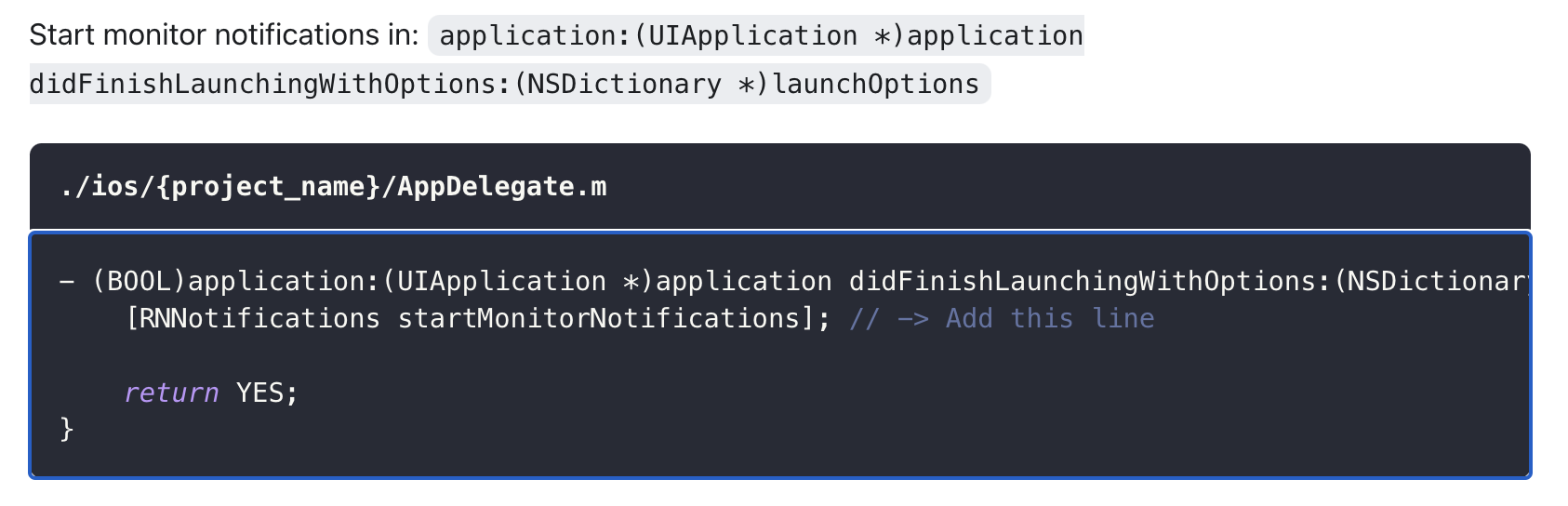
Line to add is
[RNNotifications startMonitorNotifications];
 dev-two
on 19 Oct 2020
dev-two
on 19 Oct 2020
I'm having the same issue for IOS, opening notification doesnt work for me but android works
 rabiaasif
on 22 Oct 2020
rabiaasif
on 22 Oct 2020
I moved [RNNotifications startMonitorNotifications]; at the very beginning of the didFinishLaunchingWithOptions method and that's now working. Wasn't the case when [RNNotifications startMonitorNotifications]; was placed just before return YES;.
 ebaynaud
on 11 Nov 2020
ebaynaud
on 11 Nov 2020
This works for me, replace the import on AppDelegate.m:
#import "RNNotifications.h" to #import <RNNotifications.h>
And add:
- (void)application:(UIApplication *)application
didReceiveRemoteNotification:(NSDictionary *)userInfo
fetchCompletionHandler:(void (^)(UIBackgroundFetchResult))completionHandler {
  [RNNotifications didReceiveBackgroundNotification:userInfo withCompletionHandler:completionHandler];

  completionHandler(UIBackgroundFetchResultNewData);
}
 adroperez21
on 27 Nov 2020
adroperez21
on 27 Nov 2020
Related issues
 codoffer
·
5Comments
codoffer
·
5Comments
 fosteruk
·
5Comments
fosteruk
·
5Comments
 beulahpt
·
5Comments
beulahpt
·
5Comments
 Payel-Dutta28
·
5Comments
Payel-Dutta28
·
5Comments
 VRBitman
·
6Comments
VRBitman
·
6Comments
Most helpful comment
I know its poor form to reference another lib in the GH issues of another, but I just want to share what ended up working for me because I spent weeks dead in the water because of this problem.
Here is my implementation that uses the FCM event handler (which is semi-undocumented, make sure you're on the latest version release candidate) or the RNN event handler based on the Platform:
And for the record I harbor no ill feelings toward any lib. React Native is such a complicated and community-driven ecosystem that anyone whose ever spent any time working on its open-source tooling deserves a medal and a cup of coffee :)