React-native-notifications: [V3.0.0][ANDROID] TypeError: null is not an object (evaluating 'this.nativeCommandsModule.refreshToken')
as the title said. I am using the newest version of the module on Android. but I got this error when calling Notifications.registerRemoteNotifications
The error is: TypeError: null is not an object (evaluating 'this.nativeCommandsModule.refreshToken')
My package.json
"react": "16.9.0",
"react-native": "0.61.2",
"react-native-notifications": "^3.0.0",
Please fix the problem! I really appreciate it!!!
 bduyng
All 21 comments
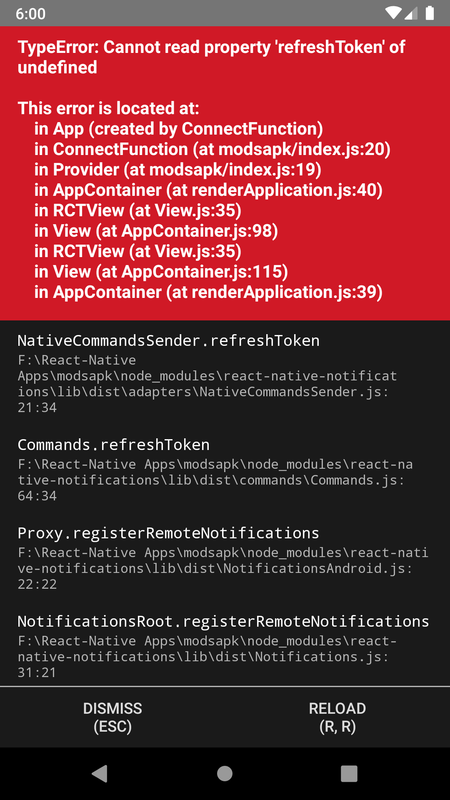
I am getting undefined:
TypeError: Cannot read property 'refreshToken' of undefined
 SMKH-PRO
on 16 Jan 2020
SMKH-PRO
on 16 Jan 2020
I am getting undefined:
TypeError: Cannot read property 'refreshToken' of undefined
This usually means, that you have not properly linked the native module for the current platform OS.
 fgreinus
on 16 Jan 2020
fgreinus
on 16 Jan 2020
Confirmed that the problem is about linking
bduyng
on 18 Jan 2020
I think that I have already well linked, but showing this error anyway.
"react": "16.9.0",
"react-native": "0.61.5",
"react-native-notifications": "3.1.1",
How is this issuel solved?
 JaioSkura
on 10 Feb 2020
JaioSkura
on 10 Feb 2020
@bduyng was right. It was a linking issue.
 ShaneMatthias
on 12 Feb 2020
ShaneMatthias
on 12 Feb 2020
yeah, I know. But how can I solve it?
Autolinking seems to be not working. I follow this steps, to link manually: https://github.com/wix/react-native-notifications/issues/447#issuecomment-576744535
But I continue having the same error in Android.
JaioSkura
on 12 Feb 2020
Hmm.. Im not too sure. I forgot to add this part and after adding it, it worked for me.
In MainApplication.java
import com.wix.reactnativenotifications.RNNotificationsPackage;

protected List<ReactPackage> getPackages() {
  ...
  packages.add(new RNNotificationsPackage(MainApplication.this));
  return packages;
}
Wow! thanks so much! I was adding that line, but not right. So stupid...
You save my day, making me see that concrete line carefully. Thanks a lot!
JaioSkura
on 12 Feb 2020
I am facing the same problem can you provide the full sample code of your solution especial that linking part i am stuck here @JaioSkura
 lylest
on 29 Apr 2020
lylest
on 29 Apr 2020
Hi @lylest
What react-native version are you using? and what react-native-notifications version? In my case, with :
"react-native": "0.61.5",
"react-native-notifications": "3.1.4"
you don't need to do anything special. This solution was for 3.1.1 but with the actual version the autolink feature works right.
Let me know!
JaioSkura
on 29 Apr 2020
iIam using
"react-native": "0.62.2",
"react-native-notifications": "^3.1.4", "react-native-notifications": "^3.1.4",
it doesn't work or should I remove manual linking that i have set i am facing the same problem exactly as above screen shots
lylest
on 29 Apr 2020
Hi, I would try removing manual linking yes.
JaioSkura
on 29 Apr 2020
failed with same error as on the screen shot above
lylest
on 29 Apr 2020
I haven't try with RN 0.62, but is strange having a regresion in that sense. Do you have somewhere manually included the library? build.gradle, settings.gradle or mainAplication.java?
If so delete, clean , i would remove build folder too, and rebuild all.
JaioSkura
on 29 Apr 2020
let Cross check again and try to clean and build again
On Wed, Apr 29, 2020, 11:21 AM JaioSkura notifications@github.com wrote:
I haven't try with RN 0.62, but is strange having a regresion in that
sense. Do you have somewhere manually included the library? build.gradle,
settings.gradle or mainAplication.java?
If so delete, clean , i would remove build folder too, and rebuild all.—
You are receiving this because you were mentioned.
Reply to this email directly, view it on GitHub
https://github.com/wix/react-native-notifications/issues/440#issuecomment-621059215,
or unsubscribe
https://github.com/notifications/unsubscribe-auth/AIFSPYSRZXXRL2K4Y4SAEW3RO7PO5ANCNFSM4KHHXZDA
.
lylest
on 29 Apr 2020
I FOLLOWED THE DOCS STEP BY STEP BUT STILL HAVE THIS ISSUE I TRIED AUTO LINKING AND MANUAL LINKIG BUT NONE OF THEM WORK ANY UPDATED SOLUTION FOR THIS ISSUE
 seif1000
on 4 Jul 2020
seif1000
on 4 Jul 2020
Witch versions of react-native and react-native-notifications are you using?
JaioSkura
on 5 Jul 2020
I tried all these ideas, without success.
"react-native": "0.62.2",
"react-native-notifications": "^3.2.2",
Having the same error displayed on the screenshot. Tried cleaning folders and chaces, rebuilding, resyncing and no luck.
 microxoft
on 9 Jul 2020
microxoft
on 9 Jul 2020
I actually failed to implement notifications for my app the documentations
are awful and most videos are outdated
On Thu, Jul 9, 2020, 10:42 PM Miguel Moronta notifications@github.com
wrote:
I tried all these ideas, without success.
"react-native": "0.62.2",
"react-native-notifications": "^3.2.2",Having the same error displayed on the screenshot. Tried cleaning folders
and chaces, rebuilding, resyncing and no luck.—
You are receiving this because you were mentioned.
Reply to this email directly, view it on GitHub
https://github.com/wix/react-native-notifications/issues/440#issuecomment-656315113,
or unsubscribe
https://github.com/notifications/unsubscribe-auth/AIFSPYQEJY23ZFNJBHZYYD3R2YMSBANCNFSM4KHHXZDA
.
lylest
on 9 Jul 2020
Fine, giving a try to https://github.com/zo0r/react-native-push-notification in that case.
Thanks,
microxoft
on 9 Jul 2020
Manually linking react-native-notifications and adding this bit to react-native.config.js solved it for me on our react-native 0.61.0 app.
  dependencies: {
    'react-native-notifications': {
      platforms: {
        android: null, // disable Android platform, other platforms will still autolink if provided
      },
    },
  },
 jkoutavas
on 26 Aug 2020
jkoutavas
on 26 Aug 2020
Related issues
 daominhsangvn
·
6Comments
daominhsangvn
·
6Comments
 veedeo
·
6Comments
veedeo
·
6Comments
 codoffer
·
5Comments
codoffer
·
5Comments
 ghost
·
3Comments
ghost
·
3Comments
 Mimble-Wimble
·
3Comments
Mimble-Wimble
·
3Comments
Most helpful comment
Hmm.. Im not too sure. I forgot to add this part and after adding it, it worked for me.
In
MainApplication.java