React-native-notifee: Will Notifee support the arm64 architecture?
Hello,
I'm trying to port an RN application to a DTK with an Apple silicon processor.
Unfortunately, Xcode refuses to compile my application with the following message:
ld: building for iOS Simulator, but linking in dylib built for iOS, file '/Users/me/git/myapp/node_modules/@notifee/react-native/ios/NotifeeCore.framework/NotifeeCore' for architecture arm64
Will Notifee soon support the arm64 architecture?
Thank you for your answers!
 dcloux
All 29 comments
That's interesting + new to me. I ran through a bunch of Apple developer forums threads and stack overflow and I'm not sure what the recommended state of the art is for a fix here.
There were quite a few mentions that if there was 'arm64' in the excluded arches for build targets in Xcode project settings, to remove that for debug with a side effect that you can't deploy debug builds to a real device (so not a great solution)
This was the best / most informative post I've seen so far:
https://stackoverflow.com/a/64139830/9910298
It appears @dcloux that you could put this stanza in your Podfile:
post_install do |installer|
  installer.pods_project.targets.each do |target|
    target.build_configurations.each do |config|
      config.build_settings["ONLY_ACTIVE_ARCH"] = "YES"
    end
  end
end
...per that linked stack overflow answer, and you should be able to bulid and run.
I want to emphasize this is an experimental change - it may impact how the app runs on devices when released via TestFlight
I put that in bold because I didn't see any confirmation from people that this solution (or the more surgical ones in the podspec) worked in all combos of apple silicon or x86 silicon building debug or release to simulator on apple silicon or x86 silicon or real device armv7 or arm64-v8. That full combo matrix needs confirmation before I will be confident in it.
Can you report any all success you have? If it's a total failure and we need to change our build of the core lib that's also a valuable result and we'll investigate further to move this forward
 mikehardy
on 4 Oct 2020
mikehardy
on 4 Oct 2020
Thx for your answer!
I did some tests. Exclude ARM64 architecture is not a good idea:

And the stanza in my Pod file doesn't work (error comes quickly on build...):
ld: library not found for -lRNNotifee
clang: error: linker command failed with exit code 1 (use -v to see invocation)
Is it possible that people on the linked issue on Stackoverflow use Xcode 12 on an Intel Mac? I'm working on an Apple DTK with an ARM64 Apple Silicon processor... Not only the target processor is ARM64 but the compiling processor is ARM64.
dcloux
on 5 Oct 2020
I wish everyone on that stackoverflow had organized their discussion around a matrix of host + target + release mode tuples and then noted which workaround worked (or was terrible!) for which part of the matrix. Many of the workarounds were ill-specified with regards to which tuple they would allow progress on.
I fear there may be something we need to do in our core library / framework generation procedure then, but this is going to be difficult for us because I don't have arm64 / "apple silicon" host and I'm not sure anyone @ Invertase does :disappointed: - @Salakar sorry to rope you in, but perhaps you already know what needs to be done to support arm64 hosts with a react-native notifee integration, or you can lay your hands on a host to use as a test rig?
Not-really-helpfully I will add that Apple's plan to make all us developer purchase new harder appears to be working :thinking:
mikehardy
on 5 Oct 2020
I think this has to do with Xcode 12, and the way the bundle is being built to a .framework and not a .xcframework. This article sums it up well (https://apontious.com/2020/08/23/arm-wrestling-your-ios-simulator-builds/). In the last build, I had to add EXCLUDED_ARCHS=arm64 due to the Xcode update.
If we convert the bundle to a .xcframework should fix it, which "should" be testable on both types of machines/hosts.
 helenaford
on 5 Oct 2020
helenaford
on 5 Oct 2020
I separately checked to see how / if this was handled in cocoapods and it looks like it's in flux as they changed it between cocoapods 1.9 and 1.10 but since 1.10 is still rc1 and not generally available, integrating it in the 1.9 style should work? https://blog.cocoapods.org/CocoaPods-1.9.0-beta/
we're already using the vendored_frameworks thing so "should" "just" be a matter of rebuilding and altering it to xcframework and it'll work (scare quotes intentional)
mikehardy
on 5 Oct 2020
Hello :) We are also experiencing the same issue as described above.
ld: building for iOS Simulator, but linking in dylib built for iOS, file '/Users/guus/Projects/ApotheekInJeBroekzak/node_modules/@notifee/react-native/ios/NotifeeCore.framework/NotifeeCore' for architecture arm64
We can't run our Detox tests since xcode 12 and while using Notifee because that uses a Release build.
It's all very confusing, but i still cant find a solution as to what to do. And if the end-user (app developers) or the package-creators should fix something.
I know a lot of packages had to change this:
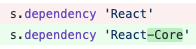
See the following as an example: https://github.com/FormidableLabs/react-native-app-auth/pull/562
Is this something Notifee needs to do too?
 Guuz
on 12 Nov 2020
Guuz
on 12 Nov 2020
If that could fix it and is a problem then I think you could see it right in the podspec in node_modules and try to fix it directly as a test? Patch-package could then be used until we adopt it. I don't believe that is the issue though
mikehardy
on 12 Nov 2020
hmm, no I don't think that's the same issue. That fix above looks like a React related issue. And, I believe we have 'React-Core' in our dependencies. For us to support arm64 we need to bundle the internal library differently to support arm64 which we are looking into. Will post here when there's updates and a release.
helenaford
on 12 Nov 2020
@helenaford any updates on this? We need to make a decision if we need to rip out Notifee for app launch or not, as we can't build on any new devices.
 jspizziri
on 10 Dec 2020
jspizziri
on 10 Dec 2020
@jspizziri apologies for the delay, you (and anyone else listening here) have been patient.
We've been discussing this internally to schedule the effort and we have a draft PR plus time allocated, this item is in development currently.
I hesitate to give ETAs ever in software development, but for the purposes of recruiting testers I'd like to know if anyone is available to test our work if we were to have test builds available later today (it's 9am my time as I type this - so in a few hours) and going forward?
We are sadly constrained by not having Apple Silicon to test ourselves but there appears to be a rough consensus on the best way to do this and we believe we can have it done quickly, with the exception of testing/verification.
mikehardy
on 17 Dec 2020
For adventurous testers only but this works for me (macOS BIgSur 11.1/Xcode 12.3/x86_64 simulator + physical iPhone SE arm64/iOS 14.3) integrated into my main app when doing local debug and TestFlight release builds:
- Alter your package.json dependency to be like this:
"@notifee/react-native": "notifee/react-native-notifee.git#@helenaford/xcframework-draft",
- add a
postinstallstep to package.json like this:
"postinstall": "cd node_modules/@notifee/react-native && yarn"
(although mine actually looks like this, as I use patch-package plus a jetify for good measure:
"postinstall": "patch-package && jetify && cd node_modules/@notifee/react-native && yarn"
)
- ...it should work on Apple Silicon now for simulators and ios
There is an unresolved problem with maccatalyst builds at the moment @ajnozari so this likely will not work for you yet but it is very close, just a matter of file locations / symbolic links not copying correctly
mikehardy
on 18 Dec 2020
@dcloux / @jspizziri if either of you have time, there is a test branch we would love feedback on :point_up: . The only change from 0.15.2 official release is how we package the library, so if 0.15.2 was working otherwise but failed on Apple Silicon (arm64) Macs when you tried to use those as development / simulator hosts, it should work for you. We're just looking for confirmation from someone to publish these changes
mikehardy
on 18 Dec 2020
@mikehardy thanks for the updates here. Some additional info that we've discovered since my original comment:
The issue only seems to be happening for us when we're trying to build & run for a simulator while also in Release mode. Building and running for simulators in Debug mode doesn't seem to be an issue. Lastly, we're able to build successfully for a generic device in Release mode and publish to the AppStore. So far none of those builds have had any issues when running on various devices via TestFlight.
So for now it seems that we (at least) have a path forward provided I'm not missing something.
Regarding the testing however, I will definitely try to check it out but we're in the midst of launch prep and unless this becomes a blocker for that again I won't be able to provide feedback until after the release is finished.
jspizziri
on 18 Dec 2020
@jspizziri okay - that makes sense and I understand the time crunch. The previous packaging style made some decisions about which slices to keep for which configurations and should always work in release on real devices, so that should explain your behavior. The new packaging should work in all combinations though without worrying about host, target, or debug vs release
mikehardy
on 18 Dec 2020
We would still love feedback from anyone that test integrates via the instructions above https://github.com/notifee/react-native-notifee/issues/162#issuecomment-747955777 - specifically I just re-pushed to that branch and now Mac Catalyst builds should be working as well.
Thanks!
mikehardy
on 30 Dec 2020
I’ll test it out in a bit just saw this!
 ajnozari
on 31 Dec 2020
ajnozari
on 31 Dec 2020
Thanks @ajnozari. It's now possible to test this with the pre-release 0.16.0-0 so no need for the post-install step.
helenaford
on 31 Dec 2020
@helenaford, I'm trying 0.16.0-0 but it's giving me an issue
'NotifeeCore/NotifeeCore.h' file not found
ajnozari
on 2 Jan 2021
Ah interesting 🤔 Do you get an issue with using this branch following @mikehardy's steps above?
helenaford
on 2 Jan 2021
@helenaford Yes, it gives me the same error. I see that @mikehardy mentioned an unresolved error, could that still be the potential issue?
ajnozari
on 2 Jan 2021
@ajnozari possibly. thanks for testing. Will leave it with Mike to comment further regarding the Mac Catalyst issue.
helenaford
on 2 Jan 2021
I'm still 99% sure this is working for Apple Silicon now - I'd love to hear feedback on that but I assume it's working now.
For macOS Catalyst builds I am of course less sure and your feedback is disappointing (professionally) since I was pretty sure I'd nailed it with this line! I'll get it though...
@ajnozari I'm digging through the internet trying to find a good starter project template I can use that's enabled for Catalyst, are you aware of one? I can't seem to find a good one so I don't have a good test rig set up to make sure I actually solve this. I can generate my own but I don't want to reinvent the wheel if you have experience here and know of one.
You can see the header file is here so I think we're close - something about symbolic links or file locations or git + symbolic links interaction is going to be the problem.
mikehardy
on 2 Jan 2021
@mikehardy take a look in the xcframework. iOS-arm64_x86_64-maccatalyst's folder structure differs from the ios-arm64_armv7 and the simulator folders.
This would explain the error as NotifeeCore.h is in NotifeeCore.framework/Versions/A/Headers/NotifeeCore.h not NotifeeCore.framework/Headers/NotifeeCore.h, and it seems that Xcode is either ignoring the sym links, or not following them properly.
To answer our question about another example React-native-webrtc is also working on this and they too have a podspec. They're having other issues due to webrtc but they do link.
ajnozari
on 4 Jan 2021
@ajnozari - yes, that's what we've been looking at, it's clearly something to do with that, our questions are about best way to solve it since this (those subdirectories, with a different layout than the ios builds) appears to be the way Xcode builds catalyst frameworks by default.
1- should we bend the catalyst headers layout to match the others? (seems like the wrong direction, we're fighting the build system...but would probably work and might be "good enough", you could try it by just manually copying them)
2- should we add the catalyst header directories to the include path for catalyst builds via podspec directives? This could work but is untested
3- and of course we need to be absolutely certain that the layout is correct after traveling from xcodebuild of Notifee core to the react-native module through a git commit, a git checkout, and then a pod install. There were problems during those transformation steps prior - we think we've worked them out but it needs careful checking
If you wanted to just manually copy the header files a la item 1 above into the directory or add the Versions/Current/Headers directory to the path (Current should be a stable symbolic link to the 'A' directory...) a la item 2, both might solve it for you locally this moment, and the feedback would be great
mikehardy
on 4 Jan 2021
So when I remade the symlinks in my node_modules, Xcode found the framework, but then complained that were building for catalyst, but are giving macOS frameworks.
I think catalyst needs x86_64 iOS frameworks to be generated, since it’s technically compiling the iPad app for macOS.
Sent from my iPhone
On Jan 3, 2021, at 9:53 PM, Mike Hardy notifications@github.com wrote:
@ajnozarihttps://github.com/ajnozari - yes, that's what we've been looking at, it's clearly something to do with that, our questions are about best way to solve it since this (those subdirectories, with a different layout than the ios builds) appears to be the way Xcode builds catalyst frameworks by default.
1- should we bend the catalyst headers layout to match the others? (seems like the wrong direction, we're fighting the build system...but would probably work and might be "good enough", you could try it by just manually copying them)
2- should we add the catalyst header directories to the include path for catalyst builds via podspec directives? This could work but is untested
3- and of course we need to be absolutely certain that the layout is correct after traveling from xcodebuild of Notifee core to the react-native module through a git commit, a git checkout, and then a pod install. There were problems during those transformation steps prior - we think we've worked them out but it needs careful checking
If you wanted to just manually copy the header files a la item 1 above into the directory or add the Versions/Current/Headers directory to the path (Current should be a stable symbolic link to the 'A' directory...) a la item 2, both might solve it for you locally this moment, and the feedback would be great
—
You are receiving this because you were mentioned.
Reply to this email directly, view it on GitHubhttps://github.com/notifee/react-native-notifee/issues/162#issuecomment-753730687, or unsubscribehttps://github.com/notifications/unsubscribe-auth/AAKRDXJ2PU4KNRRSMFJFYUTSYEUTZANCNFSM4SD22LSA.
ajnozari
on 4 Jan 2021
Interesting - thanks for checking at any rate, sorry the results weren't better. We are definitely on it - Helena and I are both poking around at this as current work item. Irony is that in order to generate catalyst framework you do have to specify a macos flavor, and we're doing things by the book there
echo "Archiving for Mac Catalyst"
xcodebuild archive -workspace "./${FRAMEWORK_NAME}.xcworkspace" -scheme ${BUILD_SCHEME} -configuration Release \
  -destination='platform=macOS,arch=x86_64,variant=Mac Catalyst' -archivePath "${CATALYST_ARCHIVE_PATH}" \
  SKIP_INSTALL=NO BUILD_LIBRARY_FOR_DISTRIBUTION=YES
example from internet including the same, with Apple verification https://developer.apple.com/forums/thread/120542
we'll get there!
mikehardy
on 4 Jan 2021
So I did this:
- https://github.com/mikehardy/rnfbdemo/blob/master/notifee-demo.sh
- changed package.json notifee dependency to
0.16.0-0 pushd node_modules/@notifee/react-native/ios/NotifeeCore.xcframework/ios-arm64_x86_64-maccatalyst/NotifeeCore.framework && cp -rv Versions/A/* . && popd- opened the Podfile and disabled Flipper
- ran
pushd ios && pod install && popd - open the .xcworkspace and toggled on 'ipad' and 'macos' targets (also set my development team here...)
- built it and...it ran just fine! I click the link and get a notification
Witness: https://youtu.be/KL4neid0MC4
I'm not sure why the directory structure xcodebuild generates has the Versions/A / Versions/Current in it, but if you collapse those directories, what we've already published works for me on catalyst.
@ajnozari (or @helenaford) If you could try step 3 there and pod install / rebuild it should work, or failing that, those 7 steps should result in success for you too.
Once I see we are reproducing success with at least one style of catalyst support we'll have a solid foundation to build on.
mikehardy
on 6 Jan 2021
Mike,
I gave it another test and the app seems to build past notifee now, I can’t confirm 100% as I’m waiting for another package to update to xcframework now, but it is getting pat notifee in the compiler so I’m going to take that as a positive until the other package updates.
Andre
Sent from my iPhone
On Jan 5, 2021, at 6:42 PM, Mike Hardy notifications@github.com wrote:
So I did this:
- https://github.com/mikehardy/rnfbdemo/blob/master/notifee-demo.sh
- changed package.json notifee dependency to 0.16.0-0
- pushd node_modules/@notifee/react-native/ios/NotifeeCore.xcframework/ios-arm64_x86_64-maccatalyst/NotifeeCore.framework && cp -rv Versions/A/* . && popd
- opened the Podfile and disabled Flipper
- ran pushd ios && pod install && popd
- open the .xcworkspace and toggled on 'ipad' and 'macos' targets (also set my development team here...)
- built it and...it ran just fine! I click the link and get a notification
Witness: https://youtu.be/KL4neid0MC4
I'm not sure why the directory structure xcodebuild generates has the Versions/A / Versions/Current in it, but if you collapse those directories, what we've already published works for me on catalyst.
@ajnozarihttps://github.com/ajnozari (or @helenafordhttps://github.com/helenaford) If you could try step 3 there and pod install / rebuild it should work, or failing that, those 7 steps should result in success for you too.
Once I see we are reproducing success with at least one style of catalyst support we'll have a solid foundation to build on.
—
You are receiving this because you were mentioned.
Reply to this email directly, view it on GitHubhttps://github.com/notifee/react-native-notifee/issues/162#issuecomment-754968049, or unsubscribehttps://github.com/notifications/unsubscribe-auth/AAKRDXKQ7LQGGLIFDHOQFXLSYOPXDANCNFSM4SD22LSA.
ajnozari
on 6 Jan 2021
Release v0.16.0 includes support for arm64 architecture.
helenaford
on 10 Jan 2021
Related issues
 tautvilas
·
9Comments
tautvilas
·
9Comments
 kperreau
·
6Comments
kperreau
·
6Comments
 ashokkumar88
·
6Comments
ashokkumar88
·
6Comments
 umang-simform
·
12Comments
umang-simform
·
12Comments
 mars-lan
·
9Comments
mars-lan
·
9Comments
Most helpful comment
Mike,
I gave it another test and the app seems to build past notifee now, I can’t confirm 100% as I’m waiting for another package to update to xcframework now, but it is getting pat notifee in the compiler so I’m going to take that as a positive until the other package updates.
Andre
Sent from my iPhone
On Jan 5, 2021, at 6:42 PM, Mike Hardy notifications@github.com wrote:
So I did this:
Witness: https://youtu.be/KL4neid0MC4
I'm not sure why the directory structure xcodebuild generates has the Versions/A / Versions/Current in it, but if you collapse those directories, what we've already published works for me on catalyst.
@ajnozarihttps://github.com/ajnozari (or @helenafordhttps://github.com/helenaford) If you could try step 3 there and pod install / rebuild it should work, or failing that, those 7 steps should result in success for you too.
Once I see we are reproducing success with at least one style of catalyst support we'll have a solid foundation to build on.
—
You are receiving this because you were mentioned.
Reply to this email directly, view it on GitHubhttps://github.com/notifee/react-native-notifee/issues/162#issuecomment-754968049, or unsubscribehttps://github.com/notifications/unsubscribe-auth/AAKRDXKQ7LQGGLIFDHOQFXLSYOPXDANCNFSM4SD22LSA.