React-native-notifee: Android: Scheduled notifications not shown when app is not running
Environment
RN: 0.63.2
notifee: 0.12.1
Android: API 30
How to reproduce?
- Schedule a notification via Trigger
- Kill the app
- No notification fired at the specified time
- Relaunch the app and receive the notification immediately
Confirmed that the notification is fired correctly if step 2 is not taken.
Expected behavior
Even if app is not running any scheduled notification should still be delivered and shown correctly.
 mars-lan
All 57 comments
Hey @mars-lan - not to be pedantic - but can you specify exactly what step 2 looked like?
I imagine it was:
- open app switcher (so you are in the launcher tile view of the apps)
- long press on the app to expose context menu
- select app info from that menu
- hit force quit on that menu?
Or, alternatively it was:
- open app switcher (so you are in the launcher tile view of the apps)
- flick the app away
My hunch is it was the first scenario but certainty is important
 mikehardy
on 23 Aug 2020
mikehardy
on 23 Aug 2020
Actually it's the second, which is how most users would have "killed" the app.
mars-lan
on 23 Aug 2020
Very interesting! I would have expected this to manifest with the first scenario but not the second.
Either way, not the expected behavior, thanks for reporting it and clarifying
mikehardy
on 23 Aug 2020
@Salakar could we expedite a fix for this? It's kind of a big deal for my app and caused a lot of user frustration.
mars-lan
on 27 Aug 2020
@mars-lan what kind of schedule are you creating single datetime ones or periodic/interval ones?
 Salakar
on 27 Aug 2020
Salakar
on 27 Aug 2020
Single datetime (aka timestamp trigger).
mars-lan
on 27 Aug 2020
Thanks, is this on specific Android devices or just any Android device?
There's a known problem with some devices where the OEM has modified the OS to Force Stop an application when the application is closed (swiped out) in the launcher, which there's nothing we can do about really. (https://issuetracker.google.com/issues/113676489)
Salakar
on 27 Aug 2020
Sorry didn't make it clear in my original post. This is readily reproducible on an emulator running the stock Android 10.0+ x86_64 image so I assume the problem is more fundamental than device-specific.
mars-lan
on 27 Aug 2020
Ok thanks, and one last bit of info, could you provide a snippet of the notification & trigger that you're creating
Salakar
on 27 Aug 2020
Unrelated as you mention it is easy to repro anywhere, just mentioning https://dontkillmyapp.com in case you haven't seen it @mars-lan - gives the context of the device-specific trouble - it's a big deal and hard to handle unfortunately though there are ways to detect power saving (even the secret Huawei mode) and to open power savings control panel for users to whitelist you if reliable background execution is fundamental to your app
mikehardy
on 27 Aug 2020
Code snippet:
      await notifee.createChannel({
        id: 'channel',
        name: 'channel',
      });

      await notifee.createTriggerNotification({
        title: 'New post from John',
        body: 'Hey everyone! Check out my new blog post on my website.',
        android: {
          channelId: 'channel',
        },
      }, {
        type: TriggerType.TIMESTAMP,
        timestamp: Date.now() + 7000,
      });
How to reproduce
- Schedule notification in 7s
- Press the circle (home) button to put the app in background
- Press the square (menu) button to bring up app switcher
- Swipe away the app to kill it
- Wait for 7s and no notification got triggered
Skipping Step 3 above will trigger the notification after 7s as expected.
mars-lan
on 29 Aug 2020
@mikehardy thanks for the link. I'm well aware of the site and it was a huge source of pain in RNFB 5. I believe a lot of those should be addressed by the adoption of AndroidX WorkManager in notifee as mentioned by @Salakar here.
mars-lan
on 29 Aug 2020
Same issue here and very similar code. Only when I open my app the notification appears.
I am testing on an Xiaomi device, so this should be explanable by _"The only issue that we have come across is the case where some Chinese OEMs treat swipe to dismiss from Recents as a force stop. When that happens, WorkManager will reschedule all pending jobs, next time the app starts up."_ source
So using the WorkManager seems not to be the solution to avoid loss of scheduling when app is closed. Also see here. I thought that would be the advantage of WorkManager over the AlertManager...
 raphaelrupprecht
on 31 Aug 2020
raphaelrupprecht
on 31 Aug 2020
@raphaelrupprecht I was able to reproduce this reliably on stock Android emulator images so I doubt it's due to OEM hacks.
mars-lan
on 31 Aug 2020
Ok, for me Nexus 5 emulator worked. We really could need an example project that was tested by the notifee team.
raphaelrupprecht
on 31 Aug 2020
@Salakar any update? We're getting a lot of complaints from our users on this.
mars-lan
on 2 Sep 2020
Ping @Salakar again. Sorry but without access to the source code the best we can do is to keep bothering the team.
mars-lan
on 6 Sep 2020
Understood - and sorry for the delay, you are correct that without source access pinging us is your recourse, it's not a bother.
mikehardy
on 6 Sep 2020
I've been tasked with this, sorry for the hold up. Working on a solution where you can ask your user permission to allow your app to run in the background. Will have more info within the next few days.
 helenaford
on 6 Sep 2020
helenaford
on 6 Sep 2020
Any update, @helenaford? Sorry to be pushy but our users are really getting unhappy...
mars-lan
on 9 Sep 2020
No worries. I was about to get back to you this evening. Do you know what devices your users are on, or what devices are causing the most problems.
For example, on a Samsung A51 device I can set a trigger for 10 minutes, swipe the app away and the notification will be delivered. However, on the emulator it seems to not work the same. I'm not sure if that's unique to the emulator and they're not a reliable way to test background requests.
In terms of WorkManager vs AlertManager, I believe there's no difference - either way the app can still be killed by the device.
We have some endpoints (in review/testing phase) to help detect the device state and to prompt the user to turn off power saving mode. Or, to prompt them to give the app AutoStart permissions (if available on device) (see https://dontkillmyapp.com/xiaomi as an example where they have screenshots of the AutoStart menu).
But, this is a huge problem for Android users for any app that performs background tasks. For example, slack has this document for their users: https://slack.com/intl/en-gb/help/articles/360001562747-Known-issues-with-Android-notifications.
helenaford
on 9 Sep 2020
We've received complaints from users with the following devices
- Google Pixel 4 XL
- Google Pixel 3a
- Google Pixel 2
- Huawei HUAWEI P30
- Samsung Galaxy S8
mars-lan
on 10 Sep 2020
So the detection of the power saving mode seems to be the only chance. Any update would be appreciated.
raphaelrupprecht
on 12 Sep 2020
There is a PR under review right now internally that exposes the underlying power saving status APIs as well as an API to open the power savings setting control panel as something you may request to be open. It's "the current item of work" which is not the same thing as a promise for a release date (which are unreliable anyway) but should mean it's the next thing out
mikehardy
on 12 Sep 2020
@mikehardy & @helenaford Any update on that PR? :)
mars-lan
on 19 Sep 2020
This one went through review yesterday and (to give a preview) it exposes two APIs, one is to detect if power optimization is engaged for the app, and one to open settings. I think it will be ready for release shortly? Shortly means "single digit number of days" to me, this one really looked ready to go. I am compelled to add @helenaford is doing everything here and should get credit I'm just giving a news-y update since you asked :-). Cheers
mikehardy
on 19 Sep 2020
I can confirm that even after disabling the "battery optimization" for the app, the notification is still not coming through when the app is killed via the app switcher. This was tested on Samsung Galaxy S9. Can we reopen this issue?
mars-lan
on 27 Sep 2020
We can re-open it, but I'm not sure what exactly we can do? Is there any more detailed information from adb logcat related to the system/app interaction while battery optimization is off?
We need something to go on in order to try to make a useful change, and right now I'm not sure what the root cause could be
mikehardy
on 27 Sep 2020
@helenaford could you suggest how to debug this? As pointed out by you, it's readily reproducible in the emulator, and I was able to reproduce it on the only Android device I have. What else can I do to help debug this issue?
mars-lan
on 27 Sep 2020
@mars-lan
Is there any more detailed information from adb logcat related to the system/app interaction while battery optimization is off?
mikehardy
on 27 Sep 2020
I have a pixel 2 and a Samsung Galaxy s8, which both worked fine when optimization was turned off. What Android version is your device on?
There's a checklist for s9 (https://dontkillmyapp.com/samsung), maybe try the following:
- Disable Put unused apps to sleep
- Disable Auto-disable unused apps
- Remove your app from the list of sleeping apps
- Disable background restrictions for your app
If one of these steps helps, then we can look into adding to the API or at least to the docs.
Also, this is useful, how Apppointfix prevent background issues. Samsung is the only one that they had an extra step for, maybe for the s9.
helenaford
on 28 Sep 2020
I can confirm the issue @mars-lan reported 2 days ago on Xiaomi Mi 9T. When navigating to the battery-optimization settings via openBatteryOptimizationSettings() I could switch off the optimization for my app. After that the notifications did not show when killing via app switcher.
When I open the app-info the energy-saving mode was not "no restrictions" but still "energy saving mode (recommended)". Turning that to "no restrictions" did not solve the issue.
@helenaford Your comment on Xiaomi to enable autostart brought the solution for me (maybe in combination with turning off battery-saving). @mars-lan is that working for you too? (edit: ok this is just MIUI relevant)
Remaining problem for me is, that users have to turn on auto-start manually and don't get navigated to the app-info screen to do it.
raphaelrupprecht
on 29 Sep 2020
https://stackoverflow.com/questions/39366231/how-to-check-miui-autostart-permission-programmatically
There are solution in there for detection and for opening that settings page.
I'm not sure this is the direction the package should go though, this seems like it should be it's own package, or maybe I should host these in react-native-device-info, I'd take a PR there as this is a very general problem all react-native people have and the whole community could collaborate and keep it up to date there.
mikehardy
on 29 Sep 2020
Just to express some hope for the future, there was a good Reddit A2A thread from the AOSP team @ google and they mentioned that what they call "background kills" and vendor-specific power management is receiving attention from them. They have at least heard the complaints from the dev community on the fragmentation and non-standard behavior here, and they've got plans for Android 12 plus are adding qualifying checks to the standard android compatibility suite such that vendors can't break the standard API behaviors and get away with it. We shall see.
mikehardy
on 29 Sep 2020
@raphaelrupprecht ah yeah, we did have the autostart feature so possibly we could put that back in 🙁
helenaford
on 29 Sep 2020
Thanks for your replies! So should I wait for you to build the "open auto-start settings" in, or did you decide to not implement it here? This seems to affect many manufacturers I guess (https://stackoverflow.com/a/49167712/954674).
@mars-lan Any updates from you regarding Samsung Galaxy S9? Maybe got a look at the app-info screen if all settings look good?
I think it could be beneficial to have a small sample project in order to compare if notifee works on device XY or not. We even could have some common test-workflows written on the app screen, including the scenario in this thread.
raphaelrupprecht
on 4 Oct 2020
@raphaelrupprecht no problem. Thanks for all your feedback! I will be releasing it. For Samsung, looking into an endpoint that directs the user to 'Apps that won't be put to sleep' menu as it doesn't quite fit the "AutoStart" endpoint.
helenaford
on 4 Oct 2020
not quite on target but as related information: I agree @raphaelrupprecht I'm hoping to do a sample app at the same time as a full CI bring up but it hasn't got priority yet. All we have so far is a demonstrator that is mostly targeted by me at install/build triage: https://github.com/mikehardy/rnfbdemo/blob/master/notifee-demo.sh - but all it does is a simple notification, it currently does not demonstrate rich notifications or scheduling so it's not on target for this discussion
mikehardy
on 4 Oct 2020
@raphaelrupprecht no problem. Thanks for all your feedback! I will be releasing it. For Samsung, looking into an endpoint that directs the user to 'Apps that won't be put to sleep' menu as it doesn't quite fit the "AutoStart" endpoint.
Any update on the release?
mars-lan
on 13 Oct 2020
Can confirm the problem on real device (Xiaomi Redmi Note 5, Android 9.1.18).
Trigger notification only showing when opening the app.
 VivienTournie
on 14 Oct 2020
VivienTournie
on 14 Oct 2020
0.14.0 was actually released 5 days ago https://www.npmjs.com/package/@notifee/react-native just not tagged as a release here (@helenaford ?)
I'm not sure there is any more work in progress at the moment - there does not appear to be - and it's worth noting just to make sure no one is waiting on something impossible - that even the utilities added are just to expose state and help direct users to settings, they don't actually fix the issues created by vendors implementing Android API incorrectly
So most specifically @VivienTournie - if you check https://dontkillmyapp.com for the given device and follow the steps there it should all work, and the same is what needs to happen for your users - they need to be directed to alter their power settings. Knowing whether it is necessary is something the APIs are trying to help with but they don't eliminate the need to take a fair bit of project-specific action
mikehardy
on 14 Oct 2020
I understand your point. But my app is an alarm clock so trigger notifications are a key feature for me.
I can't ask my users to do those complicated processes to allow the notifications to show up... They will just delete the app.
I just downloaded the v0.14.0 and my app didn't have the auto-start. Even after activating it, the notifications are still not showing on the locked screen. I activated all the possible permissions + auto-start manually, still not working.
Edit : to be more precise, the notifications are showing up even when the app is in background or killed. But not when the screen is locked. Is this my fault for not implementing the api well ?
VivienTournie
on 14 Oct 2020
Unsure about notifications not showing when screen locked, that sounds like a channel configuration on android? either some level of importance or some level of privacy not set?
And I understand the trouble these power settings cause for apps - they affect me too! - it's a reason to complain to the vendor though, they have done this to the platform and they must be held accountable. I do know that Google is adding power management API compliance to it's platform CTS (compatibility test suite) for AOSP so perhaps it will get better in the future. In the meantime Xioami, Huawei, and others have really made a mess of things and there isn't much developers can do other than to guide users to settings panels.
mikehardy
on 14 Oct 2020
Unsure about notifications not showing when screen locked, that sounds like a channel configuration on android? either some level of importance or some level of privacy not set?
You were right sorry, my mistake.
And I understand the trouble these power settings cause for apps - they affect me too! - it's a reason to complain to the vendor though, they have done this to the platform and they must be held accountable. I do know that Google is adding power management API compliance to it's platform CTS (compatibility test suite) for AOSP so perhaps it will get better in the future. In the meantime Xioami, Huawei, and others have really made a mess of things and there isn't much developers can do other than to guide users to settings panels.
Yes of course I understand this is not Notifee's fault and you do the best to make things easier for us. My apologies if my post sounded rough, I know this if frustrating for all of us !
VivienTournie
on 14 Oct 2020
No worries re: power management, I'm really just commiserating. I really wish there was something more useful to do. Glad you've got the lock screen working - android channel settings are finicky and I wasn't sure if I was remembering them or not. Good luck on your project
mikehardy
on 14 Oct 2020
@mars-lan yea sorry, I had to put it on pause briefly with a release last week to fix critical bugs. Will have more info by end of tomorrow.
helenaford
on 15 Oct 2020
Hi All, new endpoints have been released in v0.15.0, getPowerManagerInfo() and openPowerManagerSettings(). Please check out the docs on how to use them.
helenaford
on 25 Oct 2020
@helenaford I'm unsure how to apply these new methods.
I'm encountering the same behavior as this issue describes on a Huawei P20 lite, running Android 8 (and probably on other devices).
When calling openPowerManagerSettings() a screen is shown with the title "Close apps on screen lock" which is empty without options to add something.
Meanwhile i've already adjusted the settings in openBatteryOptimizationSettings to make isBatteryOptimizationEnabled return false.
But still, no local trigger notifications are being delivered when the app is killed. They will show up when launching the app.
 tdekoning
on 29 Oct 2020
tdekoning
on 29 Oct 2020
Hey @tdekoning, so for that device based on dontkillmyapp (https://dontkillmyapp.com/huawei) would have expected openPowerManagerSettings() to open one of the following activities: ProtectActivity, StartupNormalAppListActivity, StartupAppControlActivity.
By any chance, do you have the result from getPowerManagerInfo(), and/or a screenshot of the screen?
Would have expected it to look something like this:
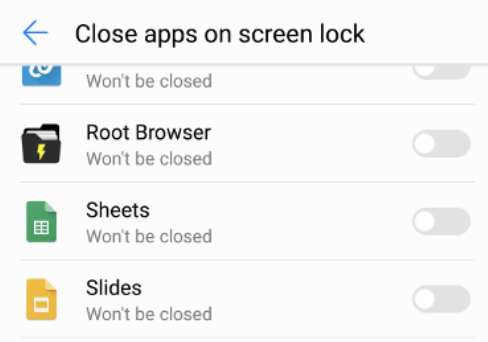
Maybe the text can be "Please make sure the app isn't listed, if it is please make sure the toggle is switched to off.
The endpoints are intended to help guide the user to the right settings page, but you might need to list some other steps. getPowerManagerInfo() can help detect if, for example, someone has a Huawei P20 lite running Android 8, to then be able to ask them to do _x, y, z_.
helenaford
on 30 Oct 2020
@helenaford The getPowerManagerInfo function returns the following:
{"activity": "ProtectActivity", "manufacturer": "HUAWEI", "model": "ANE-LX1", "version": "8.0.0"}
The screen opened by the openPowerManagerSettings is the following:
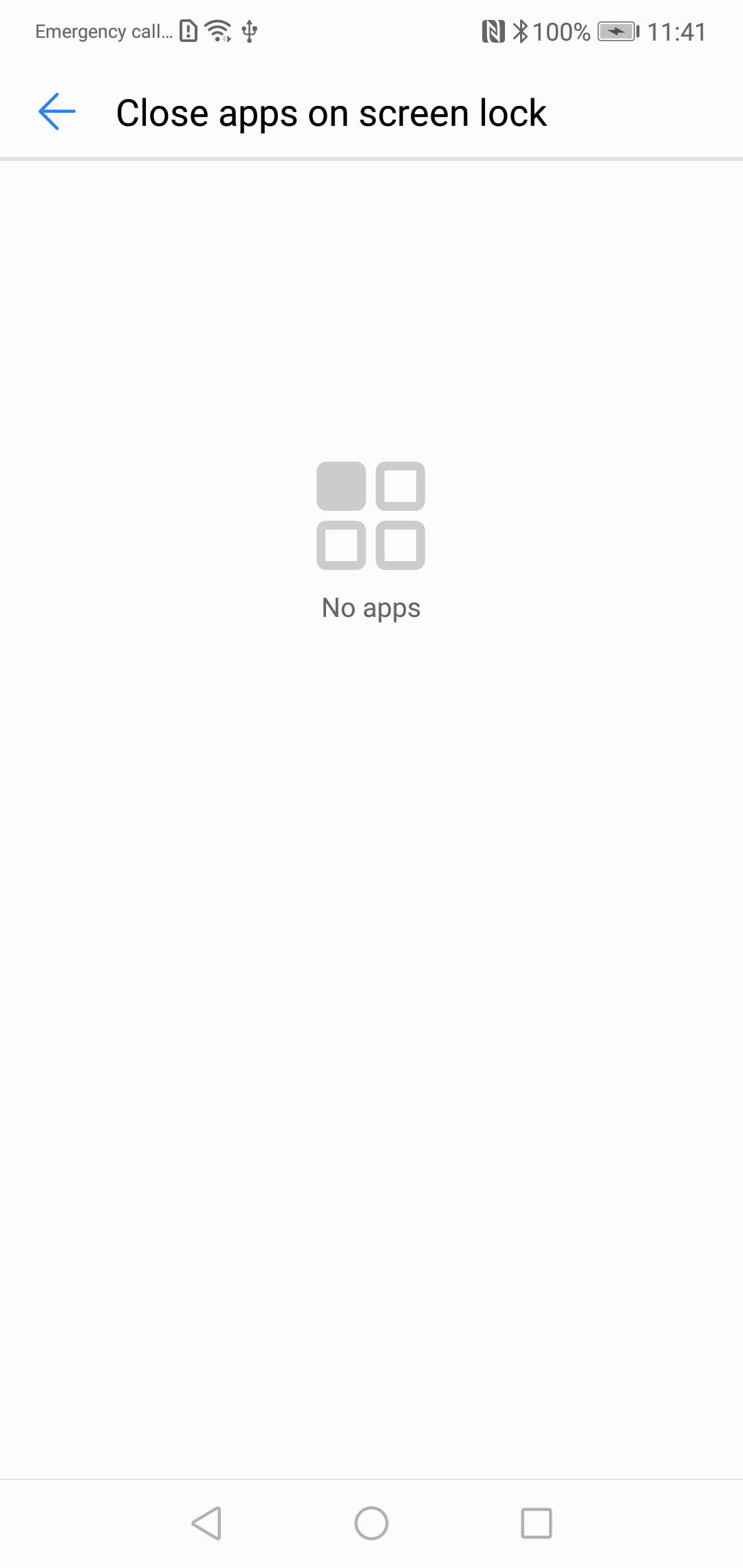
At least on this device, this screen seems to do nothing
tdekoning
on 2 Nov 2020
@helenaford is Notifee using the setExactAndAllowWhileIdle (https://developer.android.com/reference/android/app/AlarmManager#setExactAndAllowWhileIdle(int,%20long,%20android.app.PendingIntent)) method for scheduling notifications?
tdekoning
on 3 Nov 2020
@tdekoning notifee uses work manager under the hood. Would it help if we did use alarm manager too? Although they both are prone to getting killed in the background on android.
helenaford
on 19 Nov 2020
@helenaford Well, if i read this https://developer.android.com/training/monitoring-device-state/doze-standby#doze-checklist , it says that critical alarms (which not all use cases should use), should use setExactAndAllowWhileIdle().
This may help in resolving above mentioned issues with trigger alarms.
tdekoning
on 23 Nov 2020
@helenaford any progress on this?
tdekoning
on 14 Dec 2020
Hi, I've looked into those functions (setAndAllowWhileIdle() , setExactAndAllowWhileIdle()) and they are part of the AlarmManager. We're looking into how we can include these, if they will help solve some of these background issues.
One thing to bear in mind is that the AlarmManager can still be prone to being killed by certain devices. So you may still need to do extra steps for your Huawei device.
helenaford
on 24 Dec 2020
Based on anecdotal evidence we encountered far fewer issues with react-native-firebase 5.x which used AlarmManager to schedule notifications. I suspect there's some differences between AlarmManager and WorkManager that allow the former to wake up apps more reliably across a wider range of devices.
mars-lan
on 27 Dec 2020
After reading the link provided by @tdekoning and https://developer.android.com/topic/libraries/architecture/workmanager, it's pretty clear that instead of asking the users to manually disable battery optimization, it'd be more appropriate to use setExactAndAllowWhileIdle() to schedule notifications. I understand that various OEM power saving hacks will still prevent the alarm from firing, but at least it's one fewer hurdle users have to jump through. WDYT, @helenaford?
mars-lan
on 28 Dec 2020
Related issues
 lavi-moolchandani
·
10Comments
lavi-moolchandani
·
10Comments
 roni-castro
·
4Comments
roni-castro
·
4Comments
 pyeonjaesik
·
6Comments
pyeonjaesik
·
6Comments
 nvojnovic
·
4Comments
nvojnovic
·
4Comments
 joshuacano
·
6Comments
joshuacano
·
6Comments
Most helpful comment
This one went through review yesterday and (to give a preview) it exposes two APIs, one is to detect if power optimization is engaged for the app, and one to open settings. I think it will be ready for release shortly? Shortly means "single digit number of days" to me, this one really looked ready to go. I am compelled to add @helenaford is doing everything here and should get credit I'm just giving a news-y update since you asked :-). Cheers