React-native-notifee: Is possible to create Media Style Notification in android notifications?

The image is a random image from google search.
Can we create such notifications using Notifee?
 SaeedZhiany
All 18 comments
This sort is a Media Style Notification, which right now isn't supported. We're prioritising triggers (e.g. Schedules) & iOS support first.
 Ehesp
on 28 Jan 2020
Ehesp
on 28 Jan 2020
While in Alpha, it would still be great to see some high-level roadmaps on features like these (schedules, initial iOS support, Android Media notifs, etc).
I think there's a decent number of RN devs that are preeetttyy unsatisfied with the Android Media Style Notification libraries out in the world right now.so we're quite keen to throw our money at a solution as soon as it becomes available :)
 sampsonjoliver
on 28 Jan 2020
sampsonjoliver
on 28 Jan 2020
Any update on this one ? WIP ? :)
 VivienTournie
on 25 Oct 2020
VivienTournie
on 25 Oct 2020
Still no update ?
I do know you have other things to work on and your time isn't infinite. I just would like some information on this request which is almost 1 year old.
Thanks.
VivienTournie
on 2 Nov 2020
It's not possible to just "create" one, which is why it's not been done. You need actual media playing on the device which returns a token, and this is fed into a notification to display things. We could expose that token feed, however it's not much use without a way for users to control media.
We have taken a look into some of the media libraries but none support returning the token.
Ehesp
on 2 Nov 2020
Sorry I was not specific enough in what I need in this request.
My goal is to play a streaming song from (for example) Napster API from trigger notification. Those are .mp3 remote files (30sec).
According to Helena : "For remote file support when implemented, the plan is that you would be able to pass in a url that points to an audio file and the API will be able to attach it to the notification".
See https://github.com/notifee/react-native-notifee/issues/132#issuecomment-683655652
iOS is already implemented : https://github.com/notifee/react-native-notifee/issues/132#issuecomment-699127332
What about Android ?
VivienTournie
on 2 Nov 2020
The remote file support was referring to iOS. For Android, I believe it would require a media style notification 🙁
 helenaford
on 2 Nov 2020
helenaford
on 2 Nov 2020
It's not possible to just "create" one, which is why it's not been done. You need actual media playing on the device which returns a token, and this is fed into a notification to display things. We could expose that token feed, however it's not much use without a way for users to control media.
I believe you're talking about MediaSession token ? (cf. Android Developers blog on "Playing nicely with media controls")
The steps to create a media browser service are :
- Create and initialize the media session
- Set the media session callback
- Set the media session token
My understanding is that a media session can be created then can be "paused" (called "inactive" in Android documentation), putting a Play action into the PlaybackState associated with the session. Isn't it possible to create the session, associate a media (audio, video), just to create the mediaBrowser Service, then when the notification triggers, use the playback action to activate the media session and play the media ?
We could expose that token feed, however it's not much use without a way for users to control media.
By default Android is now using ExoPlayer to play audio and video both locally and over the Internet. On my react native project i'm using react-native-track-player to play remote .mp3 files and control media. From what I understood it uses the same callbacks structure than Android ExoPlayer/MediaPlayer (onPlay(), onPause(), and onStop(), ...).
Could we imagine using this player as media controller ?
I'm not Android native developer so sorry if my propositions aren't realistic. I'm trying my best to help you find a solution .. :)
VivienTournie
on 4 Nov 2020
That's possible yes, however we need access to that token created from the media player. Last time I checked the track-player library didn't support it
Ehesp
on 5 Nov 2020
They seem to be using media session token for some things. Idk if this could be reproducible/usefull for Notifee
VivienTournie
on 5 Nov 2020
Ok so I spoke with the author of the library; they create their own notifications since it's required to keep the music service running (foreground notifs). I'll have a look through the source code and see if we can hook into those created notifications.
Ehesp
on 6 Nov 2020
@Ehesp maybe related, there was a separate request for Notifee to be able to handle interaction on notifications that were automatically displayed when firebase cloud messages included a notification payload. I'm not sure if that is implemented yet but the reason I comment is that it seems like it might be generic at design level - "allow specification via configuration of some thing (a message id pattern or something?) that let's notifee know that it should pay attention to an otherwise-external notification (FCM notification payload, music player foreground service notification, etc)"
 mikehardy
on 7 Nov 2020
mikehardy
on 7 Nov 2020
@Ehesp Have you been able to take a look ?
VivienTournie
on 17 Nov 2020
Any news on this request ? Sorry to post again, but without a public roadmap, it's hard to know where you're at or what you're working on right now.
VivienTournie
on 12 Dec 2020
No problem. We understand this is the main way you can contact us and get your questions answered. There's currently a lot of work being done behind the scenes to speed up deployment and testing which will have an immense impact at the speed we can push out features like this. I can sync up with Elliot and get back to you. Thanks for being patient.
helenaford
on 12 Dec 2020
@helenaford Have you been able to sync up with Elliot on this request ? This request has been pending for 1 year now, which is huge in the mobile app world :(
VivienTournie
on 14 Jan 2021
Yes, think I've got a solution. I've been working on it for the last 2 weeks seeing how we can integrate with react-native-track-player. It's not easy 😆 The first think I looked at was getting the session token out, so you could use it when create a notification with Notifee but doesn't seem possible, and tbh it's probably best it's left on the native side.
The other thing and I think how we can get it to work initially is to create what looks like a media style notification but without the session token. Then when the user clicks play, you can call TrackPlayer.play() where their notifications will take over, if that makes sense.
I'm aware this will need some testing, and feedback.
Didn't have time to make the artwork pretty, but here's a screenshot(s).
With Notifee using createTriggerNotification
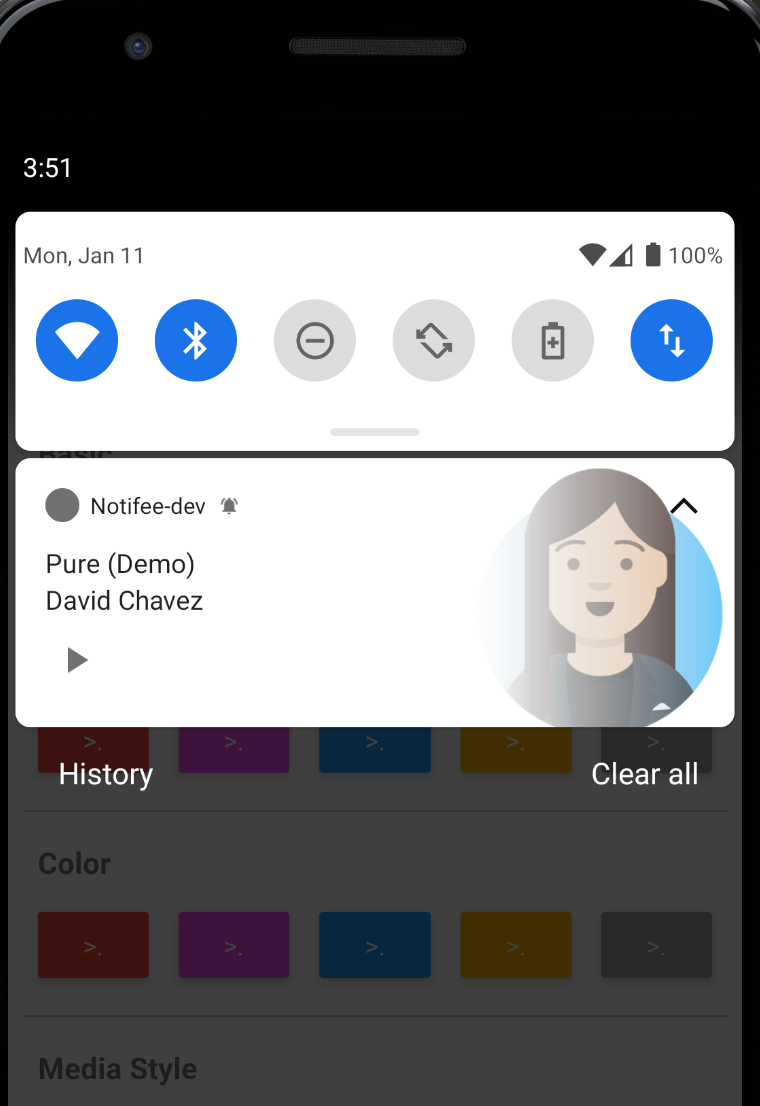
Next, using action listeners, after user has clicked play:
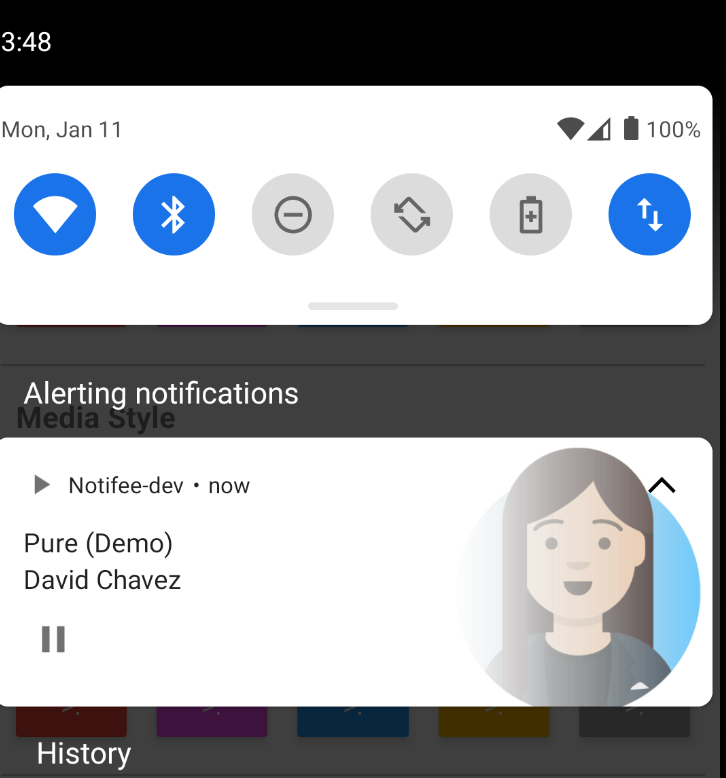
Appreciate all your input/feedback so far on this feature 👍 😎
helenaford
on 14 Jan 2021
I didn't expect such a quick answer :)
Your solution seems promising, and I am well aware that this is a difficult feature, so thank you for your hard work !
The other thing and I think how we can get it to work initially is to create what looks like a media style notification but without the session token. Then when the user clicks play, you can call TrackPlayer.play() where their notifications will take over, if that makes sense.
I'm a bit concerned about the "user clicking on play button" part. Does it mean the user would need to manually click play button for the sound to be played ? I probably misunderstood your explanation about that part.
To be sure : For me, the sound must be played automatically when the TriggerNotification appears, because it's the purpose of this type of notification. Once the music starts, the "Pause" button becomes available. Can you confirm this use case ?
Being able to manually click the play/pause buttons to listen again should happen only after the automatic start of the sound. What is your opinion ?
VivienTournie
on 14 Jan 2021
Related issues
 ashokkumar88
·
6Comments
ashokkumar88
·
6Comments
 roni-castro
·
4Comments
roni-castro
·
4Comments
 hmazer
·
4Comments
hmazer
·
4Comments
 flaviogranero
·
11Comments
flaviogranero
·
11Comments
 hibinoA
·
4Comments
hibinoA
·
4Comments
Most helpful comment
While in Alpha, it would still be great to see some high-level roadmaps on features like these (schedules, initial iOS support, Android Media notifs, etc).
I think there's a decent number of RN devs that are preeetttyy unsatisfied with the Android Media Style Notification libraries out in the world right now.so we're quite keen to throw our money at a solution as soon as it becomes available :)