React-native-navigation: [v6] Nesting Stack -> BottomTabs -> Stack creates empty space above topBar
Issue Description
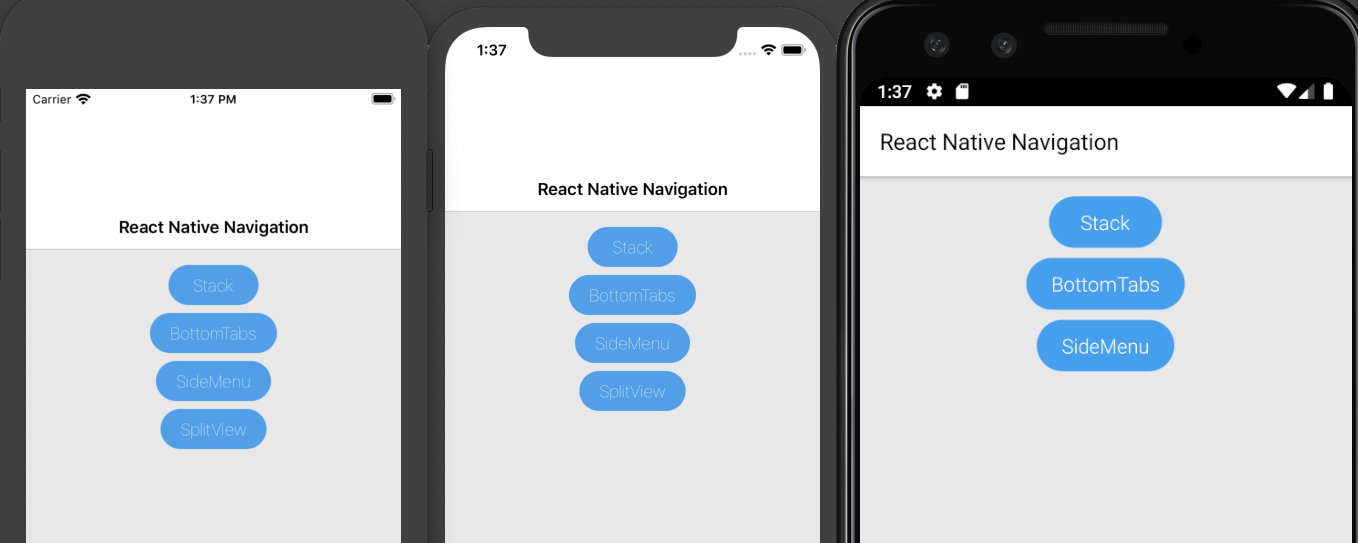
Nesting Stack -> BottomTabs -> Stack creates empty space above topBar on iOS
Steps to Reproduce / Code Snippets / Screenshots
Reproduced in the playground app:
https://github.com/NBoychev/react-native-navigation/blob/master/playground/src/app.js
Screenshot:

Environment
- React Native Navigation version: 6.5.0
- React Native version: 0.62.2
- Platform(s): iOS
- Device info: Simulator iPhone 11 Pro and real device iPhone X 13.3.1
 NBoychev
All 9 comments
Same. Only on ios. The problem in my opinion in SafeArea is two stacks. Checked for android everything is fine
 ShabanovPavel
on 29 Apr 2020
ShabanovPavel
on 29 Apr 2020
I've just checked and can confirm that there's no issue on Android. What I've found is that on iPhone 8, where we don't have a notch, so SafeArea shouldn't apply, the issue is still presented.
NBoychev
on 29 Apr 2020
I have similar issue but it's on Android and the issue is bottom having too much empty space (shown in red) when I have the setting for the topBar:
 topBar: {
                        title,
                        visible: true
                        drawBehind:false,
}
RN: 0.60.6
RNN: 6.9.0
Page Navigation to reach this page: Main Screen => Open new Screen

However, if I change the topBar setting to below the empty space reduced (shown in red)
 topBar: {
                        title,
                        visible: false,
                        drawBehind: true,

 lkwjohn
on 15 Jul 2020
lkwjohn
on 15 Jul 2020
@lkwjohn did you find any workaround? I am facing the same issue.
 ashokkumar88
on 24 Aug 2020
ashokkumar88
on 24 Aug 2020
@ashokkumar88 sadly no, seems to me it's a bug introduced after 2.62.1. This only happen on Android.
lkwjohn
on 25 Aug 2020
@NBoychev If you refer to the playground app, you can see that bottomTabs.children does not contain any stack layout. If you remove stack under bottomTabs.children, it will fix the issue for you 👍
 jinshin1013
on 26 Aug 2020
jinshin1013
on 26 Aug 2020
@jinshin1013 , unfortunately, this doesn't resolve the issue. In my case, I want a structure of stack -> bottom tabs -> stack. It's a specific case, but I'm sure that others will also bump in the same. In the example, a stack is actually nested in the bottomTabs: https://github.com/wix/react-native-navigation/blob/master/playground/src/app.ts#L39
@guyca helped me to resolve the issue with the idea to use custom tabs, but I hope that I'll see this one fixed at some point, so I can transition to the native solution.
NBoychev
on 26 Aug 2020
@NBoychev My bad I said the wrong thing 😅 Meant to say, do not wrap BottomTabs with a Stack hahaha.
If you don't mind me asking, what's your use case of going Stack -> BottomTabs ??
jinshin1013
on 26 Aug 2020
@jinshin1013 , no worries :) it's actually more complicated: SideMenu -> Stack (like a home screen with items) -> Bottom tabs (each item has modules) -> Stack (each module has lists and list item detailed screens).
NBoychev
on 26 Aug 2020
Related issues
 no23reason
·
3Comments
no23reason
·
3Comments
 bdrobinson
·
3Comments
bdrobinson
·
3Comments
 Chipped1
·
3Comments
Chipped1
·
3Comments
 kiroukou
·
3Comments
kiroukou
·
3Comments
 birkir
·
3Comments
birkir
·
3Comments
Most helpful comment
@jinshin1013 , no worries :) it's actually more complicated: SideMenu -> Stack (like a home screen with items) -> Bottom tabs (each item has modules) -> Stack (each module has lists and list item detailed screens).