React-native-navigation: [v4] -> [v6] [Android] Still getting UNAUTHORIZED_OVERLAY error while we use react-native-youtube.
Issue Description
Hi, this issue is probably duplicated but my app is totally dependant on your lib, please help me.
I always get UNAUTHORIZED_OVERLAY error when playing the video inline.
I tried all versions from v4 to v6 but no luck. I also see all changes of commits and PRs below.
Please take a look. Thank you so much!!
Related issues #4256, PR #5999, PR #5903
Environment
- React Native Navigation version: Have tried 4.0.4, 4.8.0, 6.1.0, 6.4.0
- React Native version: 0.61.5 (Sorry I cant downgrade to 0.59)
- React Native Youtube version: 2.0.0
- Platform(s) (iOS, Android, or both?): Just Android
- Device info (Simulator/Device? OS version? Debug/Release?): Both of simulator and device
 vanthang91
All 8 comments
Hey @vanthang91 , I'm sorry to hear you're still experiencing issues integrating react-native-youtube.
In what kind of layout are you showing the native YouTube video player? Please provide as much details about the layout structure as possible. Thanks.
 guyca
on 13 Apr 2020
guyca
on 13 Apr 2020
Hi @guyca, thanks for replying me quickly.
Here is more details about the layout structure:
- Tabbar app
export function startTabbarApp() {
   Navigation.setRoot({
        root: {
            bottomTabs: {
                children: [
                    {
                        stack: {
                            children: [{
                                component: {
                                    name: SCREEN.FIRST_TABBAR,
                                    options: {
                                        topBar: {
                                            title: {
                                                text: 'First Tabbar',
                                            },
                                        }
                                    }
                                }
                            }],
                            options: {
                                bottomTab: {
                                    text: 'First Tabbar',
                                    icon: require('../../asset/img/tabbar_1.png'),
                                }
                            }
                        }
                    },
                    {
                        stack: {
                            children: [{
                                component: {
                                    name: SCREEN.SECOND_TABBAR,
                                    options: {
                                        topBar: {
                                            title: {
                                                text: 'Second Tabbar',
                                            },
                                        }
                                    }
                                },
                            }],
                            options: {
                                topBar: {
                                    backButton: {
                                        title: '',
                                        icon: require('../../asset/img/ic_back_black.png'),
                                        color: 'red',
                                    }
                                },
                                bottomTab: {
                                    text: 'Second Tabbar',
                                    icon: require('../../asset/img/tabbar_2.png'),
                                }
                            }
                        }
                    }
                ]
            }
        }
    })
}
- And the component of first tab just render
render() {
        return (
            <View style={styles.container}>     // with style flex: 1
                <YouTube
                    ref={(player) => this.player = player}
                    apiKey={getYouTubeAPIKey()}
                    videoId={'ArexdEMWRlA'}
                    play={true}
                    loop={true}
                    showFullscreenButton={false}
                    rel={false}
                    // onReady={e => ()}
                    onChangeState={e => this.setState({ playerState: e.state})}
                    onError={e => this.setState({ error: e.error })}
                    style={{ alignSelf: 'stretch', backgroundColor: 'black', height: YOUTUBE_PLAYER_VIEW_HEIGHT }}
                />
            </View>
        )
    }
}
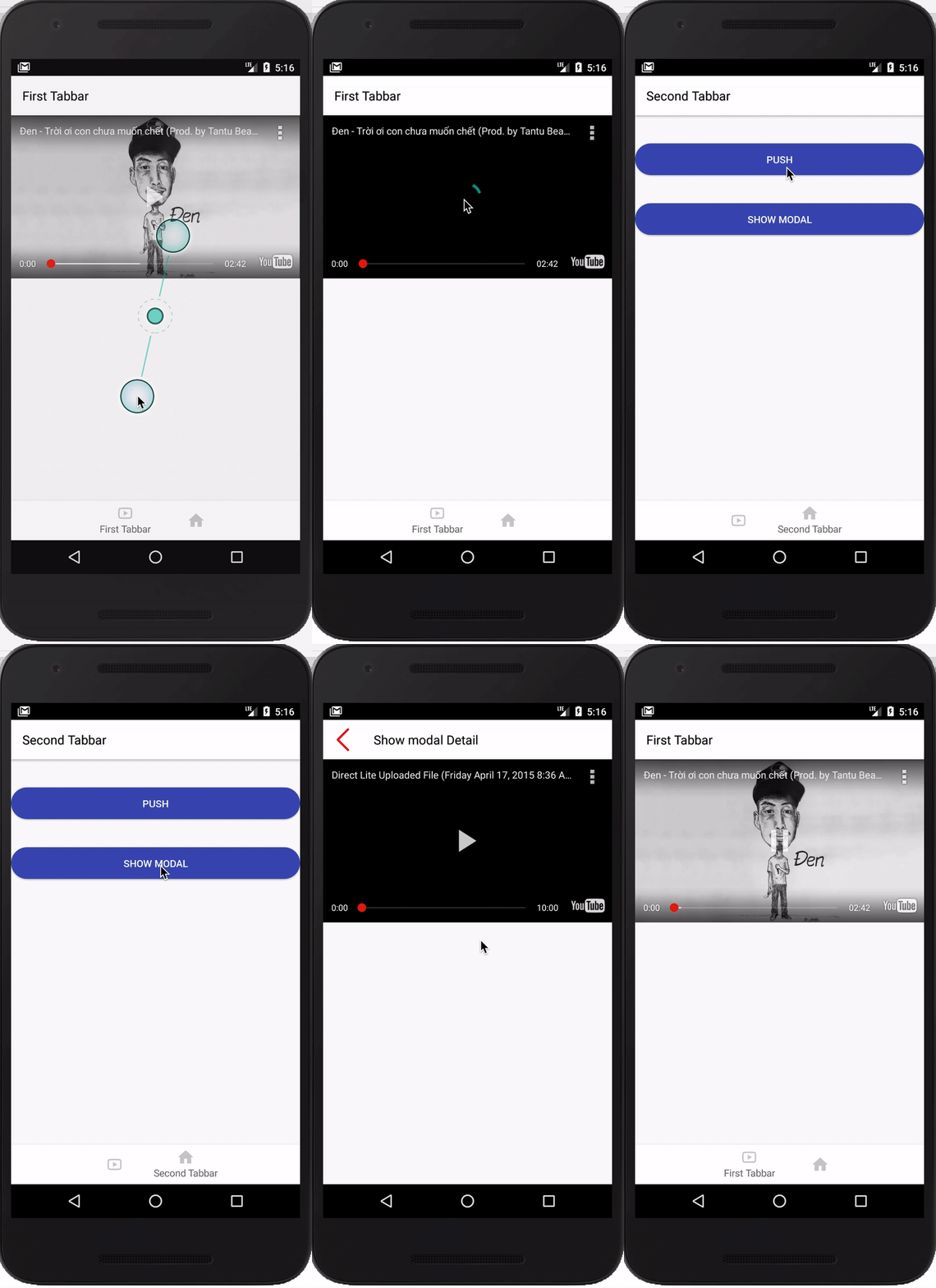
I also test pushing or showing modally another component (crashed when dismiss modal) but
the video is getting paused immediately after starting. Please see attached video gif file below.
Simulator test device: Nexus 5X API 24 (Android 7.0)
vanthang91
on 13 Apr 2020
Have you tried setting padding to styles.container? What's the full error message? It details which view exactly is conflicting.
Try disabling yellow boxes with console.disableYellowBox = true just to rule that out.
guyca
on 13 Apr 2020
@guyca I already set console.disableYellowBox = true and tried setting padding: 10 to styles.container too.
Here is detailed error message:
YouTube video playback stopped due to unauthorized overlay on top of player. The YouTubePlayerView is not contained inside its ancestor com.google.android.youtube.player.YouTubePlayerView{4139589 V.E...... ......ID 0,0-0,0}. The distances between the ancestor's edges and that of the YouTubePlayerView is: left: 0, top: 0, right: 0, bottom: 0 (these should all be positive).
2020-04-13 21:29:59.409 9266-9266/*bundleName* W/unknown:ReactNative: Calling JS function after bridge has been destroyed: RCTEventEmitter.receiveEvent([65,"error",{"target":65,"error":"UNAUTHORIZED_OVERLAY"}])
I pushed demo app on here, you can check out and run on Android.
https://github.com/vanthang91/RN_Youtube_Demo
Note:
Please update local.properties file on root/android to help IDE can find Android SDK and run npm install first.
Just look at startTabbarApp() function on root/src/common/utils/global.js and root/src/feature/youtube folder.
Thank you!!!
vanthang91
on 15 Apr 2020
@guyca If you have any updates, pls tell me. Thanks
vanthang91
on 19 Apr 2020
+1 same issue. On latest RNN and youtube.
 crushy26
on 17 May 2020
crushy26
on 17 May 2020
Hey guys, I'm closing the issue as it should be resolved by 6.7.5
guyca
on 16 Jun 2020
@guyca Thanks for your support!!
vanthang91
on 17 Jun 2020
Related issues
 bdrobinson
·
3Comments
bdrobinson
·
3Comments
 yedidyak
·
3Comments
yedidyak
·
3Comments
 switchtrue
·
3Comments
switchtrue
·
3Comments
 charlesluo2014
·
3Comments
charlesluo2014
·
3Comments
 yayanartha
·
3Comments
yayanartha
·
3Comments
Most helpful comment
Hey guys, I'm closing the issue as it should be resolved by 6.7.5