React-native-navigation: [V3] Android Custom TopBar Right Buttons Not Working Consistently
Issue Description
This is my first github issue post, so please excuse any poor quality aspects of it (feedback to improve is welcome).
I am not sure what is exactly causing this problem, but on Android, when using a custom component for the rightButtons field for a topBar (whether in a stack for bottomTabs or a Navigation.push screen), the button image renders, but is sometimes not clickable. The problem seems to occur non-deterministically, and trying various attempts to find patterns has been unsuccessful so far.
My project only started experiencing this issue upon upgrading from RN v59 to RN v60 and RNN v2 to RNN v3. This issue does not seem to apply with regular rightButtons with the navigationButtonPressed listener.
At the very least, is anyone experiencing similar issues? Any workaround solutions are welcome.
Steps to Reproduce / Code Snippets / Screenshots
// navigation.ts

rightButtons: [
  {
    id: 'customRightBtnId',
    component: {
      name: 'CustomTopBarBtn',
      passProps: {
        iconSrc: require('../assets/icons/custom-btn.png'),
      },
    },
  },
],
// CustomTopBarBtn.tsx

const CustomTopBarBtn: React.SFC<Props> = (props) => {
  const { iconSrc } = props;

  return (
    <TouchableOpacity onPress={() => console.log('pressed btn')}>
      <View style={styles.container}>
        <Image source={iconSrc} resizeMode="contain" />
      </View>
    </TouchableOpacity>
  );
};

const styles = StyleSheet.create({
  container: {
    justifyContent: 'center',
    flexDirection: 'column'
    height: '100%',
    width: '100%',
    marginRight: 5,
    marginLeft: 5,
  },
});
Environment
- React Native Navigation version: 3.2.0
- React Native version: 0.60.5
- Platform(s) (iOS, Android, or both?): Android
- Device info (Simulator/Device? OS version? Debug/Release?): All Android Devices
 gpsugy
All 17 comments
I have discovered that the cause of this issue is two-fold, and both pertain to a custom title component:
Using a custom title component with
flex: 1results in the title overlapping _on top_ of the right buttons in the top bar. This is most evident when more than one right button is present, and typically results in the left-most right buttons becoming unpressable since the title component renders transparently on-top of them. I would think thatflex: 1would take up only space up until the right buttons, but it does not.Although setting a width of the custom title component so that it does not overlap the right buttons helps with the issue, the issue still occurs non-deterministically. Replacing the custom component with the regular static properties for the
titleoptions, however, removes all of these issues. This leads me to believe that further implementation needs to be done on the custom title component working well with the right buttons of the top bar.
gpsugy
on 30 Sep 2019
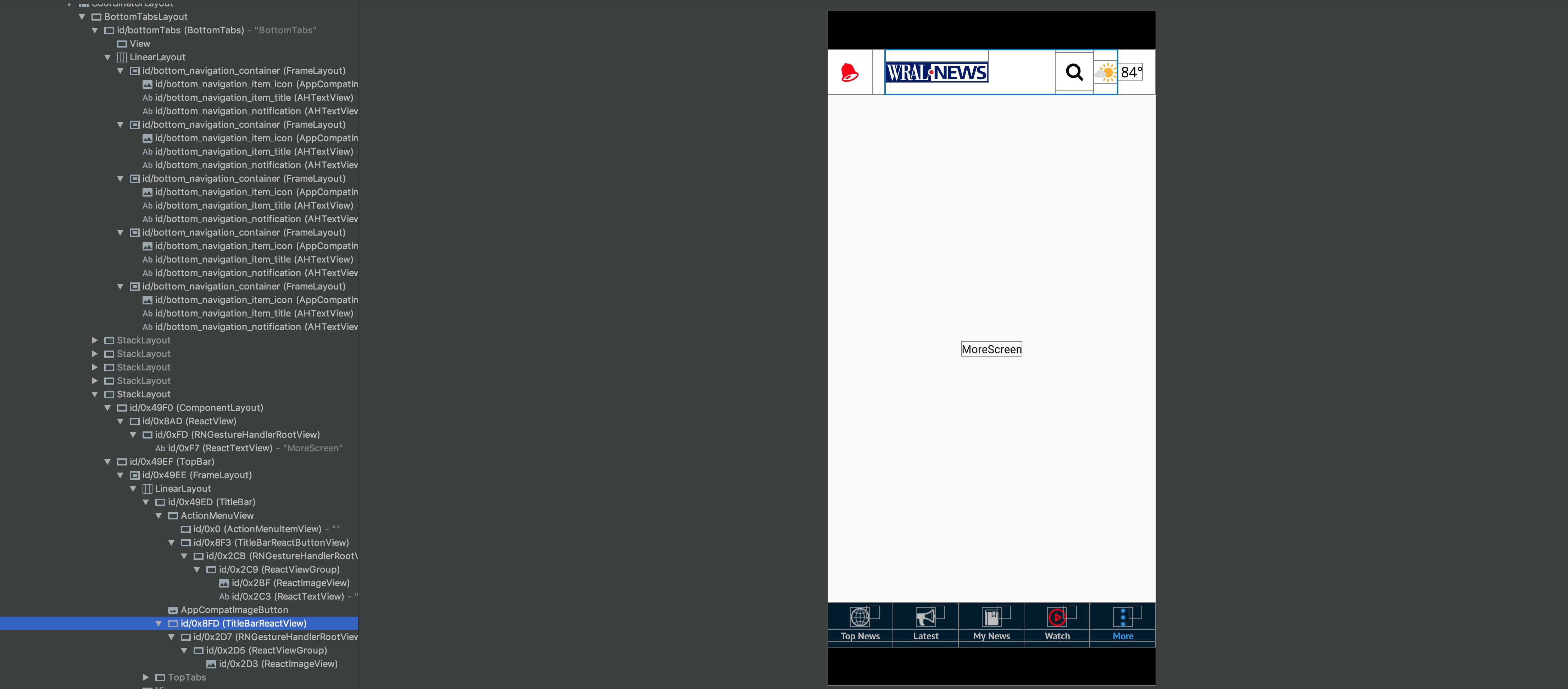
I'm seeing this as well. It happens using regular icon buttons as well as custom components for me. I have been unable to find a workaround but removing flex: 1 seemed to help, like you said. You can see the issue in Android Studio's Layout Inspector.
This is when the search button is pressable, notice the TitleBarReactView (blue border) sits beside the search button view:

This is when the search button is not pressable, notice the TitleBarReactView (blue border) sits overtop of the search button view:
 ianwelsh
on 2 Oct 2019
ianwelsh
on 2 Oct 2019
So far I'm only seeing this in debug builds, production builds don't seem to have the issue.
This does seem to be happening on production builds too.
ianwelsh
on 2 Oct 2019
Maybe related to the issue I've opened?
https://github.com/wix/react-native-navigation/issues/5497
I do have it in production builds though..
 MakhouT
on 3 Oct 2019
MakhouT
on 3 Oct 2019
Made a change that seems to fix the issue for me, but it's possible it's just a fluke and I'm randomly not seeing the issue at the moment. See https://github.com/wix/react-native-navigation/pull/5594. Can someone else try this fix? To easily test, you should be able to change the file in your project's node_modules directory.
ianwelsh
on 17 Oct 2019
I would love to take a look at this, but my android skills are practically non-existent. Best to leave this to someone who knows what they are doing :D
MakhouT
on 17 Oct 2019
Here is Layout Inspector after the fix, you can see that the TitleBarReactView is now only as wide as the image.

ianwelsh
on 17 Oct 2019
@MakhouT No worries, I have basically no Android skills either. If you do want to give the fix a try, you can simply change line 19 of <YOUR_RN_PROJECT_ROOT>/node_modules/react-native-navigation/lib/android/app/src/main/java/com/reactnativenavigation/views/titlebar/TitleBarReactView.java to:
(getChildCount() > 0 && getChildAt(0).getWidth() > 0) ? MeasureSpec.makeMeasureSpec(getChildAt(0).getWidth(), MeasureSpec.UNSPECIFIED) : widthMeasureSpec,
It's a one word change.
ianwelsh
on 17 Oct 2019
Just tried it out, and it is still not working with the suggested changes.
MakhouT
on 20 Oct 2019
This issue has been automatically marked as stale because it has not had recent activity. It will be closed if no further activity occurs.
If you believe the issue is still relevant, please test on the latest Detox and report back. Thank you for your contributions.
![stale[bot] picture](https://avatars.githubusercontent.com/in/1724?v=4&s=40) stale[bot]
on 27 Dec 2019
stale[bot]
on 27 Dec 2019
The issue has been closed for inactivity.
stale[bot]
on 3 Jan 2020
Can this be re-opened? This is still an issue.
ianwelsh
on 6 Jan 2020
i removed the flex: 1 at it worked for me , i had this issue also using custom component on topbar
 netshedzo
on 15 Jan 2020
netshedzo
on 15 Jan 2020
any updates? I had remove flex but its doesnt help me.
 arashkevich25
on 15 Apr 2020
arashkevich25
on 15 Apr 2020
Can this be reopened? This PR (although closed due to 'stale') fixes the issue: https://github.com/wix/react-native-navigation/pull/5594
 alex-phillips
on 8 Jun 2020
alex-phillips
on 8 Jun 2020
@guyca Please see above, this was an issue in v4 and is still an issue in v6.
alex-phillips
on 8 Jun 2020
Still not fixed...
 samparmenter
on 3 Dec 2020
samparmenter
on 3 Dec 2020
Related issues
 birkir
·
3Comments
birkir
·
3Comments
 Chipped1
·
3Comments
Chipped1
·
3Comments
 viper4595
·
3Comments
viper4595
·
3Comments
 charlesluo2014
·
3Comments
charlesluo2014
·
3Comments
 zhanguangao
·
3Comments
zhanguangao
·
3Comments