React-native-navigation: Custom TopBar button flickering and crashing on mergeOptions()
Issue Description
Using mergeOptions to change right topBar button on Android causes flickering on every render.
Everytime mergeOptions is called to change the button status the flicker occurs. This issue also causes crashing on release builds.
Navigation.mergeOptions(props.componentId, {
        topBar: {
          rightButtons: [
            {
              id: 'rightButton',
              enabled: true,
              color: '#ffffff',
              disabledColor: 'rgba(255, 255, 255, .5)',
              fontFamily: 'SourceSansPro-Black',
              fontWeight: 'bold',
              fontSize: 14,
              text: 'SALVAR'
            }
          ]
        }
      })
Steps to Reproduce / Code Snippets / Screenshots
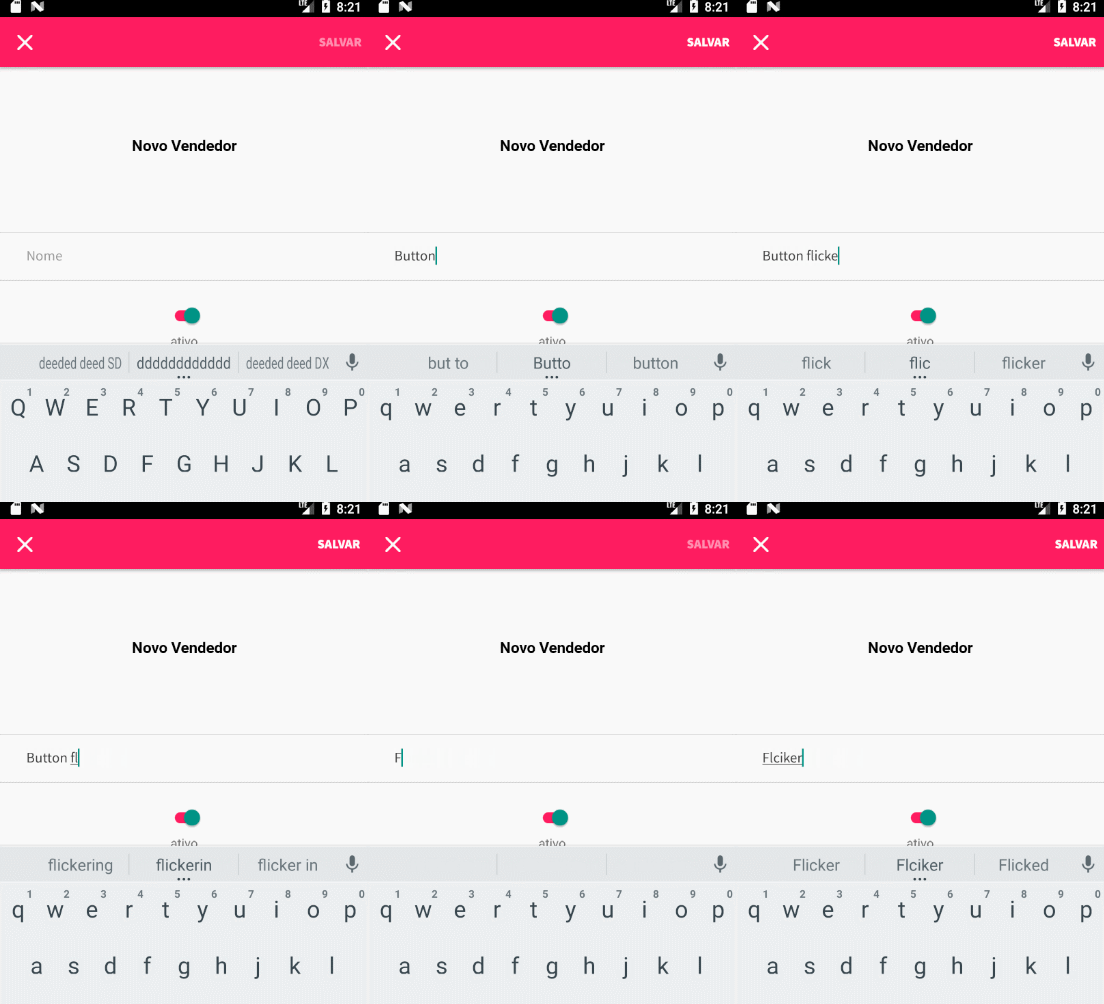
Use mergeOptions to change right topBar button on Android. Any change on it will trigger this issue.
Environment
- React Native Navigation version: 2.18.5
- React Native version: 0.59.5
- Platform(s) (iOS, Android, or both?): Android Only
- Device info (Simulator/Device? OS version? Debug/Release?): Simulator or Device / Release or Debug
 igortupini
All 18 comments
1.Where did you write a mergeOptions function in your Component?
2.Did you tried static options function (see example below)
class Example extends Component {
  static options(passprops) {
   return {
        topBar: {
          rightButtons: [
            {
              id: 'rightButton',
              enabled: true,
              color: '#ffffff',
              disabledColor: 'rgba(255, 255, 255, .5)',
              fontFamily: 'SourceSansPro-Black',
              fontWeight: 'bold',
              fontSize: 14,
              text: 'SALVAR'
            }
          ]
        }
    }
  }
}
 syedabuthahirm
on 14 May 2019
syedabuthahirm
on 14 May 2019
1.Where did you write a mergeOptions function in your Component?
2.Did you tried static options function (see example below)class Example extends Component { static options(passprops) { return { topBar: { rightButtons: [ { id: 'rightButton', enabled: true, color: '#ffffff', disabledColor: 'rgba(255, 255, 255, .5)', fontFamily: 'SourceSansPro-Black', fontWeight: 'bold', fontSize: 14, text: 'SALVAR' } ] } } } }
1- I wrote mergeOptions inside a useEffect like an ComponentDidUpdate. Every update check if the text input is filled. Already tried a workaround where I only called mergeOptions when the text input wasnt empty (for The first time). This reduces constant flickering because does not call mergeOptions on every render, but The issue persists everytime mergeOptions is called.
2- Because I'm using React Hooks I can't call a static function. Instead I set this options after closing the component defining a key to my component object. Something like that:
const MyComponent = props => {
...
return ...
}

MyComponent.options = {
topBar: {
...
}
}
export default MyComponent
_I'm sorry for not posting the original code here. Forgot my notebook at work. (Writing from my phone)_
igortupini
on 14 May 2019
Can you try this code?
i tried the following code there is no re render in my app. can you paste your code?
import React, { useState, useEffect } from "react";
import { View, Text, TextInput } from "react-native";
import { Navigation } from 'react-native-navigation';

export default function help(props) {
  const [example, setExample] = useState('TestInput')
  useEffect(() => {
    Navigation.mergeOptions(props.componentId,{
      topBar: {
        rightButtons: [
          {
            id: 'contextMenu',
            // icon: require('../icons/more_vert.png'),
            color: '#000',
            text: 'SALVAR',
            enabled: true
          }
        ]
      }
    })
  },[example]);
  return (
    <View>
        <Text>Message</Text>
        <Text>Message</Text>
        <TextInput value={example} onChangeText={ text => setExample(text) } />
    </View>
  )
}
Can you try this code?
i tried the following code there is no re render in my app. can you paste your code?import React, { useState, useEffect } from "react"; import { View, Text, TextInput } from "react-native"; import { Navigation } from 'react-native-navigation'; export default function help(props) { const [example, setExample] = useState('TestInput') useEffect(() => { Navigation.mergeOptions(props.componentId,{ topBar: { rightButtons: [ { id: 'contextMenu', // icon: require('../icons/more_vert.png'), color: '#000', text: 'SALVAR', enabled: true } ] } }) },[example]); return ( <View> <Text>Message</Text> <Text>Message</Text> <TextInput value={example} onChangeText={ text => setExample(text) } /> </View> ) }
import React, { useState, useEffect } from 'react'
import { View, Text, TextInput, Switch, Keyboard } from 'react-native'
import { Navigation } from 'react-native-navigation'
import { connect } from 'react-redux'

import { Stext, DismissKeyboardView } from '../../shared'
import { addSeller, fetchSellers, uiPushModal } from '../../ducks'
import style from './style'

import closeIcon from '../../assets/close.png'

const useNavigationEvents = handler => {
  useEffect(() => {
    const subsNBP = Navigation.events().registerNavigationButtonPressedListener(handler)
    return () => {
      return subsNBP.remove()
    }
  })
}

const SellerRegister = props => {
  const [fields, setFields] = useState({ name: '', active: true })

  const handleTextInput = value => setFields({ ...fields, name: value })

  const handleToggleActive = () => setFields({ ...fields, active: !fields.active })

  useEffect(() => {
    if (fields.name) {
      Navigation.mergeOptions(props.componentId, {
        topBar: {
          rightButtons: [
            {
              id: 'rightButton',
              enabled: true,
              color: '#ffffff',
              disabledColor: 'rgba(255, 255, 255, .5)',
              fontFamily: 'SourceSansPro-Black',
              fontWeight: 'bold',
              fontSize: 14,
              text: 'SALVAR'
            }
          ]
        }
      })
    } else {
      Navigation.mergeOptions(props.componentId, {
        topBar: {
          rightButtons: [
            {
              id: 'rightButton',
              enabled: false,
              color: '#ffffff',
              disabledColor: 'rgba(255, 255, 255, .5)',
              fontFamily: 'SourceSansPro-Black',
              fontWeight: 'bold',
              fontSize: 14,
              text: 'SALVAR'
            }
          ]
        }
      })
    }
  }, [fields.name])

  useNavigationEvents(({ buttonId, componentId }) => {
    if (buttonId === 'leftButton') {
      return Navigation.dismissModal(componentId)
    }
    if (buttonId === 'rightButton') return handleSave()
    return null
  })

  const handleSave = async () => {
    Keyboard.dismiss()
    try {
      await props.addSeller(fields)
      Navigation.dismissModal(props.componentId)
      return await props.fetchSellers()
    } catch (error) {
      switch (error) {
        case 2002:
          return props.uiPushModal({
            title: 'Revise os dados',
            subtitle: 'Já existe um cadastro com este nome. \n Tente um nome alternativo',
            buttons: [{ name: 'Voltar' }]
          })
        case 4004:
          return props.uiPushModal({
            title: 'Preencha o nome',
            subtitle: 'O nome do vendedor não pode estar vazio. Por favor preencha o nome.',
            buttons: [{ name: 'Voltar' }]
          })
        default:
          return props.uiPushModal({ title: 'Ops!' })
      }
    }
  }

  return (
    <DismissKeyboardView style={style.Container}>
      <View style={style.ContainerTopo}>
        <Stext style={style.textBold}>Novo Vendedor</Stext>
      </View>

      <TextInput
        placeholder="Nome"
        value={fields.name}
        onChangeText={value => handleTextInput(value)}
        keyboardType="default"
        autoComplete="name"
        returnKeyType="next"
        textContentType="name"
        style={style.input}
      />
      <Switch
        onValueChange={handleToggleActive}
        style={{ marginTop: 15, marginBottom: 5, transform: [{ scaleX: 0.9 }, { scaleY: 0.9 }] }}
        trackColor={{ true: '#ff1c61', false: '#bebebe' }}
        value={fields.active}
      />
      <Text>ativo</Text>
      <View style={style.ContainerMeio} />
    </DismissKeyboardView>
  )
}

SellerRegister.options = {
  topBar: {
    visible: true,
    leftButtons: [
      {
        id: 'leftButton',
        icon: closeIcon,
        color: 'white',
        enabled: true
      }
    ],
    rightButtons: [
      {
        id: 'rightButton',
        enabled: false,
        color: '#ffffff',
        disabledColor: 'rgba(255, 255, 255, .5)',
        fontFamily: 'SourceSansPro-Black',
        fontWeight: 'bold',
        fontSize: 14,
        text: 'SALVAR'
      }
    ],
    background: {
      color: '#ff1c61'
    }
  }
}

const mapDispatchToProps = dispatch => ({
  addSeller: fields => dispatch(addSeller(fields)),
  fetchSellers: () => dispatch(fetchSellers()),
  uiPushModal: content => dispatch(uiPushModal(content))
})

export default connect(
  null,
  mapDispatchToProps
)(SellerRegister)
Here's my code. I think both are similiar, but mine keeps flickering.
igortupini
on 14 May 2019
This issue has been automatically marked as stale because it has not had recent activity. It will be closed if no further activity occurs.
If you believe the issue is still relevant, please test on the latest Detox and report back. Thank you for your contributions.
![stale[bot] picture](https://avatars.githubusercontent.com/in/1724?v=4&s=40) stale[bot]
on 13 Jun 2019
stale[bot]
on 13 Jun 2019
This still an issue
igortupini
on 14 Jun 2019
Any updates on this?
 julioxavierr
on 15 Jun 2019
julioxavierr
on 15 Jun 2019
This issue has been automatically marked as stale because it has not had recent activity. It will be closed if no further activity occurs.
If you believe the issue is still relevant, please test on the latest Detox and report back. Thank you for your contributions.
stale[bot]
on 15 Jul 2019
Not stale, still an issue
igortupini
on 16 Jul 2019
I have the same issue, only on Android.
 markhomoki
on 2 Aug 2019
markhomoki
on 2 Aug 2019
This issue has been automatically marked as stale because it has not had recent activity. It will be closed if no further activity occurs.
If you believe the issue is still relevant, please test on the latest Detox and report back. Thank you for your contributions.
stale[bot]
on 1 Sep 2019
Not stale still an issue
igortupini
on 2 Sep 2019
This issue has been automatically marked as stale because it has not had recent activity. It will be closed if no further activity occurs.
If you believe the issue is still relevant, please test on the latest Detox and report back. Thank you for your contributions.
stale[bot]
on 2 Oct 2019
Half an year and still a issue =/
igortupini
on 2 Oct 2019
This issue has been automatically marked as stale because it has not had recent activity. It will be closed if no further activity occurs.
If you believe the issue is still relevant, please test on the latest Detox and report back. Thank you for your contributions.
stale[bot]
on 1 Nov 2019
The issue has been closed for inactivity.
stale[bot]
on 8 Nov 2019
issue is still present in Android for react-native-navigation version 4.5.3.
 JencirJamal
on 4 May 2020
JencirJamal
on 4 May 2020
Still an issue with 6.0.0 version. Flickering with rightButton in mergeOptions on Android.
 stachu2k
on 27 May 2020
stachu2k
on 27 May 2020
Related issues
 charlesluo2014
·
3Comments
charlesluo2014
·
3Comments
 EliSadaka
·
3Comments
EliSadaka
·
3Comments
 yayanartha
·
3Comments
yayanartha
·
3Comments
 swingywc
·
3Comments
swingywc
·
3Comments
 bdrobinson
·
3Comments
bdrobinson
·
3Comments
Most helpful comment
I have the same issue, only on Android.