React-native-navigation: Setting width to sideMenu shows black screen.
Issue Description
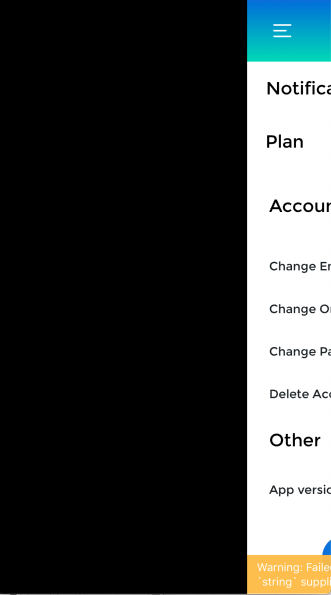
When you set a width to sideMenu and try opening the menus, it shows up as a black background.
Steps to Reproduce / Code Snippets / Screenshots
Navigation.events().registerAppLaunchedListener((name, params) => {
Navigation.setDefaultOptions({
popGesture: true,
animations: {
push: {
enabled: 'true', // Optional, used to enable/disable the animation
},
},
topBar: {
visible: false
},
layout: {
backgroundColor: 'rgba(23,23,23,1)',
orientation: ['portrait'] // An array of supported orientations
},
sideMenu: {
right: {
width: Config.SCREEN_WIDTH, // Setting the width
},
left: {
width: Config.SCREEN_WIDTH, // Setting the width
},
// animationType: 'slide', // defaults to none if not provided, options are 'parallax', 'door', 'slide', or 'slide-and-scale'
// openGestureMode: 'entireScreen' // this doesn't work on 2.0.2641 version
},
})
Current hacky fix
In the file lib/ios/RNNSideMenuController.m, if you comment out lines self.maximumRightDrawerWidth (line 98) and self.maximumLeftDrawerWidth (line 102), this fixes the problem.
Environment
- React Native Navigation version: 2.14.0-snapshot.246
- React Native version: 0.57.3
- Platform(s) (iOS, Android, or both?): iOS
- Device info (Simulator/Device? OS version? Debug/Release?): Simulator/Mojave/Debug
 byonghun
All 10 comments
An update, before, I was setting the width in setDefaultOptions but moving the width to the root fixed this issue.
byonghun
on 22 Mar 2019
@byonghun you able to elaborate a little on this please? Might be my best hope for a fix!
 flikQ
on 6 Apr 2019
flikQ
on 6 Apr 2019
Here a workaround:
Navigation.setRoot({
    root: {
      sideMenu: {
        left: {
          component: {
            // Your left component
          }
        },
        right: {
          component: {
            // Your right component
          }
        },
        center: {
          stack: {
            children: [
              {
                component: {
                  // Your main component
                 options: {
                    sideMenu: {
                      // Sets the width of left and right here
                    }
                  }
                }
              }
            ]
          }
        }
      }
    }
  });
 thienlhh
on 25 Apr 2019
thienlhh
on 25 Apr 2019
@byonghun Did you solve this issue, because i am also facing it
 rishabhSmartdata
on 2 May 2019
rishabhSmartdata
on 2 May 2019
This issue has been automatically marked as stale because it has not had recent activity. It will be closed if no further activity occurs.
If you believe the issue is still relevant, please test on the latest Detox and report back. Thank you for your contributions.
![stale[bot] picture](https://avatars.githubusercontent.com/in/1724?v=4&s=40) stale[bot]
on 1 Jun 2019
stale[bot]
on 1 Jun 2019
The issue has been closed for inactivity.
stale[bot]
on 8 Jun 2019
None of the solutions above worked for me. Here are my versions:
react-native: 0.59.10
React Native Navigation version: 2.18.2
any ideas how to solve it?
 thalesgaldino
on 8 Aug 2019
thalesgaldino
on 8 Aug 2019
@thienlhh solution worked for me.
react-native: 0.59.8
react-native-navigation: ^2.21.0
 zarvedan
on 8 Aug 2019
zarvedan
on 8 Aug 2019
In my case the side menu is initialized on Navigation.setRoot :
Navigation.setRoot({
    root: {
      sideMenu: {
        left: ...,
        center: {
          stack: {
            children: [
              {
                component: {
                  id: componentId,
                  name: componentName,
                  options: {
                    topBar: { ...},
                    sideMenu: {
                      left: {
                        enabled: true,
                        visible: false,
                        // SET WIDTH HERE
                        // width: sideMenuWidth
                      },
                    },
                  },
                },
              },
            ],
          },
        },
      },
    },
  })
and made visible using:
Navigation.mergeOptions(componentId, {
  sideMenu: {
    left: {
      visible: true,
      // SET WIDTH HERE
      // width: sideMenuWidth
    },
  },
})
Setting the width of the side menu on Navigation.setRoot and Navigation.mergeOptions did the trick for me.
react-native: 0.61.2
react-native-navigation: 3.0.0
iOS Simulator: iPhone 5s / 12.1
 MarianPalkus
on 11 Dec 2019
MarianPalkus
on 11 Dec 2019
Happening to me as well.
@guyca Would it be an easy fix given @byonghun initial "Current hacky fix" comment?
_Note_: I'm setting the width inside sideMenu.options not inside sideMenu.center.stack.children[0].component.options... As suggested above (which does not make a lot of sense to me anyway...).
react-native: 0.59.9
react-native-navigation: 2.21.0
iOS Simulator: iPhone 8 / 13.1
 eightyfive
on 20 Dec 2019
eightyfive
on 20 Dec 2019
Related issues
 EliSadaka
·
3Comments
EliSadaka
·
3Comments
 zhanguangao
·
3Comments
zhanguangao
·
3Comments
 zagoa
·
3Comments
zagoa
·
3Comments
 tmaly1980
·
3Comments
tmaly1980
·
3Comments
 nbolender
·
3Comments
nbolender
·
3Comments