React-native-navigation: [V2] TopBar with LargeTitle + ScrollView
Issue Description
Large Title is not shown when opening the screen.
After scrolling up the title becomes visible.
| Screen opened | Scrolled up |
| :-----------------------------------------------------------------------------------: | :-----------------------------------------------------------------------------------------: |
|  |
| 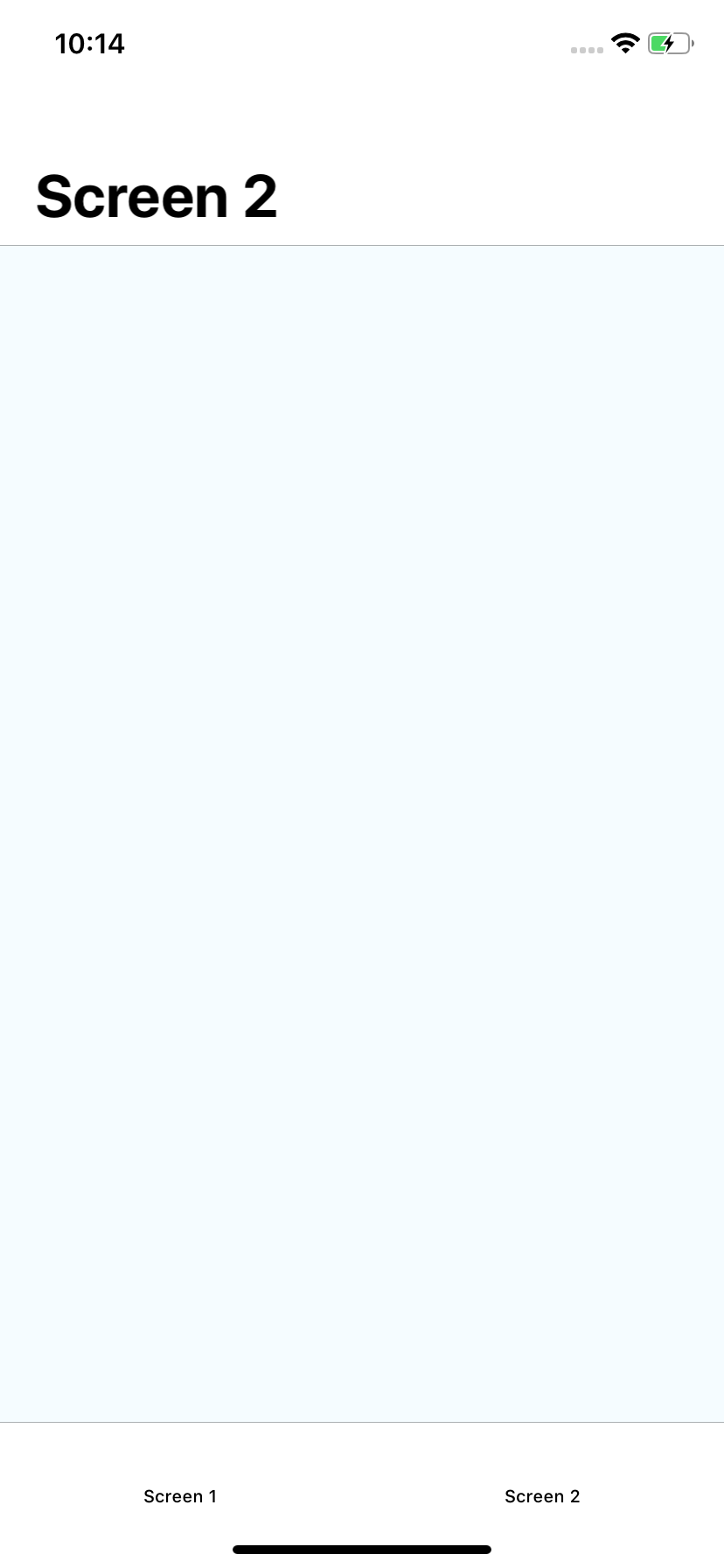 |
|
Steps to Reproduce / Code Snippets / Screenshots
/**
 * Sample React Native App
 * https://github.com/facebook/react-native
 *
 * @format
 * @flow
 */

import React, { Component } from "react";
import {
  Dimensions,
  Platform,
  ScrollView,
  StyleSheet,
  Text,
  View
} from "react-native";

const instructions = Platform.select({
  ios: "Press Cmd+R to reload,\n" + "Cmd+D or shake for dev menu",
  android:
    "Double tap R on your keyboard to reload,\n" +
    "Shake or press menu button for dev menu"
});

type Props = {};
export default class Screen2 extends Component<Props> {
  static options(passProps) {
    return {
      bottomTab: {
        text: "Screen 2"
      },
      topBar: {
        title: {
          text: "Screen 2"
        },
        visible: true,
        animate: true,
        largeTitle: {
          visible: true
        }
      }
    };
  }

  render() {
    return (
      <ScrollView contentContainerStyle={styles.container}>
        <Text style={styles.welcome}>Welcome to React Native!</Text>
        <Text style={styles.instructions}>To get started, edit App.js</Text>
        <Text style={styles.instructions}>{instructions}</Text>
      </ScrollView>
    );
  }
}

const styles = StyleSheet.create({
  container: {
    flex: 1,
    justifyContent: "center",
    alignItems: "center",
    backgroundColor: "#F5FCFF",
    minHeight: Dimensions.get("window").height * 2
  },
  welcome: {
    fontSize: 20,
    textAlign: "center",
    margin: 10
  },
  instructions: {
    textAlign: "center",
    color: "#333333",
    marginBottom: 5
  }
});
Environment
- React Native Navigation version:
2.2.5 - React Native version:
0.57.8 - Platform(s) (iOS, Android, or both?):
iOS - Device info (Simulator/Device? OS version? Debug/Release?):
Simulator > Debug
 Purii
Purii
All 14 comments
Needed second screen to demonstrate because of https://github.com/wix/react-native-navigation/issues/3429.
Purii
on 19 Dec 2018
This issue has been automatically marked as stale because it has not had recent activity. It will be closed if no further activity occurs.
If you believe the issue is still relevant, please test on the latest Detox and report back. Thank you for your contributions.
![stale[bot] picture](https://avatars.githubusercontent.com/in/1724?v=4&s=40) stale[bot]
on 18 Jan 2019
stale[bot]
on 18 Jan 2019
This issue still occurs
Purii
on 19 Jan 2019
This issue it still relevant.
 jinshin1013
on 22 Jan 2019
jinshin1013
on 22 Jan 2019
+1
 nbolender
on 25 Jan 2019
nbolender
on 25 Jan 2019
This issue has been automatically marked as stale because it has not had recent activity. It will be closed if no further activity occurs.
If you believe the issue is still relevant, please test on the latest Detox and report back. Thank you for your contributions.
stale[bot]
on 25 Feb 2019
+1
 ericschaal
on 26 Feb 2019
ericschaal
on 26 Feb 2019
Here is a quick workaround.
<ScrollView ref={ref => ref.scrollTo({x: 0, y: -10})}>
or
<ScrollView ref={ref => (this.view = ref)}>
and then in componentDidMount:
componentDidMount() {
    If(this.view) {
        this.view.scrollTo({ x: 0, y: -10})
    }
}
 julianklumpers
on 3 Mar 2019
julianklumpers
on 3 Mar 2019
This issue has been automatically marked as stale because it has not had recent activity. It will be closed if no further activity occurs.
If you believe the issue is still relevant, please test on the latest Detox and report back. Thank you for your contributions.
stale[bot]
on 4 Apr 2019
The issue has been closed for inactivity.
stale[bot]
on 11 Apr 2019
bump
 hahtml
on 17 May 2019
hahtml
on 17 May 2019
This issue still occurs.
 cesarm16
on 4 Jul 2019
cesarm16
on 4 Jul 2019
Still happens
 hammadj
on 22 Aug 2019
hammadj
on 22 Aug 2019
+1
 Findiglay
on 25 Sep 2019
Findiglay
on 25 Sep 2019
Related issues
nbolender
·
3Comments
 zagoa
·
3Comments
zagoa
·
3Comments
 yedidyak
·
3Comments
yedidyak
·
3Comments
 ghost
·
3Comments
ghost
·
3Comments
 kiroukou
·
3Comments
kiroukou
·
3Comments
Most helpful comment
bump