React-native-navigation: bottomtabs icon become small when i click multi time in ios
Issue Description
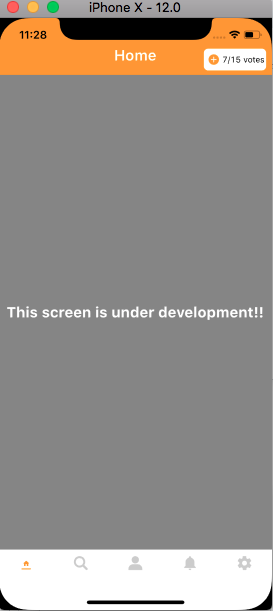
When i click multi time on bottomtabs icon of setRoot({bottomTabs}) in ios size of icon is continuously decreasing. and size of icon in ios and android is also not same. Is their any method for animation on click
Steps to Reproduce / Code Snippets / Screenshots
Click multi time on same icon
Environment
- React Native Navigation version: "^2.2.0"
- React Native version: FILL THIS OUT
- Platform(s) (iOS, Android, or both?): FILL THIS OUT
- Device info (Simulator/Device? OS version? Debug/Release?): FILL THIS OUT
 ruchi1234
All 16 comments
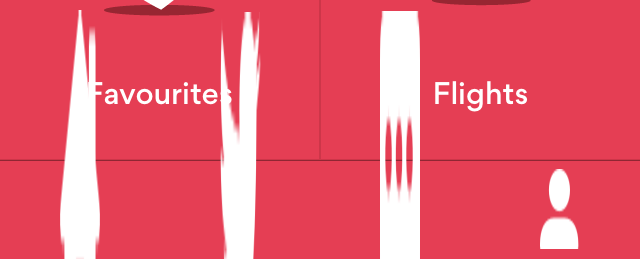
I currently have the opposite issue, but only when testing on iOS 10.2 on iPhone 5s. I've not tested any other older devices / OS versions yet, but it does not happen on iOS 12 on iPhone 5s or any of the newer devices with latest OS.
 chrise86
on 9 Dec 2018
chrise86
on 9 Dec 2018
Resolved my issue by balancing the icon insets as explained here https://stackoverflow.com/questions/23306963/ios-tab-bar-icons-keep-getting-larger
chrise86
on 9 Dec 2018
I have resolve this issue in of large icon in ios. But my current problem is when user click on multi time on same icon. icon size is decreasing on each click
And in android icon size to smal
ruchi1234
on 10 Dec 2018
@ruchi1234 could you please share some code? The place where you're describing the bottom tabs for your app.
 vshkl
on 10 Dec 2018
vshkl
on 10 Dec 2018
Navigation.setRoot({
root: {
bottomTabs: {
id: 'BottomTabsId',
children: [
{
stack: {
children: [
{
component: {
name: Constant.Screens.HOME_SCREEN.screen,
}
}],
options: {
topBar: {
visible: false,
drawBehind: true,
              },
              bottomTab: {
                icon: Constant.Images.HOME_SCREEN_UNSELECTED,
                selectedIcon: Constant.Images.HOME_SCREEN_SELECTED,
                iconInsets: { top: 5 },
                //fontSize: 20,
                selectedIconColor: Constant.Colors.appTheme,
              },
            }

          }
        },
        {
          stack: {
            children: [
              {
                component: {
                  name: Constant.Screens.SEARCH_SCREEN.screen,
                }
              }],
            options: {
              topBar: {
                visible: false,
                drawBehind: true
              },
              bottomTab: {
                icon: Constant.Images.SEARCH_UNSELECTED,
                selectedIcon: Constant.Images.SEARCH_SELECTED,
                iconInsets: { top: 5 },
                //fontSize: 20,
                selectedIconColor: Constant.Colors.appTheme,
              },
            }

          }
        },

        {
          stack: {
            children: [
              {
                component: {
                  name: Constant.Screens.PROFILE_SCREEN.screen,
                },
              }
            ],
            options: {
              topBar: {
                visible: false,
                drawBehind: true
              },
              bottomTab: {
                icon: Constant.Images.PROFILE_UNSELECTED,
                selectedIcon: Constant.Images.PROFILE_SELECTED,
                iconInsets: { top: 5 },
                selectedIconColor: Constant.Colors.appTheme,
              }
            }
          },
        },
        {
          stack: {
            children: [
              {
                component: {
                  name: Constant.Screens.NOTIFICATION_SCREEN.screen,
                }
              }],
            options: {
              topBar: {
                visible: false,
                drawBehind: true
              },
              bottomTab: {
                icon: Constant.Images.NOTIF_TAB_UNSELECTED,
                selectedIcon: Constant.Images.NOTIF_TAB_SELECTED,
                iconInsets: { top: 5 },
                //fontSize: 20,
                selectedIconColor: Constant.Colors.appTheme,
              },
            }

          }
        },
        {
          stack: {
            children: [
              {
                component: {
                  name: Constant.Screens.SETTING_SCREEN.screen,

                },
              }
            ],
            options: {
              topBar: {
                visible: false,
                drawBehind: true
              },
              bottomTab: {
                icon: Constant.Images.SETTING_UNSELECTED,
                selectedIcon: Constant.Images.SETTING_SELECTED,
                iconInsets: { top: 5 },
                selectedIconColor: Constant.Colors.appTheme,
              },

            },
          }
        },
      ],
    }
  }
});
@ruchi1234 hmm... quite a weird bottom tab definition as for me. Let me share how it done in our app:
const iconChart = require('src/resources/icons/chart.png')

...

options: {
  bottomTab: {
    text: 'Chart',
    icon: iconCahrt,
  },
  ...
}
and default options related to tab:
bottomTab: {
  iconColor: colors.grayOslo,
  selectedIconColor: colors.blueCerulean,
  textColor: colors.grayOslo,
  selectedTextColor: colors.blueCerulean,
  fontSize: fonts.size.tiny,
},
And that's the icons:
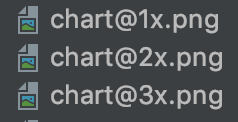
The same way it's done in the native iOS project and it works well w/o any glitches like that.
vshkl
on 10 Dec 2018
Hey guys, Is this issue reproducible this issue on the playground app?
 guyca
on 11 Dec 2018
guyca
on 11 Dec 2018
@guyca I managed to reproduce it on my app (RNN v2.2.1-snapshot.61). The issue is in the iconInsets: { top: 5 },. As I added it, it started to decrease the icon size with every tap on the tab bar item. Looks like it adds that inset value to the previous one every time.
@ruchi1234 you can fix your issue by removing that iconInsets: { top: 5 },, but in general it's still an issue.
vshkl
on 11 Dec 2018
Thanks vshkl
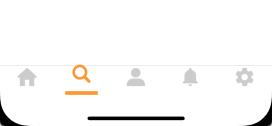
Animation issue has been resolve by removing iconInsets: { top: 5 }. But Icon size in android is still small in compare of ios and in ios Selected icon size is looking larger than unselected icon
ruchi1234
on 12 Dec 2018
Yes, if you use 5px inset for top then balance with a -5px inset for bottom:
iconInsets: { top: 5, bottom: -5 }
Thanks chrise86
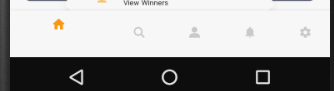
The issue of ios Selected icon size is looking larger than unselected icon has been resolve
but in android bottom bar icon is still looking small in compare of Ios
ruchi1234
on 13 Dec 2018
Is there any solution for above problem or it is bug of rect native navigation
 Deepaknathtiwari
on 17 Dec 2018
Deepaknathtiwari
on 17 Dec 2018
This issue has been automatically marked as stale because it has not had recent activity. It will be closed if no further activity occurs.
If you believe the issue is still relevant, please test on the latest Detox and report back. Thank you for your contributions.
![stale[bot] picture](https://avatars.githubusercontent.com/in/1724?v=4&s=40) stale[bot]
on 18 Jan 2019
stale[bot]
on 18 Jan 2019
this is still happening on v3. clicking many times on an icon with insets stacks the insets
temporary workaround is as @chrise86 mentioned:
iconInsets: { top: 3, bottom: -3 }
 bneigher
on 6 Aug 2019
bneigher
on 6 Aug 2019
Same for me!
 tiempham
on 29 Nov 2019
tiempham
on 29 Nov 2019
Hey guys, I'm closing the issue as icon insets were added to help users center bottomTabs icons when tabs had no titles. We've since fixed the issue and using hardcoded insets isn't needed.
To align your icons use the following options:
bottomTabs: {
  titleDisplayMode: 'alwaysHide'
}
Related issues
 no23reason
·
3Comments
no23reason
·
3Comments
 charlesluo2014
·
3Comments
charlesluo2014
·
3Comments
 edcs
·
3Comments
edcs
·
3Comments
 zhanguangao
·
3Comments
zhanguangao
·
3Comments
 ghost
·
3Comments
ghost
·
3Comments
Most helpful comment
Yes, if you use 5px inset for top then balance with a -5px inset for bottom: