React-native-navigation: [V2] setRoot action leads to the ID collision error when calling it with the same layout
Issue Description
Calling setRoot with the same layout the app already has, leads to the following error:
Exception 'Component id already exists screen.One' was thrown while invoking setRoot on target RNNBridgeModule with params
It happens when the custom ids to the components being set.
I didn't have this issue with previous versions of the RNN like 2.0.2555.
Steps to Reproduce / Code Snippets / Screenshots
- Call
setRootwith some layout when the app launch. - Call it again with the same layout.
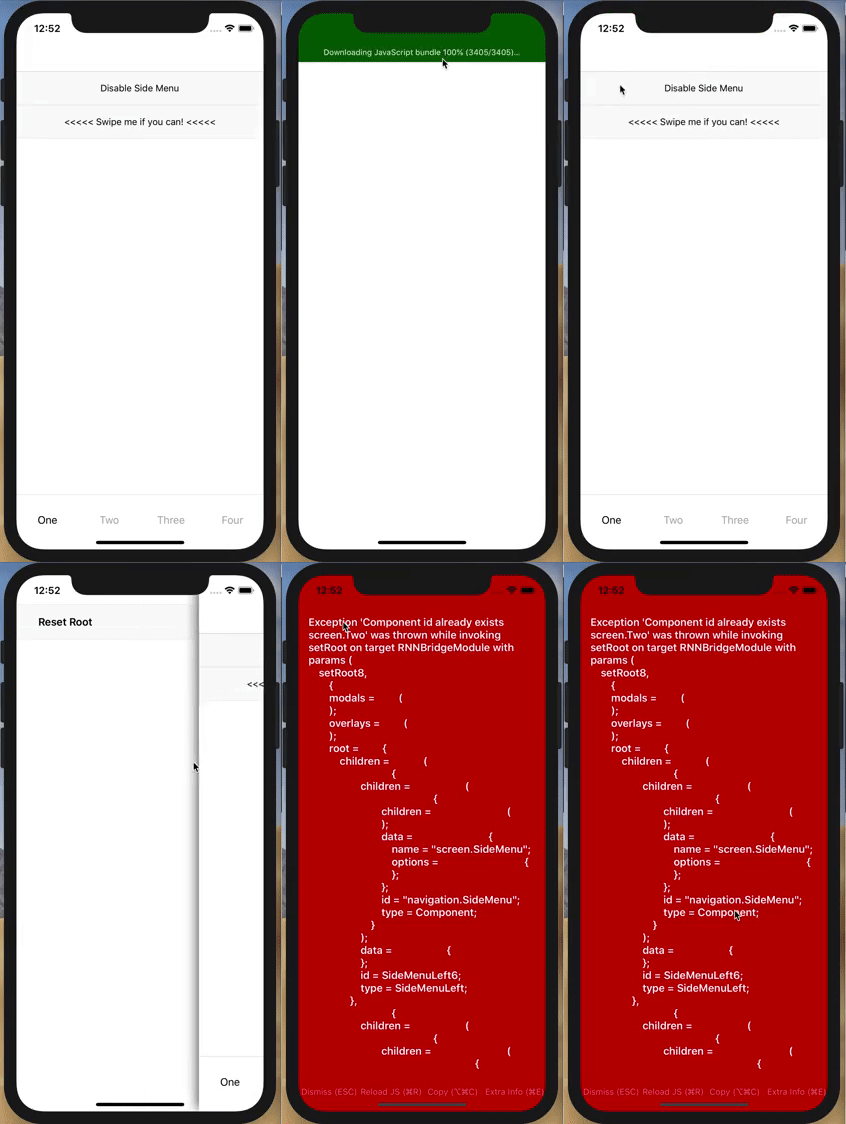
Expected: the app's layout should be recreated from the ground up with the same layout.
Got: Exception 'Component id already exists for all the screens and components in the layout.
I've made a demo app for this issue: https://github.com/vshkl/RNNDemo
- Launch the app
- Open the side menu
- Press on Reset Root button
- See the error I've described above
Environment
- React Native Navigation version:
2.1.3 - React Native version:
0.57.5 - Platform(s) (iOS, Android, or both?):
iOS - Device info (Simulator/Device? OS version? Debug/Release?):
Simulator, 12.1, Debug
 vshkl
vshkl
All 19 comments
I don't think you can setRoot or push a screen with a same componentId. Try using it without setting a custom component id and see if it fixes it.
 jinshin1013
on 22 Nov 2018
jinshin1013
on 22 Nov 2018
Hey, @jinshin1013 👋. It will definitely work without custom ids, but the first: I need those ids, and the second: technically, it doesn't make any sense and that's why I still consider it's a bug.
Let's think about app's layout as a tree:
The original one (the result of the initial setRoot:
[1]
root
├── side-menu (id: sm)
    ├── left (id: sml)
    │   ├── side-menu-left-component (id: smlc)
    ├── center (id: smc)
        ├── bottom-tabs (id: bt)
            ├── stack-1 (id: bts1)
            │   ├── screen-1 (id: scr1)
            ├── stack-2 (id: bts2)
            │   ├── screen-2 (id: scr2)
            ├── stack-3 (id: bts3)
            │   ├── screen-3 (id: scr3)
            ├── stack-4 (id: bts4)
                ├── screen-4 (id: scr4)
not, imagine, we're adding (Navigation.push) some screen to the, let's say, first stack: navigating from the first tab's screen:
[2]
root
├── side-menu (id: sm)
    ├── left (id: sml)
    │   ├── side-menu-left-component (id: smlc)
    ├── center (id: smc)
        ├── bottom-tabs (id: bt)
            ├── stack-1 (id: bts1)
            │   ├── screen-1 (id: scr1)
            │   ├── screen-5 (id: scr5)
            ├── stack-2 (id: bts2)
            │   ├── screen-2 (id: scr2)
            ├── stack-3 (id: bts3)
            │   ├── screen-3 (id: scr3)
            ├── stack-4 (id: bts4)
                ├── screen-4 (id: scr4)
we can't make .push() with the screen-5 with any id which is already in the tree (layout). And tha's totally reasonable.
But, imagine, I want to show to the user the layout above, with the screen-5 in the first tab's stack without showing any push animation and from arbitrary screen (user was on 3rd tab, selected to go to the screen-5 from the side menu).
So I made setRoot with the layout [2], which will not add anything to the original one, it will substitute [1] with [2]. So why there should be any ids collision?!
Makes sense?
vshkl
on 22 Nov 2018
I might be wrong, for sure. But the thing is it used to work previously and now it doesn't. I know that the 2.0.2555 is not a final release and the API or its inner behavior is a subject of change, but I want to hear it from someone of the developers, that this is an expected behavior and not a bug.
vshkl
on 22 Nov 2018
That's a good point, I've just tested on v2.0.2636 and setRoot with the same componentId is valid.
jinshin1013
on 23 Nov 2018
This is also an issue for me (on 2.1.3). I found I was able to work around it by first switching to a non-tab root, waiting for 500ms, then switching back to tabs.
Obviously a horrible solution but it actually works okay for our usecase UX-wise 🙈
 bdrobinson
on 30 Nov 2018
bdrobinson
on 30 Nov 2018
I dont think there is an exposed method to get the current tree. If there was, you could conditionally push, popTo, etc.
 stokesbga
on 3 Dec 2018
stokesbga
on 3 Dec 2018
@stokesbga that "tree" representation was given for the sake of a better explanation of the issue. It doesn't have any connection (mostly) with the real look of the RNN tree under the hood.
And, basically, there is a way to get the full current navigation state (through the registerCommandListener as I remember), however, it's an enormously huge object to somehow analyze it every time.
vshkl
on 3 Dec 2018
@vshkl youre right. looking at the tree provided by registerCommandListener is useless. Static checking needs on every action needs to to be build into the repo.
stokesbga
on 17 Dec 2018
Just a heads up for anyone coming from google or this thread who still cares, my issue was mainly with showOverlay. I personally never need to show more than one overlay at the same time, so I just reset the overlayWindows array each time I show. I know this defeats the purpose of the array but until a real fix comes through, I didnt want to replace the array with a single UIWindow placeholder. For my use case, thats all I need.
in lib/ios/RNNOverlayManager.m:
- (void)showOverlayWindow:(RNNOverlayWindow *)overlayWindow {
    overlayWindow.previousWindow = [UIApplication sharedApplication].keyWindow;
    _overlayWindows = [[NSMutableArray alloc] init];        // add this
    [_overlayWindows addObject:overlayWindow];
    overlayWindow.rootViewController.view.backgroundColor = [UIColor clearColor];
    [overlayWindow setWindowLevel:UIWindowLevelNormal];
    [overlayWindow makeKeyAndVisible];
}
Also comment out the exception in RNNStore.m
- (void)setComponent:(UIViewController*)viewController componentId:(NSString*)componentId {
    // UIViewController *existingVewController = [self findComponentForId:componentId];
    // if (existingVewController) {
    //  @throw [NSException exceptionWithName:@"MultipleComponentId" reason:[@"Component id already exists " stringByAppendingString:componentId] userInfo:nil];
    // }

    [_componentStore setObject:viewController forKey:componentId];
}
Using the same component also leads to events not being called, as replacing the root with the same component ID will call the unmounted event in ComponentEventsObserver after the scene is replaced (thus removing all events for the latest scene).
 ashleydw
on 8 Jan 2019
ashleydw
on 8 Jan 2019
This issue has been automatically marked as stale because it has not had recent activity. It will be closed if no further activity occurs.
If you believe the issue is still relevant, please test on the latest Detox and report back. Thank you for your contributions.
![stale[bot] picture](https://avatars.githubusercontent.com/in/1724?v=4&s=40) stale[bot]
on 17 Feb 2019
stale[bot]
on 17 Feb 2019
Not stale
 dozoisch
on 19 Feb 2019
dozoisch
on 19 Feb 2019
A workaround for this is to create a wrapper that handles the navigation and is aware of the current active screen and which screen is in loading.
let currentActiveScreenID = '';
const screensInLoading = [];

const registerComponentDidAppearListener = () => {
  // When a screen is activated the component id is cached in currentActiveScreenID
  Navigation.events().registerComponentDidAppearListener(({ componentId }) => {
    currentActiveScreenID = componentId;
    // If the screen is loaded remove it form the list of screens in loading
    if (screensInLoading.indexOf(componentId) !== -1) {
      screensInLoading.splice(screensInLoading.indexOf(componentId), 1);
    }
  });
};

const pushScreen = (componentId, screen, layout) => {
  // If the screen is not being loaded, start the loading
  if (screensInLoading.indexOf(screen) === -1 && screen !== currentActiveScreenID) {
    screensInLoading.push(screen);
    Navigation.push(componentId, layout || { component: { id: screen, name: screen } });
  }
};
This way pushScreen may be imported and used to handle navigation and will not allow to load a screen that is already being loaded.
!!! registerComponentDidAppearListener has to be loaded when the Root screen is being set
 lbudakov
on 21 Mar 2019
lbudakov
on 21 Mar 2019
This issue has been automatically marked as stale because it has not had recent activity. It will be closed if no further activity occurs.
If you believe the issue is still relevant, please test on the latest Detox and report back. Thank you for your contributions.
stale[bot]
on 20 Apr 2019
Not stale
dozoisch
on 20 Apr 2019
@dozoisch This should be fixed in2.17.0-snapshot.283, can you please try and let us know if the issue still persists?
 guyca
on 21 Apr 2019
guyca
on 21 Apr 2019
This issue has been automatically marked as stale because it has not had recent activity. It will be closed if no further activity occurs.
If you believe the issue is still relevant, please test on the latest Detox and report back. Thank you for your contributions.
stale[bot]
on 21 May 2019
@guyca Oh wow not sure how I missed your last ping. I'll test tomorrow and let you know. Sorry about that.
--
Edit: Haven't forgotten about this... been a wild week
dozoisch
on 21 May 2019
@guyca I'm resetting the root to the same and don't get a crash anymore! 🎉
dozoisch
on 29 May 2019
Related issues
 EliSadaka
·
3Comments
EliSadaka
·
3Comments
 yayanartha
·
3Comments
yayanartha
·
3Comments
 tmaly1980
·
3Comments
tmaly1980
·
3Comments
 bjacog
·
3Comments
bjacog
·
3Comments
 henrikra
·
3Comments
henrikra
·
3Comments
Most helpful comment
@guyca I'm resetting the root to the same and don't get a crash anymore! 🎉