React-native-navigation: [v2] bottomTabs root configuration not respecting bottomTab text for stacks
Issue Description
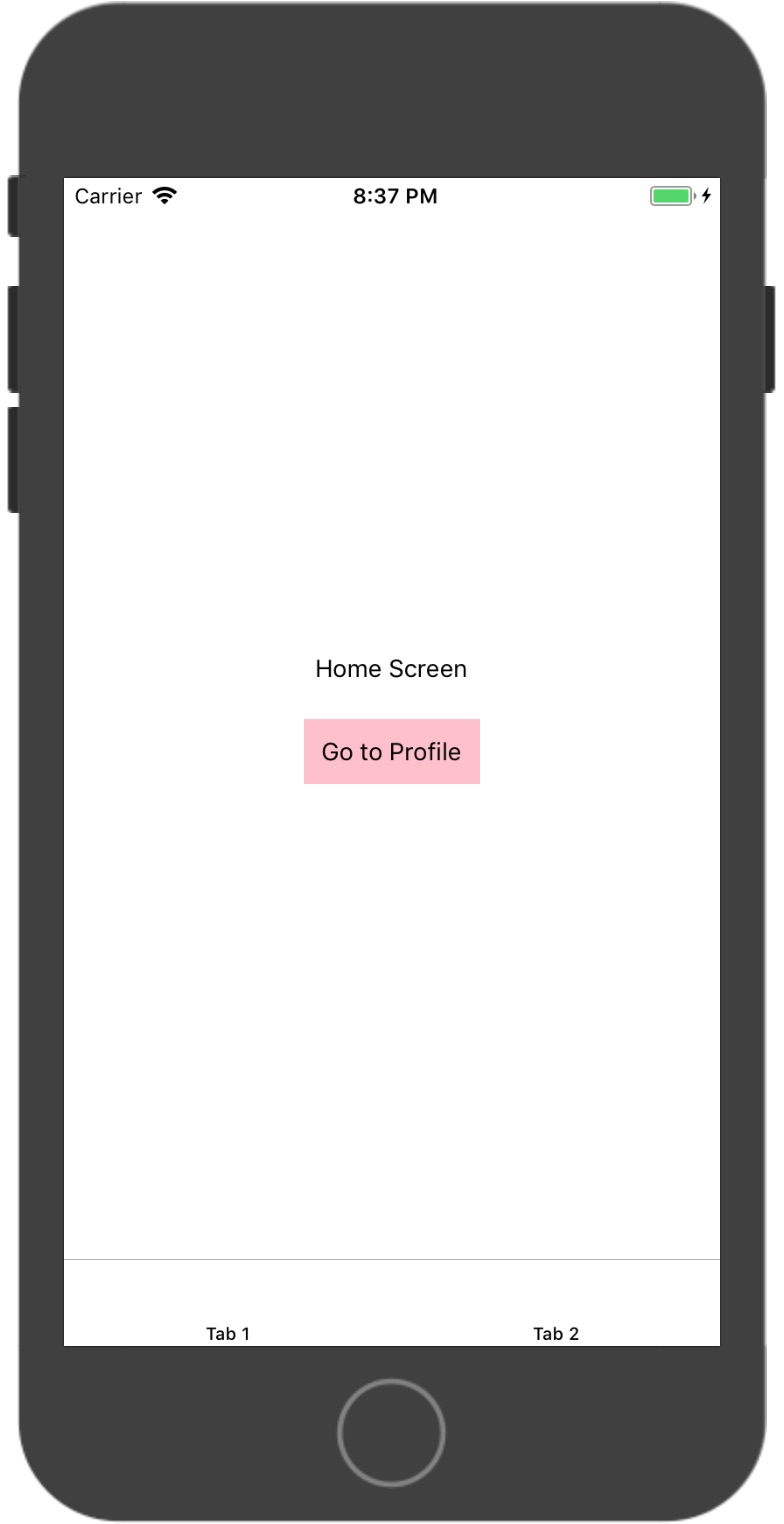
When using a stack within bottomTabs, the bottomTab text field is not respected. Here is my root configuration:
import { Navigation } from 'react-native-navigation'
import { registerScreens } from './src/screens'

registerScreens()

Navigation.events().registerAppLaunchedListener(() => {
  Navigation.setRoot({
    root: {
      bottomTabs: {
        children: [
          {
            stack: {
              children: [
                {
                  component: {
                    name: 'Home'
                  }
                }
              ],
              options: {
                topBar: {
                  title: {
                    text: 'Home'
                  }
                },
                bottomTab: {
                  text: 'Tab 1'
                }
              }
            }
          },
          {
            component: {
              name: 'Profile',
              options: {
                bottomTab: {
                  text: 'Tab 2'
                }
              }
            }
          }
        ],
        options: {}
      }
    }
  })
})
If I change this to only components, it works fine:
import { Navigation } from 'react-native-navigation'
import { registerScreens } from './src/screens'

registerScreens()

Navigation.events().registerAppLaunchedListener(() => {
  Navigation.setRoot({
    root: {
      bottomTabs: {
        children: [
          {
            component: {
              name: 'Home',
              options: {
                bottomTab: {
                  text: 'Tab 1'
                }
              }
            }
          },
          {
            component: {
              name: 'Profile',
              options: {
                bottomTab: {
                  text: 'Tab 2'
                }
              }
            }
          }
        ],
        options: {}
      }
    }
  })
})
Steps to Reproduce / Code Snippets / Screenshots
Screenshot with stack:

Screenshot with only components:
Environment
- React Native Navigation version: 2.0.2411
- React Native version: 0.56.0
- Platform(s) (iOS, Android, or both?): iOS (haven't tested this on Android yet)
- Device info (Simulator/Device? OS version? Debug/Release?): Simulator/Debug
 zachrnolan
All 8 comments
Yes, I have same with 2.0.2453.
And main problem, than when we use stack: we can see topBar and do what we want with tap bar. But when we don't use stack: we can't work with topBar
But, I found than when I add Icon for bottomTab I will get Icon and text for tab, @zachrnolan could you try this code:
Navigation.events().registerAppLaunchedListener(() => {
  Navigation.setRoot({
    root: {
      bottomTabs: {
        children: [
          {
            stack: {
              children: [
                {
                  component: {
                    name: 'Home'
                  }
                }
              ],
              options: {
                topBar: {
                  title: {
                    text: 'Home'
                  }
                },
                bottomTab: {
                  **icon: 'your ex. icon'**
                  text: 'Tab 1'
                }
              }
            }
          }
         }
        ],
        options: {}
      }
    }
  })
})
 TimurAsayonok
on 3 Aug 2018
TimurAsayonok
on 3 Aug 2018
Having exact same problem, bottomTab text not displaying while inside a stack.
 lindesvard
on 7 Aug 2018
lindesvard
on 7 Aug 2018
@lindesvard do you have a logo set for the bottomTab? I was having this issue until I put a logo in. Silly fix I know but it has seemed to work for me.
 JoelFieldCode
on 9 Aug 2018
JoelFieldCode
on 9 Aug 2018
@JoelFieldCode Why sis you say 'Silly fix..' ?) How many applications do you know without Icons on the bottomTabs?)
TimurAsayonok
on 9 Aug 2018
@JoelFieldCode no, just played around a bit to see if it was ready or not. Everything worked fine except this issue. Maybe should try add icon also...
lindesvard
on 13 Aug 2018
This issue has been automatically marked as stale because it has not had recent activity. It will be closed if no further activity occurs.
If you believe the issue is still relevant, please test on the latest version and report back. Thank you for your contributions.
![stale[bot] picture](https://avatars.githubusercontent.com/in/1724?v=4&s=40) stale[bot]
on 27 Sep 2018
stale[bot]
on 27 Sep 2018
This issue has been automatically marked as stale because it has not had recent activity. It will be closed if no further activity occurs.
If you believe the issue is still relevant, please test on the latest Detox and report back. Thank you for your contributions.
stale[bot]
on 26 Nov 2018
The issue has been closed for inactivity.
stale[bot]
on 3 Dec 2018
Related issues
 edcs
·
3Comments
edcs
·
3Comments
 EliSadaka
·
3Comments
EliSadaka
·
3Comments
 charlesluo2014
·
3Comments
charlesluo2014
·
3Comments
 henrikra
·
3Comments
henrikra
·
3Comments
 Chipped1
·
3Comments
Chipped1
·
3Comments
Most helpful comment
Yes, I have same with 2.0.2453.
And main problem, than when we use
stack:we can seetopBarand do what we want with tap bar. But when we don't usestack:we can't work withtopBarBut, I found than when I add Icon for bottomTab I will get Icon and text for tab, @zachrnolan could you try this code: