React-native-navigation: Error: Drawer side menu is overlaid by main menu..
Issue Description
[ENTER DESCRIPTION HERE - Please make sure to use the current naming conventions]
The side menu (drawer) is overlaid by main page, but I wanted is side menu should be on top of the main page. please help.

Steps to Reproduce / Code Snippets / Screenshots
[FILL THIS OUT - It will be extremely helpful]
Environment
- React Native Navigation version: latest
- React Native version: 0.47.2
- Platform(s) (iOS, Android, or both?): iOS
- Device info (Simulator/Device? OS version? Debug/Release?): simulator iphone 6 plus
 kevinchensd
All 9 comments
This is the behaviour of the SideMenu. I believe you can tweak it a bit using
type and animationType
https://wix.github.io/react-native-navigation/#/top-level-api?id=startsinglescreenappparams
drawer: {
    // optional, add this if you want a side menu drawer in your app
    left: {
      // optional, define if you want a drawer from the left
      screen: 'example.FirstSideMenu', // unique ID registered with Navigation.registerScreen
      passProps: {}, // simple serializable object that will pass as props to all top screens (optional)
      disableOpenGesture: false, // can the drawer be opened with a swipe instead of button (optional, Android only)
      fixedWidth: 500 // a fixed width you want your left drawer to have (optional)
    },
    right: {
      // optional, define if you want a drawer from the right
      screen: 'example.SecondSideMenu', // unique ID registered with Navigation.registerScreen
      passProps: {}, // simple serializable object that will pass as props to all top screens (optional)
      disableOpenGesture: false, // can the drawer be opened with a swipe instead of button (optional, Android only)
      fixedWidth: 500 // a fixed width you want your right drawer to have (optional)
    },
    style: {
      // ( iOS only )
      drawerShadow: true, // optional, add this if you want a side menu drawer shadow
      contentOverlayColor: 'rgba(0,0,0,0.25)', // optional, add this if you want a overlay color when drawer is open
      leftDrawerWidth: 50, // optional, add this if you want a define left drawer width (50=percent)
      rightDrawerWidth: 50 // optional, add this if you want a define right drawer width (50=percent)
    },
    type: 'MMDrawer', // optional, iOS only, types: 'TheSideBar', 'MMDrawer' default: 'MMDrawer'
    animationType: 'door', //optional, iOS only, for MMDrawer: 'door', 'parallax', 'slide', 'slide-and-scale'
    // for TheSideBar: 'airbnb', 'facebook', 'luvocracy','wunder-list'
    disableOpenGesture: false // optional, can the drawer, both right and left, be opened with a swipe instead of button
  },
 guyca
on 16 May 2018
guyca
on 16 May 2018
@guyca can you style the sidemenu the same in version 2?
 karlmosenbacher
on 22 May 2018
karlmosenbacher
on 22 May 2018
I can't use fixedWidth in version2
 maestrolsj
on 13 Jun 2018
maestrolsj
on 13 Jun 2018
Does the type of sidemenu applies to V2 also @guyca ?
 anonrig
on 29 Sep 2018
anonrig
on 29 Sep 2018
Any news with this?
 acollazomayer
on 20 Mar 2019
acollazomayer
on 20 Mar 2019
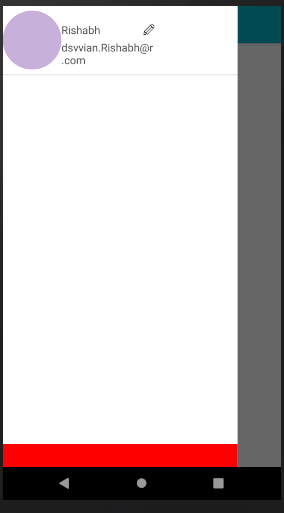
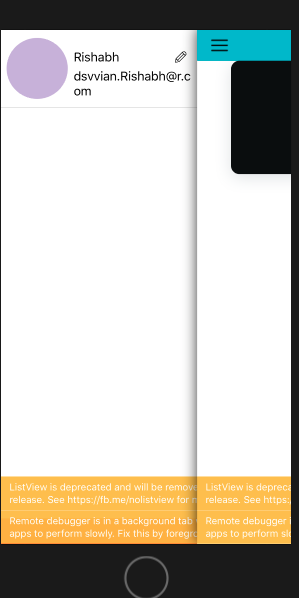
@guyca I am facing this issue on ios with React-native-navigation[V2]
What should i do
"navigation.js"
Navigation.setRoot({
root: {
sideMenu: {
left: {
    component: {
      id: "sideDrawer",
      name: "SideMenu",

    },

  },
  center: {
    stack: {
      options: {},
      children: [{
        component: {
          name:"NewCard",
          options: {
            topBar: {
              hideOnScroll: true,
              title: {
                text: "Homescreen",
                color: "white"
              },
              leftButtons: [
                {
                  id: "buttonOne",
                  icon: require("../assets/img/menu.png")
                }
              ],
              background: {
                color: "#05B8CC"
              },
              drawBehind: false,
              visible: true,
              animate: true
            },
          }
        }
      }]
    }
  },

}
}
});
 rishabhSmartdata
on 15 Apr 2019
rishabhSmartdata
on 15 Apr 2019
Same issue here on V2.
Any way to style it on iOS to be in front of the content ?
 cajasmota
on 1 May 2019
cajasmota
on 1 May 2019
@rishabhSmartdata & @guyca Have you find any solution for this v2 Side Menu?
I am also facing the same issue.
 uday007
on 14 May 2019
uday007
on 14 May 2019
Same issue here on V2.
Any news about this topic on V2 version ?
 igor-nm
on 17 May 2019
igor-nm
on 17 May 2019
Related issues
 bjacog
·
3Comments
bjacog
·
3Comments
 nbolender
·
3Comments
nbolender
·
3Comments
 switchtrue
·
3Comments
switchtrue
·
3Comments
 yedidyak
·
3Comments
yedidyak
·
3Comments
 swingywc
·
3Comments
swingywc
·
3Comments
Most helpful comment
Does the type of sidemenu applies to V2 also @guyca ?