React-native-navigation: Back button inside custom navbar component
Issue Description
Is there way to implement fully functional navbar component based on current stack (to show back button), and be able to toggle drawer. Show screen's title based on props etc.
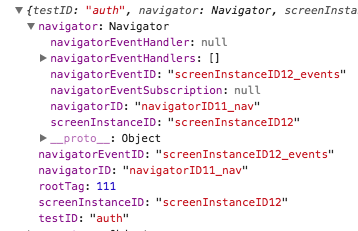
There is no info about stack, screen title etc. Which is pretty strange in common, what's the purpose of custom navbar in this case?
Custom navbar props:

Screen component props:
Environment
- React Native Navigation version: 1.1.311
- React Native version: 0.50
- Platform(s) (iOS, Android, or both?): Doesn't matter
- Device info (Simulator/Device? OS version? Debug/Release?): Doesn't matter
 sergeylaptev
👍5
>All comments
You have to set the custom navbar and its props after the Screen Component is created.
this.props.navigator.setStyle({
  navBarCustomView: 'example.CustomTopBar',
  navBarCustomViewInitialProps: { navigator = this.props.navigator }
});
 pqkluan
on 2 Feb 2018
pqkluan
on 2 Feb 2018
👍2
🎉1
Was this page helpful?
0 / 5 - 0 ratings
Related issues
 ghost
·
3Comments
ghost
·
3Comments
 birkir
·
3Comments
birkir
·
3Comments
 viper4595
·
3Comments
viper4595
·
3Comments
 zagoa
·
3Comments
zagoa
·
3Comments
 henrikra
·
3Comments
henrikra
·
3Comments
Most helpful comment
You have to set the custom navbar and its props after the Screen Component is created.