React-native-modal: Can not seem to set height
Below is all my dependencies. What I am trying to do is have the modal as a module. This the main screen that imports the modal screen.
<Grid style={styles.container}>
        <Row>
          <TouchableOpacity
            onPress={() => this.setState({showModal: !this.state.showModal})}
          >
            <Text>Open Modal here</Text>
          </TouchableOpacity>

          {this.state.showModal &&
            <EnterCodeModalScreen2
              testProp='testProp'
            />
          }
   </Row>
</Grid>
This is the modal screen
<Modal isVisible={this.state.isModalVisible} style={styles.container} >
        <View style={{flex:1}}>
          <TextInput
            editable = {true}
            keyboardType='number-pad'
            onChangeText={(code) => this.setState({code})}
            placeholder='Please enter your code'
            placeholderTextColor='#757575'
            autoFocus={true}
            autoCorrect={false}
          />
        </View>
</Modal>
.
.
.
const styles = StyleSheet.create({
  container: {
    width: 250,
    height: 100,
    backgroundColor: '#FFF',
  }
});
Below is the end result. I've tried multiple height values. Width works. I've only looked at this on iOS.
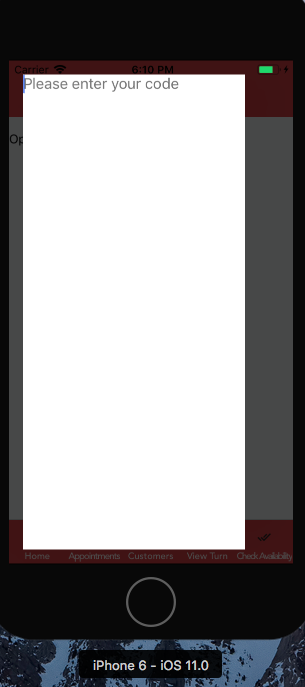
All my dependencies
"dependencies": {
    "axios": "^0.16.2",
    "date-fns": "^1.28.5",
    "lodash": "^4.17.4",
    "native-base": "^2.3.0",
    "react": "16.0.0-alpha.12",
    "react-native": "0.46.4",
    "react-native-animatable": "^1.2.3",
    "react-native-camera": "^0.10.0",
    "react-native-credit-card-input": "^0.3.3",
    "react-native-easy-grid": "^0.1.15",
    "react-native-elements": "^0.16.0",
    "react-native-modal": "^4.1.0",
    "react-native-modal-datetime-picker": "^4.11.0",
    "react-native-navigation": "^1.1.143",
    "react-native-signature-capture": "^0.4.7",
    "react-native-vector-icons": "^4.2.0",
    "react-redux": "^5.0.5",
    "redux": "^3.7.2",
    "redux-persist": "^4.8.2",
    "redux-thunk": "^2.2.0"
  },
question
 ODelibalta
All 3 comments
Did you already try removing the flex: 1 from the content view?
Also, try passing flex: 0 to the modal style.
 mmazzarolo
on 21 Oct 2017
mmazzarolo
on 21 Oct 2017
👍32
🚀9
❤9
🎉9
👎3
😄2
👀1
Setting the flex 0 on modal style resolved the issue. This ticket can be closed. Sorry for not labeling it right. Thank you for helping and your great libs (I am also using datetime picker :) )
ODelibalta
on 23 Oct 2017
👍 no worries, have fun!
mmazzarolo
on 23 Oct 2017
Was this page helpful?
0 / 5 - 0 ratings
Related issues
mmazzarolo
·
4Comments
 dcarrot2
·
4Comments
dcarrot2
·
4Comments
 JuniusAng
·
4Comments
JuniusAng
·
4Comments
 matheusrezende
·
4Comments
matheusrezende
·
4Comments
 haveamission
·
3Comments
haveamission
·
3Comments
Most helpful comment
Did you already try removing the
flex: 1from the content view?Also, try passing
flex: 0to the modal style.