React-native-modal-datetime-picker: Unable to resolve "./CustomDatePickerAndroid" from "node_modules/react-native-modal-datetime-picker/src/index.js" Failed building JavaScript bundle.
Environment :
macOS Sierra v10.12.6
Processor 2,3 GHz Intel Core i5
expo: 36.0.0
react: 16.9.0 (React Native 0.60 and 0.61)
Platforms : iOS & Android
Versions: react-native-modal-datetime-picker: 8.1.0
Description : When I migrate to v8.1.0 of the react-native-modal-datetime-picker, the terminal throws this error at me : Unable to resolve "./CustomDatePickerAndroid" from "node_modules/react-native-modal-datetime-picker/src/index.js"
Failed building JavaScript bundle.
What have I tried ?
- I have no problems in compiling the code with v7.6.1 of react-native-modal-datetime-picker
- I deleted all node modules and reinstalled all the npm packages.
- Uninstalling and reinstalling @react-native-community/datetimepicker.
- expo install instead of npm install
Can anyone please advice on how to rectify this problem ? Any help will be appreciated.
 fromsujay
All 10 comments
@fromsujay could you check what the content of node_modules/react-native-modal-datetime-picker/src/index.js is?
I would expect it to be the same as this file.
If it's not, I would suggest you to reset the metro bundler/server, uninstall and reinstall your app and try again.
 mmazzarolo
on 16 Jan 2020
mmazzarolo
on 16 Jan 2020
Thanks for your response @mmazzarolo. I have checked the contents of the file. They are exactly the same.
fromsujay
on 17 Jan 2020
After more than 2 hours of trial and error, I uninstalled both react-native-modal-datetime-picker and @react-native-community/datetimepicker. Then I reinstalled both by chaining them this way :
npm i react-native-modal-datetime-picker @react-native-community/datetimepicker
This seems to have done the trick.
Thanks for your help anyways @mmazzarolo and great work on developing this useful module 👍
fromsujay
on 17 Jan 2020
Hi
Good afternoon
I just made the update from version 7.6 to 8.1 and I am having this error in iOS, I already uninstall of the 2 libraries, I did clean of the build in Xcode, uninstall the app and the error continues, any other suggestions? @mmazzarolo
Thanks
 eae-christian
on 23 Jan 2020
eae-christian
on 23 Jan 2020
Reset the metro bundler npm run start -- --reset-cache
mmazzarolo
on 23 Jan 2020
It worked, thank you very much
eae-christian
on 24 Jan 2020
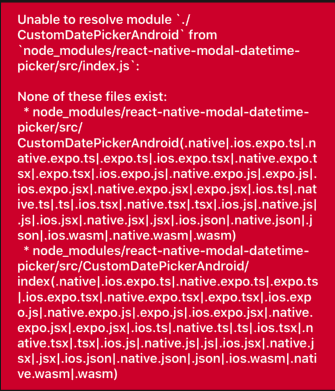
I had the same error about
Unable to resolve "./CustomDatePickerAndroid" from "node_modules/react-native-modal-datetime-picker/src/index.js"
Failed building JavaScript bundle.
Environment:
- expo sdk: 37.0.0
- react: 16.9.0
- react native: 0.61.4
Platforms :
iOS & Android
Versions:
react-native-modal-datetime-picker: 8.5.4
@react-native-community/datetimepicker: 2.2.2
It did not work. Please help me @mmazzarolo
I tried re-install and ran expo start -c a lot of time. I also checked the contents of the file you sent above they are the same.
 lisa-nguyen-goldenowl
on 10 Apr 2020
lisa-nguyen-goldenowl
on 10 Apr 2020
@lisa-nguyen-goldenowl
Estoy trabajando con expo sdk 37.0.0 y me apareció el mismo error. La solución la encontré en la pagina de npm [https://www.npmjs.com/package/react-native-modal-datetime-picker]. Ahí aparecia la opcion de instalar con expo, mientras que lo estaba haciendo con npm. Los pasos que segui fueron:
1 npm uninstall @react-native-community/datetimepicker
2 npm uninstall react-native-modal-datetime-picker
3 rm -rf node_modules
4 npm i
5 expo install react-native-modal-datetime-picker @react-native-community/datetimepicker
Espero les sirva. Saludos.
 sistemasjhdez
on 19 Apr 2020
sistemasjhdez
on 19 Apr 2020
Thanks @sistemasjhdez.
i don't know why but i copy file node_modules/react-native-modal-datetime-picker/src/index.js and paste in my node_modules. Restart and then it works.
lisa-nguyen-goldenowl
on 4 May 2020
Reset the metro bundler
npm run start -- --reset-cache
Thank you. This worked for me!
 berinberchmans
on 15 Jan 2021
berinberchmans
on 15 Jan 2021
Related issues
 cgathergood
·
5Comments
cgathergood
·
5Comments
 pankajguptablueivory
·
3Comments
pankajguptablueivory
·
3Comments
 ketanpatel3377
·
5Comments
ketanpatel3377
·
5Comments
 taylorkline
·
4Comments
taylorkline
·
4Comments
 lavarajallu
·
3Comments
lavarajallu
·
3Comments
Most helpful comment
Reset the metro bundler
npm run start -- --reset-cache