React-native-mapbox-gl: Project with path ':mapbox-react-native-mapbox-gl' could not be found in project ':app'.
hi, i tried install mapbox with android and ios, recently i create a app , with react-native init geroApp, and try install library mapbox, but after executed command "npm install @mapbox/[email protected] --save" and include this lot in Project builder " jcenter()
maven { url "$rootDir/../node_modules/react-native/android" }
maven { url "https://jitpack.io" }
maven { url "https://maven.google.com "
this show this error
when try include add to app:build.gradle
build.gradle compile project(':mapbox-react-native-mapbox-gl') throw this error "Gradle sync failed: Project with path ':mapbox-react-native-mapbox-gl' could not be found in project ':app'.
Consult IDE log for more details (Help | Show Log)"


 mealbarracin10
All 16 comments
Did you also add Mapbox to your settings.gradle https://github.com/mapbox/react-native-mapbox-gl/blob/master/android/install.md#settingsgradle?
 nitaliano
on 5 Mar 2018
nitaliano
on 5 Mar 2018
@nitaliano
It's working well. Thanks
 reactionic127
on 3 Apr 2018
reactionic127
on 3 Apr 2018
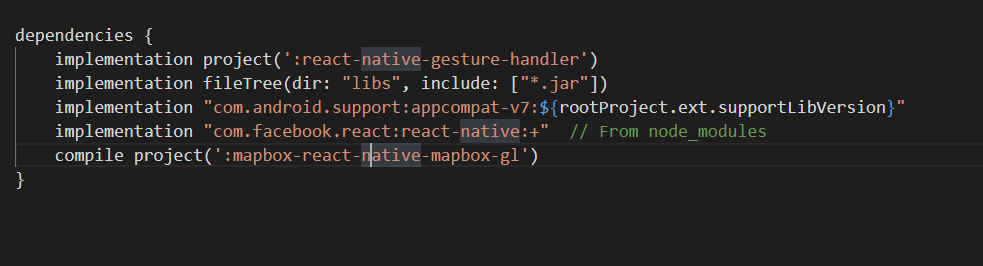
Hi,
I have same issue . I am using it from react native.
I have added all necessary options(from Documentation) but still wasnt able to run.
Please Could you help me?


 grigvardanyan
on 13 Mar 2019
grigvardanyan
on 13 Mar 2019
Hi,
I have same issue . I am using it from react native.
I have added all necessary options(from Documentation) but still wasnt able to run.
Please Could you help me?
I am too. I created a new react-native project, added all and have error when i react-native run-android...
 dkotowicz
on 5 Apr 2019
dkotowicz
on 5 Apr 2019
I'm facing exactly the same problem when trying to use this lib inside a react-native project.
 lcnogueira
on 13 May 2019
lcnogueira
on 13 May 2019
I thought I was alone but I am also facing the same issue when trying to install mapbox on android react native...
 louisnot
on 14 May 2019
louisnot
on 14 May 2019
hey all,
make sure you add this to your projects package.json
"@mapbox/react-native-mapbox-gl": "nitaliano/react-native-mapbox-gl#master"
The version on npm isn't the latest.
Having this set as the dependency and following the installation guide should do the trick.
 ferdicus
on 15 May 2019
ferdicus
on 15 May 2019
mine looks different, ive tried adding like this,
protected List<ReactPackage> getPackages() {
      List<ReactPackage> packages = new PackageList(this).getPackages();
      packages.add(new ModuleRegistryAdapter(mModuleRegistryProvider));
      packages.add(new RCTMGLPackage());
      return packages;
    }
from what i read this is how you do it but maybe its a versioning issue?
 psyKressX
on 27 May 2020
psyKressX
on 27 May 2020
Hi anyone fix this? I am still getting the error
 DanielAmah
on 1 Sep 2020
DanielAmah
on 1 Sep 2020
Kindly share your solution. I have done everything here but I still have the issue.
DanielAmah
on 1 Sep 2020
@DanielAmah:
https://github.com/nitaliano/react-native-mapbox-gl#deprecation-notice
ferdicus
on 1 Sep 2020
I followed this the installation guide but still got the error above

DanielAmah
on 1 Sep 2020
@ferdicus. Pls any help would be highly appreciated.
DanielAmah
on 1 Sep 2020
Please read what I posted....
ferdicus
on 1 Sep 2020
You're using an outdated and deprecated library. Switch to the community-maintained version here: https://github.com/react-native-mapbox-gl/maps
 systemlevel
on 2 Sep 2020
systemlevel
on 2 Sep 2020
hey all,
make sure you add this to your projectspackage.json"@mapbox/react-native-mapbox-gl": "nitaliano/react-native-mapbox-gl#master"The version on npm isn't the latest.
Having this set as the dependency and following the installation guide should do the trick.
This one worked! Thank you so much, hours of searching for a tiny bug when it's the wrong version installed.
 JackJBlundell
on 15 Mar 2021
JackJBlundell
on 15 Mar 2021
Related issues
 EwanValentine
·
3Comments
EwanValentine
·
3Comments
 lucasbento
·
3Comments
lucasbento
·
3Comments
 kristfal
·
3Comments
kristfal
·
3Comments
 glennverschooren
·
4Comments
glennverschooren
·
4Comments
 vyankat70war
·
3Comments
vyankat70war
·
3Comments
Most helpful comment
Did you also add Mapbox to your settings.gradle https://github.com/mapbox/react-native-mapbox-gl/blob/master/android/install.md#settingsgradle?