React-native-mapbox-gl: Raster Source does not load tiles with dynamically generated URL.
Hi all,
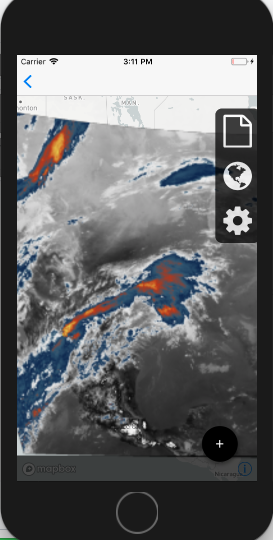
I am using a custom API to fetch satellite data and display them on the map using raster source and raster layer. I've come across an interesting issue that when I dynamically generate the URLs through this JSON fetch call, raster source will not generate the tiles. However if I copy and paste the URL that was output to the console, the tiles load correctly. Is this an issue with text formatting or possibly a caching issue? I've been pulling my hair out trying to figure out a solution as the URLs appear to be generated correctly.
 componentWillMount(){
    this.fetchSatData();
  }

  fetchSatData = async () => {
    const response = await fetch("https://FIRSTPARTOFURL.com/tilesdata/GOES16_"+this.state.channel+"_"+this.state.sector+".json");
    console.log("https://FIRSTPARTOFURL.com/tilesdata/GOES16_"+this.state.channel+"_"+this.state.sector+".json");
    const json = await response.json();
    this.setState({ satData: json.times});
    this.setState({url: "https://FIRSTPARTOFURL.com/tilesdata/GOES16_"+this.state.channel+"/"+this.state.sector+"/"+this.state.satData[this.state.satData.length -1]+'/{z}/{x}/{y}.png'});
    console.log(this.state.url);}
This does not load correctly despite the console log output showing exactly what I expect.
       <Mapbox.MapView
            styleURL={Mapbox.StyleURL.Light}
            zoomLevel={3}
            centerCoordinate={[-97.5164, 35.4676]}
            style={styles.container}
            showUserLocation={locationBool}>
            <Mapbox.RasterSource
              id="sat"
              tileSize={256}
              tms={true}
              url={this.state.url}>
                <Mapbox.RasterLayer
                  id='satLayer'
                  sourceID='sat'/>
            </Mapbox.RasterSource>
        </Mapbox.MapView>
@ debuggerWorker.js:72
Map.js:51 https://FIRSTPARTOFURL.com/tilesdata/GOES16_14_CONUS.json
Map.js:55 https://FIRSTPARTOFURL.com/tilesdata/GOES16_14/CONUS/20180227_215959/{z}/{x}/{y}.png
However, when I paste the output of the log directly into the URL the tiles load no problem. This would seem to indicate to me the dynamically generated URL is correct?
This loads correctly.
        <Mapbox.MapView
            styleURL={Mapbox.StyleURL.Light}
            zoomLevel={3}
            centerCoordinate={[-97.5164, 35.4676]}
            style={styles.container}
            showUserLocation={locationBool}>
            <Mapbox.RasterSource
              id="sat"
              tileSize={256}
              tms={true}
              url={"https://FIRSTPARTOFURL.com/tilesdata/GOES16_14/CONUS/20180227_215959/{z}/{x}/{y}.png"}>
                <Mapbox.RasterLayer
                  id='satLayer'
                  sourceID='sat'/>
            </Mapbox.RasterSource>
        </Mapbox.MapView>
 adlyons
All 6 comments
try to not render your raster source until the dynamic url is ready. The native SDK's don't have setURL method so it needs to be passed in through the constructor, that's why waiting until the url is ready should work.
 nitaliano
on 27 Feb 2018
nitaliano
on 27 Feb 2018
How would I do that programmatically? I am very new to react native and am a bit confused.
adlyons
on 28 Feb 2018
Say this is in your render
<Mapbox.MapView
      styleURL={Mapbox.StyleURL.Light}
      zoomLevel={3}
      centerCoordinate={[-97.5164, 35.4676]}
      style={styles.container}
      showUserLocation={locationBool}>
       {this.renderRaster()}
</Mapbox.MapView>
you can have a method that does this
renderRaster() {
  if (!this.state.url) {
    return null;
  }
  return (
    <Mapbox.RasterSource
          id="sat"
          tileSize={256}
          tms={true}
          url={this.state.url}>
             <Mapbox.RasterLayer id='satLayer' sourceID='sat'/>
    </Mapbox.RasterSource>
  );
}
Thank you, this is exactly what I was looking for. I will close the issue.
adlyons
on 28 Feb 2018
Say this is in your render
<Mapbox.MapView
      styleURL={Mapbox.StyleURL.Light}
      zoomLevel={3}
      centerCoordinate={[-97.5164, 35.4676]}
      style={styles.container}
      showUserLocation={locationBool}>
       {this.renderRaster()}
</Mapbox.MapView>
you can have a method that does this
renderRaster() {
  if (!this.state.url) {
    return null;
  }
  return (
    <Mapbox.RasterSource
          id="sat"
          tileSize={256}
          tms={true}
          url={this.state.url}>
             <Mapbox.RasterLayer id='satLayer' sourceID='sat'/>
    </Mapbox.RasterSource>
  );
}
It's not working.
I have 5 wms url and setting in state. I try to changing url but map does not changing.
Have any idea ?
 marufkilic
on 27 Nov 2018
marufkilic
on 27 Nov 2018
@marufkilic Have you found a solution to load the different wmsurl ?
Say this is in your render
<Mapbox.MapView
      styleURL={Mapbox.StyleURL.Light}
      zoomLevel={3}
      centerCoordinate={[-97.5164, 35.4676]}
      style={styles.container}
      showUserLocation={locationBool}>
       {this.renderRaster()}
</Mapbox.MapView>
you can have a method that does this
renderRaster() {
  if (!this.state.url) {
    return null;
  }
  return (
    <Mapbox.RasterSource
          id="sat"
          tileSize={256}
          tms={true}
          url={this.state.url}>
             <Mapbox.RasterLayer id='satLayer' sourceID='sat'/>
    </Mapbox.RasterSource>
  );
}
It's not working.
I have 5 wms url and setting in state. I try to changing url but map does not changing.
Have any idea ?
 rsimbu89
on 9 Dec 2018
rsimbu89
on 9 Dec 2018
Related issues
 lernerbot
·
3Comments
lernerbot
·
3Comments
 EugenePisotsky
·
4Comments
EugenePisotsky
·
4Comments
 vyankat70war
·
3Comments
vyankat70war
·
3Comments
 Craytor
·
3Comments
Craytor
·
3Comments
 yaduc
·
3Comments
yaduc
·
3Comments
Most helpful comment
Say this is in your render
you can have a method that does this