React-native-mapbox-gl: MapView overflows bounds on iOS with 6.0.3-rc1
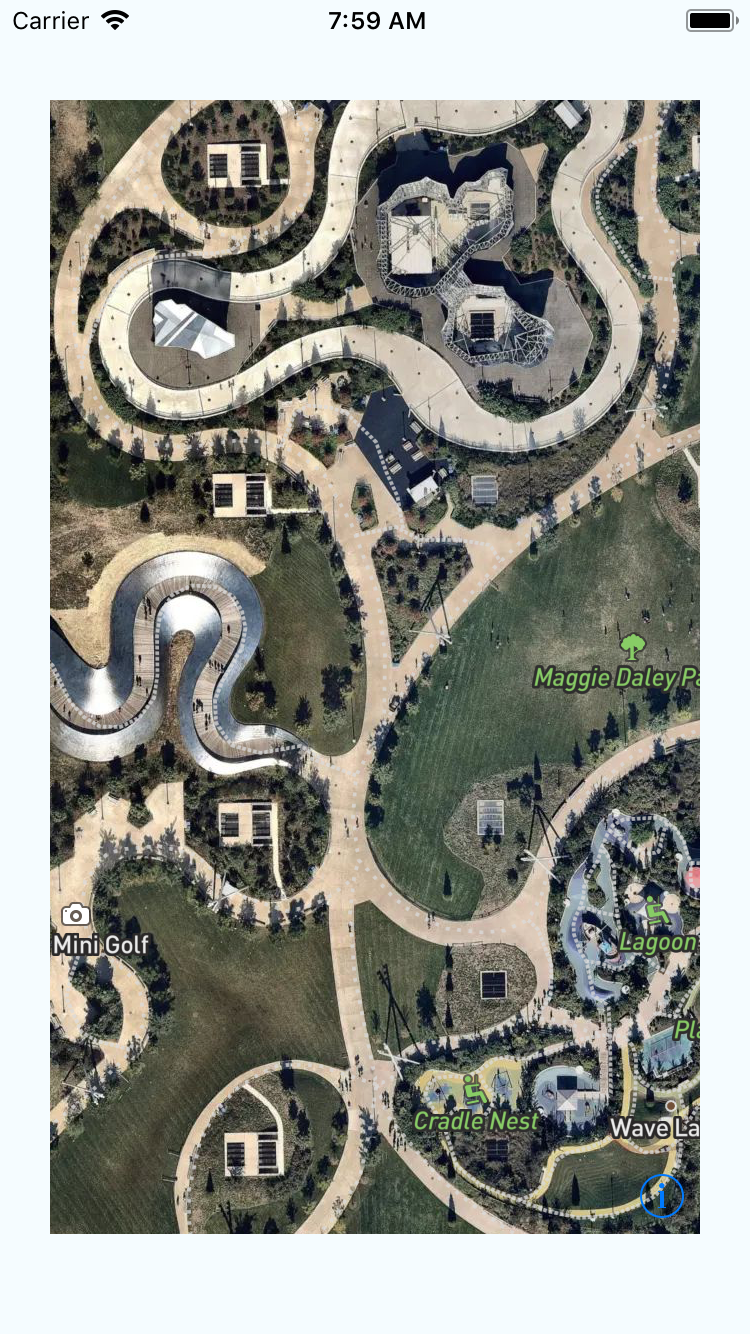
On iOS in 6.0.3-rc1, with RN 0.53, in the iOS Simulator, there are issues with the apparent size of the map. The behavior is nondeterministic; the map is sometimes correctly sized, but frequently rendered vastly in excess of the specified height and width. This happens on startup in a very simple app and smells a bit like a race condition.
I created a GitHub repo with sample code with which I am easily able to reproduce the issue. The iOS folder contains screenshots and a video demonstrating the issue.
https://github.com/jondubman/react-native-mapbox-gl-mapview-issue
Hitting Command-R to refresh in the simulator should repro after a few attempts, but the issue is not specific to a refresh scenario; it can happen when the app is cold booted.

 jondubman
All 14 comments
@jondubman thanks for reporting and really appreciate the sample repo! Will look into it
 nitaliano
on 12 Feb 2018
nitaliano
on 12 Feb 2018
It's happening to me as well and I wasn't sure if it was related to RN0.53 or <SafeAreaView> that I introduced.
I've added this hack to temporarily fix it and seems to be working fine on the simulator most of the times but once in 20 times I still got the bug.
  render() {
    return (
      <View
        style={{ flex: 1 }}
        onLayout={() => setTimeout(() => this.setState({ ready: true }), 1)}
      >
        {this.state.ready && <MyMap />}
      </View>
    );
  }
 mtt87
on 13 Feb 2018
mtt87
on 13 Feb 2018
@nitaliano any idea on this?
@jondubman have you tried with [email protected] instead of 0.53.0? Just curious to understand if this is an issue introduced with latest version of rn or latest version of rn-mapbox.
I'm doing a test right now in my app downgrading react native.
EDIT: tested with rn 0.52.2 and latest master for about 5 minutes refreshing many times on the simulator and seems like it doesn't happen so it might be related to [email protected] ? I don't remember any breaking changes though 🤔
mtt87
on 15 Feb 2018
@mtt87 noticed this as well after upgrading to 0.53.0 - we are currently pinning react native version at 0.52.2.
 EricPKerr
on 16 Feb 2018
EricPKerr
on 16 Feb 2018
Actually still with rn 0.52.2 sometimes the map doesnt take the full height, not sure if it's related to this.
<View style={{ flex: 1 }}><Map style={{ flex:1 }} /></View>
This has come up on both Android and iOS. I don't believe this is a react native problem, this is something in our codebase causing the issue
nitaliano
on 16 Feb 2018
@mtt87 the map not taking the full height could also be dependent on if the View parent is taken up the full height flex:1 can act weird sometimes
nitaliano
on 16 Feb 2018
Can anyone test this PR out https://github.com/mapbox/react-native-mapbox-gl/pull/1050?
nitaliano
on 17 Feb 2018
Easiest way to test it? Clone repo and npm link or something faster?
mtt87
on 17 Feb 2018
I applied PR #1050 locally, and with the fix, the map appeared correctly 10 out of 10 app launches. Re-ran without it, and it appeared correctly 5 out of 10 times.
jondubman
on 17 Feb 2018
🎉 🎉 🎉
Tested the PR with 0.52.2 seems like it's working perfectly now, even my issue with the map not taking the full height.
Gonna try later with 0.53.0 but I feel positive this should be fixed 😄
mtt87
on 17 Feb 2018
Is this related https://github.com/mapbox/react-native-mapbox-gl/issues/777 @nitaliano ?
 henrikra
on 19 Feb 2018
henrikra
on 19 Feb 2018
@henrikra I just read that issue and to me it feels related, try this PR https://github.com/mapbox/react-native-mapbox-gl/pull/1050 because for me it seems to fix the issue.
mtt87
on 19 Feb 2018
@henrikra it has not been tested with react-native-navigation but I haven't run into the issue of an oversized map since this PR
nitaliano
on 19 Feb 2018
Related issues
 digitaldavenyc
·
4Comments
digitaldavenyc
·
4Comments
 Craytor
·
3Comments
Craytor
·
3Comments
 lernerbot
·
3Comments
lernerbot
·
3Comments
 Gp2mv3
·
3Comments
Gp2mv3
·
3Comments
 vyankat70war
·
3Comments
vyankat70war
·
3Comments
Most helpful comment
Can anyone test this PR out https://github.com/mapbox/react-native-mapbox-gl/pull/1050?