React-native-mapbox-gl: iOS Memory Leak
Hi,
I am having a memory leak issue that I am having trouble tracking down.
I am using the MapBox map a fair amount and when you navigate deeply down through the app and then back up the memory usage continues to rise.
I have a video showing the issue here: https://youtu.be/uy1kGgzM50Q
As you can see when you drill down into the app the memory rises. This is to be expected but when you go back up to the top level the memory usage does not drop down to reasonable levels. After doing this only 3 times the memory usage is over 1GB. The same behaviour happens on the phsyical device as well.
If I disable the map component then I don't see the above behaviour.
I am using react navigation as the navigation library. I know this could be quite difficult to solve so any more information or anything I should try then just let me know.
Thanks,
Stephen
 stephenheron
All 21 comments
Is componentWillUnmount called at all when using react navigation? I've known from past use using react navigation it might not be unmounting the components correctly. I've profiled the example application before with the modal and it unmounts the Map and memory goes down
 nitaliano
on 27 Nov 2017
nitaliano
on 27 Nov 2017
Hi,
componentWillUnmount does seem to be called correctly.
However I might have got to the bottom of the issue. I took the simplest map example and dropped it in place of my map and the memory leak went away. I then added functionality back in bit by bit until the memory leak appeared and it seems to be something todo with the geoJSON.
Sometimes my map has geoJSON and other times it does not so I had some code to handle that.
This is what I had before:
this.state = {
   geoJSON: {},
};

renderGeoJSON() {
      return (
      <MapboxGL.ShapeSource id='routeLineSource' shape={this.state.geoJSON}>
        <MapboxGL.LineLayer id='routeLineLayer' style={layerStyles.routeLine} />
      </MapboxGL.ShapeSource>
    )
}
However when I updated the geoJSON to be null and then check it for null it seems to make the memory leak disappear.
this.state = {
   geoJSON: null,
};

renderGeoJSON() {
    if(this.state.geoJSON == null) {
      return null;
    }

    return (
      <MapboxGL.ShapeSource id='routeLineSource' shape={this.state.geoJSON}>
        <MapboxGL.LineLayer id='routeLineLayer' style={layerStyles.routeLine} />
      </MapboxGL.ShapeSource>
    )
  }
Seems a tad strange to be honest. I have not had enough time to test it properly on a real device but on first glance it does seem to make the issue disappear.
Will test a bit further and see if it has truly fixed the issue.
Thanks,
Stephen
stephenheron
on 27 Nov 2017
The code you posted above actually removes the source and all of it's layers from the RN view tree. What I'm wondering is why it's not removing when the MapView is being removed with react-navigation
nitaliano
on 28 Nov 2017
I have this problem. My ShapeSource is as dead simple as it can be. Every time I CMD+R (refresh) the app, memory leaks.
<MapboxGL.ShapeSource shape={this.props.geography} />
It seems like the native ShapeSource sticking around even though the RN one is removed.
 woodpav
on 11 Dec 2017
woodpav
on 11 Dec 2017
+1 same issue with ShapeSource on iOS
 frankrowe
on 11 Dec 2017
frankrowe
on 11 Dec 2017
The remove flow is not being called when we hot reload so it's never being removed. I'm not sure if there is a special lifecycle event that we can hook into for hot reloading with RN on iOS. Anyone have any idea?
nitaliano
on 15 Dec 2017
I just came back to the project I was working on and I am still having this issue. I updated to the latest version in the hopes that it would fix things but still no luck.
The leak seems to be definitely in the ShapeSource. If I remove it then everything behaves as expected and memory drops once navigating away put it back in place and memory does not drop when navigating away.
I tried to delve into the Objective-C but to be honest it's not my forte.
@tywoodpav @frankrowe Did you guys manage to get anywhere with solving the issue?
@nitaliano If I manage to put together a simple/minimal example that shows the problem and posted it on GitHub would you mind taking a look?
stephenheron
on 3 Jan 2018
@stephenheron yup, I'll take a look at it, would be very helpful!
nitaliano
on 3 Jan 2018
@nitaliano Thanks, I managed to get a good simple example of the issue just using React Native and Mapbox.
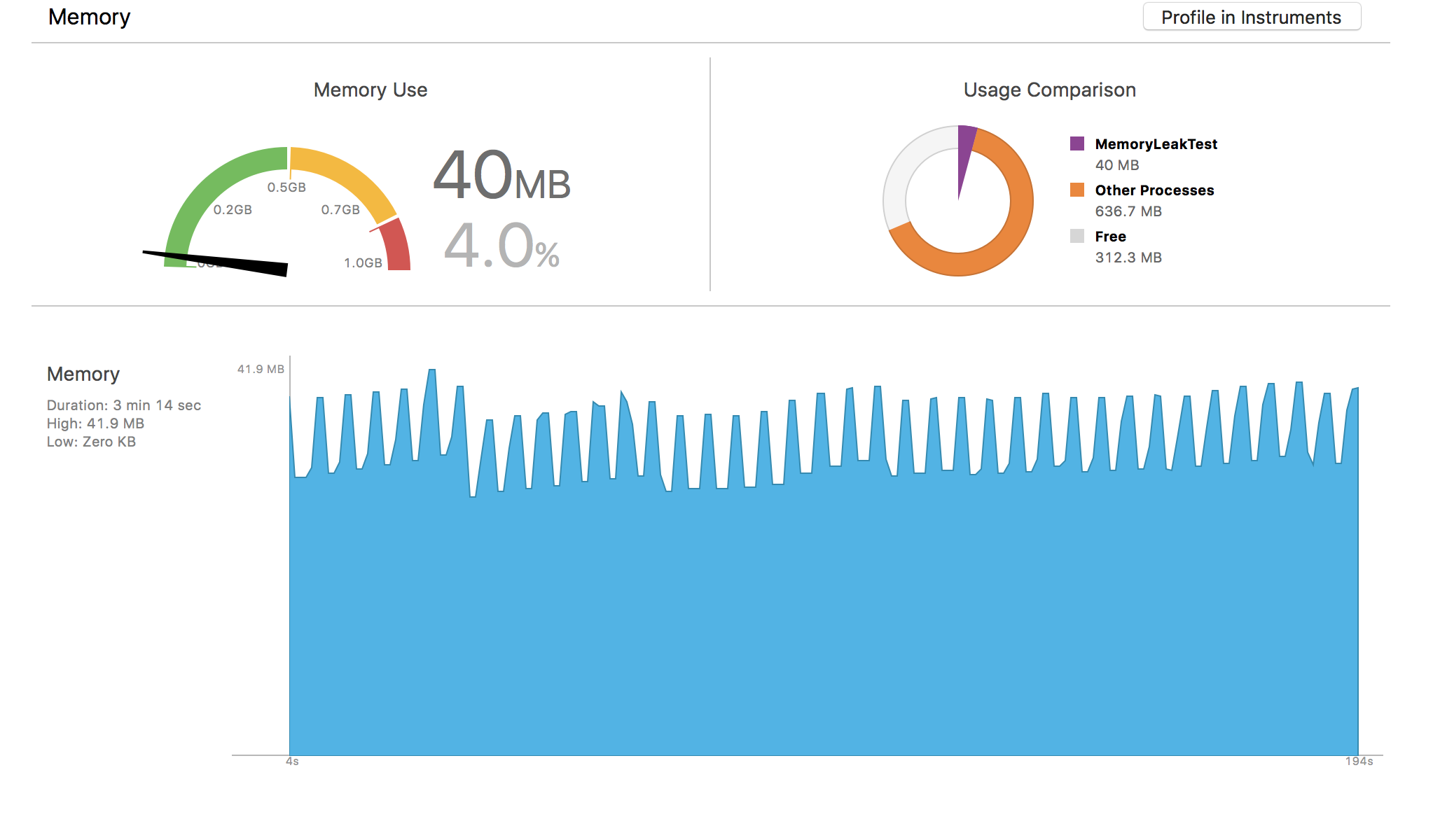
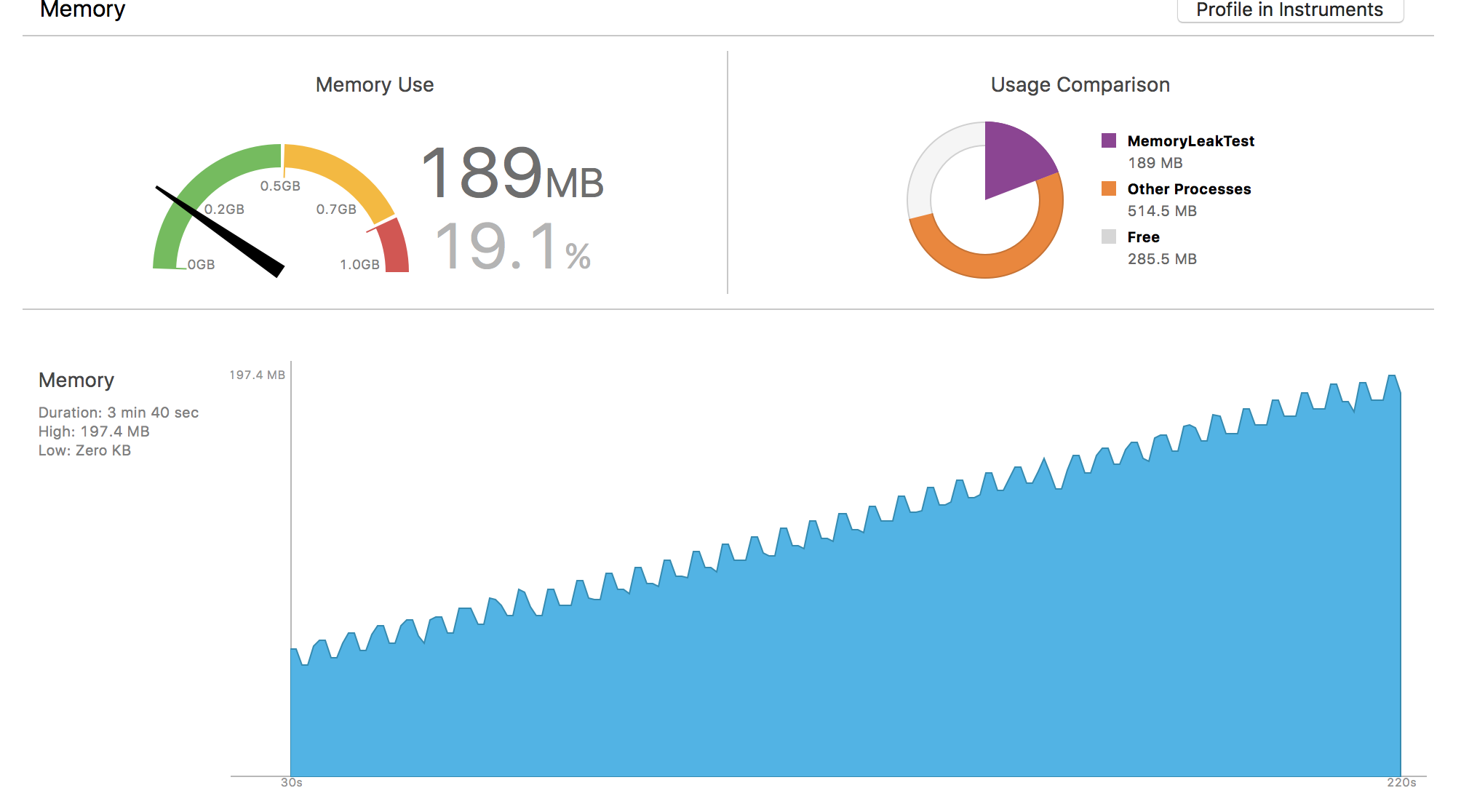
I wrote a simple component which uses a modal to show/hide the map every 2.5 seconds.
Below are two screenshots showing the memory usage from a iPhone 6 with the app running in release mode.
No GeoJSON ShapeSource:
With GeoJSON ShapeSource:
Here is a gist with the code: https://gist.github.com/stephenheron/44dd57b6e32c7a2f79e30ba73d30222d
Hope this helps!
stephenheron
on 4 Jan 2018
@stephenheron thanks for the example, really appreciate the help! I'll let you know what I discover.
nitaliano
on 4 Jan 2018
Hi @nitaliano
Sorry to be a pain but did you get a chance to look at this issue?
Thanks,
Stephen
stephenheron
on 23 Jan 2018
I too have experienced this. If I tap a feature on my map, a menu pops up allowing me to navigate to a details page for that feature. If I tap back, the memory is not released, and the ShapeSource is re-rendered, causing the memory usage to increase with every interaction with features on the map.
 atarsha
on 25 Jan 2018
atarsha
on 25 Jan 2018
The same is happening on Android emulator and physical devices.
I simplified the code to this App:
// @flow

import React, { Component } from "react";
import { Text, View } from "react-native";
import MapboxGL from "@mapbox/react-native-mapbox-gl";
import { MAP_ACCESS_TOKEN } from "./constants";

MapboxGL.setAccessToken(MAP_ACCESS_TOKEN);

class App extends Component<{}, {}> {
  state = { showMap: false };

  componentDidMount() {
    setInterval(() => this.setState(state => ({ showMap: !state.showMap })), 1000);
  }
  render() {
    return (
      <View style={{ width: "100%", height: "100%" }}>
        {this.state.showMap ? (
          <MapboxGL.MapView
            zoomLevel={15}
            centerCoordinate={[-122.4184106, 37.7771754]}
            styleURL="mapbox://styles/mapbox/satellite-v9"
            style={{ width: "100%", height: "100%" }}
          />
        ) : (
          <Text>This is a text</Text>
        )}
      </View>
    );
  }
}

export default App;
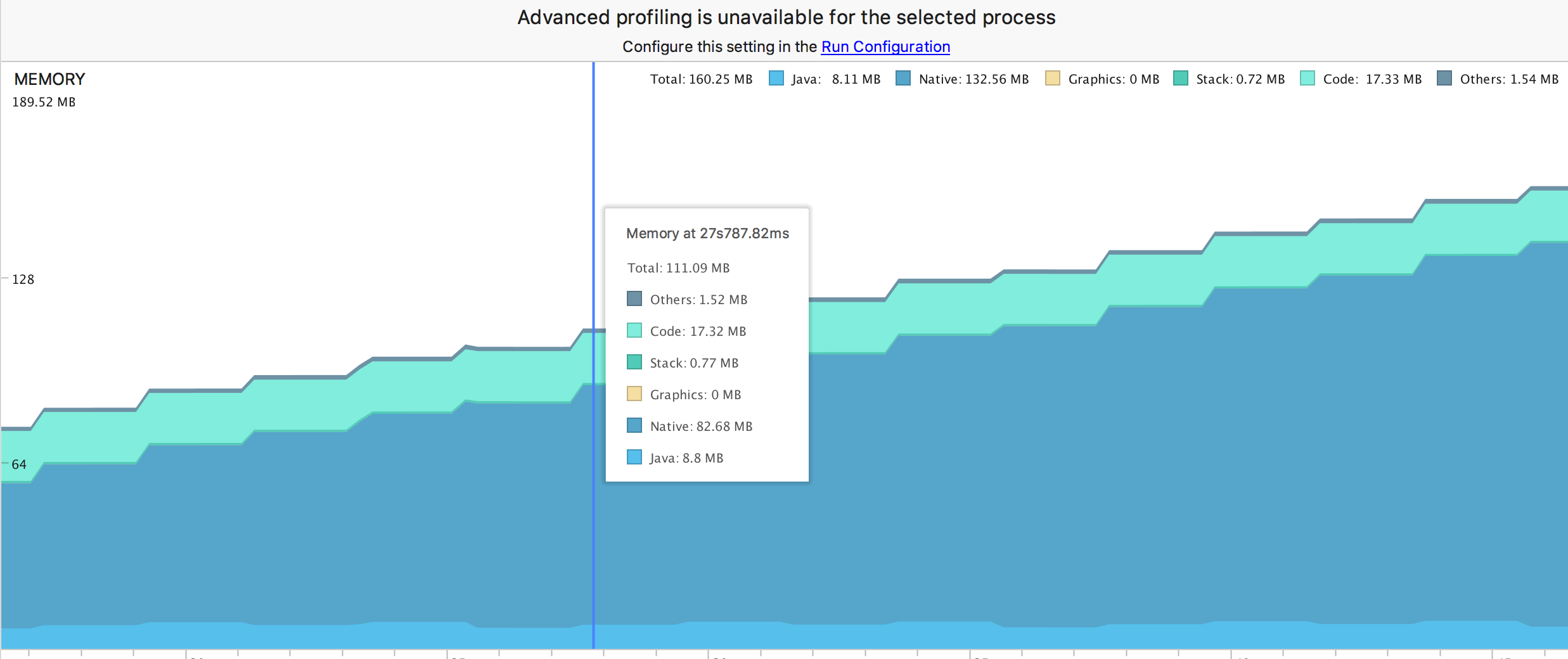
and the memory grows rapidly:
 NameFILIP
on 10 Mar 2018
NameFILIP
on 10 Mar 2018
@NameFILIP thanks for the code sample I can reproduce this, I will move this to the top of my priority list and try to get this fixed next week
nitaliano
on 10 Mar 2018
@NameFILIP I just tried to reproduce this on master which is slightly ahead of 6.1.0 and I cannot reproduce this issue there anymore.
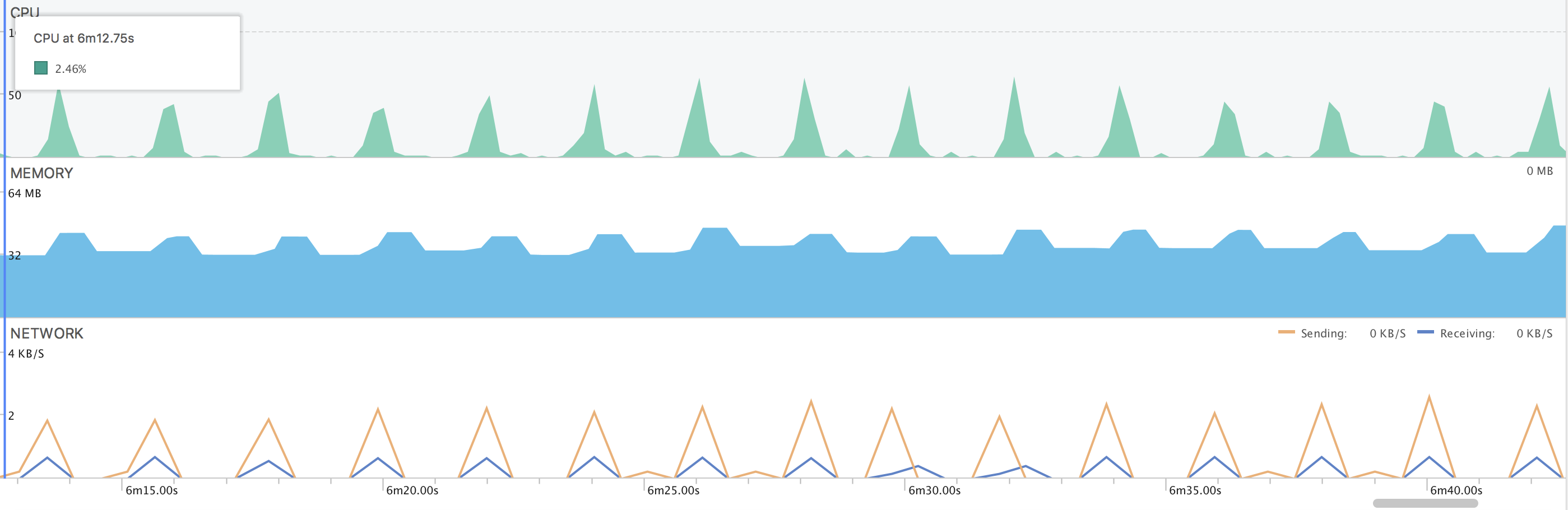
I'm seeing the memory without the map in the example application hover around 28-36 MB, going up into 40s then back down to the initial range when the map is removed.
I believe a recent PR that went it that correctly called onPause, onStop, and onDestroy is the reason why I'm not able to see this behavior anymore.
nitaliano
on 19 Mar 2018
@stephenheron I think this issue might need to be opened in gl-native when I was debugging ShapeSources being removed I'm noticing the problem exists on both Android and iOS. When debugging on Android this is the breakdown of memory that I'm seeing.

It seems that the native c++ codebase might be holding onto some memory. I also debugged to make sure that we were calling the correct methods that were needed to remove the source/layers from the map and they are being called.
nitaliano
on 19 Mar 2018
@nitaliano Thanks for digging into it. I was getting a feeling that this one might be tricky. I had a quick search in the gl-nativeproject for similar issues but I can't see anything that jumps out.
Do you wish me to open a issue in the gl-native project or would you prefer to? I am happy to raise the issue however it might be best if you open it. You probably have more experience with the native APIs than I do. :wink:
stephenheron
on 20 Mar 2018
@stephenheron yes, my next steps here will be creating fully native projects without the SDK and seeing if I can reproduce the issues, if I can I'll open the issues and post the sample repos, if not I'll have to dig into the react native codebase some more and see what I'm missing
nitaliano
on 26 Mar 2018
A fix has been merged into master for this, it was my fault on the react native side and @studyro pointed out the error and sent us a PR!
nitaliano
on 19 Apr 2018
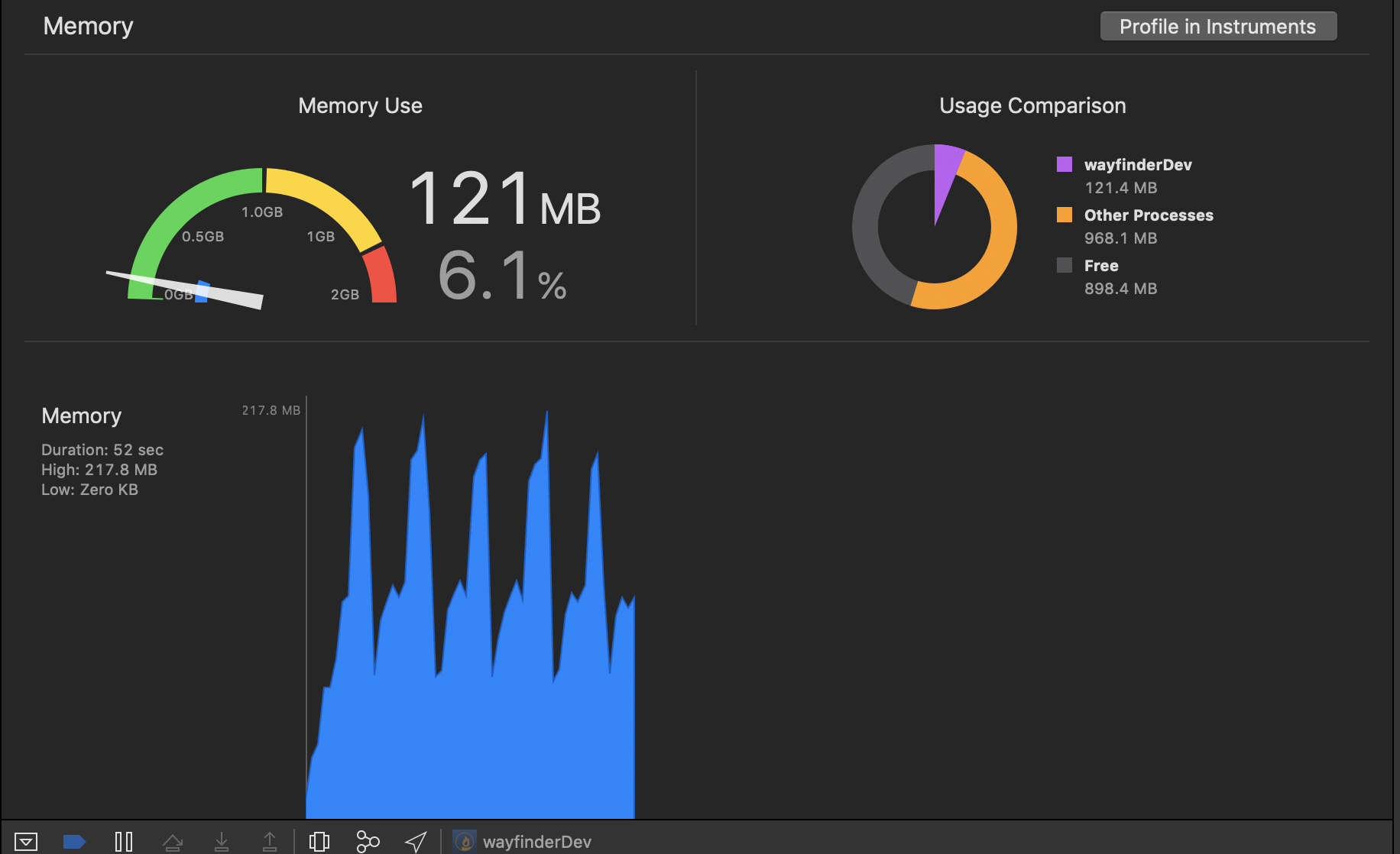
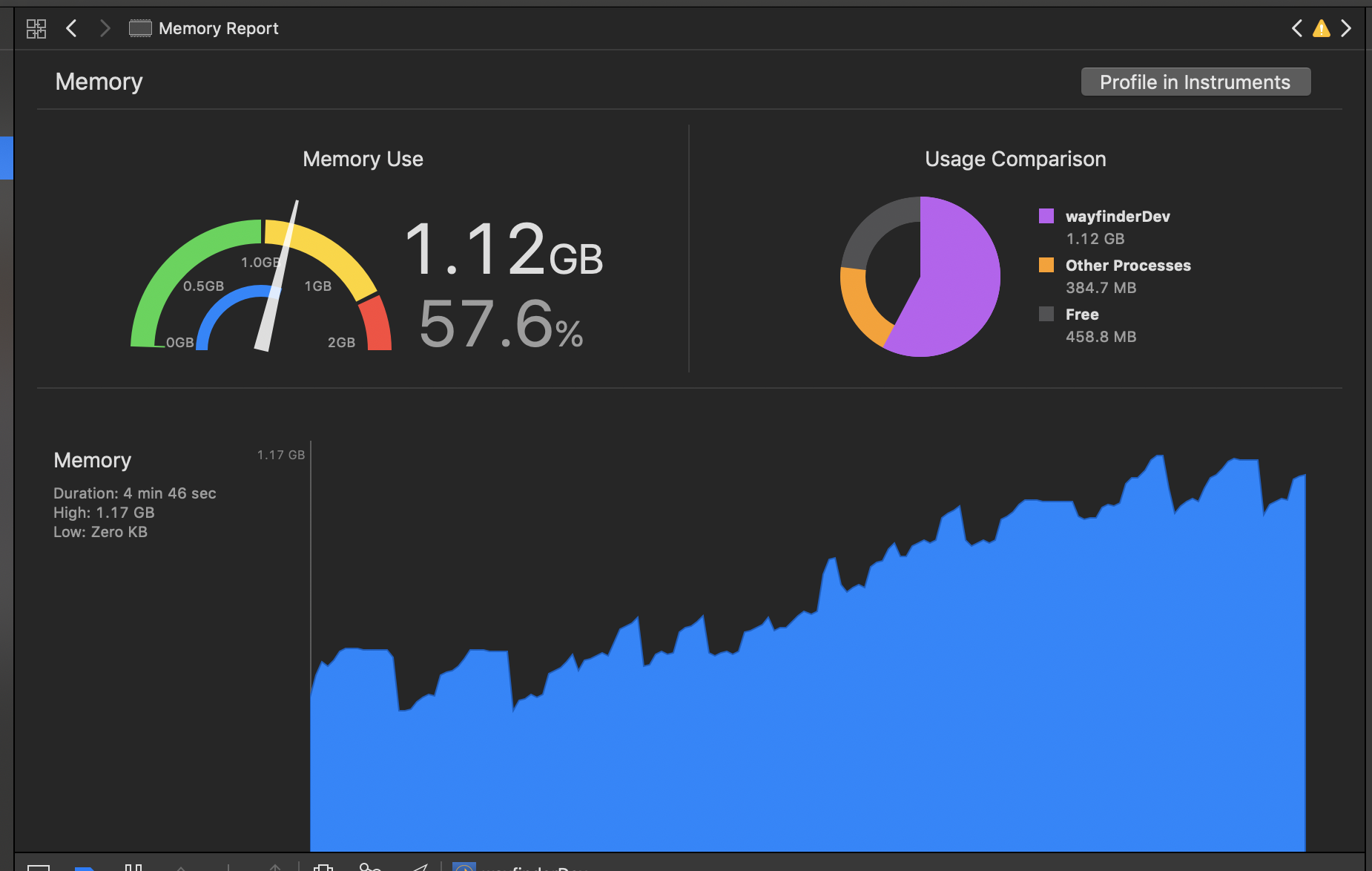
I am still seeing this issue. On Version 6.1.2.
Here is the memory usage of my app when there is no shape source. I am just loading the app then reloading the app. The memory profile looks as expected It spikes and then all memory is released when the app reloads.
Here is a profile for the same behavior when the map includes a shape source.
 L-Yeiser
on 18 Dec 2018
L-Yeiser
on 18 Dec 2018
Just created an empty app and seeing the same issue

L-Yeiser
on 19 Dec 2018
Related issues
 Craytor
·
3Comments
Craytor
·
3Comments
 Gp2mv3
·
3Comments
Gp2mv3
·
3Comments
 VentsislavDinev
·
3Comments
VentsislavDinev
·
3Comments
 EwanValentine
·
3Comments
EwanValentine
·
3Comments
 Amalp
·
3Comments
Amalp
·
3Comments
Most helpful comment
@NameFILIP thanks for the code sample I can reproduce this, I will move this to the top of my priority list and try to get this fixed next week