React-native-mapbox-gl: [iOS] The map is shifted half a screen
Possible race condition with map initialisation or something. I have come across this weird bug which I can reproduce about 50% of every app start. This is very critical bug ❗️
Here I have simple app that just shows map component on startup and the map will position itself to certain coordinates with centerCoordinate.
import React, { Component } from 'react';
import { View, Text } from 'react-native';
import Mapbox from '@mapbox/react-native-mapbox-gl';

class TestBug extends Component {
  state = { visibleBounds: undefined };

  getVisibleBounds = async () => {
    const visibleBounds = await this.map.getVisibleBounds();
    this.setState({ visibleBounds });
  };

  render() {
    const { visibleBounds } = this.state;
    return (
      <View style={{ flex: 1 }}>
        <Mapbox.MapView
          style={{ flex: 1 }}
          centerCoordinate={[24.9284942, 60.1670202]}
          zoomLevel={12}
          onDidFinishRenderingMapFully={this.getVisibleBounds}
          ref={(map) => {
            this.map = map;
          }}
        />
        <Text>
          1st corner: {visibleBounds ? `${visibleBounds[0][0]}, ${visibleBounds[0][1]}` : ''}
        </Text>
        <Text>
          2nd corner: {visibleBounds ? `${visibleBounds[1][0]}, ${visibleBounds[1][1]}` : ''}
        </Text>
      </View>
    );
  }
}

export default TestBug;
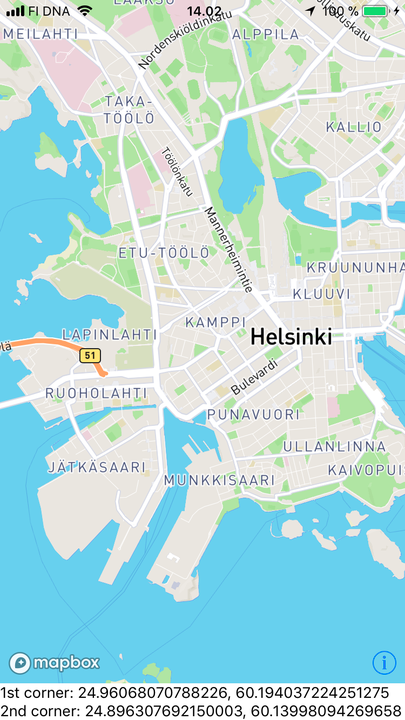
Most of the time the map will show correctly "Kamppi" in the center of the map as it should. Here is the picture of it:
But then I noticed that on some reboots it shifts the map half screens width to the left and half screens height to up. So now the "Meilahti" is at the center of the map. Here is image:
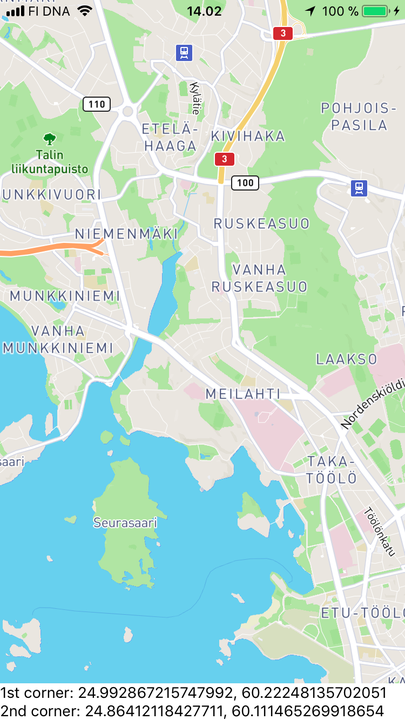
Notice from the image that "Kamppi" is peeking from bottom right corner. And this is the amount the map shifts according to the zoom level. If my zoom is closer to the streets the shift is smaller. And if zoom is far away from the streets the shift is longer.
Also one thing to notice is the differences between these images that on 2nd picture where location is shifted you can't see the Mapbox logo or info icon at the bottom. So I guess they are shifted too?
I am able to reproduce this with our app with minimum setup when I reboot the app, js refresh is not enough. You have to close the app and open it again. It comes about 50% of the time.
I tried to reproduce this on Mapbox example app with same map props etc. But I could not reproduce the bug :( Since the bug it tied randomly on app startup I guess it might have something to do with Wix's https://github.com/wix/react-native-navigation/ Because that is different between our app's startup and your example app's startup.
This bug never happened with Mapbox v5 and it started happening after we updated to Mapbox v6. Our React Native version is 0.49.0
@nitaliano Do you have any idea what could cause this? We are unable to use v6 in production until I know how to fix this :(
 henrikra
All 23 comments
Happy news!!! 🎉 I managed to do repo that reproduces this bug! It is here: https://github.com/henrikra/mapbox-shifted-map-bug
So it has to do something with react-native-navigation + react-native-mapbox-gl v6.
@nitaliano to reproduce this you need iPhone (I used iPhone 6s). Just build the project to your phone and when to app starts it shows "Kamppi" most of the time as it should. But now start rebooting the app. Dont just put it to background but actually turn the app off and start it again. Do this until you see "Meilahti" in the center. Sometimes it helps that you close the app and lock the phone and the start app again. Sometimes it can take even 15 reboots until you get the bug. This has to be some race condition with react-native-navigation
Please play around this and tell if you need more information :) Your time is very appreciated ❤️
henrikra
on 17 Nov 2017
I also made video on how to reproduce the bug with the repo: https://drive.google.com/file/d/1uAPjtq_hzRWUWL60oRoYxhywLlxULKlQ/view?usp=sharing
As you can see from the video it can take bunch of times to get the bug view since the cause must be race condition. Skip to last 20 seconds of the video if you wan't to see successful bug state.
henrikra
on 17 Nov 2017
@henrikra I'll check this out. My first guess without debugging this is since both the View and the MapView have flex=1 on them the parent of the view could be larger than the screen? Could be interesting to hard code the width and height using https://facebook.github.io/react-native/docs/dimensions.html for now and seeing if you still see the problem
 nitaliano
on 17 Nov 2017
nitaliano
on 17 Nov 2017
@henrikra I only have an iPad on hand to test with(trying to get my hands on an iPhone) and I can't reproduce it on the iPad or iPhone sim.
Update:
Found an iPhone 6s. I've tried about 100 times each on a debug and release build and it did not happen once.
One idea could be putting an onLayout callback on the View without the MapView and once it's called add the MapView as a child. It could avoid the race condition.
nitaliano
on 17 Nov 2017
Did you try to lock the iphone screen between app reboots?
henrikra
on 17 Nov 2017
Do you have an idea what those race conditions could be?
henrikra
on 17 Nov 2017
My guess is we didn't see this in v5 because the native components were not extending the MapView, so it was always rendered last which essentially stoped React lifecycle methods from working. Now we are extending the MapView so it's rendered right away, so I think it's frame related, which is why I would be curious to see if mounting the child after the onLayout will work
nitaliano
on 17 Nov 2017
I can try these hacks on monday. But I think there should be some consistent way to make this eork with react-native-navigation 🤔
henrikra
on 17 Nov 2017
I can cut you a build with some extra logging and when you reproduce you could send me those logs. That might be able to help narrow down the problem
nitaliano
on 18 Nov 2017
We can try that 👍
henrikra
on 18 Nov 2017
@nitaliano I am now ready to use your extra logging build if you want :)
Tried again this morning with my repro repo and got the error state in 5th try :(
henrikra
on 20 Nov 2017
Update:
I tried your proposal @nitaliano and I tried hard coding screen dimension in three ways:
- hard coding screen dimensions just to mapview I still got the bug 🔴
- hard coding screen dimension just to parenting View I didn't get the bug ✅ when rebooting for 15 min
- hard coding screen dimensions to mapview and it's containing view I didn't get the bug ✅ when rebooting for 15 min (this was assumed since option 2 worked)
Does this help you @nitaliano ? Also note issue I created on react-native-navigation here: https://github.com/wix/react-native-navigation/issues/2193
henrikra
on 20 Nov 2017
@henrikra commented on the ticket, if they're willing to merge in a PR and not have it sit there I'll pick it up
nitaliano
on 15 Dec 2017
Great!
henrikra
on 15 Dec 2017
I've hit the same issue it seems to happen when the map renders during a screen transition animation. In my case I ended up doing
componentDidMount() {
  InteractionManager.runAfterInteractions(() =>
    this.setState({ renderMap: true }),
  );
}
to make sure the map only renders once the screen transition is finished. This is not ideal and would be nice to figure out the actual issue.
 janicduplessis
on 20 Jan 2018
janicduplessis
on 20 Jan 2018
Notice this issue when upgrading from react-native 0.52.2 to 0.53.0 today (downgraded and the issue went away).
We have the same issue as here https://github.com/wix/react-native-navigation/issues/2193 but are not using the react-native-navigation component. Is there any recommended way to handle this without hardcoding the parent dimensions (instead of flex: 1)?
Thanks!
 EricPKerr
on 6 Feb 2018
EricPKerr
on 6 Feb 2018
Check here it seems related
https://github.com/mapbox/react-native-mapbox-gl/issues/1027#issuecomment-366386979
This PR seems to solve the issue for me https://github.com/mapbox/react-native-mapbox-gl/pull/1050
 mtt87
on 19 Feb 2018
mtt87
on 19 Feb 2018
@henrikra I just realized that this ticket is referring to iOS not Android, this PR that was just merged into master should fix the problem https://github.com/mapbox/react-native-mapbox-gl/pull/1050 mind verifying and closing if so?
nitaliano
on 19 Feb 2018
FYI I think I'm also seeing this issue when wrapping a MapView inside of a Modal (but I haven't isolated the issue yet)
 savv
on 3 Mar 2018
savv
on 3 Mar 2018
@savvopoulos try 6.1.0-beta it has a fix for this issue
nitaliano
on 3 Mar 2018
Didn't fix it for me. So far there are two things necessary for the bug to appear:
- presence of modal
- setting centerLat/centerLng based on the result of onRegionDidChange
(without either, it works fine)
This leads me to believe that there is a bug inside of onRegionDidChange, which is triggered when the MapView is inside a modal.
savv
on 3 Mar 2018
Would you mind posting some code? The example application is using the modal and I haven't run into the issue. I can copy and paste it there and see what happens
nitaliano
on 4 Mar 2018
Closing this out this is fixed in 6.1.0
nitaliano
on 12 Mar 2018
Related issues
 lernerbot
·
3Comments
lernerbot
·
3Comments
 Gp2mv3
·
3Comments
Gp2mv3
·
3Comments
 madroneropaulo
·
4Comments
madroneropaulo
·
4Comments
 digitaldavenyc
·
4Comments
digitaldavenyc
·
4Comments
 EwanValentine
·
3Comments
EwanValentine
·
3Comments
Most helpful comment
Notice this issue when upgrading from
react-native0.52.2 to 0.53.0 today (downgraded and the issue went away).We have the same issue as here https://github.com/wix/react-native-navigation/issues/2193 but are not using the
react-native-navigationcomponent. Is there any recommended way to handle this without hardcoding the parent dimensions (instead offlex: 1)?Thanks!