React-native-keychain: Touch ID prompt not showing when using accessControl on emulator
async componentDidMount() {

    await Keychain.resetGenericPassword();


      await Keychain.setGenericPassword('username', 'secret', {
        accessControl: Keychain.ACCESS_CONTROL.BIOMETRY_ANY_OR_DEVICE_PASSCODE
      });

    var privateKey = await Keychain.getGenericPassword();

    console.log(privateKey)


  }
The app is able to set and grab a set of credentials without any biometric or passcode authentication. What am I doing wrong here?
 waseemshahwan
All 3 comments
This is a limitation of the simulator, try it on a real device instead :-)
 oblador
on 2 Mar 2018
oblador
on 2 Mar 2018
Hmm, unfortunate. Closing.
waseemshahwan
on 10 Mar 2018
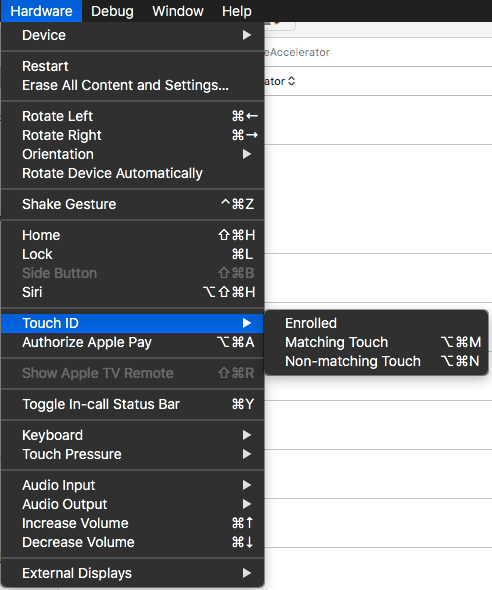
You can also make sure on your simulator that you are Enrolled for Touch ID so it prompts you for fingerprint - worked for me.
 jpmonette
on 10 Apr 2018
jpmonette
on 10 Apr 2018
👎4
😕2
Was this page helpful?
0 / 5 - 0 ratings
Related issues
 chenxsan
·
5Comments
chenxsan
·
5Comments
 activebiz
·
6Comments
activebiz
·
6Comments
 retailos
·
4Comments
retailos
·
4Comments
 pdoggi
·
4Comments
pdoggi
·
4Comments
 coderscode2
·
7Comments
coderscode2
·
7Comments