React-native-keyboard-aware-scroll-view: extraScrollHeight issues
Hey, guys.
I found a bug when you have a button at the bottom of the form.
Typically, you don't want your user to dismiss keyboard and only then show a "send" button, right?
That's is the use case of extraScrollHeight, so the user can enter values and submit the form.
Below I uploaded a gif showing that works as expected, but it causes two bugs:
1) if you scroll while the keyboard is opened, it adds empty space and the bottom.
2) after keyboard is dismissed, the same empty space is there.
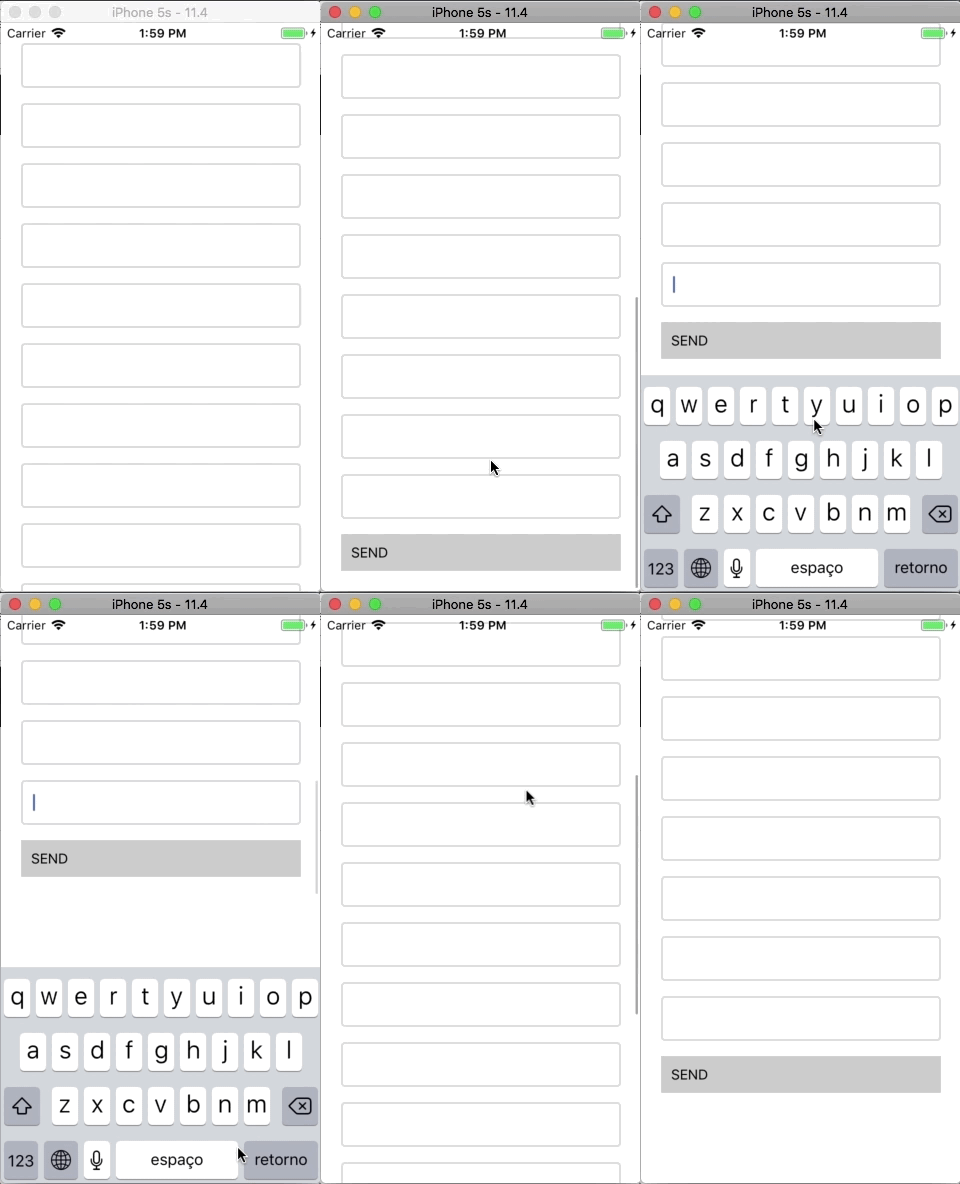
Code:
render() {
    return (
        <KeyboardAwareScrollView extraScrollHeight={70}>
            <View style={{ padding: 20 }}>
                <TextInput />
                <TextInput />
                <TextInput />
                <TextInput />
                <TextInput />
                <TextInput />
                <TextInput />
                <TextInput />
                <TextInput />
                <TextInput />
                <TextInput />
                <TextInput />
                <TextInput />
                <TextInput />
                <TextInput />
                <TextInput />
                <TextInput />
                <TouchableOpacity>
                    <View style={{ padding: 10, backgroundColor: '#ccc' }}>
                        <Text>SEND</Text>
                    </View>
                </TouchableOpacity>
            </View>
        </KeyboardAwareScrollView>
    );
}
 diegolmello
All 12 comments
same issue
 hiradary
on 12 Aug 2018
hiradary
on 12 Aug 2018
same issue +1
 yongching
on 13 Aug 2018
yongching
on 13 Aug 2018
Same for me here, work perfectly when keyboard is open. But this height left make the view not so pleasant.
 EQuimper
on 24 Aug 2018
EQuimper
on 24 Aug 2018
same issue +1, would be great if this could get patched up
 McMainsLiam
on 11 Sep 2018
McMainsLiam
on 11 Sep 2018
I'm facing the same issue. After the keyboard hides, there is a gap at the bottom.
 AaronDRS
on 12 Oct 2018
AaronDRS
on 12 Oct 2018
It's working now. It was an animation not updating the right time causing wrong values in my UI, my bad.
I don't have any issues with the package.
AaronDRS
on 18 Oct 2018
I have bottom empty space, it cause extraScrollHeight
"react-native-keyboard-aware-scroll-view": "^0.8.0",
"react-native": "0.55.4",

 andrej-kuznetsov
on 26 Jan 2019
andrej-kuznetsov
on 26 Jan 2019
same issue
 IsharaHansaka
on 28 Feb 2019
IsharaHansaka
on 28 Feb 2019
@alvaromb Hey is it possible to re-open this? I believe this is still an issue
 NathanDsouza
on 18 Apr 2019
NathanDsouza
on 18 Apr 2019
I'm convinced this is linked to a bug in the implementation of extraScrollHeight.
In the meantime someone found the issue, I found a way to bypass it :
render() {
    return (
        <KeyboardAwareScrollView
          onKeyboardWillShow={() => {
            this.setState({extraScrollHeight: 70});
          }}
          onKeyboardWillHide={() => {
            this.setState({extraScrollHeight: 0});
          }}
          extraScrollHeight={this.state.extraScrollHeight}>
            <View style={{ padding: 20 }}>
                <TextInput />
                ...
                <TextInput />
                <TextInput />
                <TouchableOpacity>
                    <View style={{ padding: 10, backgroundColor: '#ccc' }}>
                        <Text>SEND</Text>
                    </View>
                </TouchableOpacity>
            </View>
        </KeyboardAwareScrollView>
    );
}
 balzdur
on 16 Dec 2019
balzdur
on 16 Dec 2019
same issue. both android & iOS.
 Donhv
on 6 Jan 2020
Donhv
on 6 Jan 2020
This may be an issue related to the bottom tab bar. I fixed it by getting the height of the tab bar on app load, saving it to state in a context, then setting the extraScrollHeight to the negative of the tab bar height.
// Context

const [tabBarHeight, setTabBarHeight] = useState<TabBarHeight>(null)

const updateTabBarHeight = (nextTabBarHeight: TabBarHeight): void => {
  setTabBarHeight(nextTabBarHeight)
}
// Tab Bar

const { updateTabBarHeight } = useLayoutContext()

const handleOnLayout = (event: LayoutChangeEvent): void => {
  const { height } = event.nativeEvent.layout
  updateTabBarHeight(height)
}

return (
  <View
    style={{
      ...style.tabBarContainer,
      paddingBottom: insets.bottom + Sizing.x10,
    }}
    onLayout={handleOnLayout}
  >
    {tabs.map(toTabButton)}
  </View>
)


md5-c2521f7a330728f897244553a5f189df


// View

<KeyboardAwareScrollView
  style={style.innerFiltersContainer}
  contentContainerStyle={style.innerFiltersContentContainer}
  alwaysBounceVertical={false}
  extraScrollHeight={tabBarHeight ? -tabBarHeight : 0}
>
 devinjameson
on 11 Feb 2021
devinjameson
on 11 Feb 2021
Related issues
 MyGuySi
·
3Comments
MyGuySi
·
3Comments
 TylerNRobertson
·
4Comments
TylerNRobertson
·
4Comments
 KevRyan2
·
4Comments
KevRyan2
·
4Comments
 EdwardDrapkin
·
4Comments
EdwardDrapkin
·
4Comments
 RBrNx
·
4Comments
RBrNx
·
4Comments
Most helpful comment
same issue. both android & iOS.