React-native-keyboard-aware-scroll-view: Bug on focus on two fields in sequence...
How can I solve this problem?
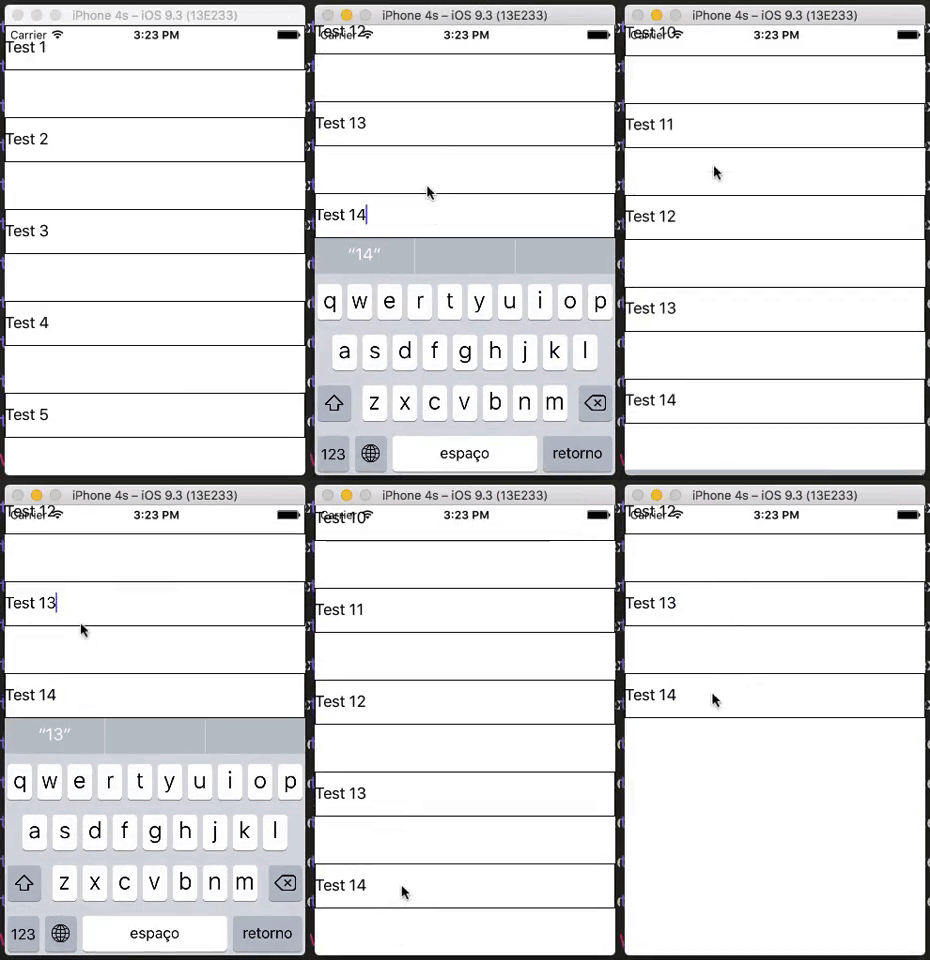
Code:
'use strict';

import React, { Component } from 'react';
import { KeyboardAwareScrollView } from 'react-native-keyboard-aware-scroll-view';

import {
  ScrollView,
  View,
  StyleSheet,
  TextInput,
} from 'react-native';

export default class AppSuperMuffato extends Component {

 constructor(props) {
    super(props);
  }

  render() {
    return(
          <KeyboardAwareScrollView keyboardDismissMode="on-drag" showsVerticalScrollIndicator={false} enableResetScrollToCoords={true} extraHeight={0} ref='scroll'>
            <View>
              <TextInput defaultValue="Test 1" style={styles.textInput}/>

              <TextInput defaultValue="Test 2" style={styles.textInput}/>

              <TextInput defaultValue="Test 3" style={styles.textInput}/>

              <TextInput defaultValue="Test 4" style={styles.textInput}/>

              <TextInput defaultValue="Test 5" style={styles.textInput}/>

              <TextInput defaultValue="Test 6" style={styles.textInput}/>

              <TextInput defaultValue="Test 7" style={styles.textInput}/>

              <TextInput defaultValue="Test 8" style={styles.textInput}/>

              <TextInput defaultValue="Test 9" style={styles.textInput}/>

              <TextInput defaultValue="Test 10" style={styles.textInput}/>

              <TextInput defaultValue="Test 11" style={styles.textInput}/>

              <TextInput defaultValue="Test 12" style={styles.textInput}/>

              <TextInput defaultValue="Test 13" style={styles.textInput}/>

              <TextInput defaultValue="Test 14" style={styles.textInput}/>
            </View>
          </KeyboardAwareScrollView>
    );
  }
};

const styles = StyleSheet.create({
  wrapperInner: {
    backgroundColor: '#fff'
  },
  container: {
    paddingTop: 60,
    paddingLeft: 10,
    paddingRight: 10,
    backgroundColor: '#fff',
  },
  title: {
    color: '#000',
    marginBottom: 10,
    fontSize: 16,
    fontWeight: 'bold',
  },
  formGroup: {
    marginBottom: 10,
  },
  textInput: {
    borderWidth: 1,
    height: 48,
    marginBottom: 50,
  }
});
 diegorodriguesvieira
👍1
All 4 comments
Hi @diegorodriguesvieira!
Which problem?
 alvaromb
on 23 Feb 2017
alvaromb
on 23 Feb 2017
@alvaromb
If you focus on one field, then focus on another field, a blank space is created.
But if you focus on a field and then click outside the field, the white space is not created.
diegorodriguesvieira
on 23 Feb 2017
How do you feel about sending a PR @diegorodriguesvieira? 😸
I'm super busy at the moment.
alvaromb
on 27 Feb 2017
alvaromb
on 29 Mar 2017
❤1
🎉1
👍1
Was this page helpful?
0 / 5 - 0 ratings
Related issues
 json469
·
3Comments
json469
·
3Comments
 yasaricli
·
3Comments
yasaricli
·
3Comments
 snksergio
·
3Comments
snksergio
·
3Comments
 pinkladywithcoco
·
3Comments
pinkladywithcoco
·
3Comments
 gkrinc
·
3Comments
gkrinc
·
3Comments
Most helpful comment
https://github.com/APSL/react-native-keyboard-aware-scroll-view/releases/tag/v0.2.8