React-native-intercom: Readme instructions for iOS doesn't work
The current installation instructions for iOS in the README suggests installing the package, then linking it with react-native link, and finally adding
pod 'react-native-intercom', :path => '../node_modules/react-native-intercom'
to your Cocoapods Podfile. This does not work. It leads to RCTBridgeModule.h not found errors on IntercomWrapper.h when building your project.
I'm not an expert in Cocoapods but I suspect the reason why the README suggests adding react-native-intercom to the Podfile is so that the podspec can add Intercom official pod as a dependency. However that same podspec also tells xcode to build all the iOS source code for this library.
In other words, the iOS source code for react-native-intercom is being added to the project twice, by react-native link and by Cocoapods. The cocoapods one fails because it can't find the RCT* header files.
What worked for us on a blank new project was to:
yarn add react-native-intercomreact-native link react-native-intercom- Add
pod 'Intercom', '> 3'to your Podfile. This only adds the source code for the Intercom's official ios library, and not the the code for react-native-intercom which is already linked to our project.
If one of the maintainers of the project could confirm these guesses are correct I'll be happy to send a PR for the readme :).
 javiercr
All 18 comments
Passing by and saw this issue. I believe you would only use the pod 'react-native-intercom' if you were also importing React in your podfile, per: https://facebook.github.io/react-native/docs/integration-with-existing-apps.html#configuring-cocoapods-dependencies
If you aren't importing React with your podfile, then you won't be able to link the react-native-intercom files either, which is the behavior you are seeing. Docs could use an update, but I think it is slowly being learned by the community that there are two ways to import React into your IOS projects, and there are intricacies to either method.
 seanadkinson
on 19 Sep 2017
seanadkinson
on 19 Sep 2017
You're right, but I think is quite common nowadays to have RN projects where you link libraries with react-native link but still use cocoapods for other stuff (such as the Facebook SDK), while not using the React pod itself.
Another confusing thing is that while the React pod from cocoapods repo is deprecated, the React.podspec from react-native npm package it is not. The correct way to include React with cocoapods is described in the RN official docs.
Regarding this library I think the REDME could be a little more "noob friendly" and explain this things. What do you guys think?
javiercr
on 19 Sep 2017
@javiercr would be great to add this to a PR for the reademe file. @seanadkinson are you saying we should use pod for react-native-intercom as well and not the react-native link method? if we are importing React with subspecs in our podfile? This may explain why I have not been able to get this package up and running at all.
 stueynet
on 3 Oct 2017
stueynet
on 3 Oct 2017
@stueynet If importing React and subspecs in your podfile, then also import react-native-intercom using your podfile, and NOT using react-native link. If not using React in your podfile though (which I am not currently) then you need to react-native link the library, and also add the Intercom dependency one way or another (which I DO have in my podfile). Hope that helps! Docs could definitely use an update, just haven't gotten around to contributing it.
seanadkinson
on 4 Oct 2017
Thanks @seanadkinson. Tried again fresh branch and using pod method instead. Still get this when building from command line.

And I get this error in xcode: ld: framework not found Intercom
clang: error: linker command failed with exit code 1 (use -v to see invocation)
stueynet
on 5 Oct 2017
Did you add pod 'Intercom' to your podfile?
Also, make sure libRNIntercom.a is listed in the "Linked Frameworks and Libraries" section of your target app.
seanadkinson
on 5 Oct 2017
Ok added that as well to the podfile. Though even without Intercom was being installed anyway. However libRNIntercom.a is not available to add to my linked frameworks. libreact-native-intercom.a is however available but I tried adding that instead and still have the same errors.
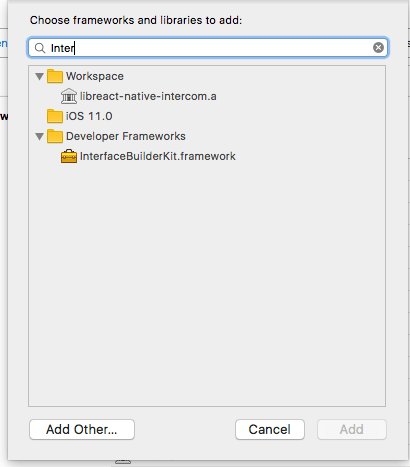
stueynet
on 5 Oct 2017
Did you react-native link react-native-intercom already? If so, you should be able to find libRNIntercom.a in the explorer:
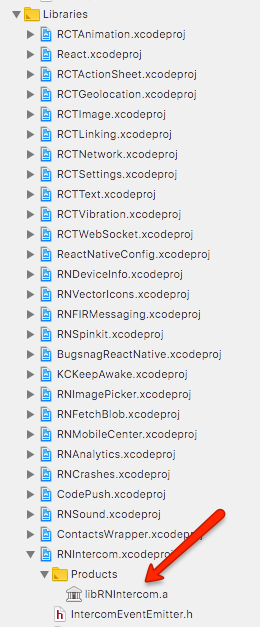
seanadkinson
on 6 Oct 2017
Ok last instruction was to not run link. But will try that and let you know.
On Oct 5, 2017, at 7:21 PM, seanadkinson notifications@github.com wrote:
Did you react-native link react-native-intercom already? If so, you should be able to find libRNIntercom.a in the explorer:
—
You are receiving this because you were mentioned.
Reply to this email directly, view it on GitHub, or mute the thread.
stueynet
on 6 Oct 2017
Same issue even with link being run:
ld: framework not found Intercom
clang: error: linker command failed with exit code 1 (use -v to see invocation)
Also looking in my link frameworks section the file icon looks different than yours:

stueynet
on 6 Oct 2017
Try deleting that one, and re-dragging libRNIntercom back into the list. Sometimes it gets a stale reference.
But it's not complaining about RNIntercom, it's complaining about Intercom. Are you sure you have Intercom in your Podfile, and that you've run pod install or pod update?
seanadkinson
on 10 Oct 2017
Ok now have done it all. Cleaned up the linking of libRNIntercom and still the same issue:
ld: framework not found Intercom
clang: error: linker command failed with exit code 1 (use -v to see invocation)
No clue what the next steps would be. I have reached out to Intercom for now.
stueynet
on 11 Oct 2017
Hi @seanadkinson. So the only solution was to Download the Intercom IOS SDK zip as per the Intercom IOS install instructions and drag intercom.framework into embedded binaries. Obviously this is not the ideal solution given updates to the SDK. Any other setup and we would get framework not found.
stueynet
on 1 Nov 2017
Not sure if this is related, but I have an installation problem too (after upgrade). I believe it is related that the libIntercom tries to run code that exists inside the Intercom which comes afterwards with pod? Not sure how this works, I just did what the instructions say. See issue here: https://github.com/tinycreative/react-native-intercom/issues/142
 afilp
on 4 Nov 2017
afilp
on 4 Nov 2017
@javiercr @afilp anyone found the solution for this ?
 bsjaffer
on 12 Mar 2018
bsjaffer
on 12 Mar 2018
@bsjaffer With https://github.com/tinycreative/react-native-intercom/pull/162, you can now place Intercom.framework in the following folder ~/Documents/Intercom. It works for me 😊
 LeoLeBras
on 12 Mar 2018
LeoLeBras
on 12 Mar 2018
It seems like this is a well-known problem. Curious, have any of the maintainers come across this issue? From my end, no matter what I try, I run into this issue.
 ryanmargheriti
on 9 Aug 2018
ryanmargheriti
on 9 Aug 2018
Install manually to make it work!
https://developers.intercom.com/installing-intercom/docs/ios-installation#section-option-3-install-intercom-manually
 ngothanhtai
on 8 Mar 2019
ngothanhtai
on 8 Mar 2019
Related issues
 klamping
·
11Comments
klamping
·
11Comments
 forsen
·
5Comments
forsen
·
5Comments
 elnygren
·
10Comments
elnygren
·
10Comments
 felippepuhle
·
9Comments
felippepuhle
·
9Comments
 aditibarbhai
·
6Comments
aditibarbhai
·
6Comments