React-native-interactable: Interactable View not found in the UIManager?
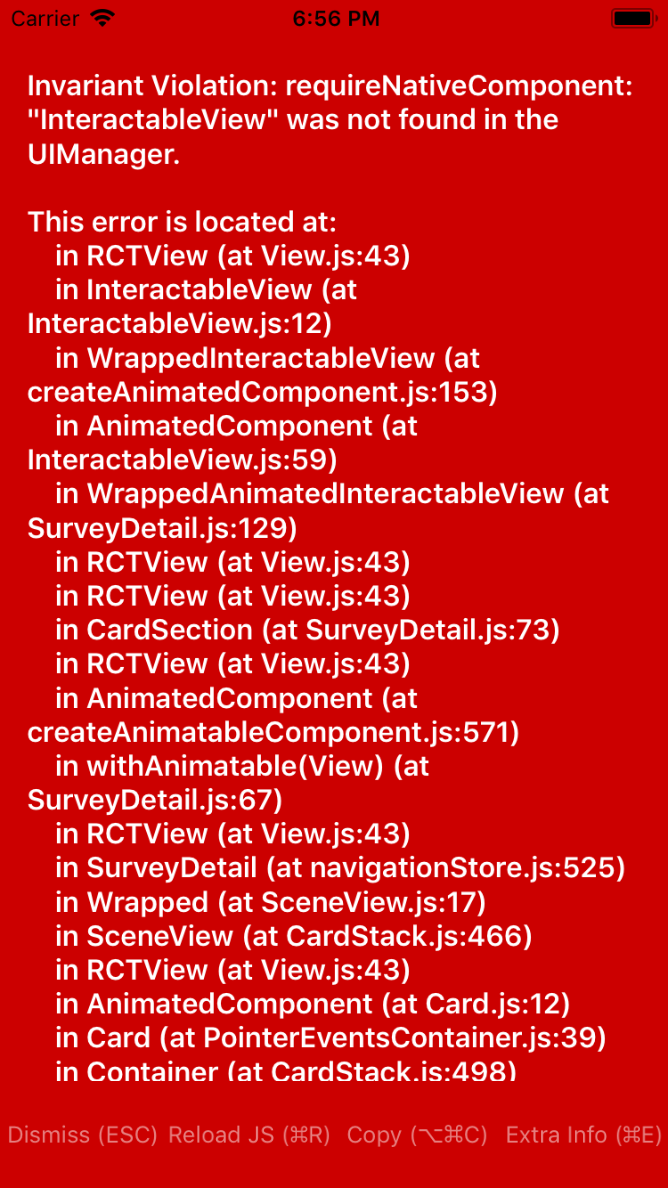
Anyone have any idea how this could be fixed? I installed and linked the package as instructed, and I've imported Interactable into my project. Not sure why this is showing up.
 baiyuli
All 16 comments
I have facing same issue. Any solution ?
 Vishalgwebs
on 13 Sep 2018
Vishalgwebs
on 13 Sep 2018
What are your RN versions _etc_?
 oVerde
on 27 Sep 2018
oVerde
on 27 Sep 2018
Me too... trying to build for iOS.
This is my package.json
├── @babel/[email protected]
├── @babel/[email protected]
├── [email protected]
├── [email protected]
├── [email protected]
├── [email protected] extraneous
├── [email protected]
├── [email protected]
├── [email protected]
├── [email protected]
├── [email protected]
├── [email protected]
├── [email protected]
├── [email protected]
├── [email protected]
├── [email protected]
├── [email protected]
└── [email protected]
 mtzfactory
on 7 Oct 2018
mtzfactory
on 7 Oct 2018
Facing same issue bud!
 ashutoshtrack
on 15 Oct 2018
ashutoshtrack
on 15 Oct 2018
Got this issues on android as well
 anhanh
on 20 Oct 2018
anhanh
on 20 Oct 2018
For android: You need to link react-native-interactable
add in /android/settings.gradle: //Make sure the path is correct in node_modules, it might change due to version
include ':react-native-interactable'
project(':react-native-interactable').projectDir = new File(rootProject.projectDir, '../node_modules/react-native-interactable/lib/android')
add in /android/app/build.gradle:
dependencies {
    implementation fileTree(dir: "libs", include: ["*.jar"])
...
    implementation project(path: ':react-native-interactable')
}
In MainApplication.java import and instantiate Iteractable.
import com.wix.interactable.Interactable;
...
protected List<ReactPackage> getPackages() {
        // Add additional packages you require here
        // No need to add RnnPackage and MainReactPackage
        return Arrays.<ReactPackage>asList(
            new Interactable()
            // eg. new VectorIconsPackage()
        );
    }
 leojle
on 24 Oct 2018
leojle
on 24 Oct 2018
same me on iOS. any solution?
 phonganhhung9xtb
on 31 Oct 2018
phonganhhung9xtb
on 31 Oct 2018
@phonganhhung9xtb what I did for IOs was to link (react-native link react-native-interactable) the lib and then did this
Manually link via Cocoa Pods (iOS)
Add the following to your Podfile and run pod update:
pod 'Interactable', :path => '../node_modules/react-native-interactable'
leojle
on 31 Oct 2018
@phonganhhung9xtb what I did for IOs was to link (react-native link react-native-interactable) the lib and then did this
Manually link via Cocoa Pods (iOS)
Add the following to your Podfile and run pod update:
pod 'Interactable', :path => '../node_modules/react-native-interactable'
yes! i just resolve it as your way :)) thank anyway!
phonganhhung9xtb
on 31 Oct 2018
How to fix this in expo?
 parthv21
on 26 Jan 2019
parthv21
on 26 Jan 2019
Got this issues on android as well. @leojle, your android solution doesnt fix it.
 valhallaferrer
on 28 Jan 2019
valhallaferrer
on 28 Jan 2019
I'm getting the same error too.. This all didn't fixed Android problem.
 tassoruas
on 30 Jan 2019
tassoruas
on 30 Jan 2019
How to fix this in expo?
You will need to eject from Expo.
Expo does not allow 'linking'.
I hope it helps who are using Expo.
 AlexandreLage
on 4 Jun 2019
AlexandreLage
on 4 Jun 2019
How to fix this in expo?
You have any solution for this error in Expo.I am new to expo.
 marikani
on 19 Sep 2019
marikani
on 19 Sep 2019
in the version I'm using 0.62.2 it's working, follow the manual link as below:
version "react-native-interactable": "^2.0.1"
android/app/build.gradle > dependencies
implementation "com.facebook.react:react-native:+" // From node_modules
// https://github.com/wix/react-native-interactable
implementation project(path: ":react-native-interactable") <-- Add this lineandroid/settings.gradle
rootProject.name = 'yourappname'
apply from: file("../node_modules/@react-native-community/cli-platform->
android/native_modules.gradle"); applyNativeModulesSettingsGradle(settings)include ':react-native-interactable' <-- Add this line
project(':react-native-interactable').projectDir = new File(rootProject.projectDir,
'../node_modules/react-native-interactable/lib/android') <-- Add this lineinclude ':app'
3.android/app/src/main/java/.../MainApplication.java
import com.wix.interactable.Interactable; <-- Add this line
// Packages that cannot be autolinked yet can be added manually here, for example:
// packages.add(new MyReactNativePackage());
packages.add(new Interactable()); <-- Add this line
I hope for you too
 DanleyCr7
on 31 May 2020
DanleyCr7
on 31 May 2020
As @DanleyCr7 specified, you have to manually link the library. Follow his instructions.
 Kouznetsov
on 18 Sep 2020
Kouznetsov
on 18 Sep 2020
Related issues
 addingama
·
7Comments
addingama
·
7Comments
 elanpang
·
5Comments
elanpang
·
5Comments
 jp928
·
4Comments
jp928
·
4Comments
 iremlopsum
·
7Comments
iremlopsum
·
7Comments
 sewerrat
·
7Comments
sewerrat
·
7Comments
Most helpful comment
For android: You need to link react-native-interactable
add in /android/settings.gradle: //Make sure the path is correct in node_modules, it might change due to version
add in /android/app/build.gradle:
In MainApplication.java import and instantiate Iteractable.