React-native-interactable: postinstall does not run as expected on ubuntu
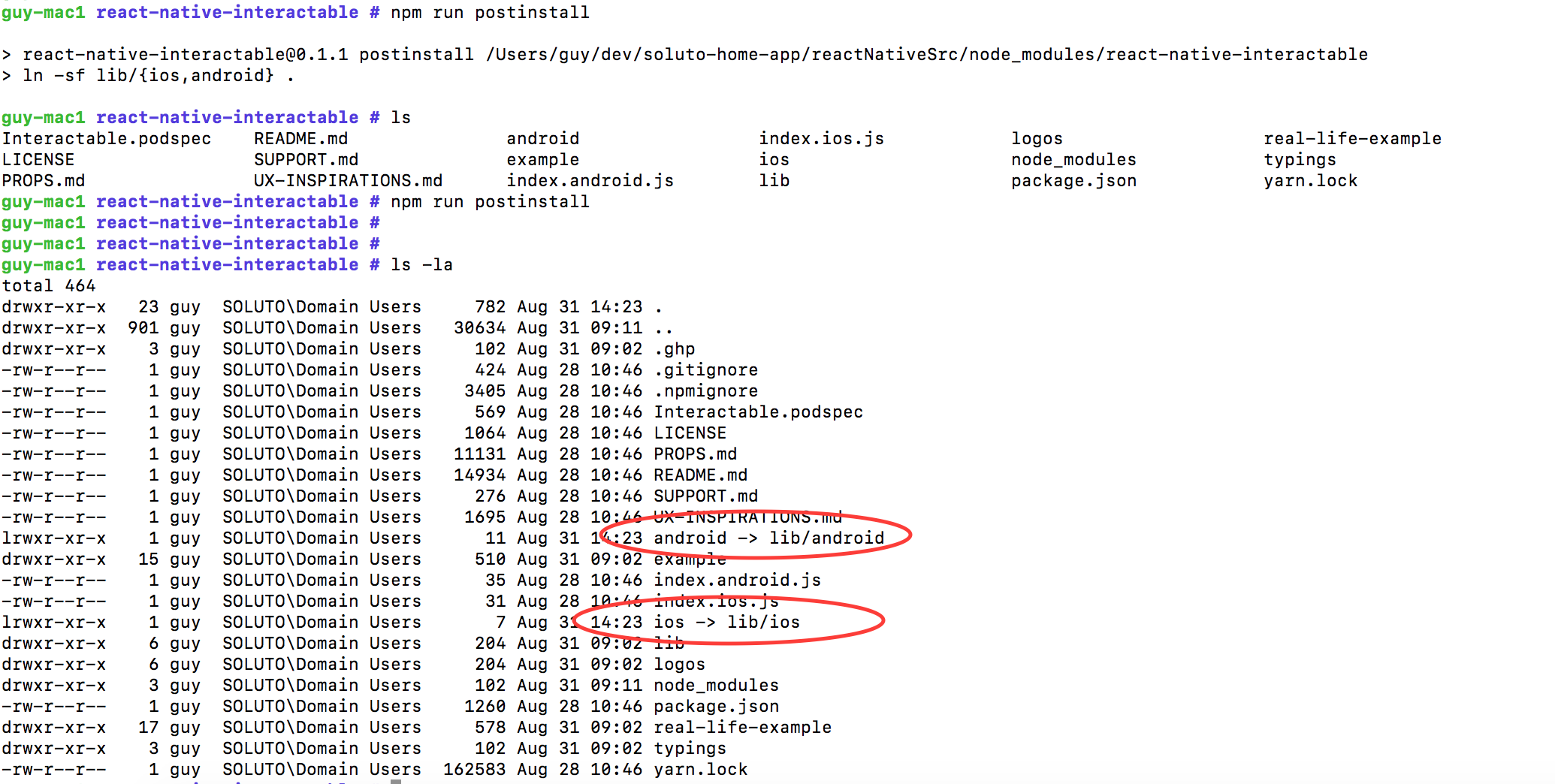
The postinstall script basically creates the symlinks:
android -> lib/android
ios -> lib/ios
This is the result of running it in OSX:
This is the result of running it in Ubuntu:
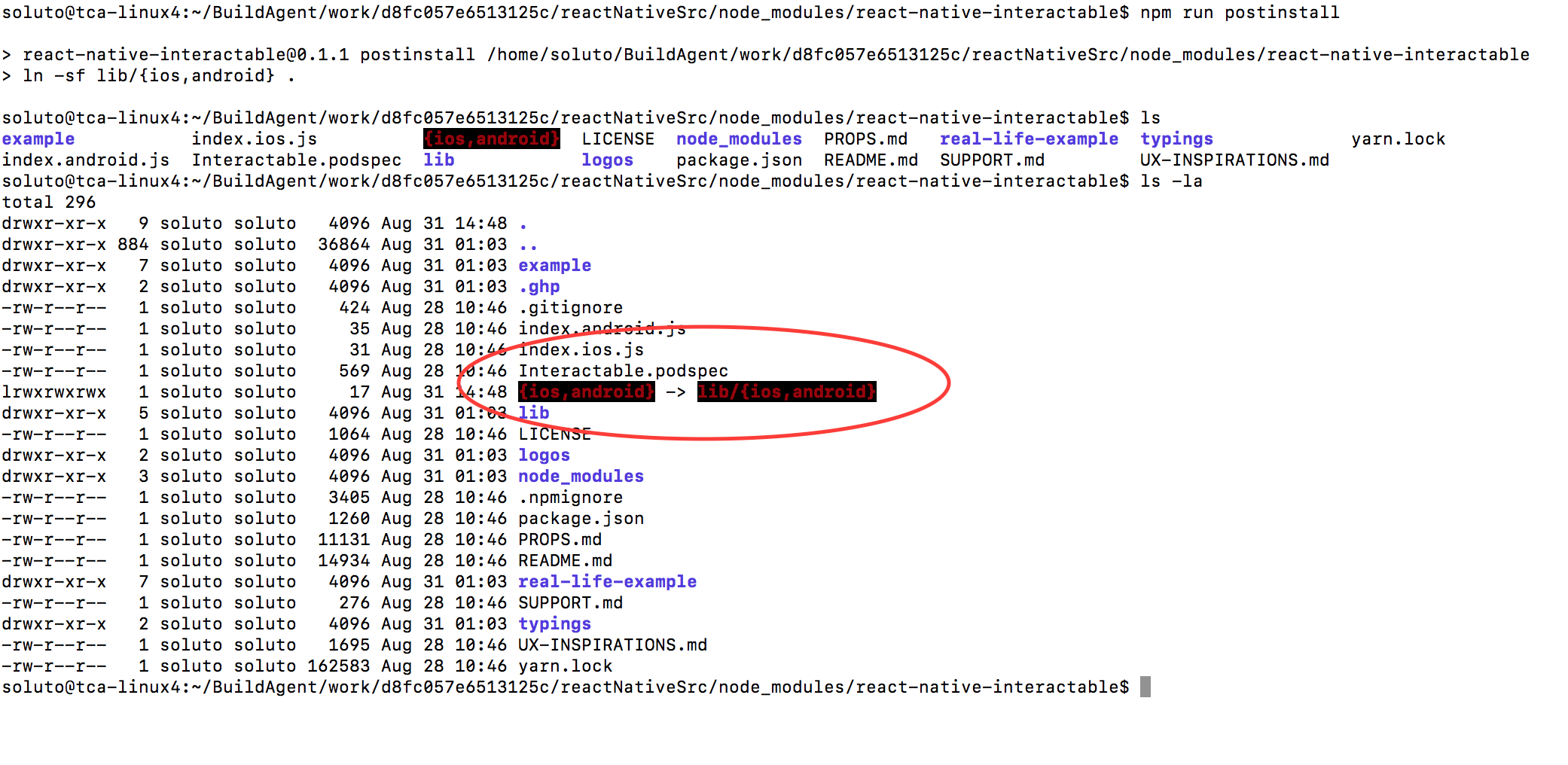
Trying to navigate in Ubuntu to ios or android library will not work.
It's important to mention that running ln -sf lib/{ios,android} . directly will work as expected:

 guysegal
All 21 comments
I had the same issue.
The problem is that the postinstall script uses a specific bash feature called expansion, but by default npm uses dash and not bash (on Ubuntu):
https://github.com/travis-ci/travis-ci/issues/3963
A temporary fix is to set npm script-shell using:
npm config set script-shell "/bin/bash" or something similar (I'm using zshell so I ran npm config set script-shell "/usr/bin/zsh").
 erezrokah
on 2 Sep 2017
erezrokah
on 2 Sep 2017
The current postinstall script does not support Windows, and is creating multiple issues for users
@silyevsk , what do you think about reimplementing it using https://nodejs.org/api/fs.html#fs_fs_symlink_target_path_type_callback ?
 rotemmiz
on 3 Sep 2017
rotemmiz
on 3 Sep 2017
Anything happening here? It's breaking my build as well.
Running on bitrise, and tried setting
npm config set script-shell "/bin/bash"
But it did not help at all
 sondremare
on 9 Oct 2017
sondremare
on 9 Oct 2017
I am also getting a breaking Android build in circleci, as the Android build runs on a bare-bones Ubuntu container:
FAILURE: Build failed with an exception.

* What went wrong:
Could not list contents of '/home/circleci/android/node_modules/react-native-interactable/{ios,android}'. Couldn't follow symbolic link.
I'll see if I can get a working PR up.
 chrismllr
on 22 Nov 2017
chrismllr
on 22 Nov 2017
The above PR does the trick for me, but I haven't tried on a Windows machine.
chrismllr
on 22 Nov 2017
@chrismllr sorry I missed your pr, I was referencing my old pr here:
https://github.com/wix/react-native-interactable/pull/150
I guess both prs will do the trick, but using platform specific commands in npm scripts might not be such a good idea. @rotemmiz suggested a better solution, but I think it will require more work than the current pending prs (which solve the problem for Linux machines at least).
erezrokah
on 22 Nov 2017
@erezrokah It has been some time since this discussion, but I tried a different approach in that same PR #172 - it seems heavy handed as far as file changes go, but also seems like the most straightforward solution. Thoughts?
chrismllr
on 2 Jan 2018
This might be a stupid question, but why don't you simply split the commands in 2?
ln -s lib/android . && ln -s lib/ios .
 helloagain-dev
on 13 Feb 2018
helloagain-dev
on 13 Feb 2018
I would really appreciate if this gets fixed quickly, as this breaks our automated build.
helloagain-dev
on 13 Feb 2018
@helloagain-dev my automated build is broken too, did you do a build in another way?
 BonnieMilian
on 27 Feb 2018
BonnieMilian
on 27 Feb 2018
any workaround?
 gsaandy
on 7 Mar 2018
gsaandy
on 7 Mar 2018
Not so far.
helloagain-dev
on 7 Mar 2018
Manually doing the following after installing dependencies worked for me
cd $PROJECT_DIR/node_modules/react-native-interactable
rm -rf \{ios\,android\} && rm -rf android && rm -rf ios
ln -s lib/android . && ln -s lib/ios .
gsaandy
on 7 Mar 2018
I don't see why the PR that fixes Linux is not getting merged.
Who has automated builds on Windows anyway?
helloagain-dev
on 7 Mar 2018
Yet another possible fix: #194 ultra-simple one-liner calling bash -c '' might work.
Or
$ cat .npmrc
script-shell=/bin/bash
 markhu
on 21 Mar 2018
markhu
on 21 Mar 2018
It's breaking my Bitrise automation too
 andreluisjunqueira
on 4 Apr 2018
andreluisjunqueira
on 4 Apr 2018
We are currently working on maintenance work for the whole package. Please just be patient. We are fixing a bunch of issues right now and thinking about the following steps.
 mkuczera
on 4 Apr 2018
mkuczera
on 4 Apr 2018
@mkuczera Two months later now... any update? Setting up a Bitrise workflow (ubuntu) and found react-native-interactable was breaking the build.
I can't see a good reason for setting up a project like this, and along with all the people above, just need a simple solution to get my app(s) deployed.
 isaachinman
on 6 Jun 2018
isaachinman
on 6 Jun 2018
You can use the forked version here -https://github.com/DylanVann/react-native-interactable - simply fork it and update your package json to react-native-interactable: github:YourProfile/react-native-interactable
Bitrise works for me with that fork.
It's from this PR which hasn't been merged yet. -> https://github.com/wix/react-native-interactable/pull/211/files
When that PR is merged this can be closed.
 evanjmg
on 15 Jul 2018
evanjmg
on 15 Jul 2018
This issue is fixed in #211. Would be nice to get it merged and stop this torrent of installing problems.
 st-sloth
on 27 Aug 2018
st-sloth
on 27 Aug 2018
Guys, I made a script to solve the issue with the response of @gsaandy. It's bad when you need to run this many times.
https://github.com/mathias5r/fix-react-native-interactable-ubuntu
 mathias5r
on 14 Dec 2018
mathias5r
on 14 Dec 2018
Related issues
 nonameolsson
·
6Comments
nonameolsson
·
6Comments
 emretekince
·
5Comments
emretekince
·
5Comments
 iremlopsum
·
7Comments
iremlopsum
·
7Comments
 arqex
·
3Comments
arqex
·
3Comments
 tikkichan4
·
5Comments
tikkichan4
·
5Comments
Most helpful comment
Manually doing the following after installing dependencies worked for me
cd $PROJECT_DIR/node_modules/react-native-interactablerm -rf \{ios\,android\} && rm -rf android && rm -rf iosln -s lib/android . && ln -s lib/ios .