React-native-interactable: Real-life Example not working

Ever components appears like this (e.g., red outline and with no animation) Environment:
    "mantra-core": "^1.7.0",
    "native-base": "^2.1.5",
    "react": "16.0.0-alpha.6",
    "react-native": "0.44.3",
    "react-native-app-intro": "^1.1.5",
    "react-native-clean-form": "^0.4.2",
    "react-native-easy-grid": "^0.1.13",
    "react-native-elements": "^0.13.0",
    "react-native-fit-image": "^1.4.8",
    "react-native-interactable": "^0.1.0",
    "react-native-linear-gradient": "^2.0.0",
    "react-native-modal-dropdown": "^0.4.4",
    "react-native-multi-slider": "^0.3.5",
    "react-native-swiper": "^1.5.4",
    "react-native-vector-icons": "^4.2.0",
    "react-redux": "^5.0.5",
    "redux": "^3.7.2",
    "redux-form": "^6.8.0"
 smooJitter
All 23 comments
Have you link the library to your project? If not, try
react-native link react-native-interactable
then rebuild the app
 horizon-blue
on 3 Aug 2017
horizon-blue
on 3 Aug 2017
I am also seeing this, but when installing react-native-interactable on a fresh test project.
I've run react-native link react-native-interactable and verified it:

Versions:
"react": "16.0.0-alpha.12",
"react-native": "0.47.1",
"react-native-interactable": "^0.1.1",
Is it possible this is an issue caused by react 16 alpha?
 chrismllr
on 16 Aug 2017
chrismllr
on 16 Aug 2017
This is the console error I'm seeing. It really does feel like an error with the link, imo
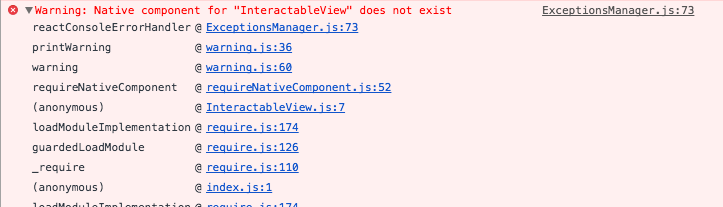
chrismllr
on 16 Aug 2017
I'm having the same problem were you able to solve it chris? It could be if you are using expo you can't link the library to you object or you need to eject your project.
 tangtai
on 22 Aug 2017
tangtai
on 22 Aug 2017
This might be a problem with React 16 (the beta, at least), but many other libraries require it. Until this bug is fixed, I can't use it :(
 AaronBuxbaum
on 30 Aug 2017
AaronBuxbaum
on 30 Aug 2017
@smooJitter @chrismllr @tangtai @AaronBuxbaum This commit fixes your issue https://github.com/wix/react-native-interactable/commit/d8c8f08f2b805070eac333124149ce87132a986e. For now, while waiting for the repo to update new version to include this commit. You can use this commit in your project by define the react-native-interactable under dependencies in your package.json as follow:
"react-native-interactable": "https://github.com/wix/react-native-interactable.git#d8c8f08f2b805070eac333124149ce87132a986e"
Hope it helps!
 luugiathuy
on 30 Aug 2017
luugiathuy
on 30 Aug 2017
@luugiathuy thanks! but it doesn't fix my problem.
11:18:16 AM: Warning: 'react-native' peer depencency missing. Run `npm ls` in ... to see full warning.
Warning: Installed version 0.1.1 of 'react-native-interactable' does not satisfy required version https://github.com/wix/react-native-interactable.git#d8c8f08f2b805070eac333124149ce87132a986e

If there is an issue running your project, please run `npm install` in ... and restart.

11:18:25 AM: Finished building JavaScript bundle in 3431ms
11:18:25 AM: Warning: Native component for "InteractableView" does not exist

11:18:25 AM: Warning: checkPropTypes has been moved to a separate package. Accessing React.checkPropTypes is no longer supported and will be removed completely in React 16. Use the prop-types package on npm instead. (https://fb.me/migrating-from-react-proptypes)
Warnings could be from other packages, but it has the same "component does not exist" bug in the end.
AaronBuxbaum
on 30 Aug 2017
@AaronBuxbaum Have you tried to run react-native link react-native-interactable again?
luugiathuy
on 30 Aug 2017
@luugiathuy yup, also deleted and reinstalled node modules just in case -- same error. I should mention that I'm using CRNA, that might be relevant to troubleshooting.
AaronBuxbaum
on 30 Aug 2017
@luugiathuy confirmed that this doesn't fix the problem. I built a new empty project with CRNA, tested that it was working, then attempted to add react-native-interactable with the above URL.
package.json dependencies:
    "expo": "^20.0.4",
    "react": "16.0.0-alpha.12",
    "react-native": "^0.47.2",
    "react-native-interactable": "https://github.com/wix/react-native-interactable.git#d8c8f08f2b805070eac333124149ce87132a986e"
Logs:
4:36:35 PM: Warning: Installed version 0.1.1 of 'react-native-interactable' does not satisfy required version https://github.com/wix/react-native-interactable.git#d8c8f08f2b805070eac333124149ce87132a986e
4:37:34 PM: Finished building JavaScript bundle in 1198ms
4:37:34 PM: Warning: Native component for "InteractableView" does not exist
Simulator:

npm ls:
npm ERR! peer dep missing: react@>= 15.4.1, required by [email protected]
npm ERR! peer dep missing: react@>=15.3.1, required by [email protected]
npm ERR! peer dep missing: react@>=15.4.0, required by [email protected]
npm ERR! peer dep missing: react@>= 16.0.0, required by [email protected].
@AaronBuxbaum CRNA& Expo are not compatible with any projects that use react-native link
 pcooney10
on 7 Sep 2017
pcooney10
on 7 Sep 2017
@pcooney10 is there a way to preview my code without building the project everytime if crna and expo are not working?
 Foberm
on 14 Sep 2017
Foberm
on 14 Sep 2017
@Foberm I am not sure, I currently only develop with Expo and CRNA.
For more information on react-native link, you can look here.
pcooney10
on 17 Sep 2017
I just cloned the current git repo and it worked fine :)
The important thing is: You have to use the right version of react / react-native in your project!
This issue can be closed!
 smyth64
on 20 Nov 2017
smyth64
on 20 Nov 2017
Manual linking helped. Check it out here
 ArtiomShapovalov
on 17 Jan 2018
ArtiomShapovalov
on 17 Jan 2018
I still get same error. Please help me.
This is my package.json:
"dependencies": {
    "react": "^16.2.0",
    "react-native": "0.52.0",
    "react-native-interactable": "^0.1.7",
    "react-native-vector-icons": "^4.5.0",
    "react-navigation": "^1.0.0-beta.27"
  },
 ngocnguyen09910060
on 21 Jan 2018
ngocnguyen09910060
on 21 Jan 2018
same issue... i guess its not compatible with react 16.2.0 at this current point in time...
also @smith64fx if that's the case, why isnt any information available about which versions are supported and which arent ? They should certainly put that information in their readme.
 MariusMeiners
on 26 Feb 2018
MariusMeiners
on 26 Feb 2018
Same issue.. not working
 Thebinoman
on 14 Mar 2018
Thebinoman
on 14 Mar 2018
Same issue, Not working too
 traxx10
on 18 Mar 2018
traxx10
on 18 Mar 2018
@luugiathuy YOU SAVED MY DAY MAN!!! Thank you soooo muuuch!!!
 nikndr
on 22 Mar 2018
nikndr
on 22 Mar 2018
If someone is having the Native component for "InteractableView" does not exist error, doing react-native link react-native-interactable is not enough. You have to add the module manually to the MainApplication.java. Check that file in the real-life-example source code.
 andyesp
on 6 Apr 2018
andyesp
on 6 Apr 2018
Specifically what @andyesp is referring to are lines 10 and 27 of that "real-life-example".
At least for myself, react-native link worked for iOS but _did not work at all_ for Android. Taking these manual linking steps is necessary and should be in the main README.
 isaachinman
on 6 Apr 2018
isaachinman
on 6 Apr 2018
I am closing the issue as a part of an effort to cleanup and revive the project. If this issue persists after v1.0.0, you are more than welcome to reintroduce the issue.
Thanks for your contribution.
 Inbal-Tish
on 5 Nov 2018
Inbal-Tish
on 5 Nov 2018
Related issues
 m10653
·
4Comments
m10653
·
4Comments
 TomAtterton
·
3Comments
TomAtterton
·
3Comments
 tikkichan4
·
5Comments
tikkichan4
·
5Comments
 emretekince
·
5Comments
emretekince
·
5Comments
 motiazu
·
5Comments
motiazu
·
5Comments
Most helpful comment
same issue... i guess its not compatible with react 16.2.0 at this current point in time...
also @smith64fx if that's the case, why isnt any information available about which versions are supported and which arent ? They should certainly put that information in their readme.