React-native-interactable: Is there a way to interact with other component in MapPanel example?
I am amazed by this library but I kinda have a problem integrating with my other components.
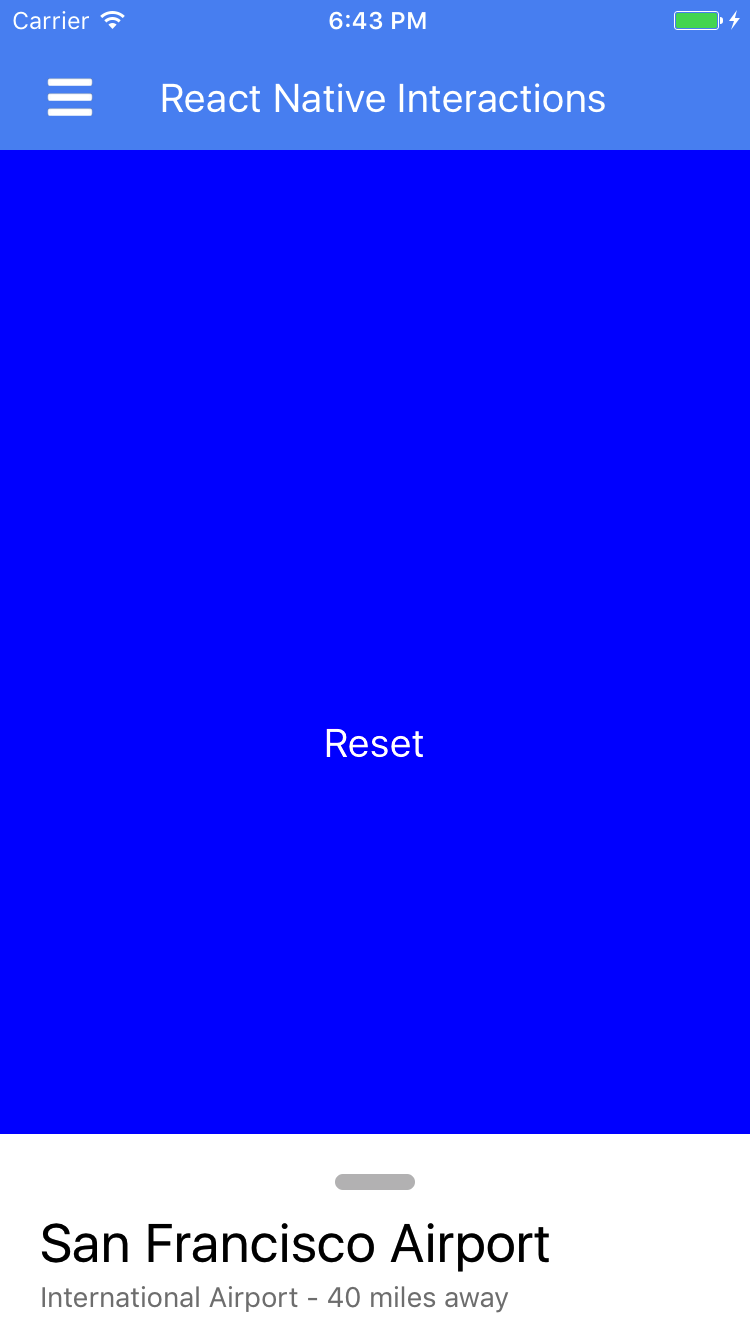
In the photo above, I have a button where width and height are equal to screen prop. I am unable to interact with it unless I mess with zIndex. Have tried to dynamically change the zIndex but it is not really the best usage.
Is there a way where we can both interact with whatever components that I have behind the Interactable view, and at the same time, have full control over the Interactable view?
onPanelDrag = ({ y }) => {
    console.log(y);
    if (y === 492) {
      this.setState({ buttonIndex: -99 });
    } else if (y === 292) {
      this.setState({ buttonIndex: 0 });
    }
  };

  render() {
    return (
      <View style={styles.container}>
        <TouchableOpacity
          style={[
            {
              width: Screen.width,
              height: Screen.height,
              justifyContent: 'center',
              alignItems: 'center',
              backgroundColor: "blue",
              zIndex: this.state.buttonIndex
            }
          ]}
          onPress={() => console.log(this.panel.props.snapPoints)}
        >
          <Text style={{ fontSize: 20, color: '#fff' }}>Reset</Text>
        </TouchableOpacity>

        <View style={[styles.panelContainer]}>
          <Animated.View
            style={[
              styles.panelContainer,
              {
                backgroundColor: "black",
                opacity: this._deltaY.interpolate({
                  inputRange: [0, Screen.height - 100],
                  outputRange: [0.5, 0],
                  extrapolateRight: "clamp"
                })
              }
            ]}
          />
          <Interactable.View
            ref={ref => {
              this.panel = ref;
            }}
            verticalOnly={true}
            snapPoints={[
              { y: Screen.height - 300 },
              { y: Screen.height - 100 }
            ]}
            boundaries={{ top: -300 }}
            initialPosition={{ y: Screen.height - 100 }}
            onDrag={event => this.onPanelDrag(event.nativeEvent)}
            animatedValueY={this._deltaY}
          >
            <View style={[styles.panel]}>
              <View style={styles.panelHeader}>
                <View style={styles.panelHandle} />
              </View>
              <Text style={styles.panelTitle}>San Francisco Airport</Text>
              <Text style={styles.panelSubtitle}>
                International Airport - 40 miles away
              </Text>
              <View style={styles.panelButton}>
                <Text style={styles.panelButtonTitle}>Directions</Text>
              </View>
              <View style={styles.panelButton}>
                <Text style={styles.panelButtonTitle}>Search Nearby</Text>
              </View>
              <Image
                style={styles.photo}
                source={require("../img/airport-photo.jpg")}
              />
            </View>
          </Interactable.View>
        </View>
      </View>
    );
  }
 rexlow
All 6 comments
I had the same issue, and we eventually figured out a workaround. If you:
- place the panel container in a view with
position: absoluteand positioning *top: Dimensions.get('window').height - 1(andbottom: 0,left: 0,right: 0) - set
initialPosition={{y: 0}} - create new snapPoints that now reference the bottom of the screen (-1)
- after render, use the ref to
snapToone of your snapPoints as if it's theinitialPosition
then your other components should be interactive. But, this is pretty janky and I would love to hear more from @talkol @rotemmiz
 lebovic
on 19 Jul 2017
lebovic
on 19 Jul 2017
@lebovic ah it does not work for me. Now my panel is gone :( Can you check where did I do wrong?
import React, { Component } from "react";
import {
  StyleSheet,
  View,
  Dimensions,
  Image,
  Text,
  Animated,
  TouchableOpacity
} from "react-native";
import Interactable from "react-native-interactable";

const Screen = {
  width: Dimensions.get("window").width,
  height: Dimensions.get("window").height - 75
};

export default class MapPanel extends Component {
  constructor(props) {
    super(props);
    this._deltaY = new Animated.Value(Screen.height - 100);
  }

  componentDidMount() {
    this.refs['panel'].snapTo({ index: 1 });
  }

  render() {
    return (
      <View style={styles.container}>
        <TouchableOpacity
          style={[
            {
              width: Screen.width,
              height: Screen.height,
              justifyContent: 'center',
              alignItems: 'center',
              backgroundColor: "blue",
            }
          ]}
          onPress={() => console.log(this.refs['panel'])}
        >
          <Text style={{ fontSize: 20, color: '#fff' }}>Reset</Text>
        </TouchableOpacity>

        <View style={{
          top: Dimensions.get('window').width - 1,
          bottom: 0, left: 0, right: 0
        }}>
          <View style={[styles.panelContainer]}>
            <Animated.View
              style={[
                styles.panelContainer,
                {
                  backgroundColor: "black",
                  opacity: this._deltaY.interpolate({
                    inputRange: [0, Screen.height - 100],
                    outputRange: [0.5, 0],
                    extrapolateRight: "clamp"
                  })
                }
              ]}
            />
            <Interactable.View
              ref='panel'
              verticalOnly={true}
              snapPoints={[
                { y: Screen.height - 300 },
                { y: Screen.height - 100 },
                { y: -1 }
              ]}
              boundaries={{ top: -300 }}
              initialPosition={{ y: 0 }}
              animatedValueY={this._deltaY}
            >
              <View style={[styles.panel]}>
                <View style={styles.panelHeader}>
                  <View style={styles.panelHandle} />
                </View>
                <Text style={styles.panelTitle}>San Francisco Airport</Text>
                <Text style={styles.panelSubtitle}>
                  International Airport - 40 miles away
                </Text>
                <View style={styles.panelButton}>
                  <Text style={styles.panelButtonTitle}>Directions</Text>
                </View>
                <View style={styles.panelButton}>
                  <Text style={styles.panelButtonTitle}>Search Nearby</Text>
                </View>
                <Image
                  style={styles.photo}
                  source={require("../img/airport-photo.jpg")}
                />
              </View>
            </Interactable.View>
          </View>
        </View>
      </View>
    );
  }
}

const styles = StyleSheet.create({
  testShit: {
    borderWidth: 2,
    borderColor: "red"
  },
  container: {
    flex: 1,
    justifyContent: "center",
    alignItems: "center",
    backgroundColor: "#efefef"
  },
  panelContainer: {
    ...StyleSheet.absoluteFillObject
  },
  panel: {
    height: Screen.height + 300,
    padding: 20,
    backgroundColor: "#fff",
  },
  panelHeader: {
    alignItems: "center"
  },
  panelHandle: {
    width: 40,
    height: 8,
    borderRadius: 4,
    backgroundColor: "#00000040",
    marginBottom: 10
  },
  panelTitle: {
    fontSize: 27,
    height: 35
  },
  panelSubtitle: {
    fontSize: 14,
    color: "gray",
    height: 30,
    marginBottom: 10
  },
  panelButton: {
    padding: 20,
    borderRadius: 10,
    backgroundColor: "#318bfb",
    alignItems: "center",
    marginVertical: 10
  },
  panelButtonTitle: {
    fontSize: 17,
    fontWeight: "bold",
    color: "white"
  }
});
Two things that I could think of:
- The
snapTopoints are in relation to the initial position of the slider, where negative is upwards and positive is downwards. You might want to try adjusting them upwards (i.e. they will have to be negative values) - The view wouldn't always pop up on
snapToincomponentDidMountfor me. I ended up using the onLayout prop of another component to callsnapTo
lebovic
on 19 Jul 2017
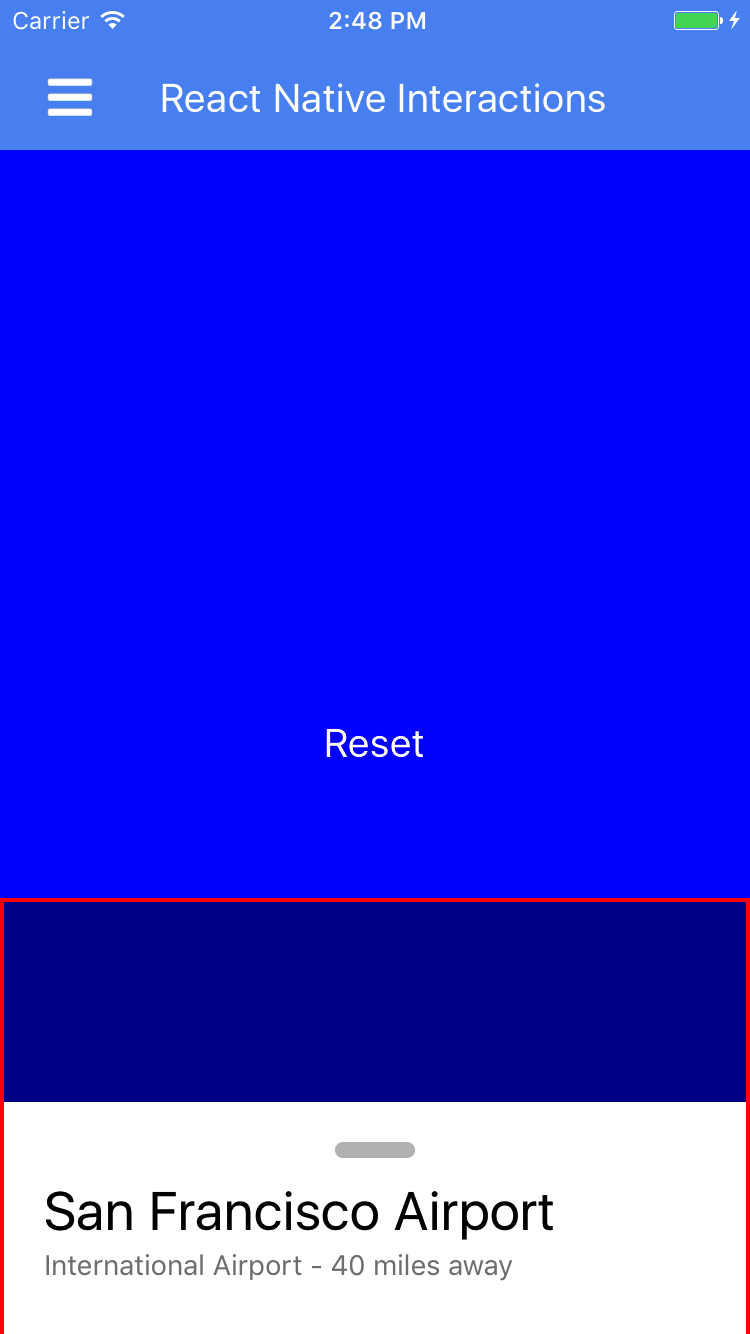
@lebovic I have got it working now (forgot to add position: 'absolute' in the panelContainer) and seems to be able to grasp the concept of the tweak but there seems to be a limitation. The tweak essentially confines the entire panel container into another block, which is cool but it left me with some grey area where I can't operate. I can easily adjust the size of panelContainer by modifying the top attribute but I will always have that area above Interactable view where I can't touch.
rexlow
on 20 Jul 2017
Whoops, I mistyped before. The top attribute should be based on height, not width. So top: Dimensions.get('window').height - 1. Then change the animation snapTos accordingly
lebovic
on 22 Jul 2017
@rexlow I think you could try to add pointerEvents='box-none' to panel container view, like this
<View style={[styles.panelContainer]} pointerEvents='box-none'>, so the container view will never the target of touch events but it's subviews can be. FYI https://facebook.github.io/react-native/docs/view.html#pointerevents
 fayang
on 31 Jul 2017
fayang
on 31 Jul 2017
Related issues
 elanpang
·
5Comments
elanpang
·
5Comments
 sewerrat
·
7Comments
sewerrat
·
7Comments
 iremlopsum
·
7Comments
iremlopsum
·
7Comments
 yash2code
·
7Comments
yash2code
·
7Comments
 kn1810
·
8Comments
kn1810
·
8Comments
Most helpful comment
@lebovic ah it does not work for me. Now my panel is gone :( Can you check where did I do wrong?