React-native-image-picker: Build problem: A problem occurred configuring project ':react-native-image-picker'.
Description
I tried to run react-native run-android on a project made by a developer (who I do not have contact anymore), but the build fails with the following output:
FAILURE: Build failed with an exception.
- What went wrong:
A problem occurred configuring project ':react-native-image-picker'.Could not resolve all artifacts for configuration ':react-native-image-picker:classpath'.
Could not find any matches for com.android.tools.build:gradle:2.2.+ as no versions of com.android.tools.build:gradle are available.
Searched in the following locations:
https://jcenter.bintray.com/com/android/tools/build/gradle/maven-metadata.xml
https://jcenter.bintray.com/com/android/tools/build/gradle/
Required by:
project :react-native-image-picker
When i check my android studio graddle build it has the same error:
org.gradle.api.internal.artifacts.ivyservice.DefaultLenientConfiguration$ArtifactResolveException: Could not resolve all artifacts for configuration ':react-native-image-picker:classpath'.
    at java.util.concurrent.ThreadPoolExecutor.runWorker(ThreadPoolExecutor.java:1142)
        at java.util.concurrent.ThreadPoolExecutor$Worker.run
        at java.lang.Thread.run
Caused by: org.gradle.internal.resolve.ModuleVersionNotFoundException: Could not find any matches for com.android.tools.build:gradle:2.2.+ as no versions of com.android.tools.build:gradle are available.
Searched in the following locations:
    https://jcenter.bintray.com/com/android/tools/build/gradle/maven-metadata.xml
    https://jcenter.bintray.com/com/android/tools/build/gradle/
Required by:
    project :react-native-image-picker
That is my build.graddle file
// Top-level build file where you can add configuration options common to all sub-projects/modules.

buildscript {
    repositories {
        jcenter()
        maven {
            url 'https://maven.google.com/'
            name 'Google'
        }
        google()
    }
    dependencies {
        classpath 'com.android.tools.build:gradle:3.2.1'

        // NOTE: Do not place your application dependencies here; they belong
        // in the individual module build.gradle files
    }
}

allprojects {
    repositories {
        mavenLocal()
        maven {
            // All of React Native (JS, Obj-C sources, Android binaries) is installed from npm
            url "$rootDir/../node_modules/react-native/android"
        }
        maven {
            url 'https://maven.google.com/'
            name 'Google'
        }
        maven { url "https://jitpack.io" }
        jcenter()
    }
}

subprojects {
    project.configurations.all {
        resolutionStrategy.eachDependency { details ->
            if (details.requested.group == 'com.android.support'
              && !details.requested.name.contains('multidex') ) {
                details.useVersion "26.0.2"
            }
        }
    }
     afterEvaluate {
         project -> if (project.hasProperty("android")) {
             android {
                 compileSdkVersion 26
                buildToolsVersion '26.0.2'
             }
         }
     }
 }

ext {
    compileSdkVersion = 26
    minSdkVersion = 16
    targetSdkVersion  = 26
    buildToolsVersion = "26.0.2"
    googlePlayServicesVersion   = "12.0.1"
    supportLibVersion = "27.1.0"
}
How to repeat issue and example
react-native run-android
Solution
How to I fix my graddle scripts to match dependencies informations?
Additional Information
- React Native version: 0.55.4
- Platform: Android
- Development Operating System: Windows 10
- Dev tools: Android SDK Tools installed versions are: 27.0.3 and 28.0.3
 zscaiosi
All 81 comments
The same mistake.
 WangJian0
on 10 Dec 2018
WangJian0
on 10 Dec 2018
Same issue
 heavyskyl
on 10 Dec 2018
heavyskyl
on 10 Dec 2018
I have same issue, started today
 tosinbot
on 10 Dec 2018
tosinbot
on 10 Dec 2018
The same here, started today.
 ramosalx1504
on 10 Dec 2018
ramosalx1504
on 10 Dec 2018
experiencing same issue. Blocked with this whole day. can anyone have a fix?
 thamarai199
on 10 Dec 2018
thamarai199
on 10 Dec 2018
The same issue, it seems https://jcenter.bintray.com/com/android/tools folder was gone or something. What could we do?
 chrismang
on 10 Dec 2018
chrismang
on 10 Dec 2018
changing build.gradle to
buildscript {
repositories {
jcenter()
google()
maven {
url 'https://maven.google.com/'
name 'Google'
}
}
dependencies {
classpath 'com.android.tools.build:gradle:3.2.1'
}
}
fixed the problem for me
heavyskyl
on 10 Dec 2018
Changing build.gradle from:
from :
classpath 'com.android.tools.build:gradle:2.2.+'
to the more exact:
classpath 'com.android.tools.build:gradle:2.2.3'
solves the issue here
 andersjalevik
on 10 Dec 2018
andersjalevik
on 10 Dec 2018
If you don't want to wait until this library will release fixed version, here is how you can fix it:
Just add it to your build.gradle under subprojects section in the root (not app/gradle)
subprojects {
    if (project.name.contains('react-native-image-picker')) {
        buildscript {
            repositories {
                jcenter()
                maven { url "https://dl.bintray.com/android/android-tools/"  }
            }
        }
    }
}
 akolpakov
on 10 Dec 2018
akolpakov
on 10 Dec 2018
changing build.gradle to
buildscript {
    repositories {
        jcenter()
        google()
        maven {
            url 'https://maven.google.com/'
            name 'Google'
        }
    }

    dependencies {
        classpath 'com.android.tools.build:gradle:3.2.1'
    }
}
fixed the problem for me
Same Issue, this fixed it for me.
 Wazzup-Tom
on 10 Dec 2018
Wazzup-Tom
on 10 Dec 2018
@heavyskyl thanks, but the same issue came up for react-native-vector-icons and I solved it doing the same for react-native-vector-icons's build.graddle. The problem is my node_modules/ folder is in .gitignore and thereby it will propagate to my colleague's projects.
Is there any contributor there to fix it in the lib's sources? Thank you very much!
zscaiosi
on 10 Dec 2018
Same here, and I can´t fix it no way
I have this:
buildscript {
ext {
buildToolsVersion = "27.0.3"
minSdkVersion = 16
compileSdkVersion = 27
targetSdkVersion = 26
supportLibVersion = "27.1.1"
}
repositories {
google()
jcenter()
}
dependencies {
classpath 'com.android.tools.build:gradle:3.1.4'
// NOTE: Do not place your application dependencies here; they belong
// in the individual module build.gradle files
}
}
I cant remove the code ext... because I have another issue
Cannot get property 'compileSdkVersion' on extra properties extension as it does not exist
ext {
buildToolsVersion = "27.0.3"
minSdkVersion = 16
compileSdkVersion = 27
targetSdkVersion = 26
supportLibVersion = "27.1.1"
}
 adrispo
on 10 Dec 2018
adrispo
on 10 Dec 2018
Same here, and I can´t fix it no way
I have this:buildscript { ext { buildToolsVersion = "27.0.3" minSdkVersion = 16 compileSdkVersion = 27 targetSdkVersion = 26 supportLibVersion = "27.1.1" } repositories { google() jcenter() } dependencies { classpath 'com.android.tools.build:gradle:3.1.4' // NOTE: Do not place your application dependencies here; they belong // in the individual module build.gradle files } }I cant remove the code ext... because I have another issue
Cannot get property 'compileSdkVersion' on extra properties extension as it does not exist
ext { buildToolsVersion = "27.0.3" minSdkVersion = 16 compileSdkVersion = 27 targetSdkVersion = 26 supportLibVersion = "27.1.1" }
@adrispo you should change the library's build.graddle file, not your project's!
zscaiosi
on 10 Dec 2018
@heavyskyl thanks, but the same issue came up for react-native-vector-icons and I solved it doing the same for react-native-vector-icons's build.graddle. The problem is my node_modules/ folder is in .gitignore and thereby it will propagate to my colleague's projects.
Is there any contributor there to fix it in the lib's sources? Thank you very much!
@zscaiosi I create a postinstall package.json script that executes this function
(https://docs.npmjs.com/misc/scripts). Personally I will use it as a temporary solution until library owners will merge a fix.
// file ./build-scripts/android-image-picker-fix.js
function fixReactNativeImagePicker() {
const filePath = 'node_modules/react-native-image-picker/android/build.gradle';
const absolutePath = path.join(__dirname, '..', filePath); // your path there should be correct, as my script exists under <App root dir>/build-scripts/ directory
const fileContent = fs.readFileSync(absolutePath, 'utf8');
const textToFind = `buildscript {
repositories {
jcenter()
}
dependencies {
classpath 'com.android.tools.build:gradle:2.2.+'
}
}`;
const textToReplace = `buildscript {
repositories {
jcenter()
google()
maven {
url 'https://maven.google.com/'
name 'Google'
}
}
dependencies {
classpath 'com.android.tools.build:gradle:3.2.1'
}
}`;
if (fileContent.indexOf(textToFind) !== -1) {
const newFileContent = fileContent.replace(textToFind, textToReplace);
fs.writeFileSync(absolutePath, newFileContent, 'utf8');
}
}
fixReactNativeImagePicker();
and my package.json
"scripts": {
"postinstall": "node ./build-scripts/android-image-picker-fix.js"
I have changed this library's build.gradle file to a hardcoded classpath (in my project) until they come up with a fix. I suggest doing the same.
(and as @heavyskyl has mentioned, this is also happening on react-native-vector-icons).
As @chrismang mentioned https://jcenter.bintray.com/com/android/tools has been removed from production, so unless that was a mistake and they put it back, this is a temp workaround to get you back up and running until a fix is out from this library or jcenter.
EDIT: Clearly myself and @heavyskyl were using an older version of react-native-vector-icons, since our 'outdated' versions, they have changed their classpath in their build.gradle file not to use a + at the end of their gradle version, and therefore bypassing the need to check jcenter.
EDIT2: PR#1000 fixes this 🎉
 ciawalsh
on 10 Dec 2018
ciawalsh
on 10 Dec 2018
I have changed this library's build.gradle file to a hardcoded classpath (in my project) until they come up with a fix. I suggest doing the same.
(and as @heavyskyl has mentioned, this is also happening on react-native-vector-icons).
This is a temp workaround to get you back up and running until a fix is out.
I fixed this within react-native-vector-icons by just upgrading to the newest version of the lib.
 Phrosh
on 10 Dec 2018
Phrosh
on 10 Dec 2018
this worked for me
https://stackoverflow.com/questions/53691457/react-native-android-could-not-find-com-android-toolscommon
 waltershub
on 10 Dec 2018
waltershub
on 10 Dec 2018
Thanks for the reporting, I'm looking at this and I'll do a release ASAP.
 charpeni
on 10 Dec 2018
charpeni
on 10 Dec 2018
Nothing works for me!!
I have this:
buildscript {
    repositories {
        jcenter()
        google()
        maven {
            url 'https://maven.google.com/'
            name 'Google'
        }
    }

    dependencies {
        classpath 'com.android.tools.build:gradle:3.2.1'
    }
}
 CarolinaStephanie
on 10 Dec 2018
CarolinaStephanie
on 10 Dec 2018
This Worked for me:
in android/build.gradle add:
subprojects {
    if (project.name.contains('react-native-image-picker')) {
        buildscript {
            repositories {
                jcenter()
                google()
                maven { url "https://dl.bintray.com/android/android-tools/"  }
            }
        }
    }
}
 maikmacs
on 10 Dec 2018
maikmacs
on 10 Dec 2018
@CarolinaStephanie is it your react-native-image-picker build.graddle file or your own project's build.graddle file?
zscaiosi
on 10 Dec 2018
@CarolinaStephanie is it your react-native-image-picker build.graddle file or your own project's build.graddle file?
My own project
EDIT: It worked. Changing the react-native-image-picker build.graddle file
CarolinaStephanie
on 10 Dec 2018
I have also been unable to fix the issues with all suggested fixes.
 L-Yeiser
on 10 Dec 2018
L-Yeiser
on 10 Dec 2018
As @maikmacs and @waltershub said.
Using this on you build.gradle will solve the issue:
subprojects { subproject ->
    if (subproject.name.contains('react-native-image-picker')){
        buildscript {
            repositories {
                maven { url "https://dl.bintray.com/android/android-tools/"  }
            }
        }
    }
}
Edit: as @evanjmg said, in some cases it will only work if you put it inside allprojects in your root build.gradle.
What is does:
Injects a maven repository into react-native-image-picker that does contains com.android.tools.build:gradle:2.2.+.
The good:
- Will not force us to update into the latest version of
react-native-image-picker. - Will not force us to update our project gradle version.
The bad:
- This is still a walkaround and should be removed once you update
react-native-image-pickeron your project.
 Yathousen
on 10 Dec 2018
Yathousen
on 10 Dec 2018
As @maikmacs and @waltershub said.
Using this on you
build.gradle, will solve the issue:subprojects { subproject -> if (subproject.name.contains('react-native-image-picker')){ buildscript { repositories { maven { url "https://dl.bintray.com/android/android-tools/" } } } } }What is does:
Injects a maven repository intoreact-native-image-pickerthat does containscom.android.tools.build:gradle:2.2.+.The good:
- Will not force us to update into the latest version of
react-native-image-picker.- Will not force us to update our project's gradle version.
The bad:
- This is still a walkaround and should be removed once you update
react-native-image-pickeron your project.
i have this problem whe include you solution
Could not find any version that matches com.android.tools.build:gradle:2.2.+.
Search in build.gradle files
 kelmants
on 10 Dec 2018
kelmants
on 10 Dec 2018
@kelmants, @Yathousen solution works if you put it in allprojects in your root build.gradle file
 evanjmg
on 10 Dec 2018
evanjmg
on 10 Dec 2018
i have Same issue!!
 jetobe95
on 10 Dec 2018
jetobe95
on 10 Dec 2018
me too @jetobe95 🥶, the solution of @Yathousen Work for me.
 Edwik
on 10 Dec 2018
Edwik
on 10 Dec 2018
[email protected]has been released, does it work?
charpeni
on 10 Dec 2018
yes, it works))
 AndreyKarpenko
on 10 Dec 2018
AndreyKarpenko
on 10 Dec 2018
Yes, it works the new version, I already remove the lines i add in build.gradle.
maikmacs
on 10 Dec 2018
No,it is not working for me
 aviralgarg0996
on 10 Dec 2018
aviralgarg0996
on 10 Dec 2018
have you update package version?
AndreyKarpenko
on 10 Dec 2018
have you update package version?
Yaa i am using latest "react-native-image-picker": "^0.27.2",
aviralgarg0996
on 10 Dec 2018
What is your error @aviralgarg0996 @CarolinaStephanie?
charpeni
on 10 Dec 2018
I'm still running into issues in CircleCI builds after upgrading to your lightening fast hotfix.
A problem occurred configuring project ':react-native-image-picker'.
> Could not resolve all files for configuration ':react-native-image-picker:classpath'.
   > Could not find com.android.tools.build:gradle:2.2.3.
     Searched in the following locations:
         https://dl.google.com/dl/android/maven2/com/android/tools/build/gradle/2.2.3/gradle-2.2.3.pom
         https://dl.google.com/dl/android/maven2/com/android/tools/build/gradle/2.2.3/gradle-2.2.3.jar
         https://jcenter.bintray.com/com/android/tools/build/gradle/2.2.3/gradle-2.2.3.pom
         https://jcenter.bintray.com/com/android/tools/build/gradle/2.2.3/gradle-2.2.3.jar
     Required by:
         project :react-native-image-picker
There's gotta be something about the CircleCI maven setup because local builds seem to be working since I updated to 0.27.2.
To get our builds in circleci running again, I used the workaround previously mentioned:
subprojects { project ->
    def name = project.name
    if (name.contains('react-native-fetch-blob')
            || name.contains('react-native-image-picker')
        ){
        buildscript {
            repositories {
                google()
                jcenter()
                maven { url "https://dl.bintray.com/android/android-tools/"  }
            }
        }
    }
}
 sginn
on 10 Dec 2018
sginn
on 10 Dec 2018
@sginn
Same for me after updating to 0.27.2, local build started working but my Bitrise workflow is failing. Cant seem to figure out whats wrong.
 nak1b
on 10 Dec 2018
nak1b
on 10 Dec 2018
Today has just been a bad day for native android dependencies: https://issuetracker.google.com/issues/120759347
sginn
on 10 Dec 2018
After upgrading the version, the problem was solved
 yigerendehaotianqi
on 11 Dec 2018
yigerendehaotianqi
on 11 Dec 2018
Ditto here, upgrade worked great locally, CI (appcenter) is now failing:
* What went wrong:
A problem occurred configuring project ':react-native-image-picker'.
> Could not resolve all artifacts for configuration ':react-native-image-picker:classpath'.
   > Could not find com.android.tools.build:gradle:2.2.3.
     Searched in the following locations:
         https://dl.google.com/dl/android/maven2/com/android/tools/build/gradle/2.2.3/gradle-2.2.3.pom
         https://dl.google.com/dl/android/maven2/com/android/tools/build/gradle/2.2.3/gradle-2.2.3.jar
         https://jcenter.bintray.com/com/android/tools/build/gradle/2.2.3/gradle-2.2.3.pom
         https://jcenter.bintray.com/com/android/tools/build/gradle/2.2.3/gradle-2.2.3.jar
     Required by:
         project :react-native-image-picker
 Samsinite
on 11 Dec 2018
Samsinite
on 11 Dec 2018
google() should be removed.
Gradle DSL method not found: 'google()'
Possible causes:<ul><li>The project 'rnmanager' may be using a version of the Android Gradle plug-in that does not contain the method (e.g. 'testCompile' was added in 1.1.0).
Upgrade plugin to version 3.2.1 and sync project</li><li>The project 'rnmanager' may be using a version of Gradle that does not contain the method.
Open Gradle wrapper file</li><li>The build file may be missing a Gradle plugin.
Apply Gradle plugin</li>
 hushicai
on 11 Dec 2018
hushicai
on 11 Dec 2018
try // classpath 'com.android.tools.build:gradle:3.2.1' , it works for me
 tangcaiyue
on 11 Dec 2018
tangcaiyue
on 11 Dec 2018
I also met the question,
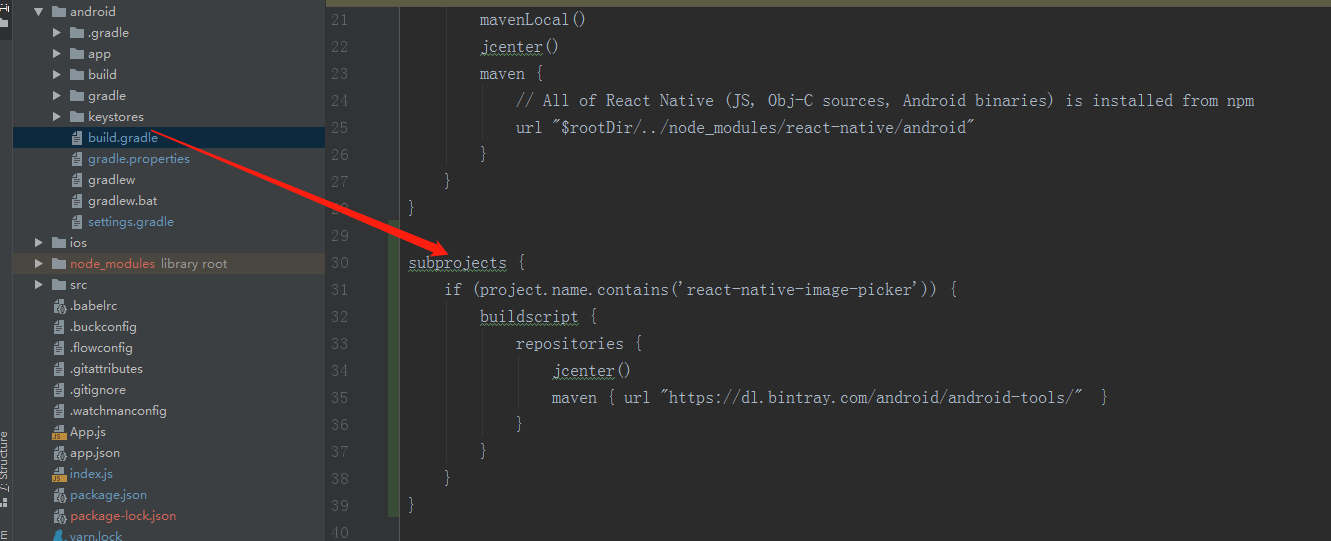
I think this is the perfect solution if you don't want to upgrade the version,The current version number is '0.27.1'.
subprojects{
           if (project.name.contains('react-native-image-picker')) {
                  buildscript {
                        repositories {
                             jcenter()
                             maven { url "https://dl.bintray.com/android/android-tools/"  }
                         }
                   }
           }
}
And,you can use [email protected],it has been released.
 Lloyd1229
on 11 Dec 2018
Lloyd1229
on 11 Dec 2018
If you don't want to wait until this library will release fixed version, here is how you can fix it:
Just add it to your
build.gradleundersubprojectssection in the root (not app/gradle)subprojects { if (project.name.contains('react-native-image-picker')) { buildscript { repositories { jcenter() maven { url "https://dl.bintray.com/android/android-tools/" } } } } }
thanks it works...
 yudhis8
on 11 Dec 2018
yudhis8
on 11 Dec 2018
@Lloyd1229 your solution is work for me
 umarudy
on 11 Dec 2018
umarudy
on 11 Dec 2018
subprojects {
    if (project.name.contains('react-native-image-picker')) {
        buildscript {
            repositories {
                jcenter()
                google()
                maven { url "https://dl.bintray.com/android/android-tools/"  }
            }
        }
    }
}
this worked for me
 amitmundra08
on 11 Dec 2018
amitmundra08
on 11 Dec 2018
This Worked for me:
in android/build.gradle add:
subprojects {
    if (project.name.contains('react-native-image-picker')) {
        buildscript {
            repositories {
                jcenter()
                google()
                maven { url "https://dl.bintray.com/android/android-tools/"  }
            }
        }
    }
}
Worked For me!
 MahbbRah
on 11 Dec 2018
MahbbRah
on 11 Dec 2018
[email protected]has been released, does it work?
Yes. works for me.
 rashidul-hasan
on 11 Dec 2018
rashidul-hasan
on 11 Dec 2018
[email protected]has been released, does it work?Yes. works for me.
Works for me too!!
MahbbRah
on 11 Dec 2018
[email protected] has have been released
npm i [email protected] -save
 AurangzaibRamzan
on 11 Dec 2018
AurangzaibRamzan
on 11 Dec 2018
 buildscript {
    repositories {
        google()
        jcenter()
        maven { url 'https://maven.fabric.io/public' }
    }
    dependencies {
        classpath 'com.android.tools.build:gradle:3.2.0'
        classpath 'com.google.gms:google-services:4.0.1'
        classpath 'io.fabric.tools:gradle:1.+'

        // NOTE: Do not place your application dependencies here; they belong
        // in the individual module build.gradle files
    }
}

allprojects {
    repositories {
        google()
        jcenter()
        mavenLocal()

        maven {
            // All of React Native (JS, Obj-C sources, Android binaries) is installed from npm
            url "$rootDir/../node_modules/react-native/android"
        }
    }
}
subprojects {
    afterEvaluate {project ->
        if (project.hasProperty('android')) {
            android {
                compileSdkVersion 27
                buildToolsVersion '27.0.3'
            }
        }
    }
}
our build.gradle. I try to add in my subprojects
subprojects {
    if (project.name.contains('react-native-image-picker')) {
        buildscript {
            repositories {
                jcenter()
                google()
                maven { url "https://dl.bintray.com/android/android-tools/"  }
            }
        }
    }
}
but it does't work. Error message:
* What went wrong:
A problem occurred configuring project ':react-native-vector-icons'.
> Could not resolve all artifacts for configuration ':react-native-vector-icons:classpath'.
   > Could not find any matches for com.android.tools.build:gradle:2.3.+ as no versions of com.android.tools.build:gradle are available.
     Searched in the following locations:
         https://jcenter.bintray.com/com/android/tools/build/gradle/maven-metadata.xml
         https://jcenter.bintray.com/com/android/tools/build/gradle/
     Required by:
         project :react-native-vector-icons
 blohamen
on 11 Dec 2018
blohamen
on 11 Dec 2018
@blohamen @KAuthor7112 try adding react-native-vector-icons too
if (project.name.contains('react-native-image-picker') || project.name.contains('react-native-vector-icons')) {
    buildscript {
        repositories {
            jcenter()
            maven { url "https://dl.bintray.com/android/android-tools/"  }
        }
    }
}
 tj00
on 11 Dec 2018
tj00
on 11 Dec 2018
@blohamen @KAuthor7112 try adding react-native-vector-icons too
if (project.name.contains('react-native-image-picker') || project.name.contains('react-native-vector-icons')) {
    buildscript {
        repositories {
            jcenter()
            maven { url "https://dl.bintray.com/android/android-tools/"  }
        }
    }
}
I just change:
classpath 'com.android.tools.build:gradle:2.3.+'
to
classpath 'com.android.tools.build:gradle:2.3.0'
in node_modules/react-native-vector-icons/android/build.graddle
And it's work for me. It just workaround)
blohamen
on 11 Dec 2018
Can someone explain what went wrong here? Updating the library simply fixed it for me but I'd like to know what broke and how it caused this error.
- Thanks in advance
 JanithaR
on 11 Dec 2018
JanithaR
on 11 Dec 2018
If you don't want to wait until this library will release fixed version, here is how you can fix it:
Just add it to your
build.gradleundersubprojectssection in the root (not app/gradle)subprojects { if (project.name.contains('react-native-image-picker')) { buildscript { repositories { jcenter() maven { url "https://dl.bintray.com/android/android-tools/" } } } } }
Yay! this fixed the issue for me. Thank you! 👍 😄
 nandini12396
on 11 Dec 2018
nandini12396
on 11 Dec 2018
I tried to run react-native run-android on a project made by a developer (who I do not have contact anymore), but the build fails with the following output:
- What went wrong:
A problem occurred configuring project ':react-native-gps-state'.
Could not resolve all files for configuration ':react-native-gps-state:classpath'.
Could not find any matches for com.android.tools.build:gradle:2.2.+ as no versions of com.android.tools.build:gradle are available.
Searched in the following locations:
https://jcenter.bintray.com/com/android/tools/build/gradle/maven-metadata.xml
https://jcenter.bintray.com/com/android/tools/build/gradle/
Required by:
project :react-native-gps-state
 kasiviswa456
on 11 Dec 2018
kasiviswa456
on 11 Dec 2018
thank god,i resolved issue by below code:
subprojects {
    if (project.name.contains('react-native-image-picker')) {
        buildscript {
            repositories {
                jcenter()
                google()
                maven { url "https://dl.bintray.com/android/android-tools/"  }
            }
        }
    }
}
thanks guys
 alvandyhamed
on 11 Dec 2018
alvandyhamed
on 11 Dec 2018
[email protected]has been released, does it work?Yes. works for me.
Works for me too!!
It works! Thanks!!
adrispo
on 11 Dec 2018
Tried the suggestion above to no avail. I've added the latest for react-native-image-picker. I've also added the subprojects closure:
 if (subproject.name.contains('react-native-image-picker')) {
            buildscript {
                repositories {
                    jcenter()
                    google()
                    maven { url "https://dl.bintray.com/android/android-tools/" }
                    }
                }
        }
and I'm receiving the following error:
```A problem occurred configuring project ':react-native-image-picker'.
Could not resolve all artifacts for configuration ':react-native-image-picker:classpath'.
Could not find com.android.tools.build:gradle:2.2.3.
Searched in the following locations:
https://dl.google.com/dl/android/maven2/com/android/tools/build/gradle/2.2.3/gradle-2.2.3.pom
https://dl.google.com/dl/android/maven2/com/android/tools/build/gradle/2.2.3/gradle-2.2.3.jar
https://jcenter.bintray.com/com/android/tools/build/gradle/2.2.3/gradle-2.2.3.pom
https://jcenter.bintray.com/com/android/tools/build/gradle/2.2.3/gradle-2.2.3.jar
Required by:
project :react-native-image-picker
```
 lfalkner
on 11 Dec 2018
lfalkner
on 11 Dec 2018
No one method in this thread helped for me. I should only wait now? Or there is an alternative?
I should say also that I'm using Flutter, not RN image picker, but I can't even start the build of start Flutter app.
 andreipoliakov
on 11 Dec 2018
andreipoliakov
on 11 Dec 2018
Tried the suggestion above to no avail. I've added the latest for react-native-image-picker. I've also added the subprojects closure:
 if (subproject.name.contains('react-native-image-picker')) {
            buildscript {
                repositories {
                    jcenter()
                    google()
                    maven { url "https://dl.bintray.com/android/android-tools/" }
                    }
                }
        }
and I'm receiving the following error:
> Could not resolve all artifacts for configuration ':react-native-image-picker:classpath'.
   > Could not find com.android.tools.build:gradle:2.2.3.
     Searched in the following locations:
         https://dl.google.com/dl/android/maven2/com/android/tools/build/gradle/2.2.3/gradle-2.2.3.pom
         https://dl.google.com/dl/android/maven2/com/android/tools/build/gradle/2.2.3/gradle-2.2.3.jar
         https://jcenter.bintray.com/com/android/tools/build/gradle/2.2.3/gradle-2.2.3.pom
         https://jcenter.bintray.com/com/android/tools/build/gradle/2.2.3/gradle-2.2.3.jar
     Required by:
         project :react-native-image-picker
I'm actually having this exact same issue after upgrading to react-native-image-picker 0.27.2. This is only happening in my App Center builds - build works on both Mac and Windows.
 devoNOTbevo
on 11 Dec 2018
devoNOTbevo
on 11 Dec 2018
Tried the suggestion above to no avail. I've added the latest for react-native-image-picker. I've also added the subprojects closure:
 if (subproject.name.contains('react-native-image-picker')) {
            buildscript {
                repositories {
                    jcenter()
                    google()
                    maven { url "https://dl.bintray.com/android/android-tools/" }
                    }
                }
        }
and I'm receiving the following error:
> Could not resolve all artifacts for configuration ':react-native-image-picker:classpath'.
   > Could not find com.android.tools.build:gradle:2.2.3.
     Searched in the following locations:
         https://dl.google.com/dl/android/maven2/com/android/tools/build/gradle/2.2.3/gradle-2.2.3.pom
         https://dl.google.com/dl/android/maven2/com/android/tools/build/gradle/2.2.3/gradle-2.2.3.jar
         https://jcenter.bintray.com/com/android/tools/build/gradle/2.2.3/gradle-2.2.3.pom
         https://jcenter.bintray.com/com/android/tools/build/gradle/2.2.3/gradle-2.2.3.jar
     Required by:
         project :react-native-image-picker
I'm actually having this exact same issue after upgrading to react-native-image-picker 0.27.2. This is only happening in my App Center builds - build works on both Mac and Windows.
It was also not working for us - both locally and on the App Center.
Upgrading to 0.27.2 fixed local builds, but the App Center ones were still failing.
Adding the following to build.gradle fixed the App Center builds:
subprojects {
    if (project.name.contains('react-native-image-picker')) {
        buildscript {
            repositories {
                jcenter()
                google()
                maven { url "https://dl.bintray.com/android/android-tools/"  }
            }
        }
    }
}
This is our current build.gradle file:
buildscript {
    repositories {
        google()
        jcenter()
    }
    dependencies {
        classpath 'com.android.tools.build:gradle:3.2.1'
        classpath 'com.google.gms:google-services:4.1.0'
    }
}

allprojects {
    repositories {
        mavenLocal()
        google()
        jcenter()
        maven { url "https://jitpack.io" }
        maven {
            url "$rootDir/../node_modules/react-native/android"
        }
    }
}

subprojects {
    if (project.name.contains('react-native-image-picker')) {
        buildscript {
            repositories {
                jcenter()
                google()
                maven { url "https://dl.bintray.com/android/android-tools/"  }
            }
        }
    }
}

ext {
    buildToolsVersion = "28.0.3"
    minSdkVersion = 21
    compileSdkVersion = 27
    targetSdkVersion = 27
    supportLibVersion = "27.1.1"
    googlePlayServicesVersion = "15.0.1"
    firebaseVersion = "17.1.0"
    firebaseCoreVersion = "16.0.1"
}
 Fallup
on 11 Dec 2018
Fallup
on 11 Dec 2018
Turns out google did https://issuetracker.google.com/issues/120759347 and caused our appcenter builds to generally fail, not an issue with react-native-image-picker.
Samsinite
on 12 Dec 2018
experiencing same issue. Blocked with this whole day. can anyone have a fix?
worked for me!
 marcosbenevides
on 12 Dec 2018
marcosbenevides
on 12 Dec 2018
@Samsinite that is the root cause, yes, but react-native-image-picker 0.27.2 initially fixed this for most of us. App center was still broken for me until implementing @Fallup 's suggestion.
devoNOTbevo
on 12 Dec 2018
@andreipoliakov my best guess for you is that the root cause of this issue, is the same root cause of your issue. It's in the link that @Samsinite linked. Should be similar fix though, something similar to this issue/solution
devoNOTbevo
on 12 Dec 2018
@devoNOTbevo thanks, but problem hasn't been solved yet
andreipoliakov
on 12 Dec 2018
Tried the suggestion above to no avail. I've added the latest for react-native-image-picker. I've also added the subprojects closure:
 if (subproject.name.contains('react-native-image-picker')) {
            buildscript {
                repositories {
                    jcenter()
                    google()
                    maven { url "https://dl.bintray.com/android/android-tools/" }
                    }
                }
        }
and I'm receiving the following error:
> Could not resolve all artifacts for configuration ':react-native-image-picker:classpath'.
   > Could not find com.android.tools.build:gradle:2.2.3.
     Searched in the following locations:
         https://dl.google.com/dl/android/maven2/com/android/tools/build/gradle/2.2.3/gradle-2.2.3.pom
         https://dl.google.com/dl/android/maven2/com/android/tools/build/gradle/2.2.3/gradle-2.2.3.jar
         https://jcenter.bintray.com/com/android/tools/build/gradle/2.2.3/gradle-2.2.3.pom
         https://jcenter.bintray.com/com/android/tools/build/gradle/2.2.3/gradle-2.2.3.jar
     Required by:
         project :react-native-image-picker
I'm actually having this exact same issue after upgrading to react-native-image-picker 0.27.2. This is only happening in my App Center builds - build works on both Mac and Windows.
It was also not working for us - both locally and on the App Center.
Upgrading to0.27.2fixed local builds, but the App Center ones were still failing.
Adding the following tobuild.gradlefixed the App Center builds:subprojects { if (project.name.contains('react-native-image-picker')) { buildscript { repositories { jcenter() google() maven { url "https://dl.bintray.com/android/android-tools/" } } } } }This is our current
build.gradlefile:buildscript { repositories { google() jcenter() } dependencies { classpath 'com.android.tools.build:gradle:3.2.1' classpath 'com.google.gms:google-services:4.1.0' } } allprojects { repositories { mavenLocal() google() jcenter() maven { url "https://jitpack.io" } maven { url "$rootDir/../node_modules/react-native/android" } } } subprojects { if (project.name.contains('react-native-image-picker')) { buildscript { repositories { jcenter() google() maven { url "https://dl.bintray.com/android/android-tools/" } } } } } ext { buildToolsVersion = "28.0.3" minSdkVersion = 21 compileSdkVersion = 27 targetSdkVersion = 27 supportLibVersion = "27.1.1" googlePlayServicesVersion = "15.0.1" firebaseVersion = "17.1.0" firebaseCoreVersion = "16.0.1" }
The issue is solved for us locally but it also fails for us in CI. We're in the middle of switching platforms, so I've seen it fail on both CircleCI and Bitrise.
lfalkner
on 12 Dec 2018
Thanks all for the feedback about the latest release.
It looks like the issue has been solved on local machines, but not in CI environment. That looks like a cache issue to me.
Let's upgrade Gradle.
charpeni
on 12 Dec 2018
Tried the suggestion above to no avail. I've added the latest for react-native-image-picker. I've also added the subprojects closure:
 if (subproject.name.contains('react-native-image-picker')) {
            buildscript {
                repositories {
                    jcenter()
                    google()
                    maven { url "https://dl.bintray.com/android/android-tools/" }
                    }
                }
        }
and I'm receiving the following error:
> Could not resolve all artifacts for configuration ':react-native-image-picker:classpath'.
   > Could not find com.android.tools.build:gradle:2.2.3.
     Searched in the following locations:
         https://dl.google.com/dl/android/maven2/com/android/tools/build/gradle/2.2.3/gradle-2.2.3.pom
         https://dl.google.com/dl/android/maven2/com/android/tools/build/gradle/2.2.3/gradle-2.2.3.jar
         https://jcenter.bintray.com/com/android/tools/build/gradle/2.2.3/gradle-2.2.3.pom
         https://jcenter.bintray.com/com/android/tools/build/gradle/2.2.3/gradle-2.2.3.jar
     Required by:
         project :react-native-image-picker
I'm actually having this exact same issue after upgrading to react-native-image-picker 0.27.2. This is only happening in my App Center builds - build works on both Mac and Windows.
It was also not working for us - both locally and on the App Center.
Upgrading to0.27.2fixed local builds, but the App Center ones were still failing.
Adding the following tobuild.gradlefixed the App Center builds:subprojects { if (project.name.contains('react-native-image-picker')) { buildscript { repositories { jcenter() google() maven { url "https://dl.bintray.com/android/android-tools/" } } } } }This is our current
build.gradlefile:buildscript { repositories { google() jcenter() } dependencies { classpath 'com.android.tools.build:gradle:3.2.1' classpath 'com.google.gms:google-services:4.1.0' } } allprojects { repositories { mavenLocal() google() jcenter() maven { url "https://jitpack.io" } maven { url "$rootDir/../node_modules/react-native/android" } } } subprojects { if (project.name.contains('react-native-image-picker')) { buildscript { repositories { jcenter() google() maven { url "https://dl.bintray.com/android/android-tools/" } } } } } ext { buildToolsVersion = "28.0.3" minSdkVersion = 21 compileSdkVersion = 27 targetSdkVersion = 27 supportLibVersion = "27.1.1" googlePlayServicesVersion = "15.0.1" firebaseVersion = "17.1.0" firebaseCoreVersion = "16.0.1" }The issue is solved for us locally but it also fails for us in CI. We're in the middle of switching platforms, so I've seen it fail on both CircleCI and Bitrise.
This works for us now. The subprojects clause contained more logic which precluded the suggested block from executing.
lfalkner
on 12 Dec 2018
这个问题貌似是第三方服务器问题,我也遇到过,不用改什么,等他们修复就可以了
https://jcenter.bintray.com/com/android/tools/build/gradle/maven-metadata.xml
https://jcenter.bintray.com/com/android/tools/build/gradle/
看这2个链接能否打开就行了
 bruce-gou
on 13 Dec 2018
bruce-gou
on 13 Dec 2018
 Darkilen
on 14 Dec 2018
Darkilen
on 14 Dec 2018
Changing build.gradle from:
from :
classpath 'com.android.tools.build:gradle:2.2.+'
to the more exact:
classpath 'com.android.tools.build:gradle:2.2.3'
solves the issue here
 Usamaliaquat123
on 11 Jun 2019
Usamaliaquat123
on 11 Jun 2019
This issue has been automatically marked as stale because it has not had recent activity. It will be closed if no further activity occurs. Thank you for your contributions. You may also mark this issue as a "discussion" and I will leave this open.
![stale[bot] picture](https://avatars3.githubusercontent.com/in/1724?v=4&s=40) stale[bot]
on 10 Aug 2019
stale[bot]
on 10 Aug 2019
Closing this issue after a prolonged period of inactivity. Fell free to reopen this issue, if this still affecting you.
stale[bot]
on 17 Aug 2019
I deleted android folder and generated by react-native eject and worked for me.
 Nazeerahmad1996
on 20 Aug 2019
Nazeerahmad1996
on 20 Aug 2019
I am getting this issue only android after linking
compiling time
app/node_modules/react-native-image-picker/android/src/main/java/com/imagepicker/utils/UI.java:24: error: cannot find symbol
@NonNull final ReadableMap options,
^
symbol: class NonNull
location: class UI
100 errors
 mehrapratham
on 27 Aug 2019
mehrapratham
on 27 Aug 2019
Please help me
mehrapratham
on 27 Aug 2019
Hi,
I had faced the same problem with following command :
yarn add react-native-image-picker
after spending some time I run the following command and issue was resolved for me:
npm i react-native-image-picker
thanks
 QamarRafhan
on 7 Oct 2019
QamarRafhan
on 7 Oct 2019
If adding google() into your build.gradle doesn't work try adding it at first place in your repositories section of node_modules/YOUR_PACKAGE/android/build.gradle file.
 b3hz4d
on 9 Feb 2020
b3hz4d
on 9 Feb 2020
As @maikmacs and @waltershub said.
Using this on you
build.gradlewill solve the issue:subprojects { subproject -> if (subproject.name.contains('react-native-image-picker')){ buildscript { repositories { maven { url "https://dl.bintray.com/android/android-tools/" } } } } }Edit: as @evanjmg said, in some cases it will only work if you put it inside
allprojectsin your rootbuild.gradle.What is does:
Injects a maven repository intoreact-native-image-pickerthat does containscom.android.tools.build:gradle:2.2.+.The good:
- Will not force us to update into the latest version of
react-native-image-picker.- Will not force us to update our project gradle version.
The bad:
- This is still a walkaround and should be removed once you update
react-native-image-pickeron your project.
this work for me, thanks
 fajrulaulia
on 30 May 2020
fajrulaulia
on 30 May 2020
Related issues
 thabemmz
·
40Comments
thabemmz
·
40Comments
 alexeypodolian
·
26Comments
alexeypodolian
·
26Comments
 CodeTitanian
·
29Comments
CodeTitanian
·
29Comments
 DIVIBEAR
·
31Comments
DIVIBEAR
·
31Comments
 MOwais
·
28Comments
MOwais
·
28Comments
Most helpful comment
If you don't want to wait until this library will release fixed version, here is how you can fix it:
Just add it to your
build.gradleundersubprojectssection in the root (not app/gradle)