React-native-image-picker: Undefined is not an object (evaluating 'ImagePickerManager.showImagePicker') on iOS
following the "Manual Installation" step by step, still show this issue.(same operations in other project works fine, i don't know why )
finally, i drag ImagePickerManager.h & ImagePickerManager.m into my project, and it works fine ! waste too much time
 12343954
All 28 comments
I have the same issue on Android. do you have any idea where the problem could be ?
 badis
on 26 Nov 2017
badis
on 26 Nov 2017
sorry, i don't have android
maybe you can try my way , including the code into your main project , and build & run, it maybe show the compile error or runtime error
12343954
on 26 Nov 2017
I deleted the node_modules. Ran npm install and then react-native link. After running the iOS build, it checked out.
 nikolaigeorgie
on 10 Dec 2017
nikolaigeorgie
on 10 Dec 2017
I had the same issue. To resolve this I just changed the react-native-image-picker version to 0.26.2. and run the react-native-run-ios
 sami718
on 18 Dec 2017
sami718
on 18 Dec 2017
i am facing similar issue.But i am using creat-react-native app project where react-native link is not allowed.Is there any other solution?I tried adding .m and .h files to the project .But it didnt help
 fithaN
on 15 Jan 2018
fithaN
on 15 Jan 2018
@fithaN which react-native version do you use?
in RN 0.25,it occurred this issue,adding the source code files into main project is the way to solute my problem。
but i upgrade to 0.50,it doesn't occur。Although the whole upgrade process is very collapse!
i know it's not the best way,but i m not OC programmer
12343954
on 16 Jan 2018
Also got this problem with both 0.26.2 and 0.26.7 when using react-native link. Worked when linking manually.
 stefanedberg
on 16 Jan 2018
stefanedberg
on 16 Jan 2018
Create react native project does not have a iOS folder with.xcodeproj to do the manual link.any idea how to do it..xcodeproj is there for react-native only i think
fithaN
on 17 Jan 2018
@12343954 -my react native version is
react-native-cli: 2.0.1
react-native: 0.50.3
fithaN
on 17 Jan 2018
@fithaN 0.50.3 ?
i just create a new project again and following the "Manual Installation" doc. it can running up successfully !
"dependencies": {
    "react": "16.2.0",
    "react-native": "0.52.0",
    "react-native-image-picker": "^0.26.7"
  },
my steps:
1, create project with "react-native init testImagePicker"
2, cd testImagePicker && npm install react-native-image-picker@latest --save
3, add(dragging & dropping) "RNImagePicker.xcodeproj" to "testImagePicker" project's Libraries
4, add "RNImagePicker.a" to "Build Phases"
5, setting "Info.plist" with 4 keys {NSPhotoLibraryUsageDescription, NSCameraUsageDescription, NSPhotoLibraryAddUsageDescription and NSMicrophoneUsageDescription}
6, in vscode IDE , add RN code to test
7, npm start
8, xcode command+R to RUN

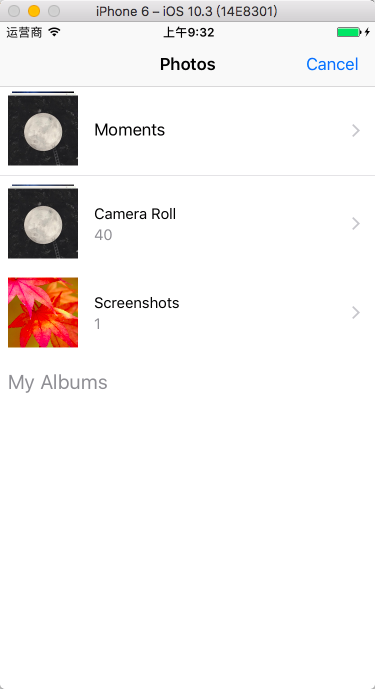

12343954
on 17 Jan 2018
i think this lib has no difference between under RN 0.50.3 and 0.52.0
my main project

my test project

2 projects are running fine
12343954
on 17 Jan 2018
@12343954
But i am facing issue with expo react native .ie my project is not with react-native init .Instead i am creating using create-react-native-app testImagePicker.Like this.
fithaN
on 17 Jan 2018
oh , expo !!! no use yet ! i don't like it !
12343954
on 17 Jan 2018
@fithaN
try this
https://github.com/react-community/react-native-image-picker/issues/453#issuecomment-273191153
12343954
on 17 Jan 2018
Thanks .but didn't work.I think that step was for react-native projects only.
fithaN
on 17 Jan 2018
I had the same issue and I experienced in on both iOS and Android. I uninstalled the app and ran react-native run-ios && react-native run-android and they worked. Except that I saw this on iOS which is a bit ugly, I did follow the tutorial on the install section and added the keys NSPhotoLibraryUsageDescription, NSCameraUsageDescription, and NSMicrophoneUsageDescription.


though the user only had to click once, then after that it won't show again. Also I noticed that the response callback takes sometime to be called back.
 aprilmintacpineda
on 5 Mar 2018
aprilmintacpineda
on 5 Mar 2018
For those who use Expo we can use this build-in library of EXPO
https://docs.expo.io/versions/v26.0.0/sdk/imagepicker
 hoanvutt
on 7 Apr 2018
hoanvutt
on 7 Apr 2018
Problem not sorted yet. This problem only persist in iOS. have tried almost everything available on web.
I have:
-reinstall library
-manually steps followed for iOS
-deleted the app and than have installed it again
-installed specific versions of this library but none of them worked
Please help...
 Daneyl
on 27 Jun 2018
Daneyl
on 27 Jun 2018
@Daneyl Make sure you are adding the libRNImagePicker.a in the "Build Phases" at the root of your project instead of the Libraries branch. If you do that, you wont find any libRNImagePicker.a references to add. If you do this by dragging the Products > libRNImagePicker.a tree item over the list. remove it. That just wont work.
Once you did the step 3 of the README.MD follow the next steps:
1 - Select your project root
2- In the center pane of the xcode screen look for this < > buttons.
3- Open the dropdown list below them.
4- Select the item named after your project name, the one in "Targets" section of the dropdown
5- Then you should find "Build phases" tab almost all the way to the right over the same row.

6- Scroll down to the "Link Binary With Libraries" section.
7- Clic '+' button at the bottom of the list, now you should find the libRNImagePicker.a this time.
Then compile and run the app
This worked for me. I was facing this issue, tried all the solutions I could find online just like you. luckily I read about this in one of the related issues around here (I don't remember now), that comment wasn't clear enough for me to understand at first, but it gave me a lead.
I think I'm a couple of months late, anyway I hope it helps you or someone else.
 bsendras
on 8 Aug 2018
bsendras
on 8 Aug 2018
If you use Expo,you can search on google 'ImagePicker expo',make sure you have the latest expo and copy this code that you find there.PROBLEM SOLVED!
 orsospatrick
on 4 Sep 2018
orsospatrick
on 4 Sep 2018
really a tricky problem :(
in my old project, the version of main packages like this:
"dependencies": {
    "react": "16.4.1",
    "react-native": "0.56.0",
    "react-native-image-picker": "^0.27.1",
    ...
},
"devDependencies": {
    "babel-preset-react-native": "5.0.2",
    ...
}
and .babelrc file:
{
  "presets": ["react-native"]
}
i tried every way i could find on the internet, but all failed, what made me really crazy!
then i used a higher version of react and react-native:
"dependencies": {
    "react": "16.6.0-alpha.8af6728",
    "react-native": "0.57.4",
    "react-native-image-picker": "^0.27.1",
    ...
},
"devDependencies": {
    "metro-react-native-babel-preset": "0.49.0",
    ...
}
and new .babelrc file:
{
  "presets": ["module:metro-react-native-babel-preset"]
}
and it worked.
both projects were created by react-native-cli.
i found the main difference between two projects is babel-preset.
hope i can help anyone else.
 Femonzor
on 7 Nov 2018
Femonzor
on 7 Nov 2018
I also faced the same issue. It was linking issue, solved with below steps.
https://github.com/react-native-community/react-native-image-picker/blob/HEAD/docs/Install.md
 Digant312
on 10 Jan 2019
Digant312
on 10 Jan 2019
@Daneyl Make sure you are adding the libRNImagePicker.a in the "Build Phases" at the root of your project instead of the Libraries branch. If you do that, you wont find any libRNImagePicker.a references to add. If you do this by dragging the Products > libRNImagePicker.a tree item over the list. remove it. That just wont work.
Once you did the step 3 of the README.MD follow the next steps:
1 - Select your project root
2- In the center pane of the xcode screen look for this < > buttons.
3- Open the dropdown list below them.
4- Select the item named after your project name, the one in "Targets" section of the dropdown
5- Then you should find "Build phases" tab almost all the way to the right over the same row.
6- Scroll down to the "Link Binary With Libraries" section.
7- Clic '+' button at the bottom of the list, now you should find the libRNImagePicker.a this time.Then compile and run the app
This worked for me. I was facing this issue, tried all the solutions I could find online just like you. luckily I read about this in one of the related issues around here (I don't remember now), that comment wasn't clear enough for me to understand at first, but it gave me a lead.
I think I'm a couple of months late, anyway I hope it helps you or someone else.
work to me, thanks!
 clarkjoao
on 15 Apr 2019
clarkjoao
on 15 Apr 2019
This issue has been automatically marked as stale because it has not had recent activity. It will be closed if no further activity occurs. Thank you for your contributions. You may also mark this issue as a "discussion" and I will leave this open.
![stale[bot] picture](https://avatars3.githubusercontent.com/in/1724?v=4&s=40) stale[bot]
on 14 Jun 2019
stale[bot]
on 14 Jun 2019
Closing this issue after a prolonged period of inactivity. Fell free to reopen this issue, if this still affecting you.
stale[bot]
on 21 Jun 2019
This worked for me on android issue:
import * as ImagePicker from 'react-native-image-picker';

ImagePicker.showImagePicker(options, (response) => {
         // code here
};
 mikenath223
on 12 Dec 2020
mikenath223
on 12 Dec 2020
@mikenath223 I have had same problem here after updating this lib.. your comment saved me, bro! Thanks!
 sergiosilvajr
on 14 Dec 2020
sergiosilvajr
on 14 Dec 2020
@mikenath223 Thanks a lot ! someone has to add this example to the Readme, I might in the near future
 redoxate
on 15 Dec 2020
redoxate
on 15 Dec 2020
Related issues
 thabemmz
·
40Comments
thabemmz
·
40Comments
 zvat
·
28Comments
zvat
·
28Comments
 alexeypodolian
·
26Comments
alexeypodolian
·
26Comments
 jefelewis
·
27Comments
jefelewis
·
27Comments
 ankag94
·
32Comments
ankag94
·
32Comments
Most helpful comment
oh , expo !!! no use yet ! i don't like it !