React-native-image-crop-picker: Simulator freezes after selecting and posting image - react native 0.63.1
Version
Tell us which versions you are using:
- react-native-image-crop-picker v^0.31.1
- react-native v0.63.1
Platform
Tell us to which platform this issue is related
- iOS
- Android
Expected behaviour
On the simulator, after selecting image from library, we should be able to process the image (in my case I am posting it to the server).
Actual behaviour
After selecting an image/images OR just closing the image selecting modal, the simulator freezes (this occurring before posting or any processing). Initially, I thought it was a bug in my code, but traced the error all the way back to the openPicker method. In addition, when trying to send the image returned (an image is still returned even though the simulator freezes), I get the errors shown below in Chrome console.
This does not happen on an actual device. I wonder if it is related to this issue: https://github.com/facebook/react-native/issues/29364
Also important to note is that I only started to receive this error after updating to the latest version of react-native (0.63.1). I did not have any of these issues in RN 0.62.
My Thoughts
I am wondering if there are two issues at play here;
One issue could be related to animation/gestures and
Another related to actually sending the image to the server.
The reason I think the issues are separate, is because regardless of whether I select an image or not, the simulator freezes. However, if I open the modal to select an image the simulator freezes AND I receive the errors shown below in the Chrome console.
I receive the following errors in Chrome console
Missing request token for request:
Error processing request body: Error Domain=RCTErrorDomain Code=0 "Invalid request token." UserInfo={NSLocalizedDescription=Invalid request token.}
For all of you with iOS native dev experience, I receive the following errors in Xcode
2020-07-22 09:10:39.575509+1000 FitPlace[32558:801024] [native] [GESTURE HANDLER] Initialize gesture handler for root view
2020-07-22 09:11:09.014235+1000 FitPlace[32558:801240] [javascript]
2020-07-22 09:11:10.139509+1000 FitPlace[32558:801024] [core] "Error returned from daemon: Error Domain=com.apple.accounts Code=7 "(null)""
2020-07-22 09:11:14.190836+1000 FitPlace[32558:801240] [javascript]
2020-07-22 09:11:14.414287+1000 FitPlace[32558:801862] [native] Missing request token for request:
2020-07-22 09:11:14.431963+1000 FitPlace[32558:801862] [native] Missing request token for request:
2020-07-22 09:11:14.436436+1000 FitPlace[32558:801024] Warning: Attempt to present
2020-07-22 09:11:14.443977+1000 FitPlace[32558:801862] [native] Missing request token for request:
2020-07-22 09:11:14.444786+1000 FitPlace[32558:801024] Warning: Attempt to present
2020-07-22 09:11:14.456065+1000 FitPlace[32558:801862] [native] Error processing request body: Error Domain=RCTErrorDomain Code=0 "Invalid request token." UserInfo={NSLocalizedDescription=Invalid request token.}
2020-07-22 09:11:14.456921+1000 FitPlace[32558:801024] Warning: Attempt to present
2020-07-22 09:11:14.460264+1000 FitPlace[32558:801024] Warning: Attempt to present
Steps to reproduce
Trigger image selection modal with ImagePicker.openPicker with options: {multiple: true,
mediaType: "photo"}Click 'Cancel' on the modal -> the simulator will freeze
OR Select an image from the modal -> errors shown in Chrome console AND simulator will freeze
Love react-native-image-crop-picker? Please consider supporting our collective:
👉 https://opencollective.com/react-native-image-crop-picker/donate
 jamesshaw49
All 12 comments
same issue
 nguyenduy2392
on 7 Aug 2020
nguyenduy2392
on 7 Aug 2020
me too
 luyouwei66
on 14 Aug 2020
luyouwei66
on 14 Aug 2020
Same issue.
 codoffer
on 25 Aug 2020
codoffer
on 25 Aug 2020
@ivpusic have you fixed this issue? i saw you release 0.33.2 yesterday ... seems not work
 boorzhang
on 27 Aug 2020
boorzhang
on 27 Aug 2020
same issue
react-native-image-crop-picker: 0.33.2
react-native: 0.63.2

 GreatAuk
on 1 Sep 2020
GreatAuk
on 1 Sep 2020
Ps: this solution is no more necessary if you update the react-native to 0.63.3, as mentioned below.
This problem is not related to this lib, but with the react-native one as reported here. The temporary solution that I am using is:
1 - Modify the function (id)sendRequest:(NSURLRequest *)request withDelegate: that exists in node_modules/react-native/Libraries/Image/RCTImageLoader.mm to this code here
2 -Install the libs responsible to generate patch-package
yarn add patch-package postinstall-postinstall
or
npm i patch-package
3 - Add a script to run the postinstall
  "scripts": {
     ...
    "postinstall": "patch-package"
4 - Create the patch that will override the node-modules with this fix
npx patch-package react-native
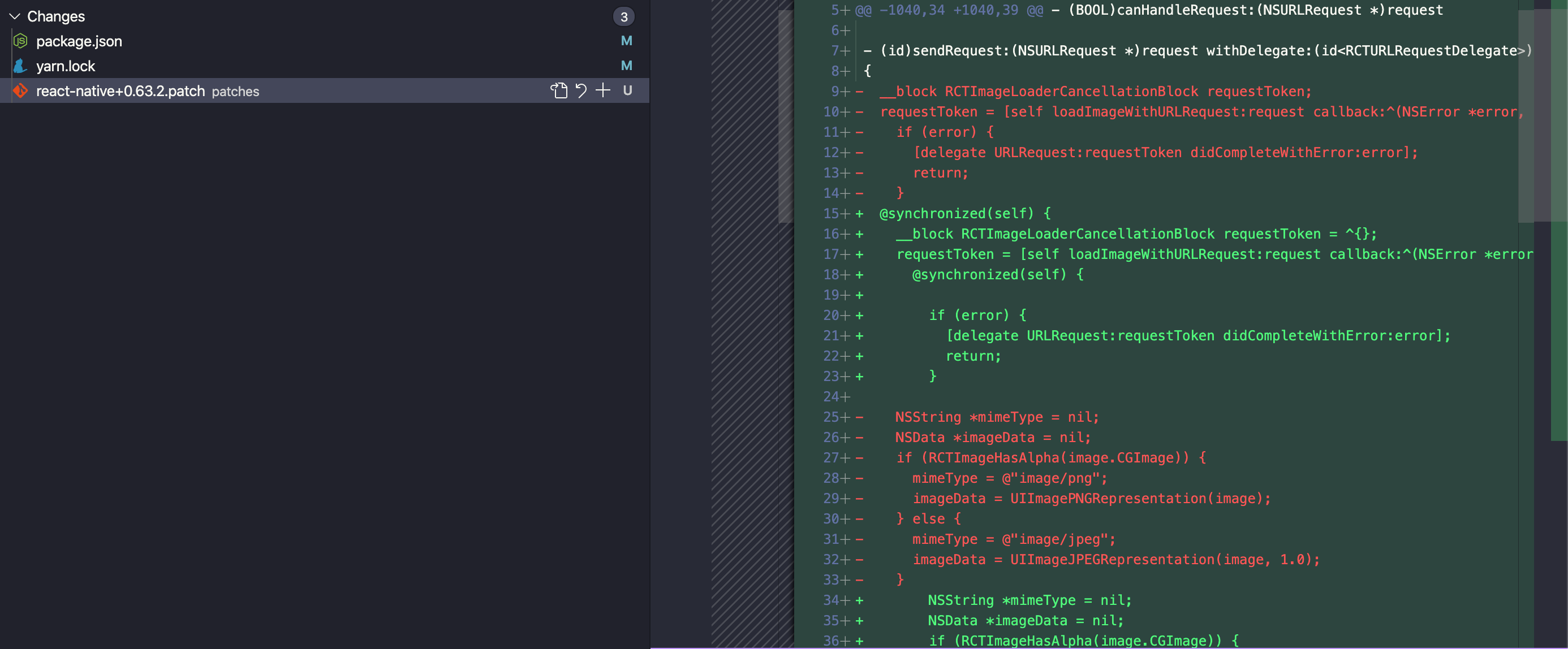
5 - Run the pod install and run your iOS app react-native run-ios
6 - The upload might work again.
PS: These are the changes I have done:
If this solutions does not fix the problem, please try to clear your iOS cache by removing the Pods (rm -rf Pods) and/or the DerivedData (rm -rf ~/Library/Developer/Xcode/DerivedData).
 roni-castro
on 7 Sep 2020
roni-castro
on 7 Sep 2020
This problem is not related to this lib, but with the
react-nativeone as reported here. The temporary solution that I am using is:
1 - Modify the function(id)sendRequest:(NSURLRequest *)request withDelegate:that exists innode_modules/react-native/Libraries/Image/RCTImageLoader.mmto this code here2 -Install the libs responsible to generate
patch-packageyarn add patch-package postinstall-postinstall or npm i patch-package3 - Add a script to run the postinstall
  "scripts": {
     ...
    "postinstall": "patch-package"
4 - Create the patch that will override the node-modules with this fix
npx patch-package react-native
5 - Run the
pod installand run your iOS appreact-native run-ios6 - The upload might work again.
PS: These are the changes I have done:
If this solutions does not fix the problem, please try to clear your iOS cache by removing the Pods (
rm -rf Pods) and/or the DerivedData (rm -rf ~/Library/Developer/Xcode/DerivedData).
Thanks a lot!!!
I was struggled in last two days, I just followed your instruction, finally iOS image upload working fine for me
 prasanna-panneerselvam
on 9 Sep 2020
prasanna-panneerselvam
on 9 Sep 2020
I just update react-native from 0.63.2 to 0.63.3, it fixed the issue for me 😉
 morgane1806
on 30 Sep 2020
morgane1806
on 30 Sep 2020
upgrade react-native to version 0.63.3
 ivpusic
on 30 Sep 2020
ivpusic
on 30 Sep 2020
Update node_modules/react-native/Libraries/Image/RCTImageLoader.mm.
https://github.com/facebook/react-native/pull/29595/files
 NoumanSakhawat
on 2 Oct 2020
NoumanSakhawat
on 2 Oct 2020
I just update react-native from 0.63.2 to 0.63.3, it fixed the issue for me 😉
this works for me too
 castalonirenz
on 14 Oct 2020
castalonirenz
on 14 Oct 2020
@roni-castro solution works for me.
 haryelramalho
on 28 Oct 2020
haryelramalho
on 28 Oct 2020
Related issues
 fmcruz
·
3Comments
fmcruz
·
3Comments
 xuchao321
·
3Comments
xuchao321
·
3Comments
 co-de
·
3Comments
co-de
·
3Comments
 cwRichardKim
·
3Comments
cwRichardKim
·
3Comments
 sergiulucaci
·
3Comments
sergiulucaci
·
3Comments
Most helpful comment
Ps: this solution is no more necessary if you update the react-native to 0.63.3, as mentioned below.
This problem is not related to this lib, but with the
react-nativeone as reported here. The temporary solution that I am using is:1 - Modify the function
(id)sendRequest:(NSURLRequest *)request withDelegate:that exists innode_modules/react-native/Libraries/Image/RCTImageLoader.mmto this code here2 -Install the libs responsible to generate
patch-package3 - Add a script to run the postinstall
4 - Create the patch that will override the node-modules with this fix
5 - Run the
pod installand run your iOS appreact-native run-ios6 - The upload might work again.
PS: These are the changes I have done:
If this solutions does not fix the problem, please try to clear your iOS cache by removing the Pods (
rm -rf Pods) and/or the DerivedData (rm -rf ~/Library/Developer/Xcode/DerivedData).