React-native-image-crop-picker: cropping multiple image
-Cropping multiple image.
- react-native-image-crop-picker v0.32.2
- react-native v0.62.2
- Android
Basically i am not getting error but i need a solution related to this package
I imported image-crop-picker and through it i am picking multiple images and want ti apply image cropping on each.
but i am not able to do it if you can help me in it .
here is my code
class PostTrip extends Component {
constructor(props){
super(props);
this.state= {
modal:false,
FromTo: true,
Photomodal: false,
isSelected1:false,
isSelected2:false,
images:[],
From: "",
To: "",
}
}
pickMultiple() {
ImagePicker.openPicker({
multiple: true,
waitAnimationEnd: false,
sortOrder: 'desc',
includeExif: true,
forceJpg: true,
})
.then((images) => {
this.setState({
image: null,
images: images.map((i) => {
return {
uri: i.path,
width: i.width,
height: i.height,
mime: i.mime,
};
}),
});
})
.catch((e) => alert());
}
renderImage(image) {
return (
);
}
Last = () =>{
this.state.images.map((item, index)=>{
console.log(item.height)
console.log(item.mime)
console.log(item.uri)
})
}
renderAsset(image) {
if (image.mime && image.mime.toLowerCase().indexOf('video/') !== -1) {
return this.renderVideo(image);
}
return this.renderImage(image);
}
render(){ } thank you
return(
    <View style={styles.ToFromBox}>
      <View>
      <Text style={{fontWeight:"bold",fontSize:19}}>{this.state.From}</Text>
      </View>
      <Text style={{fontSize:20,fontWeight:"bold"}}>-To-</Text>
      <View>
      <Text style={{fontWeight:"bold",fontSize:19}}>{this.state.To}</Text>
      </View>
    </View>

    <View style={styles.FullImage}>
      <ScrollView horizontal style={{marginLeft:10}}>
        {this.state.images ? this.state.images.map((i) =>
        (<View key={i.uri}>{this.renderAsset(i)}</View>)): null}
      </ScrollView>
    </View>

    <TouchableOpacity style={{height:60,width:170,justifyContent:"center",alignItems:"center",
    borderWidth:2, marginTop:20,borderRadius:5,borderColor:"white",backgroundColor:"#2b89b5"}}
    onPress={this.pickMultiple.bind(this)}>
      <Icon name="cloud-upload" size={25} />
      <Text style={{fontWeight:"bold"}}>Upload Images</Text>
    </TouchableOpacity>

    <View style={{flexDirection:"row",justifyContent:"space-around",marginTop:20}}>
      <View style={{marginRight:20}}>
        <Button color="#2b89b5" title={"Select Activities"}
        onPress={()=>{this.setState({modal:true})} } />
      </View>
      <View style={{marginLeft:20,width:100}}>
        <Button  title="Next" color="#2b89b5"
        onPress={()=> {this.props.navigation.navigate("CreatePost")}}/>
      </View>
    </View>

    <Modal animationType="slide" transparent={true} visible={this.state.modal}
    onRequestClose={()=>{this.setState({modal:false})}}>

      <View style={styles.modalView}>
        <View>
          <Text style={{marginLeft:20,fontSize:20,fontWeight:"bold"}}>Activities</Text>
        </View>

        <View>
          <View>
            <View style={{flexDirection:"row",justifyContent:"space-around"}}>
              <View style={{flexDirection:"row",alignItems:"center"}}>
                <CheckBox disabled={false} value={this.state.isSelected1}
                onValueChange={() => this.state.isSelected1 ? this.setState({setSelected1:false}) :
                this.setState({setSelected1:true})}/>
                  <Text>Rock Climibing</Text>
              </View>
              <View style={{flexDirection:"row",alignItems:"center"}}>
                <CheckBox disabled={false} value={this.state.isSelected2}
                onValueChange={() => this.state.isSelected2 ? this.setState({setSelected2:false}) :
                this.setState({setSelected2:true})}/>
                  <Text>Rock Climibing</Text>
              </View>
            </View>


            <View >
              <Button color="#07f783" title={"OK"} onPress={()=>{this.setState({modal:false})}}/>
            </View>
          </View>
        </View>
      </View>

    </Modal>

    <Modal animationType="slide" transparent={true} visible={this.state.FromTo}
    style={{alignItems:"center"}}>
      <View style={{flex:1,position:"absolute",bottom:55,top:55,backgroundColor:"#000000aa",
      justifyContent:"center",width:"100%",alignItems:"center"}}>
        <View style={{backgroundColor:"cyan",height:155,width:330,alignItems:"center",borderRadius:10}}>
          <Text style={{fontSize:20}}>Choose your trip destination</Text>

          <View style={{flexDirection:"row",paddingTop:20}}>
            <TextInput value={this.state.From}
            placeholder="From"
            style={{width:150,height:40,borderWidth:1,borderRadius:5}}
            onChangeText={From => this.setState({From})}/>
            <TextInput value={this.state.To}
            placeholder="To"
            style={{width:150,height:40,marginLeft:5,borderRadius:5,borderWidth:1}}
            onChangeText={To => this.setState({To})}/>
          </View>

          <View>
            <TouchableOpacity style={{borderRadius:5,borderWidth:2,height:30,width:50,marginTop:15}}>
              <Text style={{fontSize:20,textAlign:"center"}}
              onPress={()=>{this.setState({FromTo:false})}}>OK</Text>
            </TouchableOpacity>
          </View>

        </View>
      </View>
    </Modal>

        </View>
    );
}
 akhileshkumarpal
All 4 comments
Just to share my solution with the 0.25.3 release (as i'm on 0.60.x RN version) and can't wait for this fix:
ImagePicker.openPicker({
  ...imagePickerOptions,
  compressImageMaxWidth: 1000,
  compressImageMaxHeight: 1000,
  multiple: true,
  mediaType: 'photo',
}).then(async images => {
  const result = [];

  for (const image of images) {
    result.push(
      await ImagePicker.openCropper({
        path: image.path,
        width: 1000,
        height: 1000,
      })
    );
  }

   return result;
});
HPH
 VincentCATILLON
on 22 Jul 2020
VincentCATILLON
on 22 Jul 2020
I was able to crop mine with this implementation.
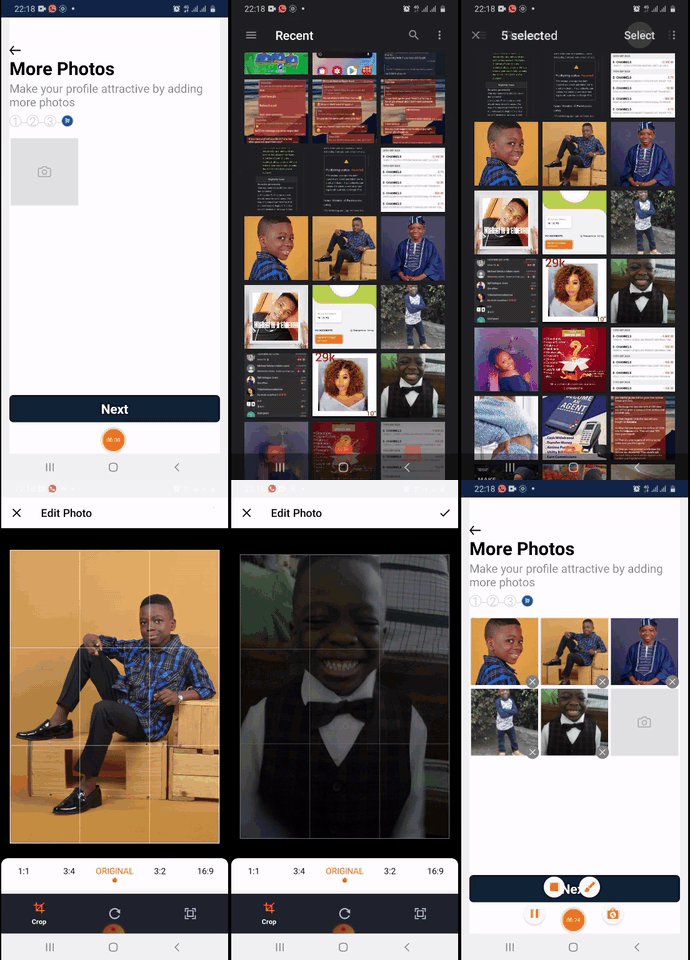
```js
const images = await ImgPicker.openPicker({
...config,
includeBase64: true,
mediaType: 'photo',
maxFiles: config.max || 1,
});
const cropped = await cropMulti(images);
return cropped;
const cropMulti = async (images) => {
const props = {
cropped: [],
length: images.length,
current: images.length,
};
// max number of times to crrop
await cropCurrent(props, images);
await cropCurrent(props, images);
await cropCurrent(props, images);
await cropCurrent(props, images);
await cropCurrent(props, images);
await cropCurrent(props, images);
return props.cropped;
};
const cropCurrent = async (props, images) => {
if (props.current) {
const cImg = await crop(images[props.length - props.current]);
props.cropped.push(cImg);
props.current = props.current - 1;
}
};
const crop = async (img) => {
return await ImgPicker.openCropper({
path: img.path,
includeBase64: true,
width: img.width,
height: img.height,
});
};```
 myckhel
on 4 Sep 2020
myckhel
on 4 Sep 2020
@myckhel that was an unnecessary dick pic. Check your pics.
 ede-sous
on 1 Oct 2020
ede-sous
on 1 Oct 2020
Oooops! Ill remove and record a new one.
Thanks
myckhel
on 6 Oct 2020
Related issues
 cwRichardKim
·
3Comments
cwRichardKim
·
3Comments
 tximpa91
·
3Comments
tximpa91
·
3Comments
 Martian2Lee
·
3Comments
Martian2Lee
·
3Comments
 phantom1299
·
3Comments
phantom1299
·
3Comments
 xuchao321
·
3Comments
xuchao321
·
3Comments
Most helpful comment
@myckhel that was an unnecessary dick pic. Check your pics.