React-native-image-crop-picker: Can't upload file, receiving 'file not present' error.
Version
Tell us which versions you are using:
- react-native-image-crop-picker v0.28.0?
- react-native v0.61.2
Platform
Tell us to which platform this issue is related
Both iOS & Android
Expected behaviour
Expected Photo to Upload and receive a success message
Actual behaviour
Receive an error message of "No File Present"
Steps to reproduce
Not sure if this is an API issue, my code, this library, or anything else. I've used to library before with a different project and had no issues. This time though I'm not able to upload properly.
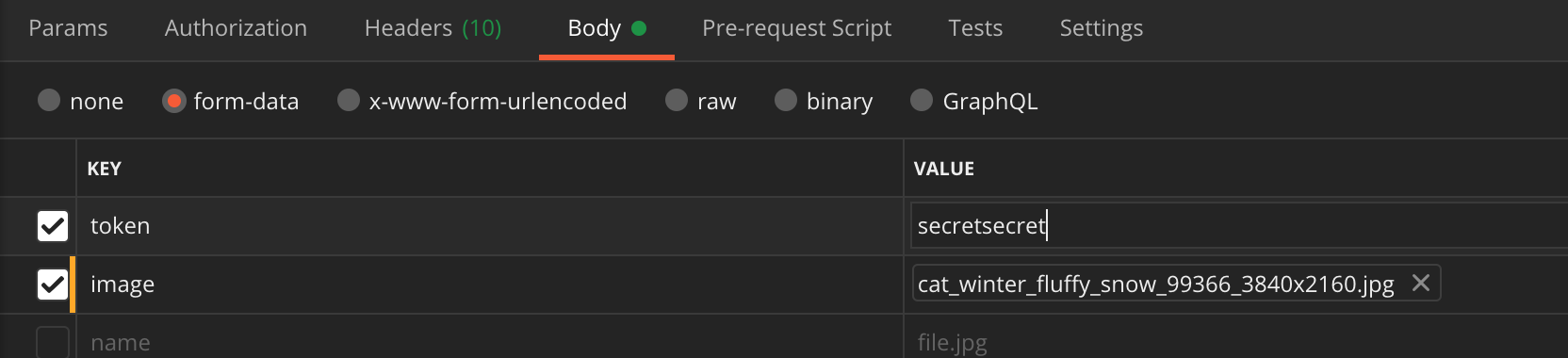
My API Docs show's that my endpoint receives 2 params, token & image, image should be in jpg format.
I'm able to successfully upload using POSTMAN by selecting BODY, changing the header to form-data, adding in my token and value in the key value section. In the next row, I added the key for image, then selected file from the dropdown in the same key input, and then selected an image from my desktop in the value. This works fine.
Here's the code I wrote for this:
import React, { useState, useEffect, useRef } from 'react';
import { useSelector } from 'react-redux';
import { View, Button } from 'react-native';

import ImagePicker from 'react-native-image-crop-picker';
import axios from 'axios';

const FileUploadScreen = () => {
  const [image, setImage] = useState(null);

  const { token } = useSelector(state => state.reducer);

  const pickGalleryImage = () => {
    ImagePicker.openPicker({
      forceJpg: true,

      compressImageMaxHeight: 2016 / 2,
      compressImageMaxWidth: 1512 / 2,
    }).then(img => setImage(img));
  };

  const handleCamera = () => {
    ImagePicker.openCamera({
      forceJpg: true,
      compressImageMaxHeight: 2016 / 2,
      compressImageMaxWidth: 1512 / 2,
      mediaType: 'photo',
    }).then(img => setImage(img));
  };

  const handlePhotoData = async img => {
    const imageData = new FormData();

    imageData.append('image', {
      name: 'image.jpg',
      type: img.mime,
      uri: img.path,
    });

    const { data } = await axios.post('endpt/upload-photo.html', {
      token,
      image: imageData,
    });

    console.log({ data });
    // data = { success: false, errorCode: 999, errorMessage: 'No File Present }
  };

  useEffect(() => {
    if (image.path) {
      handlePhotoData(image);
    }
  }, [image]);

  return (
    <View>
      <Button text="Use Camera" onPress={handleCamera} />
      <Button text="Use Photo Gallery" onPress={pickGalleryImage} />
    </View>
  );
};
When I console log the imageData, it looks like this:
  _parts: ['image', {
        name: 'image.jpg',
        uri: "/Users/Me/Library/Developer/CoreSimulator/Devices/8594-0BA1BE0D8553/data/Containers/Data/Application/AFB109C2-E606-4055-A519-ADC5A1185B98/tmp/react-native-image-crop-picker/622F1873-008E-4F37-97D8-57EBB92A0087.jpg",
        type: 'image/jpeg',
    }]
The web version of this project is using a similar image upload endpoint (not the same one unfortunately). When I inspect the network, I noticed that their formdata object looks like this:
Content-Disposition:
form-data;
name="file";
filename="dc4c0e9-8-f08ada.jpeg"
Content-Type: image/jpeg
I've tried adding 'file://' string to the uri image path
 imageData.append('image', {
      name: 'image.jpg',
      type: img.mime,
      uri: 'file: //' + img.path,
    });
Tried removing token and adding it to the form data instead.
Tried on both Android, iOS, physical devices (except for android sim).
I really don't know where to go from here. Any help would be appreciated. Thank you!
Attachments
// stacktrace or any other useful debug info
Love react-native-image-crop-picker? Please consider supporting our collective:
👉 https://opencollective.com/react-native-image-crop-picker/donate
 AndresTIY
All 6 comments
Figured it out!
I wasn't passing in the data properly. Here's what I changed:
 const handlePhotoData = async img => {
    const imageData = new FormData();

    imageData.append('image', {
      name: 'image.jpg',
      type: img.mime,
      uri: img.path,
    });

   imageData.append('token', token)
   // added token here


    const { data } = await axios.post('endpt/upload-photo.html', imageData)
   // removed body object and only passing in imageData instead of {image: imageData}

    console.log({ data });

  };
Hi @AndresTIY been using this same code but can't seem to get it working, is image in the append section a standard or something you're expecting from the server end?
 thecodecafe
on 21 Aug 2020
thecodecafe
on 21 Aug 2020
Don't bother was an issue with Flipper was on RN 63, disabled flipper and it worked.
thecodecafe
on 21 Aug 2020
@thecodecafe it was flipper issue for me as well, when I commented the network code in ReactNativeFlipper.java line 43, it worked for me.
Commented the following code
//builder.addNetworkInterceptor(new FlipperOkhttpInterceptor(networkFlipperPlugin));
 azhararmar
on 24 Aug 2020
azhararmar
on 24 Aug 2020
Commented the following code
//builder.addNetworkInterceptor(new FlipperOkhttpInterceptor(networkFlipperPlugin));
Thanks you @azhararmar ! That worked for me ! I had "network error" and "stream closed" with axios but commenting this line did the trick !
 Thomas-Negrault
on 6 Sep 2020
Thomas-Negrault
on 6 Sep 2020
My issue was that I was trying to be clever and set content-type headers, worked for iOS but not for android
      const file = {
          uri:res.path,
          name: "file",
          type: res.mime||"image/jpg"
        }

        const body = new FormData()
        body.append('file', file)
        const data = {
          method: 'POST',
          body,
          headers: {
            'token':"xyz",
            // 'content-type': 'multipart/form-data;'
          }
        };
 kyle-ssg
on 13 Nov 2020
kyle-ssg
on 13 Nov 2020
Related issues
 cwRichardKim
·
3Comments
cwRichardKim
·
3Comments
 victorwpbastos
·
3Comments
victorwpbastos
·
3Comments
 pavsidhu
·
3Comments
pavsidhu
·
3Comments
 sergiulucaci
·
3Comments
sergiulucaci
·
3Comments
 manojshrimalla
·
3Comments
manojshrimalla
·
3Comments
Most helpful comment
Don't bother was an issue with Flipper was on RN 63, disabled flipper and it worked.