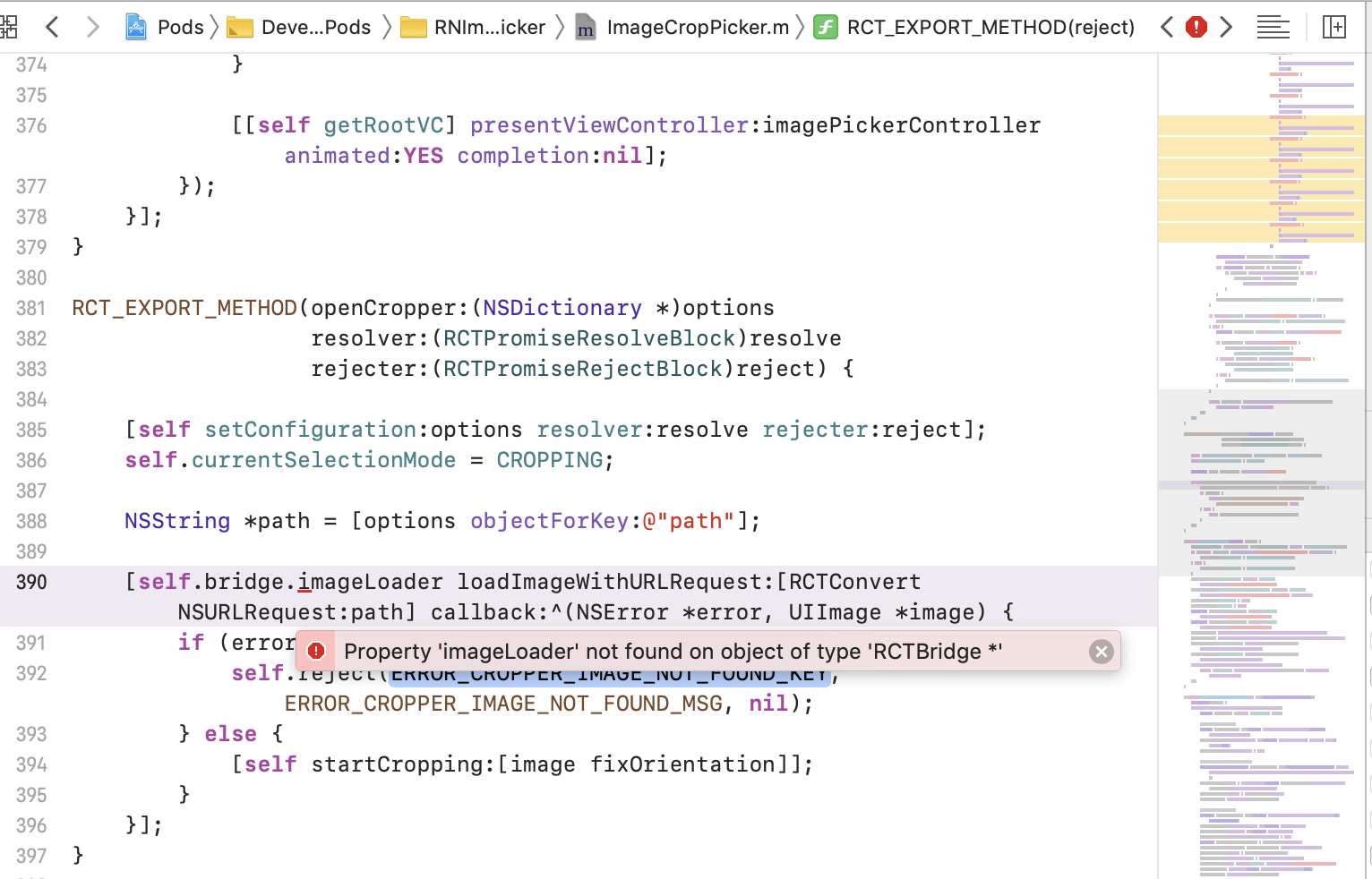
React-native-image-crop-picker: Property 'imageLoader' not found on object of type 'RCTBridge *'
Version
Tell us which versions you are using:
- react-native-image-crop-picker v0.25.0
- react-native v0.61.1
Platform
Tell us to which platform this issue is related
- iOS
Expected behaviour
Compiles normally
Actual behaviour
Steps to reproduce
Update ipad to iOS 13.1
Update XCode
Update all dependencies (npm install, pod etc)
Run project as usual
Attachments
Love react-native-image-crop-picker? Please consider supporting our collective:
👉 https://opencollective.com/react-native-image-crop-picker/donate
 kazartsevalex
All 5 comments
Facing the same issue with v0.24.1 and react-native 0.59.10
 jinxac
on 3 Nov 2019
jinxac
on 3 Nov 2019
Ran into this issue with react-native 0.61.4
Fixed Adding these entries to Podfile:
  pod 'React-CoreModules', :path => '../node_modules/react-native/React/CoreModules'
  pod 'FBReactNativeSpec', :path => "../node_modules/react-native/Libraries/FBReactNativeSpec"
  pod 'RCTTypeSafety', :path => "../node_modules/react-native/Libraries/TypeSafety"
  pod 'FBLazyVector', :path => "../node_modules/react-native/Libraries/FBLazyVector"
  pod 'RCTRequired', :path => "../node_modules/react-native/Libraries/RCTRequired"
  pod 'ReactCommon/turbomodule/core', :path => "../node_modules/react-native/ReactCommon"
then ran pod install
then edited on XCODE the React.podspec file (can be found at Pods/Development Pods/React/Pod/React.podspec) and added before the end tag the following lines:
  s.dependency "React-RCTActionSheet", version
  s.dependency "React-CoreModules", version
 xtealer
on 18 Nov 2019
xtealer
on 18 Nov 2019
In my case, my Podfile has global 'use_modular_headers!', which caused this issue.
use_modular_headers!

source 'https://github.com/CocoaPods/Specs.git'
# source 'https://cdn.cocoapods.org/'

platform :ios, '9.0'

# The target name is most likely the name of your project.
target 'RNTestProject' do
  # Your 'node_modules' directory is probably in the root of your project,
  # but if not, adjust the `:path` accordingly
  pod 'React', :path => '../node_modules/react-native', :subspecs => [
    'Core',
    'RCTImage',
    'CxxBridge', # Include this for RN >= 0.47
    'DevSupport', # Include this to enable In-App Devmenu if RN >= 0.43
    'RCTText',
    'RCTNetwork',
    'RCTWebSocket', # needed for debugging
    # Add any other subspecs you want to use in your project
  ]
  # Explicitly include Yoga if you are using RN >= 0.42.0
  pod 'yoga', :path => '../node_modules/react-native/ReactCommon/yoga'

  # Third party deps podspec link
  pod 'DoubleConversion', :podspec => '../node_modules/react-native/third-party-podspecs/DoubleConversion.podspec', :modular_headers => false
  pod 'glog', :podspec => '../node_modules/react-native/third-party-podspecs/glog.podspec', :modular_headers => false
  pod 'Folly', :podspec => '../node_modules/react-native/third-party-podspecs/Folly.podspec', :modular_headers => false

  pod 'RNImageCropPicker', :path => '../node_modules/react-native-image-crop-picker'

end

post_install do |installer|
  installer.pods_project.targets.each do |target|
    if target.name == "React"
      target.remove_from_project
    end
  end
end
 dan-huang
on 25 Dec 2019
dan-huang
on 25 Dec 2019
I run into that myself as well: When using swift react-native libs, we need now to set : modular_headers => true on react. Then we are getting an errror in the rn-image-crop-picker as follow
info /Users/philc/dev/tkbel/conf/node_modules/react-native-image-crop-picker/ios/src/ImageCropPicker.m:390:18: error: definition of 'RCTBridge' must be imported from module 'React.React.RCTBridge' before it is required

info     [self.bridge.imageLoader loadImageWithURLRequest:[RCTConvert NSURLRequest:path] callback:^(NSError *error, UIImage *image) {
                 ^

info In module 'React' imported from /Users/philc/dev/tkbel/conf/node_modules/react-native-image-crop-picker/ios/src/ImageCropPicker.h:14:
/Users/philc/dev/tkbel/conf/ios/Pods/Headers/Public/React/React/RCTBridge.h:106
info :12: note: previous definition is here
@interface RCTBridge : NSObject <RCTInvalidating>
           ^

info /Users/philc/dev/tkbel/conf/node_modules/react-native-image-crop-picker/ios/src/ImageCropPicker.m:390:18: error: property 'imageLoader' not found on object of type 'RCTBridge *'

info     [self.bridge.imageLoader loadImageWithURLRequest:[RCTConvert NSURLRequest:path] callback:^(NSError *error, UIImage *image) {
                 ^
So this may impact many projects that are using new rn libs developed in swift!!
I've also reported that to the swift project: https://github.com/react-native-kit/react-native-track-player/issues/503#issuecomment-578750460
 philjoseph
on 27 Jan 2020
philjoseph
on 27 Jan 2020
I had a same issue with
React native version : 0.59.10
when i add swift file to project
i solve this by change in RNImageCropPicker.podspec
changed platform version change from '8.0' to '9.0'
s.platform = :ios, "9.0"
 bharamalhusen
on 10 Sep 2020
bharamalhusen
on 10 Sep 2020
Related issues
 victorwpbastos
·
3Comments
victorwpbastos
·
3Comments
 equesteo
·
3Comments
equesteo
·
3Comments
 DISKONEKTeD
·
3Comments
DISKONEKTeD
·
3Comments
 sergiulucaci
·
3Comments
sergiulucaci
·
3Comments
 Phenek
·
3Comments
Phenek
·
3Comments
Most helpful comment
Facing the same issue with v0.24.1 and react-native 0.59.10