React-native-image-crop-picker: iOS 13 dark mode support.
Version
Tell us which versions you are using:
- react-native-image-crop-picker v0.25.0
- react-native v0.60.5
Platform
Tell us to which platform this issue is related
- iOS
Expected behaviour
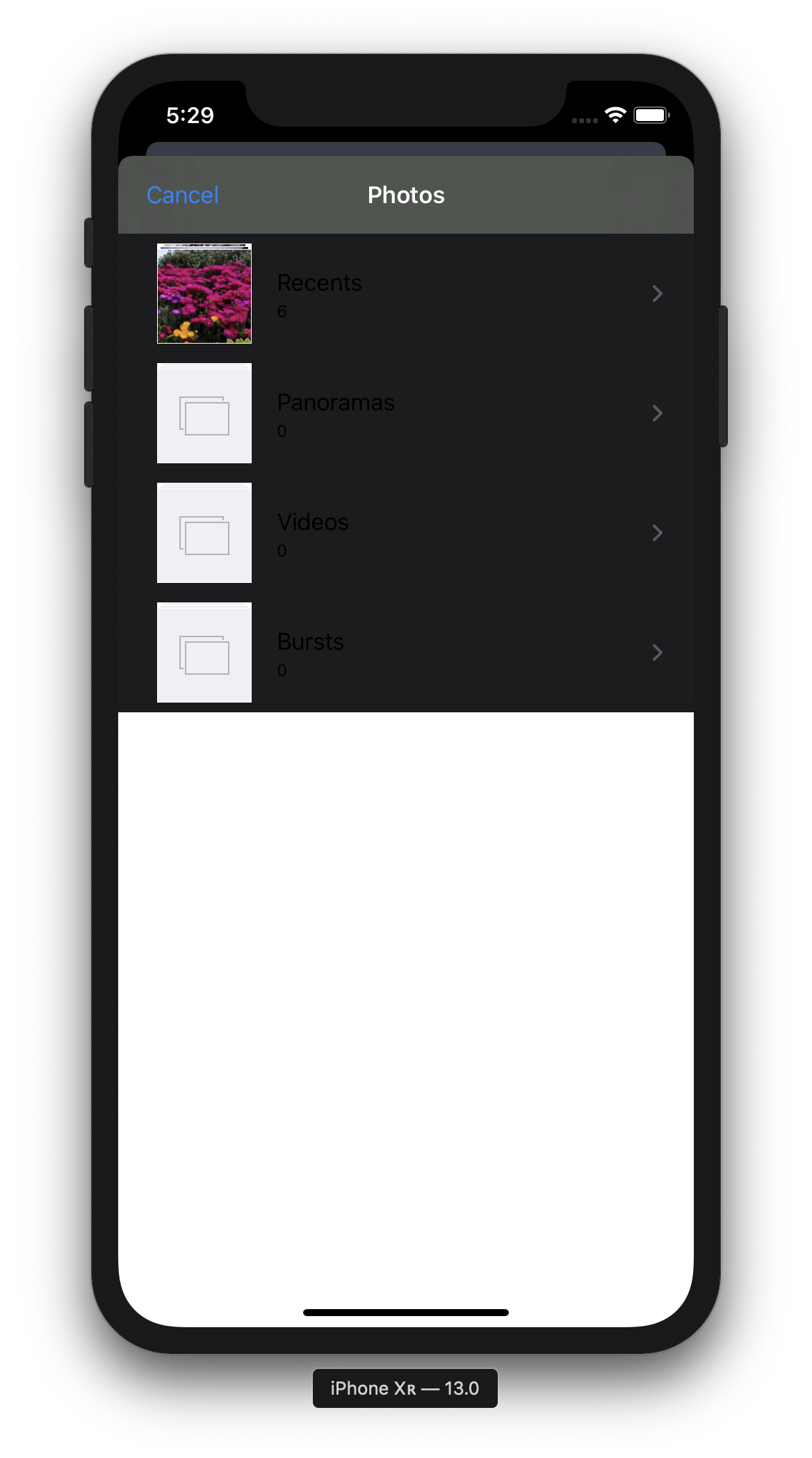
Image picker should looks properly in dark mode.
( background color, text color )
Actual behaviour
Picker background partly white. The albums titles are not readable.
Steps to reproduce
get iPhone XR
call openPicker
Look at picker styles.
Attachments
 tr3v3r
All 11 comments
+1
 bneigher
on 21 Sep 2019
bneigher
on 21 Sep 2019
I made a fork to add the dark mode support #1129
 cr1s3c
on 26 Sep 2019
cr1s3c
on 26 Sep 2019
+1
 marcoizzo
on 29 Sep 2019
marcoizzo
on 29 Sep 2019
released https://github.com/ivpusic/react-native-image-crop-picker/releases/tag/v0.25.3. check release notes
 ivpusic
on 3 Oct 2019
ivpusic
on 3 Oct 2019
If anyone is still stuck on a react-native < 0.60 project like me, this fix seems to work on < 0.25.0 versions as well.
Thanks @cr1s3c!
 jrapala
on 12 Oct 2019
jrapala
on 12 Oct 2019
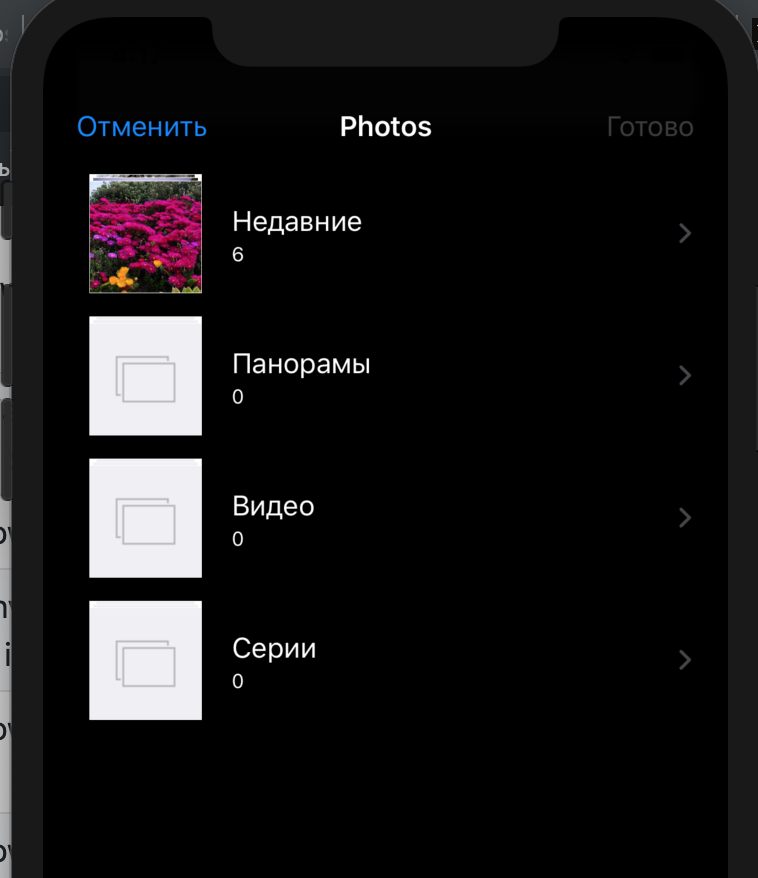
Thanks, adding a dependency
pod 'QBImagePickerController', :path => '../node_modules/react-native-image-crop-picker/ios/QBImagePicker/QBImagePickerController.podspec',
running pod install and Product > Clean Build Folder solves that issue with iOS 13 dark mode for my app.
 artshevtsov
on 18 Oct 2019
artshevtsov
on 18 Oct 2019
If anyone is still stuck on a react-native < 0.60 project like me, this fix seems to work on < 0.25.0 versions as well.
Thanks @cr1s3c!
@jrapala -- did you have to edit node_modules directly?
 Rileyp33
on 26 Oct 2019
Rileyp33
on 26 Oct 2019
@Rileyp33 Yep, I'm a fan of patch-package for making adjustments like this.
jrapala
on 26 Oct 2019
patch-package
Thank you!
Rileyp33
on 26 Oct 2019
Solution from @jrapala works (for those stuck on a react-native < 0.60 project)! Found another workaround for anyone in this situation who wants to avoid patching node_modules:
- Clone
react-native-image-crop-picker> v0.25.3 - In your project's
iosdirectory, create a directory calledpatch - Copy the contents of
react-native-image-crop-picker/ios/QBImagePickerfrom the cloned repo and drop it into your newpatchdirectory - Add the following to your Podfile:
pod 'QBImagePickerController', :path => './patch/QBImagePicker/QBImagePickerController.podspec' $ cd ios && pod install
Rileyp33
on 26 Oct 2019
If anyone is still stuck on a react-native < 0.60 project like me, this fix seems to work on < 0.25.0 versions as well.
Thanks @cr1s3c!
Thanks, adding a dependency
pod 'QBImagePickerController', :path => '../node_modules/react-native-image-crop-picker/ios/QBImagePicker/QBImagePickerController.podspec',
runningpod installandProduct>Clean Build Foldersolves that issue with iOS 13 dark mode for my app.
Thanks, adding a dependency
pod 'QBImagePickerController', :path => '../node_modules/react-native-image-crop-picker/ios/QBImagePicker/QBImagePickerController.podspec',
runningpod installandProduct>Clean Build Foldersolves that issue with iOS 13 dark mode for my app.
thank you save my hair XDDDDD
 GuiltyKirito
on 9 Apr 2020
GuiltyKirito
on 9 Apr 2020
Related issues
 manojshrimalla
·
3Comments
manojshrimalla
·
3Comments
 phantom1299
·
3Comments
phantom1299
·
3Comments
 althurzard
·
3Comments
althurzard
·
3Comments
 sergiulucaci
·
3Comments
sergiulucaci
·
3Comments
 JodiWarren
·
3Comments
JodiWarren
·
3Comments
Most helpful comment
Solution from @jrapala works (for those stuck on a react-native < 0.60 project)! Found another workaround for anyone in this situation who wants to avoid patching node_modules:
react-native-image-crop-picker> v0.25.3iosdirectory, create a directory calledpatchreact-native-image-crop-picker/ios/QBImagePickerfrom the cloned repo and drop it into your newpatchdirectorypod 'QBImagePickerController', :path => './patch/QBImagePicker/QBImagePickerController.podspec'$ cd ios && pod install