React-native-image-crop-picker: Getting build errors
Getting nothing but issues, I followed the installation guide but I keep getting different

errors
 AlmogRnD
All 27 comments
I just released a new version with updated installation instructions. If you follow step by step instructions from there, it will compile and run properly. https://github.com/ivpusic/react-native-image-crop-picker/releases/tag/v0.20.0
 ivpusic
on 5 Mar 2018
ivpusic
on 5 Mar 2018
I did this but now I'm getting Lexical or Preprocessor issues
#import <React/RCTDefines.h> 'React/RCTDefines.h' file not found
Happing at #import "ImageCropPicker.h" will open a new issue
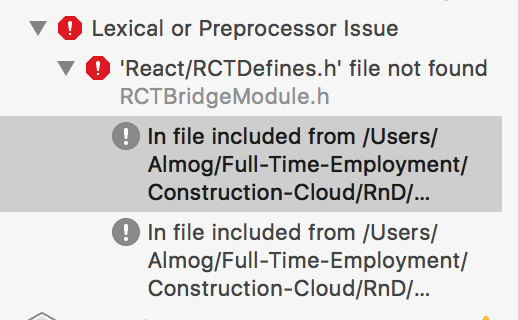
https://github.com/ivpusic/react-native-image-crop-picker/issues/635
AlmogRnD
on 6 Mar 2018
can you show me you Pods file?
ivpusic
on 6 Mar 2018
This is my entire pod file
# Uncomment the next line to define a global platform for your project
 platform :ios, '8.0'

target 'ConstructionCloud' do
  # Comment the next line if you're not using Swift and don't want to use dynamic frameworks
  use_frameworks!

  # Pods for ConstructionCloud
  rn_path = '../node_modules/react-native'

    pod 'yoga', path: "#{rn_path}/ReactCommon/yoga/yoga.podspec"
    pod 'React', path: rn_path, subspecs: [
      'Core',
      'RCTActionSheet',
      'RCTAnimation',
      'RCTGeolocation',
      'RCTImage',
      'RCTLinkingIOS',
      'RCTNetwork',
      'RCTSettings',
      'RCTText',
      'RCTVibration',
      'RCTWebSocket'
    ]

    pod 'RNImageCropPicker', :path =>  '../node_modules/react-native-image-crop-picker'
end

post_install do |installer|
  installer.pods_project.targets.each do |target|
    if target.name == "React"
      target.remove_from_project
    end
  end
end
the only difference is that I don't have use_frameworks! in my Pods file. I followed instructions from readme step-by-step and it compiled and runs without problems.
ivpusic
on 6 Mar 2018
Let me try without frameworks
AlmogRnD
on 6 Mar 2018
Now I'm getting
ld: 24 duplicate symbols for architecture x86_64
clang: error: linker command failed with exit code 1 (use -v to see invocation)
AlmogRnD
on 6 Mar 2018
This is the full error
duplicate symbol _OBJC_IVAR_$_ImageResult._data in:
    /Users/Almog/Library/Developer/Xcode/DerivedData/ConstructionCloud-bcoecdtxeoikdpcgmgahscvuemda/Build/Products/Debug-iphonesimulator/RNImageCropPicker/libRNImageCropPicker.a(ImageCropPicker.o)
    /Users/Almog/Library/Developer/Xcode/DerivedData/ConstructionCloud-bcoecdtxeoikdpcgmgahscvuemda/Build/Products/Debug-iphonesimulator/libimageCropPicker.a(ImageCropPicker.o)
ld: 24 duplicate symbols for architecture x86_64
clang: error: linker command failed with exit code 1 (use -v to see invocation)
maybe you linked it. Linking is only necessary if not using cocoapods. Try to unlink it.
ivpusic
on 6 Mar 2018
Well I did run react-native link which I would have to do at some point for other packages so it shouldn't link this package. I did try to unlink it and I get the following error
~/Full-Time-Employment/Construction-Cloud/RnD/CCMobileApp(branch:w3.2.7*) » react-native unlink react-native-image-crop-picker Almog@Almogs-MacBook-Pro
Scanning folders for symlinks in /Users/Almog/Full-Time-Employment/Construction-Cloud/RnD/CCMobileApp/node_modules (8ms)
rnpm-install info Unlinking react-native-image-crop-picker ios dependency
rnpm-install ERR! It seems something went wrong while unlinking. Error: Cannot read property 'podfile' of undefined
Cannot read property 'podfile' of undefined
AlmogRnD
on 6 Mar 2018
react-native link without providing package name is not a good idea these days because many of third party modules are not playing well with react-native link, so I suggest to always link specific package. Cannot read property 'podfile' of undefined is something I see for the first time :/. Would be great if you can do some investigation what could be wrong here.
ivpusic
on 6 Mar 2018
I'm not really seeing anything else that would hit at whats wrong, are you testing on the latest react version v0.54.0?
AlmogRnD
on 6 Mar 2018
@ivpusic was to fix the Cannot read property 'podfile' of undefined I deleted the pod file then run the unlink command on the package added back the pod file and did pod install
AlmogRnD
on 6 Mar 2018
But still getting
ld: 24 duplicate symbols for architecture x86_64
clang: error: linker command failed with exit code 1 (use -v to see invocation)
so it was not the linking
AlmogRnD
on 6 Mar 2018
yes, I am using rn 0.54.0. Maybe open the project in Xcode, and check if react-native-image-crop-picker is still in Libraries folder. If yes, remove it. Also, check if libRNImageCropPicker is in Build Phases > Link binary with images, if yes, remove it.
ivpusic
on 6 Mar 2018
Thanks working now
AlmogRnD
on 6 Mar 2018
Sorry to reopen but if the "link" is necessary for the Android build, what should we do?
 hoscarcito
on 16 Mar 2018
hoscarcito
on 16 Mar 2018
@hoscarcito Just remove pod 'RNImageCropPicker', :path => '../node_modules/react-native-image-crop-picker' from Podfile and run pod install if you are going to use link command.
 sahil290791
on 22 Mar 2018
sahil290791
on 22 Mar 2018
What if I need to use use_frameworks! Because of another pods?
I'm making a bridge for another SDK in Swift so I need to add use_frameworks
 tiaaaa123
on 26 Mar 2018
tiaaaa123
on 26 Mar 2018
I have the same problem but upgrading to v0.20.1 and it works. I use with CocoaPods.
 ngothanhtai
on 30 Jun 2018
ngothanhtai
on 30 Jun 2018
This is a nightmare, I'm starting to think it was a really bad idea to trust in react-native, I've been the whole day with this but there's always a nightmare with libraries. :( by the time i fought with library issues in react native I think I could have done 50 apps in android and iPhone.
 r01010010
on 29 Aug 2018
r01010010
on 29 Aug 2018
how to resolve it, I can't add any framework.
 musicode
on 13 Sep 2018
musicode
on 13 Sep 2018
@ivpusic
can you help me? how to resolve #import <React/RCTDefines.h> 'React/RCTDefines.h' file not found, even though I only added one line:
use_frameworks!
Hey @ivpusic,
Any news on the issue ? Did you resolved it ?
Thanks!
 letssave
on 22 Sep 2018
letssave
on 22 Sep 2018
+1 Any updates about using this package with use_frameworks!, @ivpusic? This is basically the only cross-platform RN image picker package since react-native-image-picker is no longer maintained.
 edreyyo
on 18 Oct 2018
edreyyo
on 18 Oct 2018
Is it possible to install the package manually for ios?
 hahtml
on 24 Oct 2018
hahtml
on 24 Oct 2018
@hahtml Apparently so, but the instructions are unclear ("Drag and drop the ios/ImageCropPickerSDK folder to your xcode project" -- but to which folder in the Xcode project?) and extra steps need to be followed before releasing a production build.
It's a shame as it looks like a lot of effort has been put into this package.
edreyyo
on 24 Oct 2018
Related issues
 tximpa91
·
3Comments
tximpa91
·
3Comments
 co-de
·
3Comments
co-de
·
3Comments
 manojshrimalla
·
3Comments
manojshrimalla
·
3Comments
 pavsidhu
·
3Comments
pavsidhu
·
3Comments
 Martian2Lee
·
3Comments
Martian2Lee
·
3Comments
Most helpful comment
This is a nightmare, I'm starting to think it was a really bad idea to trust in react-native, I've been the whole day with this but there's always a nightmare with libraries. :( by the time i fought with library issues in react native I think I could have done 50 apps in android and iPhone.