React-native-image-crop-picker: Android platform cannot support multiple photos?
Version
Tell us which versions you are using:
- react-native-image-crop-picker v0.15.1
- react-native v0.44.2
Platform
Android (China HuaWei Honor 8)
- Android
Expected behaviour and Actual behaviour
I want to go into the photos gallery to select multiple photos,and then to upload them ,but there are two problems occur.
(1) It goes into the phone root directory,not the gallery directory,like this...:
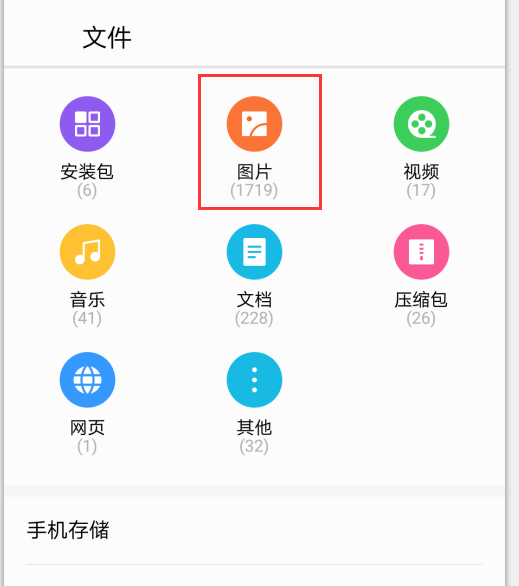
So I don't how to solve this problem..
(2),when I want to select multiple photos,I write this code:
ImagePicker.openPicker({
          multiple: true
        }).then(images => {
          console.log(images);
        });
but it can only select one photo,I searched it in website,someone say the croppicker plugin doesn't support it in android ??Is it true ? I hope to solve it.......
Attachments
no debug info.
 wenwen1995
All 9 comments
selecting multiple photos depends on device vendor. Try to long-press one photo...usually this will allow you to enter into "multi-selection" mode.
 ivpusic
on 21 Aug 2017
ivpusic
on 21 Aug 2017
@ivpusic Thank a lot, it worked for me.
 Fox-3394
on 21 Aug 2017
Fox-3394
on 21 Aug 2017
Oh,Thanks a lot @ivpusic ,but it cannot work well for me ...Even I tried to long-press one photo.It just likes in photo gallery title: already select xx(number), but I still cannot select multiple photos... Like this:

My android app version is android 7.0.It's a high version. @Fox-3394 ,how can you solve the problem ?Can u tell me about your app some info?
wenwen1995
on 21 Aug 2017
@ivpusic ,I'm so sorry to ask u the first problem again..Can you tell me some ways to solve the first problem or did u meet this situation when I want to choose photos,it goes into the root directory,the same question is in this link,https://github.com/ivpusic/react-native-image-crop-picker/issues/357,
A few days ago,I thought it might be a small bug,because in the code ,like this:
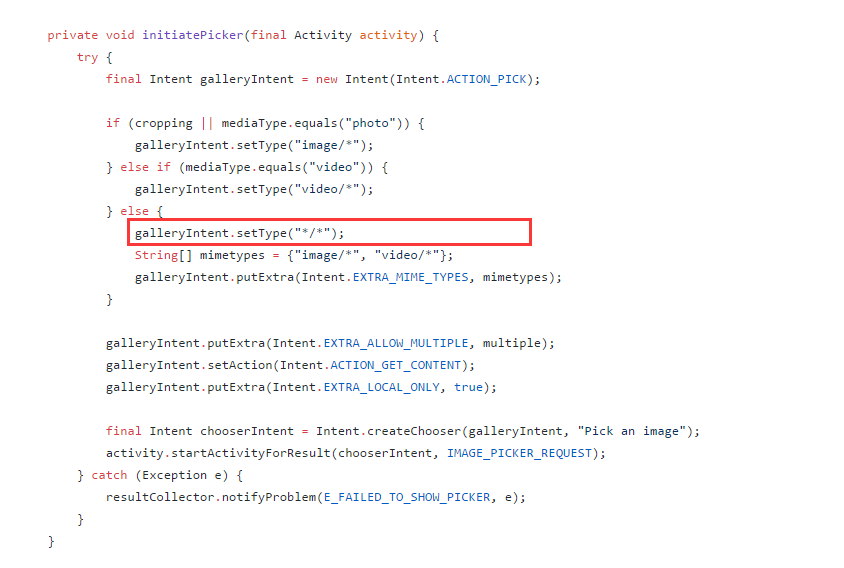
So when I set cropping false,and openPicker,it goes into the root directory...Is it right ?
wenwen1995
on 21 Aug 2017
actual behaviour depends on the phone manufacturer again, because built in gallery is used. From time to time I am looking for available custom galleries to unify user experience, but so far I didn't find any which meets all requirements.
ivpusic
on 21 Aug 2017
Okay, @ivpusic , thanks a lot !
wenwen1995
on 21 Aug 2017
@wenwen1995 您这个问题解决了吗 我也是在华为上遇到了同样的问题
 zhuxiaozhuworking
on 4 Dec 2017
zhuxiaozhuworking
on 4 Dec 2017
i tried other libraries like "react-native-file-picker" and it works just fine .. it is supported by the device but there is some problems in your implementation
please give it another try
 dekemega
on 22 Mar 2018
dekemega
on 22 Mar 2018
so strange ... i just set mediaType: "any" and it works ..
dekemega
on 22 Mar 2018
Related issues
 phantom1299
·
3Comments
phantom1299
·
3Comments
 cwRichardKim
·
3Comments
cwRichardKim
·
3Comments
 sergiulucaci
·
3Comments
sergiulucaci
·
3Comments
 equesteo
·
3Comments
equesteo
·
3Comments
 aterribili
·
3Comments
aterribili
·
3Comments
Most helpful comment
actual behaviour depends on the phone manufacturer again, because built in gallery is used. From time to time I am looking for available custom galleries to unify user experience, but so far I didn't find any which meets all requirements.