React-native-image-crop-picker: 'RCTBridgeModule.h' not found
Version
Tell us which versions you are using:
- react-native-image-crop-picker v0.15.1
- react-native v0.47.1
Platform
Tell us to which platform this issue is related
- iOS
Expected behaviour
Build succeeded
Actual behaviour
'React/RCTBridgeModule.h'file not found
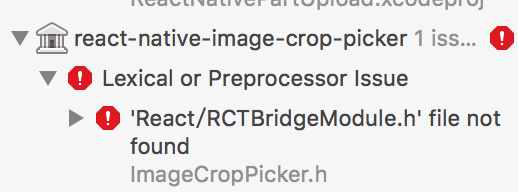
i used cocoapods for installation of this library.
 SeanLine
All 20 comments
Doesn't seem to work out of the box.
Made it work by installing the dependencies via Cocoapods and Adding the imageCropPicker manually to the project i.e. add .xcodeproj file and link library
 hhunaid
on 20 Aug 2017
hhunaid
on 20 Aug 2017
@pureblood could you provide detailed instructions?
how does your podfile look?
what do you mean under "link library"? adding imagecropPicker.a to "Linked libraries" under "general" doesn`t help at all
 chuece
on 23 Aug 2017
chuece
on 23 Aug 2017
ok, I finally got it working. Not sure this is a correct solution, but still, it works.
Step 1. yarn add https://github.com/ivpusic/react-native-image-crop-picker.git (this is for correct podspec if you need it, because it`s missing in the npm repository)
Step 2. drag imageCropPicker.xcodeproj from node_modules/react-native-image-crop-picker/ios into your workspace to "Libraries"
Step 3. add libimageCropPicker.a to "Linked frameworks and libraries" under "General" in your project
Step 4. open "Libraries/imageCropPicker.xcodeproj/ImageCropPicker.h" and change QBImagePickerController import to QBImagePicker import.
Step 5. clean and build
chuece
on 23 Aug 2017
@chuece I did the same exact thing. You explained it better.
I just added the QBImagePickerController via cocoapods. So I didn't have to alter any source file
hhunaid
on 23 Aug 2017
@pureblood but I`ve included QBImagePickerController in pods too, but there was an error "QBImagePickerController/QBImagePickerController.h" not found in ImageCropPicker.h. I believe pods is not set up correctly. But still I dont know how to make it work from pods
chuece
on 23 Aug 2017
It should work if you have enabled use_frameworks! in your Podfile.
hhunaid
on 23 Aug 2017
i have the same problem on IOS too. android work well.
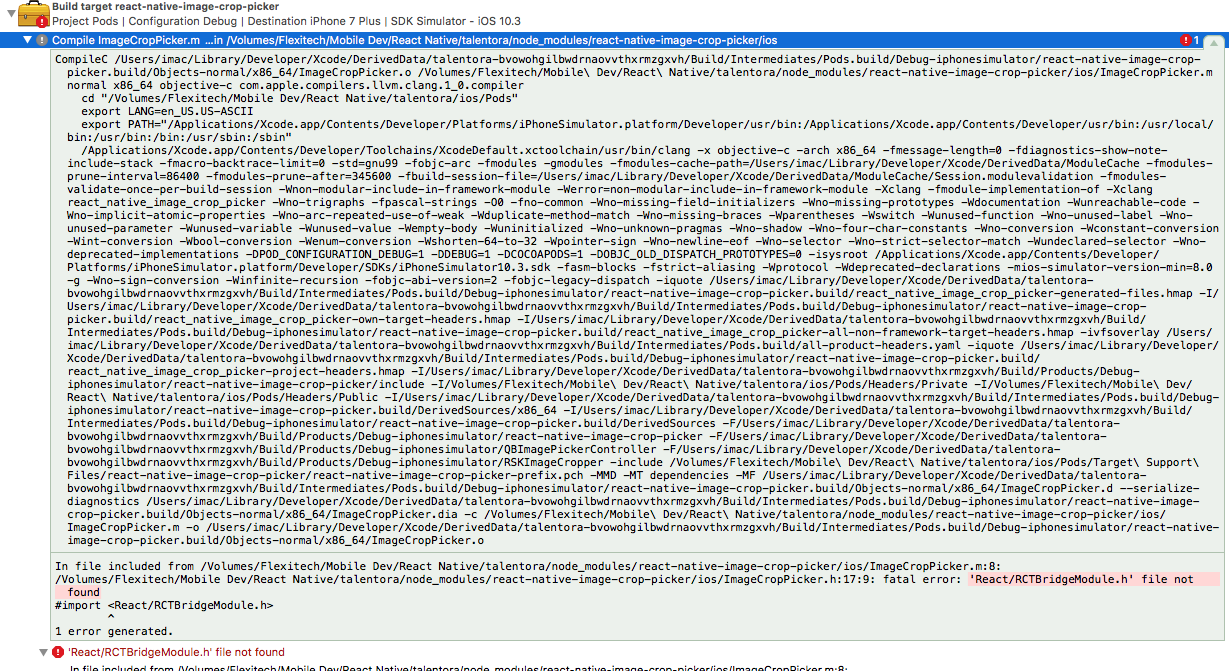
--- my pod file ---

 panhna
on 24 Aug 2017
panhna
on 24 Aug 2017
As stated above, integrating the module via cocoapods doesn't work. Please use @chuece solution
hhunaid
on 24 Aug 2017
@pureblood thx for your help. yes @chuece solution is really work.
panhna
on 24 Aug 2017
I'm having this issue when trying to build via TeamCity. It works fine locally on my development machine but when I build on a remote machine through TeamCity I'm getting these errors...



 MyGuySi
on 24 Aug 2017
MyGuySi
on 24 Aug 2017
Not quite sure why but there was a difference in the imports between my local copy and on the build server. Now they're both the same and I'm getting this same error locally as well.
I've tried following the steps above and manually importing the required files but still no luck
EDIT: I was using 0.15.3 and after downgrading to 0.15.1 it now builds locally, testing the build server now
MyGuySi
on 24 Aug 2017
I downgraded to 0.15.1. Not sure how to do the cocoapods stuff, and I don't really want to use cocoapods.
 ujwal-setlur
on 24 Aug 2017
ujwal-setlur
on 24 Aug 2017
@ujwal-setlur you can still use my solution without pods. It`s using internal imageCropPicker.xcodeproj files (QBImagePicker and RSKImageCropper)
chuece
on 24 Aug 2017
guys sorry for having troubles. I am pretty busy and didn't have time to participate in the discussion.
One of recent PR broke cocoa-pods, but it should be working now if you pull the latest release (0.16.0).
I also updated readme with step by step tutorial how to integrate cocoa-pods and how to use it to install external dependencies. Please refer to following readme section for more details. https://github.com/ivpusic/react-native-image-crop-picker#step-2.
 ivpusic
on 24 Aug 2017
ivpusic
on 24 Aug 2017
I sent the PR for integrating with cocoapods. I just found out people are having issues with it. I realised that the README I created assumes that users who would use podspec had installed react native using podspec
too.
I should have been very clear that users should link this library using podspec only if they are using podspec to install react native.
Podspec is for those developers who use pods to manage all their dependency.
You can follow the manual method or cocoapods method to install the dependencies for this library.
@chuece Regarding "QBImagePickerController/QBImagePickerController.h" not found error please read comment .
@pureblood use_frameworks! does not work with react-native and is discouraged. I found it the hard way that it can mess with your configuration.
For those interested in using cocoapods for all their dependencies please refer to this
 chaitanya-bhagavan
on 25 Aug 2017
chaitanya-bhagavan
on 25 Aug 2017
@chaitanya0bhagvan it was a workaround anyway. If it works without it now, I don't see why to still use it.
hhunaid
on 25 Aug 2017
@pureblood You are right, I assumed you are using podfile for dependency management.
chaitanya-bhagavan
on 25 Aug 2017
hey @chuece I try to follow your way, but my xcode said that imageCropPicker : "RCTDefines.h file not found". any workaround ?
I dont have "Library" folder so I put it inside "Frameworks" folder.
 nzwnabdulwahid
on 23 Oct 2017
nzwnabdulwahid
on 23 Oct 2017
@chuece I follow your way,but doesn't work. my xcode said "not found" yet
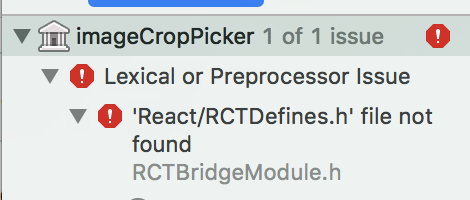
 yuanwy
on 28 Dec 2017
yuanwy
on 28 Dec 2017
If you are using cocopods add this $(SRCROOT)/../../../ios/Pods/Headers/Public to the Headers search path in the Lib.
 hackdie
on 8 Jan 2018
hackdie
on 8 Jan 2018
Related issues
 althurzard
·
3Comments
althurzard
·
3Comments
 manojshrimalla
·
3Comments
manojshrimalla
·
3Comments
 zhangjunhou
·
3Comments
zhangjunhou
·
3Comments
 aterribili
·
3Comments
aterribili
·
3Comments
 Martian2Lee
·
3Comments
Martian2Lee
·
3Comments
Most helpful comment
ok, I finally got it working. Not sure this is a correct solution, but still, it works.
Step 1. yarn add https://github.com/ivpusic/react-native-image-crop-picker.git (this is for correct podspec if you need it, because it`s missing in the npm repository)
Step 2. drag imageCropPicker.xcodeproj from node_modules/react-native-image-crop-picker/ios into your workspace to "Libraries"
Step 3. add libimageCropPicker.a to "Linked frameworks and libraries" under "General" in your project
Step 4. open "Libraries/imageCropPicker.xcodeproj/ImageCropPicker.h" and change QBImagePickerController import to QBImagePicker import.
Step 5. clean and build