React-native-image-crop-picker: To use CocoaPod,Then Archive My App It tell me: 'RSKImageCropper/RSKImageCropper.h' file not found
Version
Tell us which versions you are using:
- react-native-image-crop-picker v0.12.1
- react-native v0.37.0
Platform
Tell us to which platform this issue is related
- iOS
Expected behaviour
Success Archive
Actual behaviour
Have a issue : 'RSKImageCropper/RSKImageCropper.h' file not found
Steps to reproduce
1.add pod file
# Uncomment the next line to define a global platform for your project
platform :ios, ‘8.0’

target 'together' do
  # Comment the next line if you're not using Swift and don't want to use dynamic frameworks
  use_frameworks!
  #react-native-image-crop-picker
  pod 'RSKImageCropper' , '1.5.2'
  pod 'QBImagePickerController' , '3.4.0'

  # Pods for together

  target 'togetherTests' do
    inherit! :search_paths
    # Pods for testing
  end

end
2.react-native link react-native-image-crop-picker
(because react-native-image-crop-picker is already in my project)
coding in my RN .js
in xcode : product -> scheme -> edit scheme
select archive to change "build configuaration" to release
product -> archive
Attachments
// stacktrace or any other useful debug info
xxx/node_modules/react-native-image-crop-picker/ios/ImageCropPicker.h:15:9: 'RSKImageCropper/RSKImageCropper.h' file not found


 dailinyi
All 26 comments
I change #import "RSKImageCropper/RSKImageCropper.h" to #import <RSKImageCropper/RSKImageCropper.h> and clean ,build . but it have this issue always
Please tell me what can I do ? Thanks!
dailinyi
on 8 Feb 2017
Same Problem here, but @dailinyi solution is not working for me, and some time I get #import "RSKImageCropper/RSKImageCropper.h" and others #import "QBImagePicker/QBImagePicker.h" file not found. This error is quite frustrating.
I using:
 ranpaco
on 12 Feb 2017
ranpaco
on 12 Feb 2017
@ranpaco
I copy all of the react-native-image-crop-picker source file to my project (include .m & .h)
And then cocoapod RSKImageCropper and QBImagePickerController to my project
unlink react-native-image-crop-picker library
link photos.framework library
It works!
I know this is not the best way, but is the most simple way to solve this question.
Please keep open this issue until it have perfect solution.Thank you~
dailinyi
on 13 Feb 2017
I always encounter this issue in many condition, eventually I figure out that when I change schema to release mode to archive, it works well.
don't understand the reason :(
update:
in spite of my poor idea above, please notice the __dailinyi__ method, it could work.
 L-Jovi
on 17 Feb 2017
L-Jovi
on 17 Feb 2017
@dailinyi how do you copy the react-native-image-crop-picker source file? do you check copy if needed
thanks for your time.
L-Jovi
on 8 Mar 2017
@L-Jovi Yeah , I checked Copy if needed and Create groups .
dailinyi
on 9 Mar 2017
@dailinyi thanks again, I follow your idea and it works well :)
L-Jovi
on 9 Mar 2017
@ivpusic Hi! Any progress on this issue?
It seems like the "use_frameworks!" in our Podfile is the reason for this problem. Haven't found a way to solve it yet though
 sondremare
on 21 Mar 2017
sondremare
on 21 Mar 2017
I re-ran pod install and that fixed it for me.
 danjersoft
on 16 Apr 2017
danjersoft
on 16 Apr 2017
Still having this issue. Looking for solutions with the Cocoapod approach. Anyone have any luck?
 austinkettner
on 11 Jun 2017
austinkettner
on 11 Jun 2017
It happens for me also from time to time. I am using cocoapod approach.
 ywein
on 13 Jun 2017
ywein
on 13 Jun 2017
Yeah ,Yesterday I update my project , run npm install && pod install .It fixed.
Thanks everyone.
dailinyi
on 13 Jun 2017
I had cases where pod install and clear derived data didnt work for me. I solved this by editing the imageCropPicker scheme.
- Click "build"
- Click + bottom left
- Add "RSKImageCropper" as a dependancy
- Drag this above "imageCropPicker"
- uncheck "Parallelize builds"
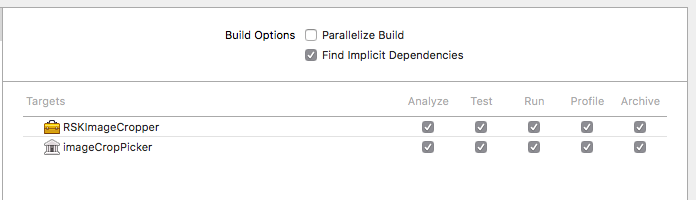
the only problem is that this has to be redone everytime you npm install
 zkrige
on 28 Jul 2017
zkrige
on 28 Jul 2017
I think this should be reopened, I seem to be facing the same issue (and so are others from the looks of it). There doesn't seem to be a good cocoapods approach, npm install && pod install didn't work in my case.
 kyle-ssg
on 30 Jul 2017
kyle-ssg
on 30 Jul 2017
OK , I've the problem sometimes too. I'll reopen the issue.
Before fix ,try my way at 4 Floor which copy sources into project please.
dailinyi
on 7 Aug 2017
@dailinyi can u please tell which files do you copy in the project? After i copied I am getting error saying RCTImageView.h is not present.
 jinxac
on 7 Aug 2017
jinxac
on 7 Aug 2017
@zkrige i tried adding "RSKImageCropper" as a dependancy but this is not working for me
jinxac
on 8 Aug 2017
However while building with fastlane on my local this works fine. I am not really sure how. When i do xcode archive it throws this error but with fastlane beta(on my local) it works fine. But i guess issue is not with fastlane because i tried integrating CI to the build process with bitrise. Now bitrise also runs fastlane beta only but i see this error there.
jinxac
on 8 Aug 2017
This error is extremely random. I will do 10 fastlane builds in a row with no problem, but on the 11th one, suddenly I get the error.
The same with xcode builds - It will work fine for a number of builds in a row, and then randomly suddenly it throws the error.
zkrige
on 9 Aug 2017
@jinxac I copy whole project of react-native-image-crop-picker .
The path in node_modules/react-native-image-crop-picker/ios/.
BecauseI used cocoaPods. I need exclude ImageCropPickerSDK folder, QBImagePicker folder & RSKImageCropper folder.
eg:

dailinyi
on 10 Aug 2017
This error is extremely random when I build or Archive,I use cocoapods,I resolve it by:
1.react-native unlink react-native-image-crop-picker
2.npm uninstall react-native-image-crop-picker —save
3.remove pod 'RSKImageCropper' pod 'QBImagePickerController' in podfile and pod install
4.install react-native-image-crop-picker again by readMe
5.clean xcode and build
 OrangePiPiPiPi
on 13 Sep 2017
OrangePiPiPiPi
on 13 Sep 2017
if use xcodebuild, or build on CI server, it will still randomly fail, annoying 👎
▸ Compiling UIImage+Resize.m

❌  /.../node_modules/react-native-image-crop-picker/ios/ImageCropPicker.h:26:9: 'RSKImageCropper/RSKImageCropper.h' file not found

#import <RSKImageCropper/RSKImageCropper.h>
^


▸ Compiling UIImage+Resize.m

❌  /.../node_modules/react-native-image-crop-picker/ios/ImageCropPicker.h:26:9: 'RSKImageCropper/RSKImageCropper.h' file not found

#import <RSKImageCropper/RSKImageCropper.h>
        ^


** ARCHIVE FAILED **
 eltonlauhk01
on 14 Sep 2017
eltonlauhk01
on 14 Sep 2017
Related or same issue: #428 Archive fails intermittently
 administerspice
on 19 Sep 2017
administerspice
on 19 Sep 2017
ou need to add RSKImageCropper.framework and QBImagePicker.framework to Embedded Binaries. This problem can be solved
 CCYQ1995
on 30 Sep 2017
CCYQ1995
on 30 Sep 2017
@CCYQ1995 This still does not solve the problem 100% of the time
administerspice
on 6 Oct 2017
should be fixed with https://github.com/ivpusic/react-native-image-crop-picker/releases/tag/v0.19.1. Please try it
 ivpusic
on 18 Dec 2017
ivpusic
on 18 Dec 2017
Related issues
 xuchao321
·
3Comments
xuchao321
·
3Comments
 leelandclay
·
3Comments
leelandclay
·
3Comments
 tximpa91
·
3Comments
tximpa91
·
3Comments
 co-de
·
3Comments
co-de
·
3Comments
 Phenek
·
3Comments
Phenek
·
3Comments
Most helpful comment
I think this should be reopened, I seem to be facing the same issue (and so are others from the looks of it). There doesn't seem to be a good cocoapods approach,
npm install && pod installdidn't work in my case.