React-native-image-crop-picker: Library not loaded: @rpath/QBImagePicker.framework/QBImagePicker
I have this weird issue where I can load my app normally from XCode but can no longer start it from the command line. I keep getting and immediate crash on startup with this error
DYLD_FALLBACK_FRAMEWORK_PATH=/Applications/Xcode.app/Contents/Developer/Platforms/iPhoneSimulator.platform/Developer/SDKs/iPhoneSimulator.sdk/System/Library/Frameworks
DYLD_SHARED_REGION=avoid

Dyld Error Message:
  Library not loaded: @rpath/QBImagePicker.framework/QBImagePicker
  Referenced from: /Users/USER/Library/Developer/CoreSimulator/Devices/77E4C570-BB05-43E6-85C7-D6B6617E6E17/data/Containers/Bundle/Application/522AAEBD-3B63-46EF-AD76-5637CF50B05B/Ology.app/Ology
  Reason: image not found
I wonder if this has to do with the fact that I removed react-native-image-picker after installing react-native-image-crop-picker
 mschipperheyn
All 8 comments
Hmm, adding the the embedded libraries to General => Embedded libraries seems to solve this. Shouldn't react-native link take care of this?
mschipperheyn
on 18 Jan 2017
link is not adding to embedded libraries. However I suggest that you use cocoa pods to manage all external dependencies. It will make your life easier. Check this out https://github.com/ivpusic/react-native-image-crop-picker#post-install-steps
 ivpusic
on 18 Jan 2017
ivpusic
on 18 Jan 2017
You can add two framework , below like this
 This is my solution
 evernoteHW
on 7 Jun 2017
evernoteHW
on 7 Jun 2017
Yep, embedding the libraries manually has worked for me too @evernoteHW @mschipperheyn , thanks for sharing
 r01010010
on 9 Jun 2018
r01010010
on 9 Jun 2018
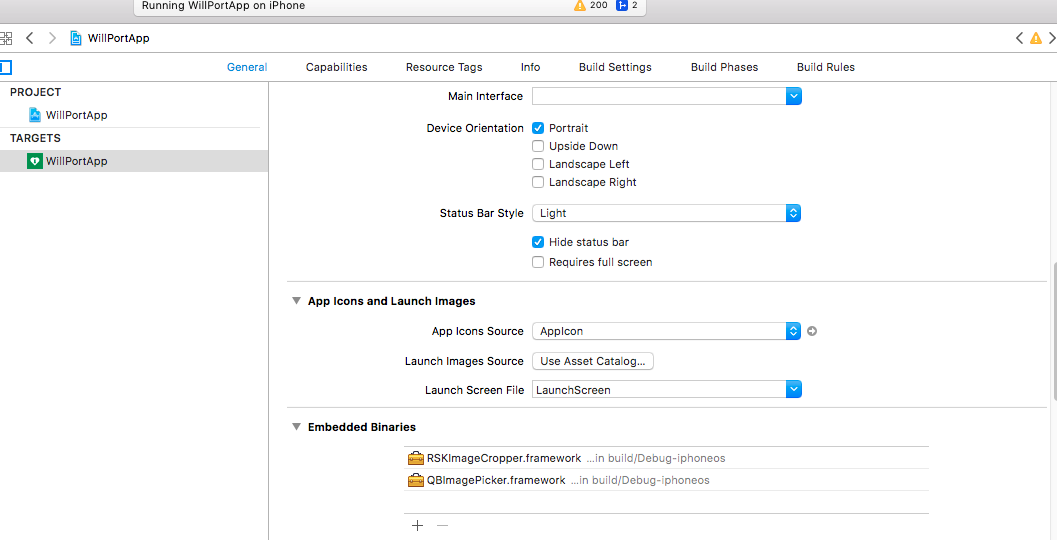
This is the solution at Xcode 9, Deployment 8.0
 ArsalanReal
on 7 Aug 2018
ArsalanReal
on 7 Aug 2018
does any one knows if the @rpath of the error must be set in pods file?
r01010010
on 29 Aug 2018
You can add two framework , below like this
Thanks
mac 10.15.3
rn 0.59.10
"react-native-image-crop-picker": "^0.24.1",
xcode 11.3.1
 hzz780
on 21 Feb 2020
hzz780
on 21 Feb 2020
What to do in case of android ?
exactly how error is occured
- Opening app ->
- Reaching the screen in which ImageCropPicker imported & used ->
- executing ImageCropPicker.openCamera ->
- captures image -> click on right tick ->
- splash screen starts.
I saw a logger and found that it is crashing at 3rd step, and since the last 4 days am just doing all the possible solutions I can.
Error occured in Android App.
Willing to see some solution asap.
 Rushabhgedam
on 17 Sep 2020
Rushabhgedam
on 17 Sep 2020
Related issues
 habovh
·
3Comments
habovh
·
3Comments
 phantom1299
·
3Comments
phantom1299
·
3Comments
 fmcruz
·
3Comments
fmcruz
·
3Comments
 pavsidhu
·
3Comments
pavsidhu
·
3Comments
 cwRichardKim
·
3Comments
cwRichardKim
·
3Comments
Most helpful comment
This is the solution at Xcode 9, Deployment 8.0