React-native-image-crop-picker: build fail with issues Apple Mach-o Linker (Id) Error
Version
Tell us which versions you are using:
in my package.json:
"react": "15.3.2",
"react-native": "0.34.1",
"react-native-image-crop-picker": "^0.9.7"
Platform
IOS(10) with XCODE 8
Actual behaviour
follow the installation instruction step by step but got the following errors:

I got these errors during the process of building app in .xcworkspace
I also follow the steps of issue #89:
unlink and link again but no luck...
Steps to reproduce
I created a brand new project to test react-native-image-crop-picker with the podfile:
platform :ios, '8.0'

target 'ipicker' do
  # Uncomment this line if you're using Swift or would like to use dynamic frameworks
  # use_frameworks!

  # Pods for ipicker
  pod 'RSKImageCropper'
  pod 'QBImagePickerController'

  target 'ipickerTests' do
    inherit! :search_paths
    # Pods for testing
  end

end
any idea??
 chuyihuang
All 10 comments
just tried it and works. Please double check what you did for installation.
Podfile I used
platform :ios, '8.0'
target 'ipicker' do
pod 'RSKImageCropper'
pod 'QBImagePickerController'
end
 ivpusic
on 4 Oct 2016
ivpusic
on 4 Oct 2016
thank you, no more Apple Mach-o Linker (Id) Error after removing
    target 'ipickerTests' do
      inherit! :search_paths
      # Pods for testing
    end
chuyihuang
on 6 Oct 2016
My RN version is 0.48.3, I have the same issue.
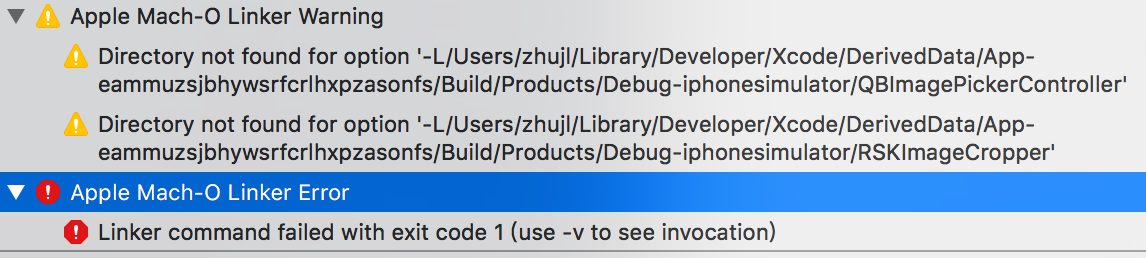
Podfile I used
platform :ios, '8.0'
target 'App' do
pod 'RSKImageCropper'
pod 'QBImagePickerController'
end
 musicode
on 12 Sep 2017
musicode
on 12 Sep 2017
I have the same issue. These library references are also visible in Xcode under Build Settings/Library Search Paths. According to what I read on SO, these paths should be removed by they are inferred based on $(inherited)
# Uncomment the next line to define a global platform for your project
platform :ios, '10.3'
target 'Project' do
# Uncomment the next line if you're using Swift or would like to use dynamic frameworks
# use_frameworks!
# Pods for Project
pod 'RSKImageCropper'
pod 'QBImagePickerController'
end
 mschipperheyn
on 1 Nov 2017
mschipperheyn
on 1 Nov 2017
Anyone? @ivpusic This issue should be reopened!
I think one way forward is to react-native unlink react-native-image-crop-picker and then relink it.
Unlinking lead to the following error in my case, suggesting something is wrong
It seems something went wrong while unlinking. Error: searchPaths.filter is not a function
What I did then is
- Open project.xcodeproj file
- Open project.pbxproj file
- remove all ImageCrop links manually
- yarn add react-native-image-crop-picker
- rerun react-native link
- clean build
- clean cache
- Fingers crossed
Same error :-(
Then solved the unlinking error with
This I solved with https://github.com/facebook/react-native/issues/13160#issuecomment-335225385 and tried again unlink, link.
Same error
The issue seems to be related to Build Settings / Library Search Paths, where both build/Debug-iphoneos/QBImagePickerController and build/Debug-iphoneos/RSKImageCropper show up (they also shows up at Other linker flags, but since these show the inferred variables $(inherited) and $(PROJECT_DIR), I'm not sure how to solve this
I do see two directories QBImagePicker.framework and RSKImageCropper.framework at the location the missing directories QBImagePicker and RSKImageCropper are reported
mschipperheyn
on 3 Nov 2017
@ivpusic @musicode FINALLY resolved this. You need to add the generated ios/Pods/Pods.xcodeproj to the Libraries folder for your project. Why this doesn't happen automatically on react-native link is beyond me.
mschipperheyn
on 3 Nov 2017
@mschipperheyn Thank you! This is what solved that error for me. For anyone else, this fixed the issue but I also had another issue that was caused by me not linking the module first. So the combination of those made the package work for me.
 FunkyGeorge
on 13 Nov 2017
FunkyGeorge
on 13 Nov 2017
How to fix this issue? Slider.xcodeproj in appDelegate file RCTRootView.h file not found so I changed it to "React/RCTRootView.h" Now this apple mach-o linker error im getting 151 of them...
 amberkatyal
on 13 Jun 2018
amberkatyal
on 13 Jun 2018
 fabriziobertoglio1987
on 20 Aug 2019
fabriziobertoglio1987
on 2 Nov 2019
fabriziobertoglio1987
on 20 Aug 2019
fabriziobertoglio1987
on 2 Nov 2019
Related issues
 zhangjunhou
·
3Comments
zhangjunhou
·
3Comments
 Martian2Lee
·
3Comments
Martian2Lee
·
3Comments
 victorwpbastos
·
3Comments
victorwpbastos
·
3Comments
 xuchao321
·
3Comments
xuchao321
·
3Comments
 JodiWarren
·
3Comments
JodiWarren
·
3Comments
Most helpful comment
thank you, no more Apple Mach-o Linker (Id) Error after removing
    target 'ipickerTests' do
      inherit! :search_paths
      # Pods for testing
    end