React-native-iap: getProducts and getSubscriptions returns empty array
Version of react-native-iap
3.4.11
Version of react-native
0.59.10
Platforms you faced the error (IOS or Android or both?)
Currently, I'm only working on iOS.
Expected behavior
Should see auto-renewable subscriptions
Actual behavior
Receiving an empty array:

Tested environment (Emulator? Real Device?)
Mainly tested in the Simulator (Although, I tried on a real device yesterday and it was still empty)
Steps to reproduce the behavior
So to clarify, I originally believed it to be because I had not finalised a tax form in the Agreements, Tax and Banking section of iTunes connect:

However, this has now been completed:

I have created two products with the product ids artistsannual and artistmonthly. My bundle id is com.iynk.iynk.
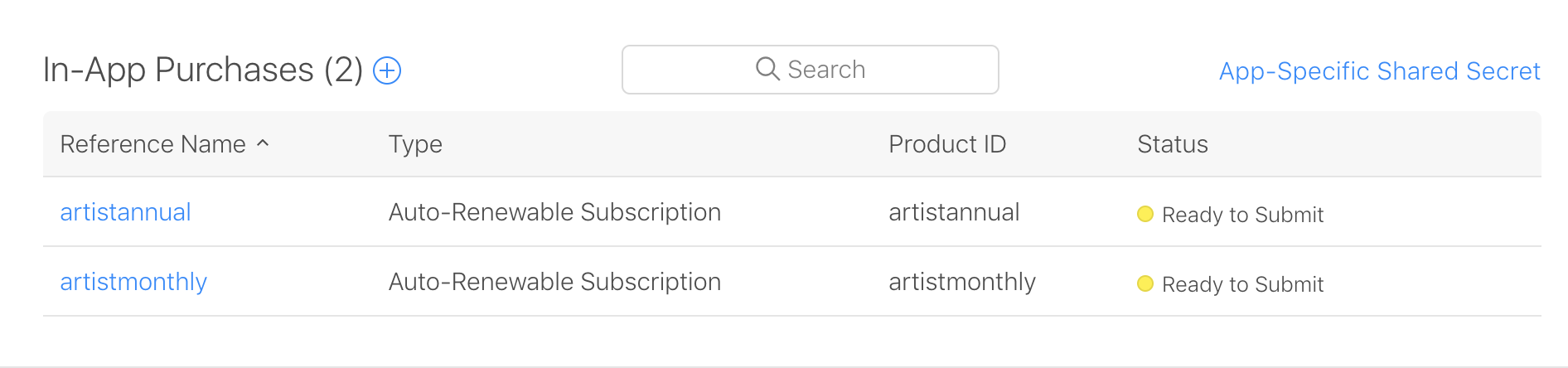
They are both "Ready to Submit".
My code:
const subscriptionSKUs = Platform.select({
  ios: ['artistmonthly', 'artistannual'],
  android: [''],
});

class Upsell extends React.Component {
  .
  .
  .
    async componentDidMount() {
    try {
      const result = await RNIap.initConnection();
      console.log('result', result);

      const subscriptions = await RNIap.getSubscriptions(subscriptionSKUs);
      console.log('subscriptions', subscriptions);

      const products = await RNIap.getProducts(subscriptionSKUs);
      console.log('products', products);
    .
    .
    .
    } catch (e) {
      console.log('Error handling in Upsell componentDidMount', e);
    }
  }
  .
  .
  .
}
The response is:
- result:
true - subscriptions:
[] - products:
[]
I have run react-native link react-native-iap.
I have also tried to implement revenuecat: https://github.com/RevenueCat/react-native-purchases Which is getting the Entitlements but not the products?
Do I need to "Submit the App" before Subscriptions and Products show up? How do you work on development products if this is the case?
I'm very stuck... Thanks in advance everyone!
 alexpchin
All 22 comments
Have you checked In App Purchase in the xcode setting?
 hyochan
on 20 Sep 2019
hyochan
on 20 Sep 2019
Yes, I have toggled on ‘In App Purchase’ in Xcode. Any other suggestions? I am still getting an empty array.
alexpchin
on 22 Sep 2019
Ok, I have resolved the problem with the use of this StackOverflow post: https://stackoverflow.com/questions/7947805/ios-in-app-purchase-no-products-received/11707704#11707704
The issue was that my bundleID was auto-created by react-native: org.reactjs.native.example.xxx. I had to change to be the correct one in all relevant files.
alexpchin
on 23 Sep 2019
@alexpchin Good job!
hyochan
on 23 Sep 2019
Ok, I have resolved the problem with the use of this StackOverflow post: https://stackoverflow.com/questions/7947805/ios-in-app-purchase-no-products-received/11707704#11707704
The issue was that my bundleID was auto-created by react-native:
org.reactjs.native.example.xxx. I had to change to be the correct one in all relevant files.
Hi, @alexpchin I am having this same issue for 4 hours now and don't know what to do. My bundleID was also created by RN. What exactly did you change to make it work??
 wmonecke
on 23 Nov 2019
wmonecke
on 23 Nov 2019
I solved it! I am using these versions,
react-native-iap: ^4.3.0
react-native: 0.60.5
just do it like this
const itemSkus = Platform.select({
    ios: [
        '100coins' // just remove bundle id from product id
    ],
    android: [
        '100coins' // just remove bundle id from product id
    ]
});
 ManalLiaquat
on 5 Dec 2019
ManalLiaquat
on 5 Dec 2019
[iOS] Is it possible to get the product in getProducts without the product being submitted for review at apple store?
If yes, then I am still getting getProducts as an empty array. Above solutions are not working for me.
 roots-ai
on 18 Dec 2019
roots-ai
on 18 Dec 2019
@roots-ai Hello did you get it work?
 youssefatti
on 28 Jan 2020
youssefatti
on 28 Jan 2020
@youssefatti - Did manual linking and also made sure that the agreement, tax, and banking were completed in the case of iOS.
 Akshay-Chhikara
on 29 Jan 2020
Akshay-Chhikara
on 29 Jan 2020
@Akshay-Chhikara Thank you for your reply. it works i just have to wait between the moment of its ready to submit and to getProducts.
For all just try to wait at least 24h
youssefatti
on 29 Jan 2020
Ok, I have resolved the problem with the use of this StackOverflow post: https://stackoverflow.com/questions/7947805/ios-in-app-purchase-no-products-received/11707704#11707704
The issue was that my bundleID was auto-created by react-native:
org.reactjs.native.example.xxx. I had to change to be the correct one in all relevant files.
How did you achieve that with which files?
 selimmidikoglu
on 9 Apr 2020
selimmidikoglu
on 9 Apr 2020
Ok, I have resolved the problem with the use of this StackOverflow post: https://stackoverflow.com/questions/7947805/ios-in-app-purchase-no-products-received/11707704#11707704
The issue was that my bundleID was auto-created by react-native:org.reactjs.native.example.xxx. I had to change to be the correct one in all relevant files.How did you achieve that with which files?
@alexpchin Trying to solve this to. I'm using schemes to change my bundle id for dev / staging / prod.
Is there something else I need to do ?
@selimmidikoglu where you able to fix it ?
 bulby97
on 23 May 2020
bulby97
on 23 May 2020
@bulby97 There were tons of
- First thing was to check if all subscriptions were on stage 'Ready to Submit'.
Second thing was to fill all the required things on itunnesconnect Agreement, Tax, Banking part. This part was kinda difficult because address field can not be filled with coorect address. You just need to submit 5 times. Apple is really interesting company.
I changed bundle ids in both xcode and itunnes connect. Than I tried to run app on real device.
- Than boom my in app purchases was there.
As I see the problem genrally lie beneath by missing one step in configuration state. There is nothing related with code.
selimmidikoglu
on 24 May 2020
@selimmidikoglu Sweet ! Changing my bundle id did the trick ! Awesome !
So basically there is no way to test in app purchases by having dev / staging / release environments with different bundle ids.
It should be written somewhere it's not obvious at all I spent 3 days on this issue.
bulby97
on 25 May 2020
@bulby97
Actually since I am creating small apps. I never went development and production stages. I only add my account to TestFLight for in app purchase test. I wrote a function which deletes current paid subscriptions in app purchases. So I am testing all posssibilities by deleting my subscription. While I make payment on my phone it already says [Sandbox account]. So it makes it testible easily. It is harder in Android for sure.
selimmidikoglu
on 25 May 2020
@selimmidikoglu
Did products/subscriptions appear only on your real device or on a simulator as well?
 AlexanderZaytsev
on 27 May 2020
AlexanderZaytsev
on 27 May 2020
Update
Got subscriptions appearing on the simulator after erasing the device&content and signing into iCloud again.
AlexanderZaytsev
on 27 May 2020
@AlexanderZaytsev I could not make subscriptions/products appearing on my simulator. But I think it is possible but I do not know how.
selimmidikoglu
on 27 May 2020
Hi Guys,
It seems that we are getting the array empty even after following all the steps, any idea or pointers to look for?
 Mindbowser
on 21 Dec 2020
Mindbowser
on 21 Dec 2020
I had same issue, In my case both catch and then section were executing, dont know why. I was testing in simulator. Testing in real devices works as intended
 KhimGurung
on 22 Dec 2020
KhimGurung
on 22 Dec 2020
For me, On simulator it worked after adding store-kit configuration under schema. Only thing it will not work on simulator is receipt validation as simulator not giving proper receipt, but it worked on actual device for me
Mindbowser
on 22 Dec 2020
hey guys, i have a interesting problem.. on ios emulator i have received the products and on real ios in testflight i haven't received.. Where is the problem?..
 BogdanRad
on 2 Feb 2021
BogdanRad
on 2 Feb 2021
Related issues
 sanilcgs
·
3Comments
sanilcgs
·
3Comments
 lc3t35
·
4Comments
lc3t35
·
4Comments
 makarsky
·
3Comments
makarsky
·
3Comments
 MacMillan13
·
3Comments
MacMillan13
·
3Comments
 hakkikonu
·
4Comments
hakkikonu
·
4Comments
Most helpful comment
Ok, I have resolved the problem with the use of this StackOverflow post: https://stackoverflow.com/questions/7947805/ios-in-app-purchase-no-products-received/11707704#11707704
The issue was that my bundleID was auto-created by react-native:
org.reactjs.native.example.xxx. I had to change to be the correct one in all relevant files.