React-native-iap: RNIap.prepare : canMakePayments is not a function
Version of react-native-iap : 1.3.6
Platforms you faced the error (IOS or Android or both?) : iOS 11.4.1
Expected behavior : no error expected
Actual behavior
RNIap.prepare sometimes throws an error :
RNIap.prepare error : TypeError: a.canMakePayments is not a function. (In 'a.canMakePayments()', 'a.canMakePayments' is undefined)
Tested environment : real device iPhone6s
Steps to reproduce the behavior
try {
    await RNIap.prepare();
}
catch (error) {
    console.log("RNIap.prepare error : ", error);
}
Link Library seems to be set accordindly to documentation :
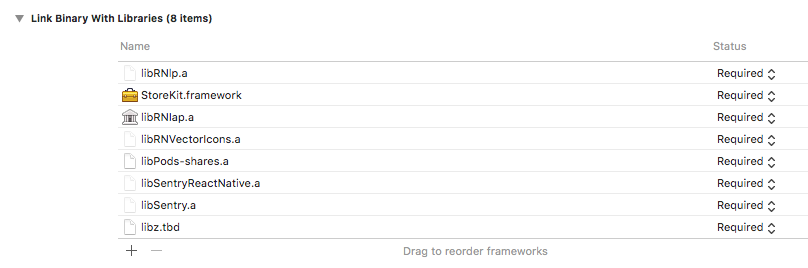
As it is something I track in Sentry, I don't have the full context of use on client side, it is possible it happens when the user hit the cancel button when asked for his AppStore credentials or when you are in a Sandbox mode .I need to dig more into this, to give more context and reproducible behavior.
 lc3t35
All 12 comments
@lc3t35 I am suspecting the mismatch version of react-native-iap with the native side. Did you use react-native-code-push to actually publish new version of your app? canMakePayments had been implemented in later version so currently, I am doubting about it.
 hyochan
on 14 Aug 2018
hyochan
on 14 Aug 2018
@dooboolab no, I don't use react-native-code-push but I've detached from expo, add manually as explained in Readme (I can see in Xcode the correct code with canMakePayment), and update code if needed with exp publish.
lc3t35
on 14 Aug 2018
Same issue here
 mygreatstory
on 14 Aug 2018
hyochan
on 15 Aug 2018
mygreatstory
on 14 Aug 2018
hyochan
on 15 Aug 2018
@lc3t35 Also, if you publish from expo without releasing new native app, this might cause the problem. publish just works as same as react-native-code-push.
hyochan
on 15 Aug 2018
@dooboolab please read Actual behaviour : "RNIap.prepare SOMETIMES throws an error :" ;) this is not a linking problem (which I had and solved).
My app is working fine in sandbox mode as I tested it before submitting to Apple (it was submitted yesterday for review).
I just noticed that sometimes I have this message, but I was not able to track why it happens.
I suppose it might happen when the user cancels the authentication process on appStore if the user was not defined (for the test I disconnect my personal appStore account so I can login with the sandbox account), I remember that I've tested that my app handle correctly the case "user cancels App store's authentication", I will make additional test after apple's review feedback.
lc3t35
on 15 Aug 2018
@dooboolab you mean that I have to submit a new app each time I publish ? so what is the interest of react-native if I can't hot push RN modifications of the app without submitting the app ...
lc3t35
on 15 Aug 2018
@lc3t35 I've read the behavior and I was suspecting if you've upgraded our module and just published to expo where canMakePayments method is missing in native side. If you've upgraded our module, you must submit new app to apply the native side too. If our update hasn't been made in the native side, you may just publish, but sometimes there can be native code updates in our module. (Maybe I can put some description later on if version changes affect native code.)
Also, you need to consider the changes in the native side when you are using any other modules that use native implementation. hot push only works with the js updates. Need to publish new app whenever there is changes in native code.
hyochan
on 15 Aug 2018
@dooboolab ok I should have stated that the module was already published with the correct current version that has canMakePayments method. Even the previous build already had the last version of react-native-iap. Of course if there is an update in react-native modules such as react-native-iap, you have to resubmit a build of the app. The current build of the app has the current version of react-native-iap. The iOS app used for the test is this latest build (all this is tracked on Sentry so I'm 100% sure).
lc3t35
on 15 Aug 2018
@lc3t35 That's ok. I just tried to share things that I know of. I think we need more information for this one to actually solve it. Please come back to us when you find something new.
hyochan
on 15 Aug 2018
I had similar issue, but that was resolved by unlinking and linking again
react-native unlink react-native-iap
react-native link react-native-iap
Scanning folders for symlinks in /InappTest/node_modules (14ms)
rnpm-install info Linking react-native-iap ios dependency
rnpm-install info Platform 'ios' module react-native-iap has been successfully linked
rnpm-install info Linking react-native-iap android dependency
rnpm-install info Platform 'android' module react-native-iap has been successfully linked
 chiragpurohit71085
on 9 Sep 2018
chiragpurohit71085
on 9 Sep 2018
Closing this since it seems linking issue in react-native.
hyochan
on 16 Sep 2018
Related issues
 HamzaIkram2727
·
3Comments
HamzaIkram2727
·
3Comments
 fergalindez
·
5Comments
fergalindez
·
5Comments
 Gribadze
·
4Comments
Gribadze
·
4Comments
 iutin
·
4Comments
iutin
·
4Comments
 chetstone
·
4Comments
chetstone
·
4Comments