React-native-i18n: load language from server then re-render?
I have 4 language store in local, en, tw, jp, zh.

now I need support Russian
I am loading Russian language by http request, and then
I18n.translations["ru-BY"] = output;

and clearly it need re-render to make it work.
I know this is not exactly react-native-i18n issue,
I need looking for a way to re-render the app.
I just thought maybe ask here and somebody know the answer
:smile:
I have tried
react-native-restartnot working, it's restart, not re-render, it just restart.forceUpdate()not working- https://blog.callstack.io/react-native-handling-language-changes-on-android-the-right-way-c883056a8f5c this one work, but only work change language setting in Android, and when switching to the app, app would reload and now language is right. but not what I need.
Anyone know how to re-render the app once it done loading language from remote server?
Thanks!
 1c7
1c7
All 18 comments
I am using React Native 0.52 and develop for Android
1c7
on 5 Feb 2018
my react-native info (if you want know more about my env)

1c7
on 5 Feb 2018
because I am using React Navigation, I thought about reset route to make it reload. after I did some research&try, it kinda work.
these 2 link is helpful:
https://github.com/react-navigation/react-navigation/issues/1990#issuecomment-332782092
https://reactnavigation.org/docs/navigation-actions.html#reset
I am still trying this, so far it seem work.
would come back and update once I got some more progress
maybe I would make a short 5 minute video tutorial on how to do this. after I figure it all out.
1c7
on 5 Feb 2018
If you use https://github.com/react-community/react-native-languages and i18next + react-i18next, it is easy to rerender your app :)
 zoontek
on 5 Feb 2018
zoontek
on 5 Feb 2018
@zoontek Would try, Thank you!
1c7
on 6 Feb 2018
I would close this issue in 1-3 day, after my problem solved,
and maybe put some note or useful code sample here too.
:smile:
1c7
on 7 Feb 2018
I wrote a little demo App, https://github.com/1c7/react-native-langauge-hot-reload-example
1c7
on 7 Feb 2018
@1c7 Awesome work, thanks you!
zoontek
on 11 Feb 2018
:D
1c7
on 12 Feb 2018
it turns out that demo app I wrote is not working for loading language from the remote server.
(the UI wouldn't refresh, even the addResourceBundle success)
it works for change language in the Android Setting. and switch back to App, it would work.
anyway, eventually I use following code sample to make it work
import { translate } from 'react-i18next';

...(some other code)...

export default translate('translation')(HomeScreen);
I hope 'react-i18next' have more code example for React Native. it a bit confusing to read their document.
1c7
on 12 Feb 2018
@ic7 hey, I want to make the same thing - download new languages from server and make the app to use them - but I dont get your last message here. Where did you use that code? And dont you need to re-render whole app when you download new language that was not there before and user have the currant locale the same as the one right downloaded?
My setup now looks this way, I have an app.js file that contains code
downloadLanguages()
    then(()=>openApp())
and in downloadLanguages() I do
function downloadLanguages() {
    return axios.get(TRANSLATIONS_URL)
        .then(response => {
            for (var lng in response.data) {
                i18n.addResourceBundle(lng, 'translations', response.data[lng], true, true);
            }
        })
}
and also I have the default setup of i18n as
export default i18n.init({
    debug: true,
    lng: ReactNativeLanguages.language,
    fallbackLng: 'en',
    resources: { en }
});
however this do not work, new languages are not recognized and everything is in default english. I tried on one component this
import i18n from '../translations'
class More extends Component {
...
}

translate.setI18n(i18n);
export default translate('translation')(More)
but also no change :
 davidbilik
on 25 Feb 2018
davidbilik
on 25 Feb 2018
@davidbilik
Hi I use "translate" from i18next
import { translate } from 'react-i18next';
and then,
export default translate('translation')(More)
use the translate to wrap my component, exactly like your code there.
I think the problem is language code,
in my case, Russian is RU-BY, not just ru
you should try console.log(i18n) after the language is loaded.
and also print out current language code, see if they match.
hope it help.
1c7
on 26 Feb 2018
@1c7 my server response looks like
{
   "en" : { ... },
   "fr" : { ... }
}
but the language from the system (android) is fr-FR. You mean that the response from the server should have the fr-FR key? I have the project at home and I cant try it now :( Also, do you use that i18nextProvideror do you set the i18n instance to translate method yourself as I do above?
davidbilik
on 26 Feb 2018
@davidbilik
- you don't need to change the 'fr' key from the server, just use
fr-FRwhen usingaddResourceBundle
maybe using anifstatement like
if(key == 'fr'){
   addResourceBundle( blah blah blah )
}
- I use both
I18nextProviderandtranslateto make it work
The code example below is from my real project (Bitbucket private repo):
in root folder App.js, MainScreen is first one in StackNavigator

and in MainScreen I use react-native-tab-view to make the bottom tab
so code look like this:
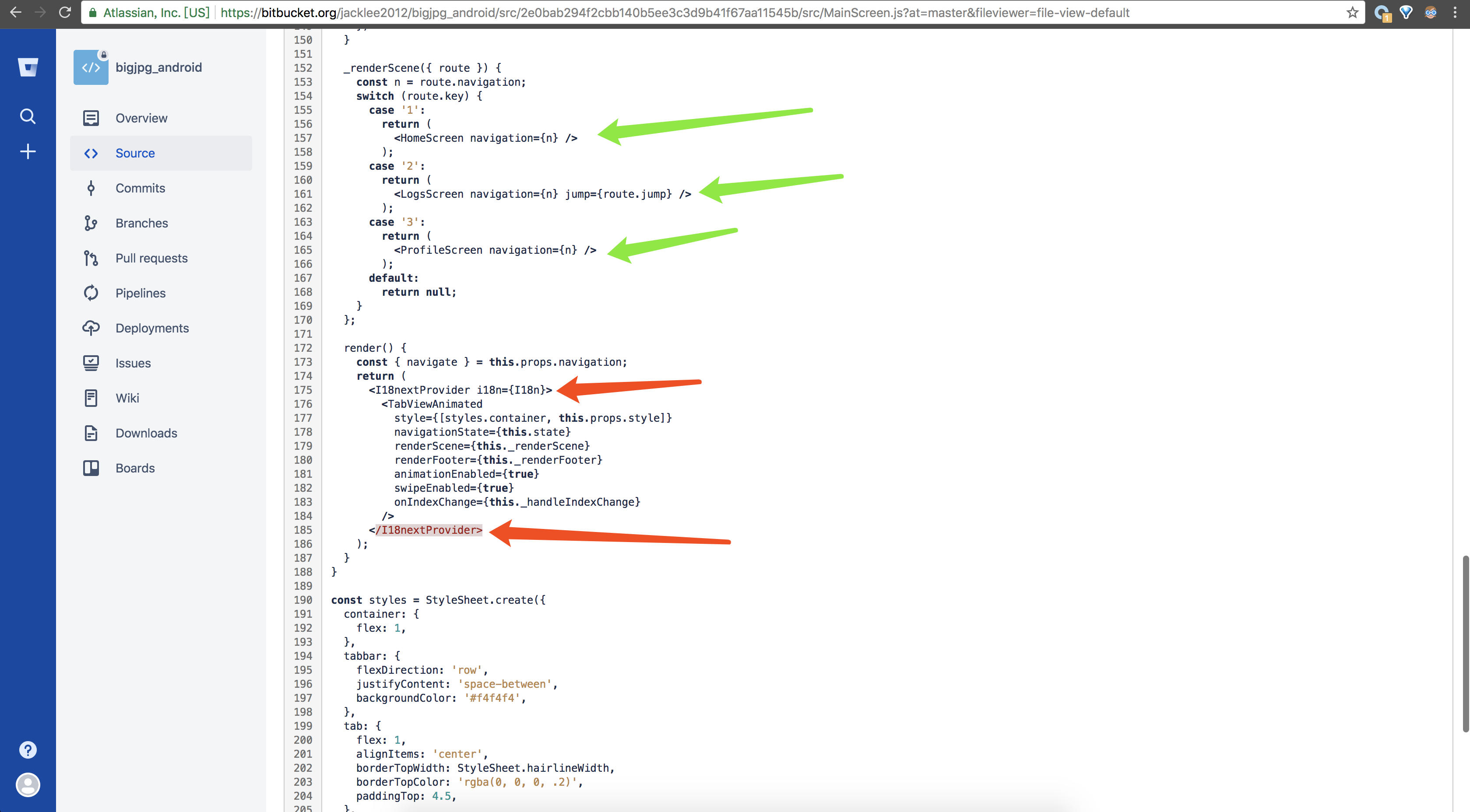
inside HomeScreen

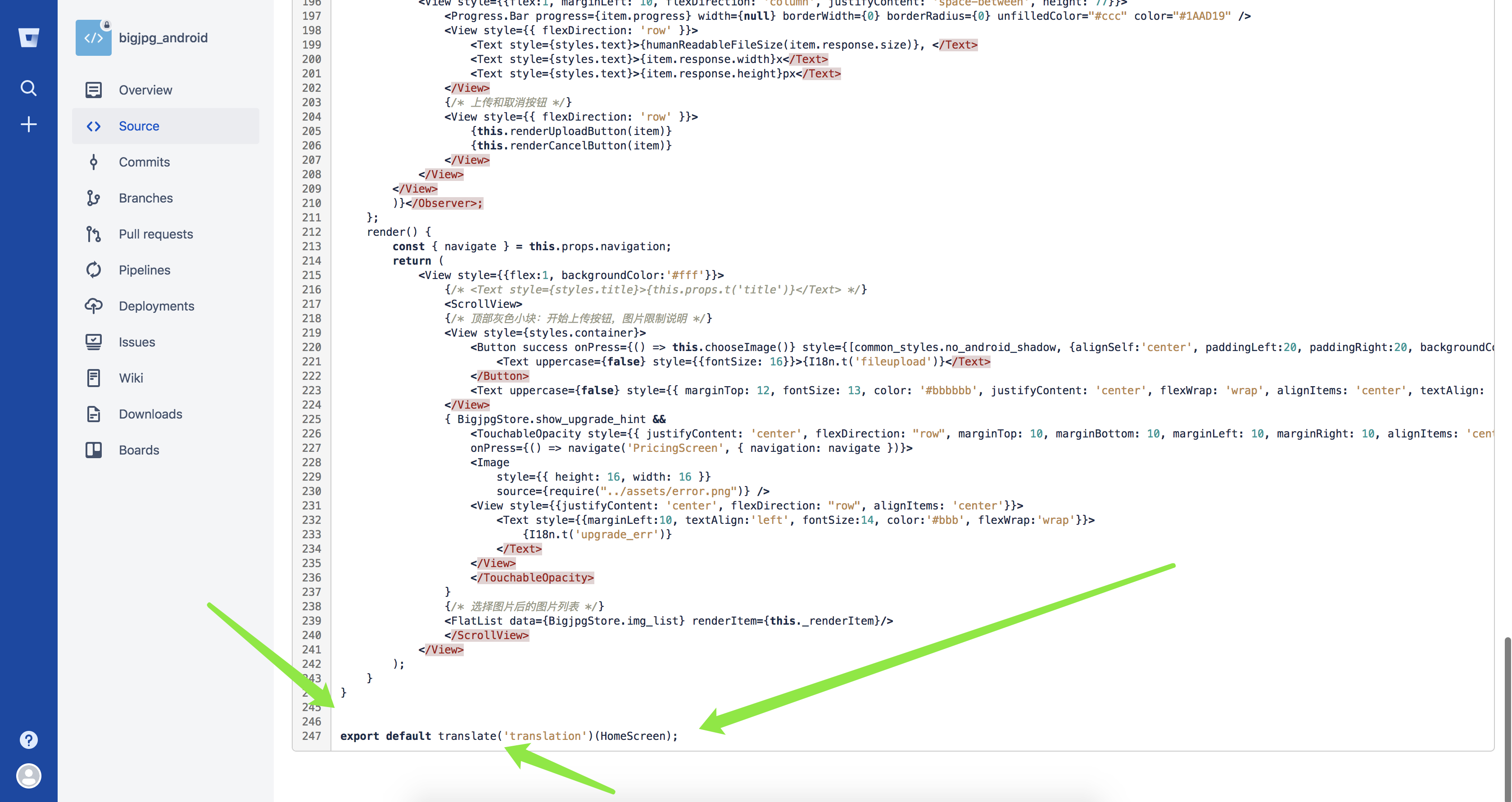
hope it help
1c7
on 26 Feb 2018
if there are more question, feel free to ask, I would help as much as I can
1c7
on 26 Feb 2018
In the app I have a list of languages when I select 1 in which whether the application changes the language in real time
@zoontek @1c7 @davidbilik
 helloo0-0oword
on 6 Aug 2018
helloo0-0oword
on 6 Aug 2018
@helloo0-0oword I tried change language in real time.
no success.
now I am not doing React Native anymore. working on a web app (Vue.js)
can't help. sorry.
good luck
1c7
on 6 Aug 2018
@helloo0-0oword I have migrated to i18next after the read of this issue https://github.com/AlexanderZaytsev/react-native-i18n/issues/68
davidbilik
on 9 Aug 2018
Related issues
 henrikra
·
4Comments
henrikra
·
4Comments
 Mengxiaowei
·
4Comments
Mengxiaowei
·
4Comments
 tregismoreira
·
7Comments
tregismoreira
·
7Comments
 timgcarlson
·
5Comments
timgcarlson
·
5Comments
 tigranbalayan
·
5Comments
tigranbalayan
·
5Comments
Most helpful comment
If you use https://github.com/react-community/react-native-languages and
i18next+react-i18next, it is easy to rerender your app :)